Learn with MD Lesson No 1 "Thoughts please"

..MD..

Helen Shapiro
Suspended / Banned
Messages
10,257
Name
MonkeyDave
Edit My Images
Yes
Hi guys. Well I thought we could start this thread off with the same idea I spoke about in my original post.


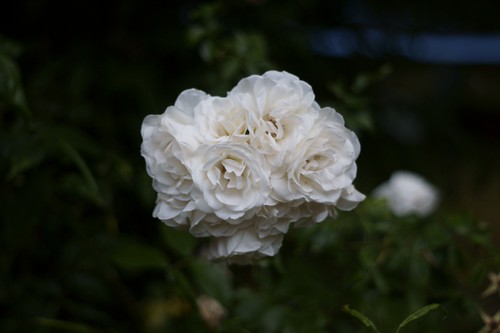
So I would like everyone who is taking part to take a photo of a flower or bunch of flowers.

Image one .

I would like you to take this shot at your widest Fstop.


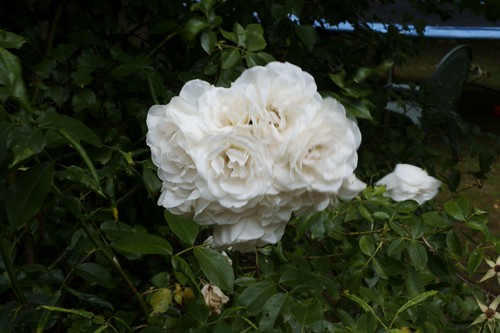
Image two.

I would like this one taken of the same subject you used for the 1st shot but this time I would like you to use your smallest Fstop.

Example.

I will be using my 50mm prime for this lesson. So for the 1st shot I will shoot at F1.8 And the 2nd shot I will shoot at F22


The difference in the two shot will be interesting and you / we will have to change a few setting in the camera to get from the 1st shot to the second..


All the best . Please post image one with exif and then image two with exif.


THIS IS NOT A COMPETITION.....


MD


" I will go and do mine now.."
 
Lovely, good timing. I was planning on doing some similar tests at all of the different apertures with the new (old) lenses I've recently acquired.

So, I'll pop the widest and narrowest up from each lens on here with links to galleries of all in between on Flickr.
 
Ok here are my 1st efforts ..

The difference in the lighting and the camera settings was huge " As we thought it would be..."

No 1

Shot at 50mm iso 100 F1.8 320sec

1_8_LESSON.jpg


Image 2 was taken further back to help with the dof

No 2
Shot at 50mm iso 500 F22 4th sec

22_LESSON.jpg


See guys they dont have to be fantastic BUT if you try this you will have to use the settings on the camera and play around to get the shots you want..


MD
 
Bah !

I've taken a couple of pics, uploaded to flickr, but flickr has changed and now my pics show up here as red crosses !!

Anyone got any ideas ?

Can you not just right click the image and click properties,, ?


YOU can i just tried it on your wide open shot..

MD
 
Can you not just right click the image and click properties,, ?


YOU can i just tried it on your wide open shot..

MD

It doesn't work for me. And now I'm very confused - where did you see my shot ???

Edit - ah, I suppose you followed my link to flickr. But when you say right click and click properties, do you mean when I post it here ?
 
.
 
50mm f1.7 1/1600 sec

4752171635_d47a734810.jpg


50mm f22 1/10 sec

4752172089_152c2575af.jpg


It's interesting to me that the camera was in aperture mode and the second pic is much brighter. I would have expected them to be the same level of brightness ?

And thanks Dave !
 
It makes a big difference .. The 1st is a lot nicer image imho..

MD
 
Yes and no.

With your first image having so little depth of field, it can't "see" a lot of the intricate highlights and reflections on the out of focus areas, or some of the deep shadows on lighter areas.

So, the light being sent to the sensor is slightly different, so it meters slightly differently. :)
 
AH THANKS FOR THAT

MD
 
Yes and no.

With your first image having so little depth of field, it can't "see" a lot of the intricate highlights and reflections on the out of focus areas, or some of the deep shadows on lighter areas.

So, the light being sent to the sensor is slightly different, so it meters slightly differently. :)

I guess this is exactly what this thread is for. Good man Dave :)
 
Will take my two over the weekend and then post on here.
 
50mm f1.7 1/1600 sec

4752171635_d47a734810.jpg


50mm f22 1/10 sec

4752172089_152c2575af.jpg


It's interesting to me that the camera was in aperture mode and the second pic is much brighter. I would have expected them to be the same level of brightness ?

And thanks Dave !

the blur in the second (because it was handheld at 1/10) will make it appear brighter than it actually is.


Yes and no.

With your first image having so little depth of field, it can't "see" a lot of the intricate highlights and reflections on the out of focus areas, or some of the deep shadows on lighter areas.

So, the light being sent to the sensor is slightly different, so it meters slightly differently. :)

I don't understand, metering is done with the aperture fully open regardless.
 
I don't understand, metering is done with the aperture fully open regardless.
In this instance, good point. I'm too used to playing with my M42 lenses. :)
 
In this instance, good point. I'm too used to playing with my M42 lenses. :)

Differences like that are common, usually because of mechanical inaccuracy when the diaphragm blades are closed so small - a fraction of a mm out makes a noticeable difference. It might well vary between different exposures as well.

That looks about a stop out! :eek:

Edit: John, take one of your M42 lenses and stop it down to f/22. Press the pin repeatedly and see if the size/shape of the aperture changes.
 
Edit: John, take one of your M42 lenses and stop it down to f/22. Press the pin repeatedly and see if the size/shape of the aperture changes.
Oh, I know, that's why I started collecting the M42s in the first place, and why all my M42 lenses are set to manual aperture. Fixing aperture flicker on a 1200 image timelapse sequence in post is not fun. :D
 
I like the idea of this thread. Seeing as i'm pretty much a full noobie to photography and it's my day off tomorrow i'll be giving this a go to help my learning!
 
Just a thought MD - but as this first exercise seems to be about Depth of Field (DoF) shouldn't you have taken your shots from the SAME place to show the difference more obviously??? :thinking:

Also (and I'm using a D300 as an example here and I can't remember what camera you have)

A D300 focussed at 5ft to your flowers at f1.8 would have an "Area of acceptable sharpness" - the posh term for DoF - of 4.9-5.11 feet so only 0.21 feet (about 2.5 inches) is in sharp focus

Whereas the same camera/lens at f22 from the same position would be sharp from 3.95-6.82 feet so a massively more 2.87 feet (about 34 inches) is now in sharp focus


Such huge ranges of DoF and learning when to use what amount of DoF to isolate your subject from its foreground/background (i.e. by using a wide aperture setting such as the f1.8 end) or alternatively to place it firmly in it's background by having everything sharp (f16 or above) is the fundamental use of the Aperture setting - and in most photography (other than really fast stuff like sports etc.) getting the Aperture & hence DoF right is key to any shot (IMHO :D)


You can calculate the effects of different apertures & distances for most camera here... http://www.dofmaster.com/dofjs.html have a go :)

DD
 
I have an idea of the kind of shot I want to do for these different aperture shots, the hard part is going to be finding the time and the right location to do it over the weekend. I'll do my best to get it done though.

I really like your F1.8 shot MD. I like the back lighting to the OOF part of the flowers.
 
Here are two from my 7D and 100-400 at 285mm and 100 ISO. The first is at f/5.6 and 1/1000; the second at f/22 and 1/50. Sorry for the framing difference and the softness of the second image - they were hand held, taken this morning while out walking the dog.

20100702_114234_0237_LR.jpg


20100702_114247_0238_LR.jpg


While neither is anything special, I much prefer the first version, with the shallower DOF making the flower stand out better from the rather uninteresting background.
 
The second one doesn't look that soft to me Tim.
 
The second one doesn't look that soft to me Tim.

But it does nicely show that sometimes more DoF isn't a good idea as the 2nd's flower shows less separation from the background and for me is the poorer image because of it. Nice example of where to use minimal DoF :thumbs:

DD
 
The second one doesn't look that soft to me Tim.

It may not be that soft, but it is soft. Thinking about it, the problem is probably as much to do with diffraction softening as shake or anything else. Here are the two images shown side by side at 100%. The difference in detail is clear to see....

20100702_131053_.JPG


In the original two images, look at the veins in the two petals at the bottom of the picture. Despite the increasing DOF within the second image, which you might think would pull them more into focus, they are actually less distinct, so whether by shake or diffraction (diffraction absolutely cannot be ignored) the detail in the image has been destroyed.
 
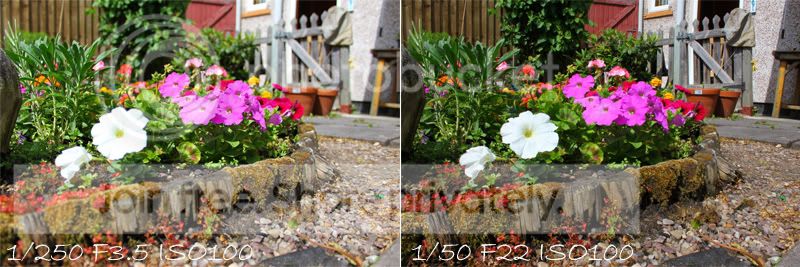
Ok here is my efforts for what I call "Lets Learn with Basil Brush".
(I know he was a fox but MD's pic of a squirrel reminded me of it).

D40, iso 200, f3.5 1/4000 18mm
flower2.jpg


D40 iso200 f22 1/250 18mm
flower1.jpg


Exif should be intact. Ignore the date though as I discovered in doing this that my date was set a year out. No idea how I missed that before :bonk:. See learned something already :)
 
Here's my pair...

450d and Nifty Fifty.. to get a hand holdable shutter that overcame the breeze I boosted the ISO on the stopped down image...

1/1600, f/1.8 ISO100
IMG_5249.jpg


1/50, f/22 ISO400
IMG_5250.jpg


they've both had an identical gentle curve and a post shrink high pass sharpen applied.
 
Shot with 500D standard 18-55mm lens, not real flowers but that's all I had inside!
Both were taken by hand as my gorilla pod wouldnt sit stable for the height I wanted!

1/8, f3.5, ISO 100
flowerlow.jpg


4sec, f22, ISO100
flowerhigh.jpg


The suns coming in and out so i'm going to try take some outdoors too if people dont mind!
 
Glad it's not a competition as could I Hell as like find any sodding flowers :lol:

Still, my neighbour's lawn is full of weeds some of which are in flower :)

So, laying on the floor I focused on the encircled flower and fired off 2 shots, the left is at f16 & the right f1.8 on an 85mm lens from about 4ft

The DoF Calculator suggests the Area of acceptable sharpness at f1.8 to be around 1/2 inch; whereas at f16 it's some 5 inches - but these images clearly show that the move from OoF to in-focus is more gentle on the smaller f-stop

With a bit more care (it's bloody windy here too) I could have found a flower with only grass behind it, and the wider aperture would have nicely separated it from the confusing foreground & background - which is how you use Aperture settings to isolate your subject

DD

 
Just a couple quick shots from the garden

sideby.jpg


sideby2.jpg


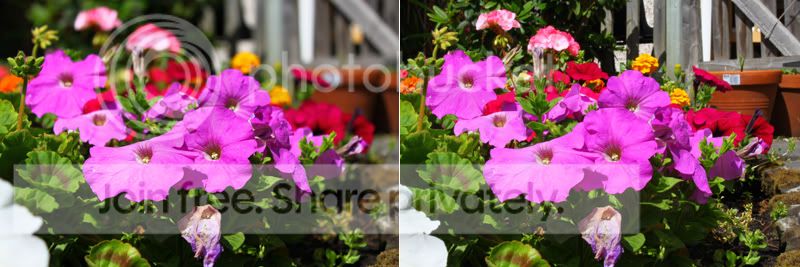
Seems the depth of feild can be felt more when getting up close. The top two images were at 18mm on my lens, the bottom two I increased the range more to see what the effects would give.

I'm using this 'lesson with MD' as a learning curve, as probably alot are! and from what i've gathered from taking these few shots is the way to setting a shot up is roughly as:

Set the aperature you want, then use shutter speed and iso to increase/reduce lighting?
However i'm not sure when to use shutter speed over iso and vice versa, or if what ive said is right? Can anyone confirm/correct me please? Is this how you would set any shot up.. or is this just specific to this task?
 
The higher you push the ISO the more noise you will see in the image, assuming you expose correctly, one way or the other. Therefore the steps for a "scenic" shot, which is essentially devoid of movement are....

1. Set the aperture to achieve the DOF you require for your creative vision;
2. Set the shutter speed only as fast as you need to in order to control movement in the subject and camera shake;
3. Set the ISO as high as is necessary in order to achieve correct exposure once items 1 and 2 are sorted.

If you find that you end up with an unacceptably high ISO, and too much noise, then either you must add more light or you will have to compromise on your ideal goals for aperture and/or shutter speed. Using a tripod can do a lot to reduce the need for high shutter speeds, as can picking the right moment, when there is no wind or other cause of disturbance.

Two further points....

a. Underexposure, regardless of ISO, will always increase the risk of excessive noise. If your shot is turning out to be underexposed, and you are unable to open the aperture or slow the shutter further then you should increase the ISO to get the exposure you need.
b. If you are really under pressure for light, a noisey image is easier to work with and to fix than a blurry one, so if you are chipping away at your shutter speed, be careful not to overdo it.

And something else....

- When shooting scenes with strong colours, such as flowers, you need to be very watchful of overexposing one or more colour channels, which you might well miss if you are not careful. Pay close attention to your RGB histogram and look for spikes on the right hand edge of any of the red, green or blue channels. As bad as underexposure is for noise, overexposure can distort colours and destroy details. For those who shoot with Canon gear, I would also advise against using ISOs other than the main stops at 100, 200, 400, 800, 1600 etc.. The intermediate ISOs will contribute either to unintentional underexposure or unintentional overexposure. Neither is a good thing. Also, again for Canon users, disable HTP, ALO or any other nasty "enhancements" that will wreak havoc with your efforts to accurately establish the correct exposure.
 
Here's my pair...

450d and Nifty Fifty.. to get a hand holdable shutter that overcame the breeze I boosted the ISO on the stopped down image...

1/1600, f/1.8 ISO100
IMG_5249.jpg


1/50, f/22 ISO400
IMG_5250.jpg


they've both had an identical gentle curve and a post shrink high pass sharpen applied.

Nice.

They ready do show what changing the aperture number does.
 
thanks :thumbs:... I went in closer than needed as it helps exacerbate it... the busy background is also good for hiding the dust and crud on the sensor too ;)
 
The higher you push the ISO the more noise you will see in the image, assuming you expose correctly, one way or the other. Therefore the steps for a "scenic" shot, which is essentially devoid of movement are....

1. Set the aperture to achieve the DOF you require for your creative vision;
2. Set the shutter speed only as fast as you need to in order to control movement in the subject and camera shake;
3. Set the ISO as high as is necessary in order to achieve correct exposure once items 1 and 2 are sorted.

Firstly thank you for a great responce, i've noted all that down and intend to learn on it!

One thing I cant get my head around is if I want to show motion, would I have to have my shutter speed on the setting I wish, say one second or so, then change my aperature and iso to fit?
As when I set my DOF first, then slow my shutter speed it seems to over expose, asumeing because the lens is being left open for a longer time?

Sorry for the questions, would just love to get my head around all this :)
 
Here are my 2:

Nifty 50 on 40D (on a redsnapper tripod!), 100 iso, f1.8.


As above, 800 iso, f22.


Both have had about 3/4 of a stop of exposure added as that is what my 40d seems to need. They might even need a little more.
I was up at the minimum focussing distance for the lens for these to get as big an effect as possible and it seems to work. The shutter speed was well down on the f22 shot at 100 iso so I bumped this up to 800. It didn't help that there was a breeze either!
 
Firstly thank you for a great responce, i've noted all that down and intend to learn on it!

One thing I cant get my head around is if I want to show motion, would I have to have my shutter speed on the setting I wish, say one second or so, then change my aperature and iso to fit?
As when I set my DOF first, then slow my shutter speed it seems to over expose, asumeing because the lens is being left open for a longer time?

Sorry for the questions, would just love to get my head around all this :)

If controlling the sense of motion is your goal then your priority is to set the shutter speed you desire in order to capture the motion as you would like. If you also care about the DOF then you would adjust the aperture to suit as well. If that then leaves you with an overexposed image, even at 100 ISO, then you will need to reduce the light intensity from the scene. An easy way to do that is to add a neutral density filter. An alternative is to shoot at a different time of day or in different weather conditions, when one way or another the light is reduced.

Using ND filters is a very valid and common technique for achieving long shutter speeds in bright (or even not so bright) conditions. I have a 9 stop ND filter to achieve really long exposures, and I use my CPL filter as an improvised ND filter to lose me almost two stops of light.

Given the softening effects of diffraction when stopping down a long way, using filters is often a better solution to such shooting than simply stopping down as far as you can go.

I know this is a little off topic, but since the thread is about learning, here is an example shot with a shutter speed of 25 seconds in daylight. The only way to achieve that speed was to use my 9 stop filter and to shoot at 100 ISO and f/16.

20100615_133433_4244_LR.jpg


An 8 stop filter would have let me shoot at around 12 seconds, 7 stops would have given me 6 seconds, 6 stops would have given me 3 seconds and so on, until without any filter I would have needed to shoot at 1/20 for an equivalent exposure.
 
Back
Top