


sc0ttie
Suspended / Banned
- Messages
- 316
- Name
- Scott
- Edit My Images
- Yes
I have finally got around to having my 120 film developed and printed and got my prints back today.
The images seem to have a very strong circle vignette around them, like this shot (which is not my shot I have just linked it from HERE for illustrative purposes)
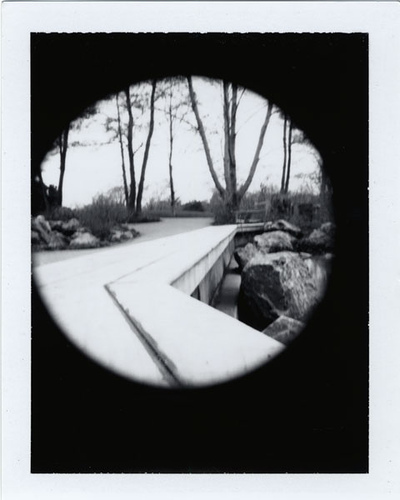
So what do I need to do to my Brownie pinhole conversion in order to not have the strong black circle around my images? I like a soft vignette but the circle just looks pants to me. :|
The images seem to have a very strong circle vignette around them, like this shot (which is not my shot I have just linked it from HERE for illustrative purposes)
So what do I need to do to my Brownie pinhole conversion in order to not have the strong black circle around my images? I like a soft vignette but the circle just looks pants to me. :|
Last edited:


 if I take the lens off and put the pinhole in its place (thus further from the film plane) does that increase the 'spread' of the image or does that introduce other problems?
 no bloody idea...I guess though that the pin hols is much smaller than the lens 'aperture' ergo the problem. How you solve requires a far more technical mind than mine. IN theory, the further the pinhole is from the film, the bigger the spread will be but after that..... :shrug:


