Killing ambient?

avarice08

Suspended / Banned
Messages
1,696
Name
Rob
Edit My Images
Yes
Hi,

Been doing photography for a while now and it's mainly been outdoor, motorsport type stuff.

However I would like to learn more about the lighting side and try some indoor projects.

Firstly, I have a strobe/flashgun set up. Can anybody explain simply what killing ambient is and how it is achieved.

Secondly, how can I ensure my white background is white and my black background is black....hope that makes sense..ie my subject is correctly exposed but my background is the solid colour it should be.

I'm sure there will be more questions to follow!

Cheers

Rob

 
Over expose white backgrounds and under expose black ones to keep them the colour they should be.

Killing ambient? Presumably means make sure no light from outside studio or the room lights will affect your exposure.
 
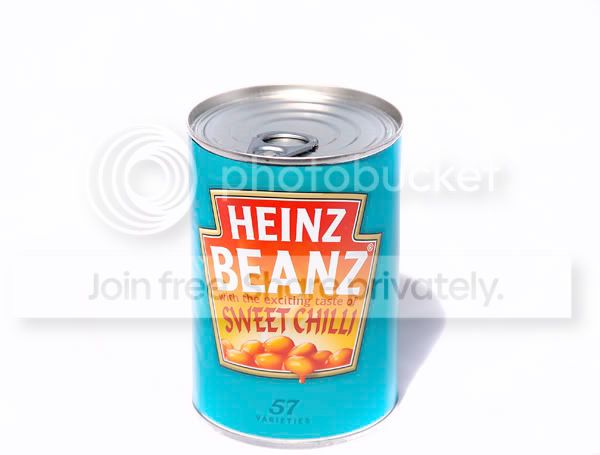
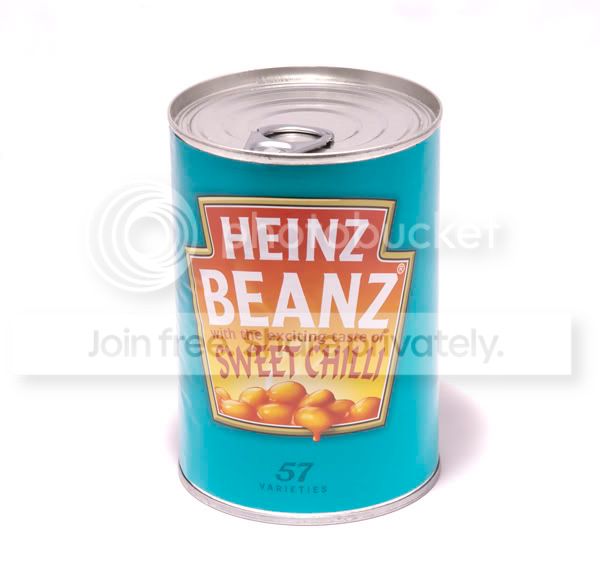
To try and make it simple..I took the image below setting the exposure for the background the had a remotely triggered strobe above the can to create a short shadow, the end result was a greyish background that I had to PS to white.

How do I sort this in-camera?

Firstly the OOC image

beans2.jpg


and the end result

beans.jpg
 
I'm pretty new to this lighting stuff but my take on it is the ambient light is from sources not brought in by you (i.e. your flashes). So for instance if you took a test shot at your set exposure but without the flashes firing, your subjects (and background) should be completely dark.

You retake the exposure but with flash to correctly expose the subject. Because all you have changed is to bring in the flash, you know the only light being used is your flash.

The key here is shutter speed - shutter speed controls the ambient light. Make it fast enough in your non-flash test shots to darken the frame out.
 
So should the pre flash shot be 0,0,0 on a RGB scale?
 
How did you set your exposure, in manual of one of the other modes? If not in manual did you apply exposure compensation (a camera will try to turn white into grey if left to its own devices?
 
How did you set your exposure, in manual of one of the other modes? If not in manual did you apply exposure compensation (a camera will try to turn white into grey if left to its own devices?

Working in manual.
 
Hmmmmm, thinking about it again, what do you mean by you set your exposure for the background? Did you use a seperate light meter for any of this?
 
Hmmmmm, thinking about it again, what do you mean by you set your exposure for the background? Did you use a seperate light meter for any of this?

No, I was using the in camera ....
 
I not really sure what it was you were trying to do with the background when you metered for it Rob so the only bit of advice I can think of would be to have moved the light closer to the tin of beans (and therefore the background). That way the fall off of light from the tin to the background would have been less (inverse square law and all that) so it would have been lighter and easier to PP. Ideally though you want a separate light for the background and the beans.
 
Killing the ambient usually means that the flash exposes your subject, but is turned up so that the power is so strong that the resulting combination of shutter speed and aperture gives a correctly exposed subject with the background looking like dusk or night. Some of our wedding togs on here do a great job using this technique where only the bride and groom are nicely lit by the flashes, with very dark backgrounds.

Black or white backgrounds are dealt with by exposing correctly for both subject and b/g. For a white b/g, expose correctly for the subject, then adjust the power of the flash that is lighting the b/g so that it blows out (overexposes) the background, making sure that you don't get light spill on the subject.

For black backgrouds, it helps if the b/g is dark to start with, but again start by exposing correctly for the subject. Then make sure that NO light falls on the b/g (even a white background can look black if far enough behind the subject and the lights do not spill onto it). Alternatively shoot outside or in an open doorway to outside at night. (This does not apply if you live in a well-lit street with cars travelling up and down :lol::lol:).

That's my take on it anyway, and it works for me, though I hope you can understand what I mean.
 
Tut... should read the whole thread!
 
Last edited:
Perhaps I didn't word it very well Andy. I understand how to do it but I don't understand why Rob has worked that way in the shot posted where he wants a white background. I think the killing ambient thing probably doesn't apply to this shot too much.

If he's trying to make the background white, why meter the background for a normal exposure with no flash and then make no adjustments?
 
If he's trying to make the background white, why meter the background for a normal exposure with no flash and then make no adjustments?

Kev,

Perhaps I didn't word it very well. I metered the background for correct exposure then lit the subject with a flash to try and blow all the background details out.

Hope that makes sense.

Rob
 
Ideally though you want a separate light for the background and the beans.

That's a fair point Kev, it would certainly make it easier to expose in the way I wanted.

Thanks

Rob
 
I'm pretty new to this lighting stuff but my take on it is the ambient light is from sources not brought in by you (i.e. your flashes). So for instance if you took a test shot at your set exposure but without the flashes firing, your subjects (and background) should be completely dark.

You retake the exposure but with flash to correctly expose the subject. Because all you have changed is to bring in the flash, you know the only light being used is your flash.

The key here is shutter speed - shutter speed controls the ambient light. Make it fast enough in your non-flash test shots to darken the frame out.


I had a go at this...I think this was pretty close to the end result I was after.

Setting exposure without flash. F14@ 1/15thsec

beans4.jpg


Same settings again but one flash above the subject on power setting 4.

beans3.jpg
 
I had a go at this...I think this was pretty close to the end result I was after.

Setting exposure without flash. F14@ 1/15thsec

beans4.jpg


Same settings again but one flash above the subject on power setting 4.

beans3.jpg

Yep thats it i much prefare the first shot:lol:

Dave:thumbs:
 
I have to do similar and have shown most of the students at my college, all you do is turn the lights off so only ambient is showing then keep ISO at 100, keep the shutter a max sync speed if using flash (if not then around 1/250 should do) and then adjust your aperture until its pitch black for example 1/250, f8 ISO 100 and then once all that has been done turn on your lights and only your lights will expose in the final image ;)
 
I have to do similar and have shown most of the students at my college, all you do is turn the lights off so only ambient is showing then keep ISO at 100, keep the shutter a max sync speed if using flash (if not then around 1/250 should do) and then adjust your aperture until its pitch black for example 1/250, f8 ISO 100 and then once all that has been done turn on your lights and only your lights will expose in the final image ;)


So you think the ed result is about right then?

Cheers

Rob
 
You really need to take that type of shot on a translucent perspex light table with a light underneath and a light lighting the background from behind. Then light your subject as you wish.

I used a similar technique on the shot below but deliberately only used one light behind the background/base to give me some fall off allowing the vignetting to nicely frame the jug.

jug.jpg
[/QUOTE]
 
Killing the ambient simply means that your flash (or other) light is significantly brighter than the ambient light, to the extent that it doesn't influence the result. You do this either by reducing the ambient, ie by pulling the studio blinds, or ramping up the flash power.

The problem with white backgrounds is that no background material is pure white. If you expose it correctly, it will always come out very, very light grey at best. So you have to over expose it to get it to blow. However, if you do that then whatever subject you have sitting on the background gets over exposed with it.

The key is to light the background separately, which Ed has done by lighting it from underneath using a professional light table. If you can't do that, then you just have to get the background as absolutely close to white as you possibly can without messing up the main subject, and then push it over the edge to blown pure white with a bit of tweaking in post processing - usually a dab of increased contrast will do it. But as with all things, there are side effects. You just have to juggle and manage them as best you can.
 
Killing the ambient simply means that your flash (or other) light is significantly brighter than the ambient light, to the extent that it doesn't influence the result. You do this either by reducing the ambient, ie by pulling the studio blinds, or ramping up the flash power.

The problem with white backgrounds is that no background material is pure white. If you expose it correctly, it will always come out very, very light grey at best. So you have to over expose it to get it to blow. However, if you do that then whatever subject you have sitting on the background gets over exposed with it.

The key is to light the background separately, which Ed has done by lighting it from underneath using a professional light table. If you can't do that, then you just have to get the background as absolutely close to white as you possibly can without messing up the main subject, and then push it over the edge to blown pure white with a bit of tweaking in post processing - usually a dab of increased contrast will do it. But as with all things, there are side effects. You just have to juggle and manage them as best you can.


Thanks Richard,

That makes a lot more sense now.

How does it work with a dark background? Do you have the subject much further away from the background so that you do not get any light fall on to the background?

Thanks

Rob
 
Thanks Richard,

That makes a lot more sense now.

How does it work with a dark background? Do you have the subject much further away from the background so that you do not get any light fall on to the background?

Thanks

Rob

Yes, that's one way. Using the inverse square law - double the distance equals one quarter the brightness. Which in a studio situation where the lights are often quite close, means that relatively short changes of distance can make a big difference to exposure levels, more than you might expect. And the reverse applies too, reducing the distance, so use that factor also, as and when.

Obviously if you want a black backgound then starting of with something very dark isn't a bad idea. Black background paper is notoriously non-black, just as white is never pure white. Velvet is often quite good - the light sinks into the fibres and dies. Or shade the light, use a black 'reflector' or whatever.

Good lighting is about both putting the right light where you want it, and stopping it going where you don't. That's what many of the light shaping tools do - light where it's needed, and nowhere else. Often with the help of 'gobos' and 'flags' and other shading/shielding devices.
 
I have to do similar and have shown most of the students at my college, all you do is turn the lights off so only ambient is showing then keep ISO at 100, keep the shutter a max sync speed if using flash (if not then around 1/250 should do) and then adjust your aperture until its pitch black for example 1/250, f8 ISO 100 and then once all that has been done turn on your lights and only your lights will expose in the final image ;)

I understand why you do it that way Luke but it's not the way I'd recommend, by setting the aperture last. In this sort of still life shot the aperture is the most important aspect and you should set it at what you want not what is dictated by the ambient light and your ISO and shutter speed.

(This is all without flash) Personally I would set the aperture first to give the DOF I want, then the ISO to something sensible like 200. Then I'd start dropping the shutter speed until I got the black frame. If I'd reached the sync speed then I'd try dropping the ISO a bit more (not forgetting that sometimes dropping it too much can have a negative effect on quality) and if there's still too much light I'd then look at removing as much ambient light as possible (even if it means working with a torch). Only after doing all of that would I consider using my aperture to control the ambient.

Then I'd add the flash.
 
I understand why you do it that way Luke but it's not the way I'd recommend, by setting the aperture last. In this sort of still life shot the aperture is the most important aspect and you should set it at what you want not what is dictated by the ambient light and your ISO and shutter speed.

(This is all without flash) Personally I would set the aperture first to give the DOF I want, then the ISO to something sensible like 200. Then I'd start dropping the shutter speed until I got the black frame. If I'd reached the sync speed then I'd try dropping the ISO a bit more (not forgetting that sometimes dropping it too much can have a negative effect on quality) and if there's still too much light I'd then look at removing as much ambient light as possible (even if it means working with a torch). Only after doing all of that would I consider using my aperture to control the ambient.

Then I'd add the flash.

yes I do agree, I was going to put the aperture first but got carried away with shutter, it is always best to shoot at around f8/f11 and if the shutter speed is slower then it won't make a difference :)
 
I understand why you do it that way Luke but it's not the way I'd recommend, by setting the aperture last. In this sort of still life shot the aperture is the most important aspect and you should set it at what you want not what is dictated by the ambient light and your ISO and shutter speed.

(This is all without flash) Personally I would set the aperture first to give the DOF I want, then the ISO to something sensible like 200. Then I'd start dropping the shutter speed until I got the black frame. If I'd reached the sync speed then I'd try dropping the ISO a bit more (not forgetting that sometimes dropping it too much can have a negative effect on quality) and if there's still too much light I'd then look at removing as much ambient light as possible (even if it means working with a torch). Only after doing all of that would I consider using my aperture to control the ambient.

Then I'd add the flash.


Thanks Guys,

I've actually learnt a lot from your inputs...I think I understand how to set up for this now. In the past it was a case of hope for the best and PP out issues.

Will be giving this a go tomorrow on some very basic veg shots.

Will upload the results.

Any other tips or hints appreciated!

(I do have another question about killing ambient outdoors, but want to try the indoor one first to ensure I have it right!)

Rob
 
yes I do agree, I was going to put the aperture first but got carried away with shutter, it is always best to shoot at around f8/f11 and if the shutter speed is slower then it won't make a difference :)

What on earth makes F8/F11 the best Luke? The best is whatever aperture gives the creative look you desire.
 
What on earth makes F8/F11 the best Luke? The best is whatever aperture gives the creative look you desire.

Is Luke being more specific to the best IQ f-stop for lenses?

I agree that some products will want a very quick drop off from the focal point and would need a wider aperture.

Rob
 
Probably, but it only really applies to very budget lenses in general. I have a Tamron 28-75 2.8, not budget but not top end either, there's a bit of a difference from 2.8-4 but nothing noticeable from 4-11.

Even if it wasn't as good wide open as it is stopped down I wouldn't let the weakness of a lens limit the creativity of a photo. It's just not the right way to go about it in my opinion.
 
When tested lenses usually perform best two or three stops or so below maximum aperture, although this can change with the maximum aperture and greater than f2 can often be as much as 4 stops before the peak lpi is reached (lines per inch). Thus for an f2.8 lens it would be likely the best aperture for 'flat field' sharpness will probably be about f5.6 - f8 similarly for a max aperture 1.4 lens it may well be between f4-f5.6.

From f8 onwards the LPi usually starts to decrease due to abberations and diffraction with the resolution decreasing further the more the aperture is closed.
 
.... anyone who eats copious amount of Heinz sweet chilli beans shouldn't be allowed indoors with a camera anyway.... best get outdoors and practice.... :whistling:
 
.... anyone who eats copious amount of Heinz sweet chilli beans shouldn't be allowed indoors with a camera anyway.... best get outdoors and practice.... :whistling:


:lol:
 
What on earth makes F8/F11 the best Luke? The best is whatever aperture gives the creative look you desire.

yes of course but i'm giving a rough idea to the quality, if you're shooting products close up you need optimum quality plus I don't know what lens he is using, also to kill ambient light you want a small aperture and fast shutter, a wide aperture will need a much faster shutter which can't exceed 1/4000 ;)
 
also to kill ambient light you want a small aperture and fast shutter, a wide aperture will need a much faster shutter which can't exceed 1/4000 ;)

The depends solely on the amount of ambient. As we're talking about product photography you can close the door, pull the curtains turn off the light and shoot at 2.8 and 1/60 til your heart's content;). Faster shutters speeds need only apply outdoors or where you sold the curtains to pay for the tripod;)
 
killing ambient:

fast shutter 1/125 - 1/250
iso100
narrow aperture (f/8)
crank up flash power

job done
 
Last edited:
Yeah, just try that in full midday sun and see how far you get.

Glad you bought up the sun!

Any suggestions for shooting a car outdoors in sunlight?

Thanks

Rob
 
Yeah, just try that in full midday sun and see how far you get.

Well yes, exactly.

You can't kill the ambient before you know what you've got to beat. Could be anything from candle light to high noon :thinking:

Glad you bought up the sun!

Any suggestions for shooting a car outdoors in sunlight?

Thanks

Rob

Assuming the car is in bright sun, Sunny 16 says you've got to beat f/16 with a shutter speed that matches the ISO - say 1/400sec at f/16, ISO400 plus at least one stop.

Rule of thumb there is at least 400ws of flash, and a big hot-shoe gun puts out about the equivalent of 60ws...

Best wait till the light level drops a bit. Fighting direct bright sunlight requires a huge amount of fire power, but when the sun is lower or it's overcast, at least you have a chance.
 
Last edited:
Back
Top