

You are using an out of date browser. It may not display this or other websites correctly.
You should upgrade or use an alternative browser.
You should upgrade or use an alternative browser.
keys on a laptop
- Thread starter spencer
- Start date


MarshallGoren
Suspended / Banned
- Messages
- 66
- Name
- Geoff
- Edit My Images
- No
On mine they simply push straight on, it feels like they are gonna break.. but then just snap back on into place. That is a HP laptop though, so if it's not and you're unsure please don't trust my advice here as I don't wanna be responsible for breaking it 

Syx
Suspended / Banned
- Messages
- 411
- Name
- Sam Hissaund
- Edit My Images
- Yes
This question needs answering... as all the Dell laptop keyboards I've used have non-removable keys. Meaning if it's come off, it's not going back on again!Is it a Dell?
In my experience they are either push on in which case you're laughing or they will have some ridiculous design that only the most nimble double-jointed person could ever get back on. I've got a laptop somewhere missing 5+ keys, I tried gluing some back in place but that did more harm than good!!

admirable
Suspended / Banned
- Messages
- 11,612
- Name
- Jim
- Edit My Images
- Yes
Is it a Dell?
Maybe he thinks I was asking if that was his Daughters name!


Richard King
Suspended / Banned
- Messages
- 3,661
- Name
- Richard King
- Edit My Images
- No
sounds like a new KB wil be needed


neil_g
Suspended / Banned
- Messages
- 30,364
- Name
- Neil
- Edit My Images
- No
This question needs answering... as all the Dell laptop keyboards I've used have non-removable keys. Meaning if it's come off, it's not going back on again!
latitudes should clip back in

- Messages
- 10,135
- Edit My Images
- No
This question needs answering... as all the Dell laptop keyboards I've used have non-removable keys. Meaning if it's come off, it's not going back on again!
My son has a Dell inspiron and the keys come off and to put them back you simply put the top party of the key in place and push it hown and it clips back on:shrug:
some are on scissor type plastic things, you have to kidn of clip them back in, depends on the make though
Matty's right, most are like this. The easiest way is to refit the scissor mechanism without the cap of the key. Then push the cap back on afterwards.
If you're unsure how the scissor mechanism goes back together, put your fingernail under a key cap which is still in place and lift it from one corner.

mrgas
Suspended / Banned
- Messages
- 3,420
- Edit My Images
- Yes
This question needs answering... as all the Dell laptop keyboards I've used have non-removable keys. Meaning if it's come off, it's not going back on again!
I've had 2 dells and the keys come off easily , to refit just push back on and they should click into place
OP

spencer
Suspended / Banned
- Messages
- 2,553
- Edit My Images
- Yes
Is it a Dell?
some are on scissor type plastic things, you have to kidn of clip them back in, depends on the make though
On mine they simply push straight on, it feels like they are gonna break.. but then just snap back on into place. That is a HP laptop though, so if it's not and you're unsure please don't trust my advice here as I don't wanna be responsible for breaking it
This question needs answering... as all the Dell laptop keyboards I've used have non-removable keys. Meaning if it's come off, it's not going back on again!
In my experience they are either push on in which case you're laughing or they will have some ridiculous design that only the most nimble double-jointed person could ever get back on. I've got a laptop somewhere missing 5+ keys, I tried gluing some back in place but that did more harm than good!!
Maybe he thinks I was asking if that was his Daughters name!
As suggested above, getting keys back on can be either extremely easy - or impossible.
I feel an insurance claim coming on.
latitudes should clip back in
My son has a Dell inspiron and the keys come off and to put them back you simply put the top party of the key in place and push it hown and it clips back on:shrug:
Matty's right, most are like this. The easiest way is to refit the scissor mechanism without the cap of the key. Then push the cap back on afterwards.
If you're unsure how the scissor mechanism goes back together, put your fingernail under a key cap which is still in place and lift it from one corner.
Sorry all for not replying sooner.

It is an Acer & has the "scissor" type mechanism.
I'll try Al de Man's method once I can pry my daughter off of it.

Many thanks for all the replys.

Regards Spence


Syx
Suspended / Banned
- Messages
- 411
- Name
- Sam Hissaund
- Edit My Images
- Yes
latitudes should clip back in
My son has a Dell inspiron and the keys come off and to put them back you simply put the top party of the key in place and push it hown and it clips back on:shrug:
I've had 2 dells and the keys come off easily , to refit just push back on and they should click into place
I've had several Latitudes (D830 at the moment) and an Inspiron 6400, none of which have had removable keys :shrug:
mrgas
Suspended / Banned
- Messages
- 3,420
- Edit My Images
- Yes
I've had several Latitudes (D830 at the moment) and an Inspiron 6400, none of which have had removable keys :shrug:
i've got a D830 and the keys come off , your obviously not trying hard enough
hope you dont think I'm havin' a go , cos i'm not

neil_g
Suspended / Banned
- Messages
- 30,364
- Name
- Neil
- Edit My Images
- No
i've got a D830 and the keys come off , your obviously not trying hard enough
hope you dont think I'm havin' a go , cos i'm not
likewise, we've got D600-630's and D800-830's all of which have removable keys. ive popped my D620 "V" key back on previously..
Syx
Suspended / Banned
- Messages
- 411
- Name
- Sam Hissaund
- Edit My Images
- Yes
i've got a D830 and the keys come off , your obviously not trying hard enough
That's interesting... as when I lost a key I required a replacement board! Thankfully under warranty though. Maybe different keyboard designs throughout the model revisions? Or maybe mine was properly broken! :shrug:
That's interesting... as when I lost a key I required a replacement board! Thankfully under warranty though. Maybe different keyboard designs throughout the model revisions? Or maybe mine was properly broken! :shrug:
Possibly. The scissor mechanism has loads of tiny lugs and if any of these break, it won't work properly.
I have a Dell Inspiron 6400 in front on me right now which needs a new keyboard (after a drink-spill) so I'll take the old one home tonight, pull it apart and take some photos of how to re-assembly.
The picture below shows the scissor mechanism.
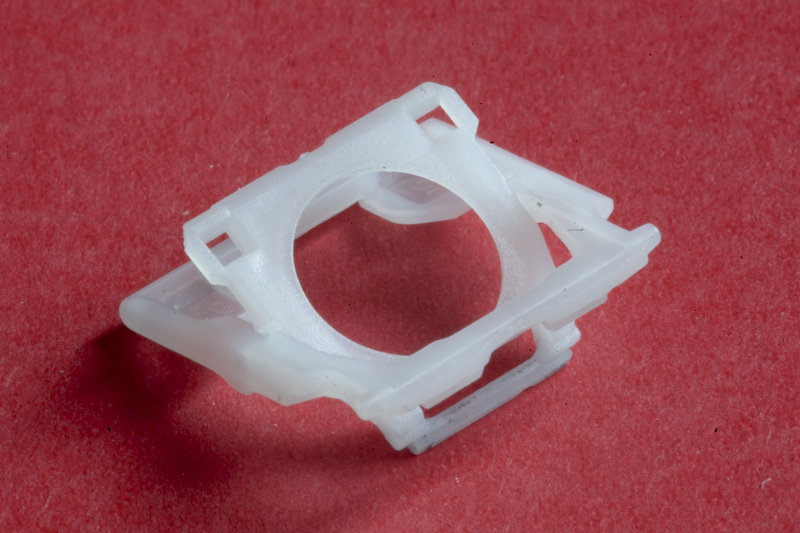
The scissor mechanism should be able to lie flat if constructed correctly.
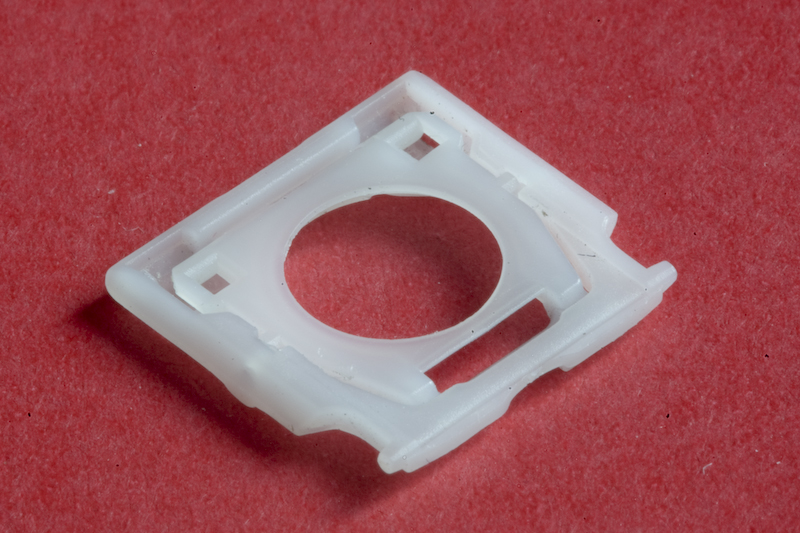
If the rubber dome has come off, you're screwed because it's glued in placed and you'll never fix it down again. The longer length of plastic seen the bottom of the first picture slides under the raised curved piece of metal just beneath the rubber dome.
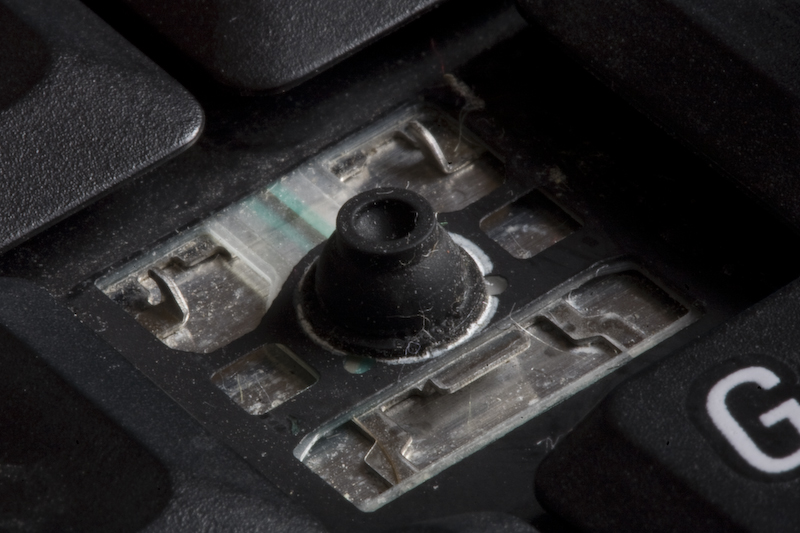
Push the plastic mechanism down so it's flat and clips into the two metal hooks in the top corners.
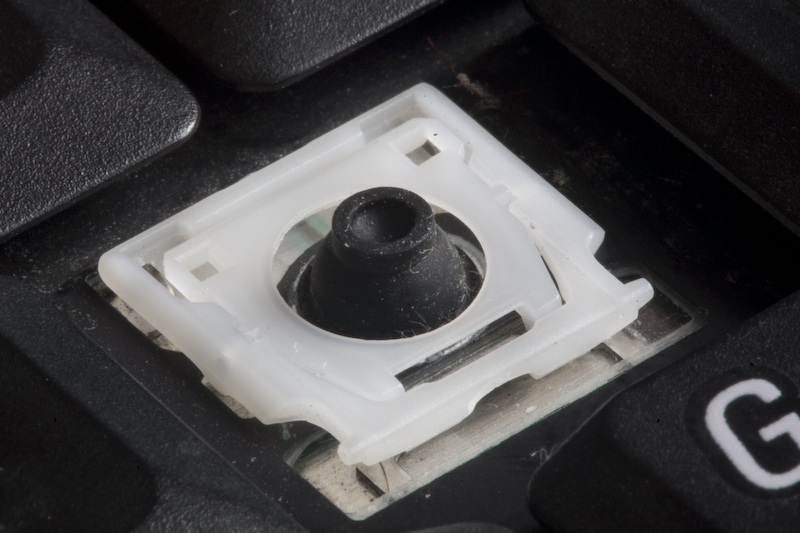
Align the key cap with the rest of the keys and just push it down onto the scissor mechanism.
If any of the lugs get broken, the scissor mechanism either won't hinge properly, won't sit on the keyboard or accept key cap.
The scissor mechanism should be able to lie flat if constructed correctly.
If the rubber dome has come off, you're screwed because it's glued in placed and you'll never fix it down again. The longer length of plastic seen the bottom of the first picture slides under the raised curved piece of metal just beneath the rubber dome.
Push the plastic mechanism down so it's flat and clips into the two metal hooks in the top corners.
Align the key cap with the rest of the keys and just push it down onto the scissor mechanism.
If any of the lugs get broken, the scissor mechanism either won't hinge properly, won't sit on the keyboard or accept key cap.
neil_g
Suspended / Banned
- Messages
- 30,364
- Name
- Neil
- Edit My Images
- No
That's interesting... as when I lost a key I required a replacement board! Thankfully under warranty though. Maybe different keyboard designs throughout the model revisions? Or maybe mine was properly broken! :shrug:
i doubt dell have a stock of spare keys lol, much easier to ship a replacement board in its entirity to be honest.
