

Keyboard - Wired vs Wireless, gaming type vs standard type, this vs that

Major Eazy

Suspended / Banned
Messages
1,150
Name
John 'Jack'
Edit My Images
No
I'm only trying to decide on the type of keyboard, so please no suggestions on any brand or models, just a matter of trying to think what would be right type for me. (I'll worry about brand and models later.)

I've got a corner desk, two monitors, I've got wireless mouse already, and got Wacom graphic table. I do graphic design, photography, sometime enjoy doing research and attempting to write novels. I also have iPad on a stand.

I have been thinking of aiming for a wireless keyboard (the current keyboard is a wired one borrowed from my mother when I completed building my new computer).

The thougths of moving the keyboard around, to allow for use of Wacom table, as well as needing the space on the desk for paperwork, is what drove me to thinking about wireless.

But I am also thinking of a gaming type keyboard. I know they are more suited for gaming, but I assume that in theory, you could reprogram most of the keys for use with work application software. Like with Photoshop, Illustrator, SketchUp, etc., etc.

But here's a problem for me: Gaming type keyboards tend to be wired, and as for wireless keyboards, they tend to be somewhat basic layout.

I'm trying to make up my mind, but struggling with a this or that choice.

What do you guys suggest? What are your workspace on your desks like?

I seems more closer to thinking of opt for wireless, if you think about it, pull the wireless keyboard closer to the edge of the desk, in proper position for serious typing, and I could put paperwork on desk between the keyboard and the monitor. With a wired one, those papers would have to be placed on top of the cable.

I'm aware that Photoshop, Illustrator, InDesign, and such application software like them, tend to let you use keys to change tools, but the idea of gaming type keyboards, I thought I could program them for some other tasks.

Well? What do you guys think?

PS: In the past, sometimes a lot of my friends would be impressed with the fact that I can start a new document, save, close, open another document, change fonts, bold, underline, etc., etc., all using the keyboard and hardly used a mouse. They often remarked: "How do you do that? It looks a lot quicker than reaching for the mouse and using it."
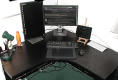
 
upload_2016-5-7_20-21-0.png

This is pretty much typical of my workspace. When using the Wacom tablet, it would be like that, but if not using Wacom tablet, I tend to move it over somewhere else, pull keyboard closer to edge of desk for serious typing, but there would be a cable running from keyboard to back of monitor which would mean any paperwork placed in that area, gets kind of put on top of the cable.

Sometimes I would move the keyboard to the left side of the tablet, keyboard would be just in front of the left hand monitor, sometimes I do some light typing there.

I feel like thinking 50:50 between wireless or gaming type ones (but the majority of those tend to be wired and may be a bit too large)
 
The problem with wireless is that if you need to boot into the bios or from a usb stick then they won't work as the drivers haven't loaded at that stage.

If you do go wireless, get a cheap (£5) wired one for when you need it.
 
Actually, like I said, this keyboard I am using is borrowed from my mother. If any problems with the machine and I need to get into BIOS, I can always borrow it again. Beside, nowadays, few motherboards let you use mouse input for the BIOS, mine do.
 
What do you like typing on? Its a bit of a personal preference.

I love a nice mechanic cherry key (as per my home machine) and hate my slim key Logitech wireless at work.
 
What do you like typing on? Its a bit of a personal preference.

I love a nice mechanic cherry key (as per my home machine) and hate my slim key Logitech wireless at work.

Oh, well I don't know. If it helps: I trained in touch typing with typewriter back in 1980s when I was a teenager. Then moved onto electric typewriters, then finally PCs with Windows 3.1 and onwards.

I tend to do serious typing, like trying to write a novel, report, essay, something like that, I'm not talking about using index fingers to type dozen words on Facebook, in a forum, email, I meant that I do proper all fingers and thumb, typing something like 50 to 70 words per minute, a long full page or dozen pages of text.

I've heard of the Cherry keys, and it's tempted, one of the reasons for why I'm thinking of gaming type of keyboards, not only because of Cherry keys but also because of customised keys. Tempting but I understand that those Cherry type keyboards are mainly wired kind, right?
 
My keyboard has a long coiled cable (will stretch to over 2m without using an extension cable) so I have loads of flexibility over positioning. How far do you want to move this keyboard?

My advice would be to get a good keyboard that you like typing on and if you need to move it about on your desk beyond the reach of the supplied cable, a USB or PS/2 extension cable as appropriate.

I use an IBM Model M here at work, which according to the sticker on the bottom is 28 years old. I've had it for nearly 25 of those years as I refuse to change it, never found anything to compare. It has come with me through every replacement of my development machine. I've got more of them at home, bought from second hand computer shops. It has a buckling spring action so it has excellent tactile and audio feedback, which I like but some do not.
 
Oh, well I don't know. If it helps: I trained in touch typing with typewriter back in 1980s when I was a teenager. Then moved onto electric typewriters, then finally PCs with Windows 3.1 and onwards.

I tend to do serious typing, like trying to write a novel, report, essay, something like that, I'm not talking about using index fingers to type dozen words on Facebook, in a forum, email, I meant that I do proper all fingers and thumb, typing something like 50 to 70 words per minute, a long full page or dozen pages of text.

I've heard of the Cherry keys, and it's tempted, one of the reasons for why I'm thinking of gaming type of keyboards, not only because of Cherry keys but also because of customised keys. Tempting but I understand that those Cherry type keyboards are mainly wired kind, right?


In that case, go somewhere that stocks a decent selection and see which feels most comfortable. As for wired v. wireless, I prefer wired. Less chance of it getting tidied away (by the cat!)
 
Agree with Neil, I had a wireless keyboard/mouse combo for the computer in the lounge and it was irritating. The "mouse" that was built into the keyboard would creep as the battery got low and sometimes key presses would need to be repeated.
 
My keyboard has a long coiled cable (will stretch to over 2m without using an extension cable) so I have loads of flexibility over positioning. How far do you want to move this keyboard?


if you need to move it about on your desk beyond the reach of the supplied cable, a USB or PS/2 extension cable as appropriate.

Sometimes I would place some papers on the desk between the keyboard and the monitor. When I do so, the papers on top of the keyboard's wired cable will make the papers look a little lumpy. Bit like someone left an extension cable running under a carpet. I may put up with it, even if I find it a bit annoying. However a coiled cable like you suggested, under the papers, would make it look like I got a model diorama of a mole running under the papers. :-)

Anyway, about your asking how far I move keyboard, well between the Wacom tablet and the wireless gaming mouse, both of them can have their buttons customised for the majority of the work, and unless I need the keyboard for typing text, I could do some graphic work with the keyboard put on the floor if it is wireless. Beside, sometimes I would need to unplug the keyboard and move it somewhere else, after all, the desk is not just for working on computer, but also for working on paperwork.
 
cabled > wireless. key lag can be a pain, batteries dying etc.

True, but it would not bother me, after all I'm not into gaming so don't mind key lag. The idea of buying a gaming type of keyboard with their extra buttons (say for example, like the Logitech having those G1, G2, G3, and on, even G11, G12 keys), is I figure I could reassign them to do other work with word processor, Photoshop, etc. (Well I know most of them already have their menus and commands assigned shortcut keys such as Ctrl + S for save, or in Photoshop, Z for zoom, etc., but there's always the odd command that don't have shortcut key.)

Those playing PC games may be worried about key lag, specially when they're pressing the firing button on the keyboard but their guns haven't started firing yet due to key lag, but I don't mind if I press Ctrl + S and waited a bit for the Save As... box to pop up.

I also don't mind batteries dying, actually I do mind batteries dying inside a camera at the moment I need to take photos, like we all do, but when it comes to doing work on computer, nah, I don't mind. It would be a good excuse to stop typing, take a break, change batteries. :-)

The pain for me is really just a case of annoying keyboard cable getting in the way, which got me thinking of going wireless, but wireless keyboards seems pretty much standard, which got me thinking of gaming type keyboards with extra keys, or even Cherry type keys, but that in turn makes me back to where I started, those sort of gaming type keyboards tend to be wired.

Maybe it would make senses to not worry about needing extra keys on the keyboard, if I can just customise and reassign most of the buttons on the Wacom tablet and the Logitech mouse?
 
How about running a USB extension cable backwards then under the desk front, maybe even using a USB hub so you can plug a keyboard and mouse into the front of the desk. No cables to make the papers on the desk top look rumpled! When the keyboard isn't wanted/needed, pop it on a shelf under the desk.
 
After getting a mechanical wired keyboard (coolermaster quickfire TK cherry blue switches) I would never go back, always a joy to type now, its a compact keyboard so takes up less space on a desk than standard The higher end gaming keyboards can be re-programmed so you could macro more of your tasks.
 
Last edited:
I own a decent micro$haft wireless keyboard : I cannot remember where I put it ... ergo : all my wired keyboards are better, even the cheapest generic ones.
Maybe I'm sensitive to something like lag in the wireless setup, I dunno.

Go for a wired one.
 
Back
Top