JPEG V's RAW

Status
Not open for further replies.
Your camera can take both RAW & Jpeg - I know - wife has just bought one...

Goto:
menu, shooting menu, Image Quality, & chose NEF (RAW) + JPEG fine..

I'm trying to convince my wife of the benefits of RAW but this was gives me the best of both worlds.. I get a 'negative' - RAW file, & she gets a easily viewed jpeg...
This way editing is still possible...
 
Jpegs can be edited, if you've taken the time to learn how. But RAW is more flexible as it contains more information.
 
An analogy of editing a jpeg is taking a printed photo, scanning it, and then editing the scan and reprinting. (As opposed to making a new print directly from the negative)
 
The argument for space now days is dead. Storage is cheap. Recently saw a 2tb hdd for £65. And as for instantly sending photos unless yours a journalist then thats not going to be the case. An edited raw file will always be better than a camera jpeg.
 
Thank you! Ill see if Nikon do something similar

Nikon View NX2 - see post #20 :)

You can even set your camera to raw and use one of the picture modes such as Landscape. View NX2 will apply all the camera settings to the file and the raw will look exactly like the JPEG would have. You can then edit the raw if you wish by changing the applied camera settings or making your own adjustments, if you like the original raw just keep that.

View NX2 has

Exp comp
WB
Picture Control
Sharpness
Contrast
Brightness
Highlight Protection
Shadow Protection
D Lighting
Colour booster
Crop
Straighten
Auto Red Eye
Axial CA
Auto Lateral CA

You can also edit metadata, batch process etc.
 
You may well be 'getting it right in camera', but pretty much all RAW captures need some editing and tend to look a bit flat on the screen. This is to do with how RAW works and nothing to do with camera skills.

If you open the RAW file with the manufacturers own software, it will look exactly the same as if you had saved the Jpeg, because it opens with all the camera settings applied. Depending on the software, you may then get total control of things you can change if needed.

Canon give you Digital Picture Professional, which is a fully functioning RAW processor. Nikon View NX2 gives limited control. Nikon Capture is Nikon's full RAW processing program, but you have to pay for it. :( Not sure about other brands.
 
The argument for space now days is dead. . .

that may be true of storage - its distinctly not the case for buffering and write times - if you are doing something that nees a fast deep burst raw is not a good idea unless you have a top end pro spec camera
 
I have the d7100 and people slate the buffer but to be honest if you require a burst of more that 6 shots you need to look at your technique

Oh no no no, :nono: lets not make excuses for the deficiencies of the camera. ;) There are times when you want/need a burst for more than a second or two, and you don't want a buffer to fill up and slow the camera down while you're doing it. You may as well say you should get the shot in one. ;)

RAW files are larger, and so fill up the buffer quicker. It's a downside of the RAW format. The D7100 is as good, or better than my camera in many many ways, but the buffer and frames per second is not one of them. I only shoot RAW, and get about 2 seconds at 8 fps. Change to Jpegs and I get another second or so. I work within the limits of my camera, but I don't say to all that they should be able to get a picture in 17 frames at 8fps because those are the constraints that I have to work within. :shake:

There are reasons why the Pro spec cameras have 10+ frames per second and large buffers, mainly to raise the chances of getting 'the' shot. I think you should be talking to a lot of Pro's and ask as to why they need a burst of more than 6 frames. ;) :lol:

The buffer will be irrelevant to most landscape photographers, it may be a key point for sports/action photographers. ;)
 
Oh no no no, :nono: lets not make excuses for the deficiencies of the camera. ;) There are times when you want/need a burst for more than a second or two, and you don't want a buffer to fill up and slow the camera down while you're doing it. You may as well say you should get the shot in one. ;)

RAW files are larger, and so fill up the buffer quicker. It's a downside of the RAW format. The D7100 is as good, or better than my camera in many many ways, but the buffer and frames per second is not one of them. I only shoot RAW, and get about 2 seconds at 8 fps. Change to Jpegs and I get another second or so. I work within the limits of my camera, but I don't say to all that they should be able to get a picture in 17 frames at 8fps because those are the constraints that I have to work within. :shake:

There are reasons why the Pro spec cameras have 10+ frames per second and large buffers, mainly to raise the chances of getting 'the' shot. I think you should be talking to a lot of Pro's and ask as to why they need a burst of more than 6 frames. ;) :lol:

The buffer will be irrelevant to most landscape photographers, it may be a key point for sports/action photographers. ;)

Soo you require 16 shots to get one decent shot...?
 
I always shoot raw because I want the most amount of information my camera produces to be available to me. JPG is an 8bit format so when the camera converts from sensor data (raw) to JPG a lot of information is lost. To quote a book.

"Most cameras allow the photographere to select raw, TIFF, or JPEG image quality. The choice is simple: For the highest quality, set your camera to save your captures in raw format using the highest bit settings available. As noted, with the camera set to write to the memory card in raw, the camera does little if any processing of the digital information and simply records the sensor information and related metadata to the memory card. In contrast, if you set your camera to write to JPEG or TIFF files, the camera processes the sensor output in to 3 greyscale images, each of which is referred to as a channel (one for each of the three primary color filters), applies a contrast curve, adjests the colour balance, makes other modifications based on the cameras settings, perfords edge sharpening, and saves the fully processed image to the memory card. In the case of JPEGS, the image is limited to 8 bits per color channel and is compressed in such a way that some of the image information is irretrievably lost."

Bruce Barnbaum - The Art of Photography (rockynook 6th edition April 2013)
 
Soo you require 16 shots to get one decent shot...?
No, but the more frames per second, and the more frames you can take in the burst, can increase the chances of catching 'the' shot during some action. Do you think sports photographers don't use the 10+ fps and choose the best image(s)?

Or it helps in catching a sequence of images of something happening.
u6oq.jpg


And that's with a couple of frames missing as I had a dodgy memory card at the time that corrupted some frames. :(
 
Last edited:
barratt1988 said:
I have the d7100 and people slate the buffer but to be honest if you require a burst of more that 6 shots you need to look at your technique

How incredibly presumptuous of you.
 
Photographing diving gannets from a rib around grassholm it took multiple bursts of about 25 at a time to get one at the moment if it hitting the water (which wound up on the front of a bird watching magazine)

Perhaps you could explain what technique could have been used to get that shot with a burst of 6 shots (not to mention buffer lock out in between bursts)
 
Of Jpegs. ;)

Things slow down pretty quickly if you shoot a burst of RAW files.

:razz:

haha, can get 11 raw(12bit compressed raw), only got 30mb cards in though, wonder if 95mb cards would improve it?
 
I think at the end of the day it depends what you are doing.

Ive been through the " I only shoot jpeg" phase and the " raw is much better" phase before coming to the realisation that both are just tools and a craftsman uses whatever tool does the job best for him (which differs from one craftsman to the next)

If i'm shooting a wedding i'll mostly use raw (although if ive promised a slide show at the late evening reception I'll shoot raw and jpeg)

If i'm shooting a few beautiful landscapes I'll use Raw

If on the other hand I'm doing tree surveys for work I'll use jpeg , because theres no way i'm processing several thousand shots of trees through a raw broweser when all that is important is to show their condition and any defects or fungal bodies

Yes agree with you there
I was at the zoo the other day when a very knowledgeable pro was explaining to a group of people about the raw vs jpeg debate
She said that if you get the settings right in camera jpeg is all you need
Made me think because when I convert the raws in light room I always use the same settings
I think its down to experience and confidence tho I will carry on using raws as it allows me to correct things if I get it wrong
 
Yes agree with you there
I was at the zoo the other day when a very knowledgeable pro was explaining to a group of people about the raw vs jpeg debate
She said that if you get the settings right in camera jpeg is all you need
Made me think because when I convert the raws in light room I always use the same settings
I think its down to experience and confidence tho I will carry on using raws as it allows me to correct things if I get it wrong

The thing is shooting jpeg applies edits in camera not allowing for simple adjustments like WB. Its no hards*** shooting raw so why not? Are we so short on time that we cant make the effort to make a good shot great
 
She said that if you get the settings right in camera jpeg is all you need

This is very true, and the day I can be totally certain of getting all of the settings exactly right, every single shot, will be the day I switch from raw to jpeg. And the first thing I will shoot will be the squadrons of piggies flying over the frozen wastes of hell.
 
Valid points above about horses for courses. For a simple record - save time. For more personal work - maximise control. An automated system can only make technical decisions, not emotional ones.
 
...
One final question I have, though; the point has been mentioned that you can turn a raw file into the picture you would have got in jpg (I.e. you can do the processing the camera would have done automatically) but how easy/quick is this? If I go out and shoot 200 pictures, am I going to spend a whole day pp?

And also, to re-raise an earlier question: I am currently in America for 3 weeks and after every day I put my photos onto my iPad, for viewing/backup etc, can I do this with raw?

Files are saved in the same way whether they are jpegs or RAW or (jpeg + RAW). The only difference is the size of the files saved, RAW files are considerably larger as they contain all the data the camera captured to be able to make the on-camera jpeg.

PP can take just a few minutes to a long time depending on what you want to. It is useful to capture in RAW + jpeg as you can then decide to only PP the ones that you consider would benefit.

I personally always shoot with RAW + jpeg but only pp specific ones. The software you use for pp may also have some presets that you can apply automatically which may save some pp time - Lightroom for example.

If you're short of space and away as you are then I would shoot in jpeg only as you can still do a lot of pp with a jpeg file later if need be.
 
Last edited:
Yes agree with you there
I was at the zoo the other day when a very knowledgeable pro was explaining to a group of people about the raw vs jpeg debate
She said that if you get the settings right in camera jpeg is all you need
Made me think because when I convert the raws in light room I always use the same settings
I think its down to experience and confidence tho I will carry on using raws as it allows me to correct things if I get it wrong

If it were Jpegs you were shooting, and always editing with the same settings, at least initially, then you could customise the Jpeg to do these changes in camera, and so hopefully less editing of the jpeg once in the computer.

If you were shooting RAW, and using the manufacturers own processing software, you could the files would open, looking like the Jpegs, (because the manufacturers software applies all the in camera settings to the RAW file for preview) and then you could do any further editing.

You can also do this with Adobe Camera Raw, and I assume most RAW processing programs.

If you're shooting RAW with a 3rd party processing software like Lightroom, and if you are applying the same initial settings each time when you open an image, because LR doesn't recognise the in camera settings and things look a bit flat, you can save those initial settings as your preset to automatically apply on opening an image. Or even apply on import to Lightroom. You may already be doing this, but it's just a heads up for those that don't know. It's one of the ways to speed up processing.
 
Last edited:
If it were Jpegs you were shooting, and always editing with the same settings, at least initially, then you could customise the Jpeg to do these changes in camera, and so hopefully less editing of the jpeg once in the computer.

If you were shooting RAW, and using the manufacturers own processing software, you could the files would open, looking like the Jpegs, (because the manufacturers software applies all the in camera settings to the RAW file for preview) and then you could do any further editing.

You can also do this with Adobe Camera Raw, and I assume most RAW processing programs.

If you're shooting RAW with a 3rd party processing software like Lightroom, and if you are applying the same initial settings each time when you open an image, because LR doesn't recognise the in camera settings and things look a bit flat, you can save those initial settings as your preset to automatically apply on opening an image. Or even apply on import to Lightroom. You may already be doing this, but it's just a heads up for those that don't know. It's one of the ways to speed up processing.

Thanks that's a good idea will save quite a bit of time :)
I do tend to normally shoot on iso 400 and 800 so when I convert the raws in lightroom 4 am mostly on the same settings
 
Soo you require 16 shots to get one decent shot...?

.................but to be honest if you require a burst of more that 6 shots you need to look at your technique

To ask such a question and make such a statement, shows a complete ignorance of why a burst of shots would be taken.
For instance, it's quite time-consuming to train a flock of ducks to coordinate their wing-flaps.

Possibly it's newbie enthusiasm coming across as arrogance. Quite common amongst moderate photographers with fancy gear who know just enough to be dangerous.
 
barratt1988 said:
The thing is shooting jpeg applies edits in camera not allowing for simple adjustments like WB. Its no hards*** shooting raw so why not? Are we so short on time that we cant make the effort to make a good shot great

Where did you get the idea that you can't change the white balance of a Jpeg?
 
To ask such a question and make such a statement, shows a complete ignorance of why a burst of shots would be taken.

Yup, it is the sort of statement that might be made by somebody who only ever takes images of things that don't move
 
Where did you get the idea that you can't change the white balance of a Jpeg?

or for that matter just get the WB right in camera to start with
 
I have the d7100 and people slate the buffer but to be honest if you require a burst of more that 6 shots you need to look at your technique

Obviously motorsports is not your thing then?
 
barratt1988 said:
From the fact it destroys the image...

Seriously - you really don't have a clue what you are talking about.
 
barratt1988 said:
Id say the same but im unsure what it is you do... try looking into a few reviews about the two and get some info

Jon's a working photographer, so am I.

You took your first portrait shot less than seven weeks ago.

Now who do you think is right?
 
Where did you get the idea that you can't change the white balance of a Jpeg?

You can make minor adjustments, but you don't have the control that raw gives you.

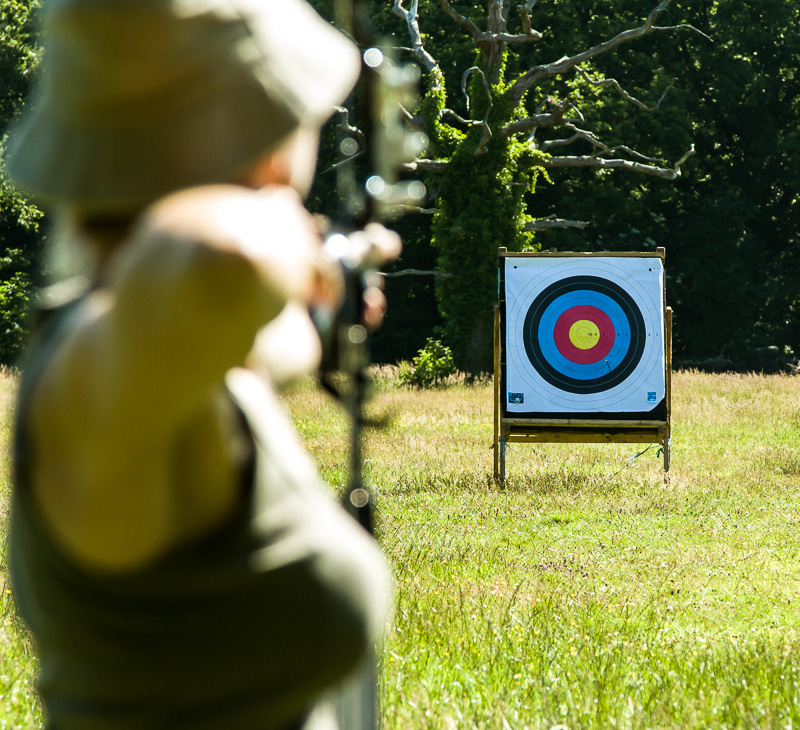
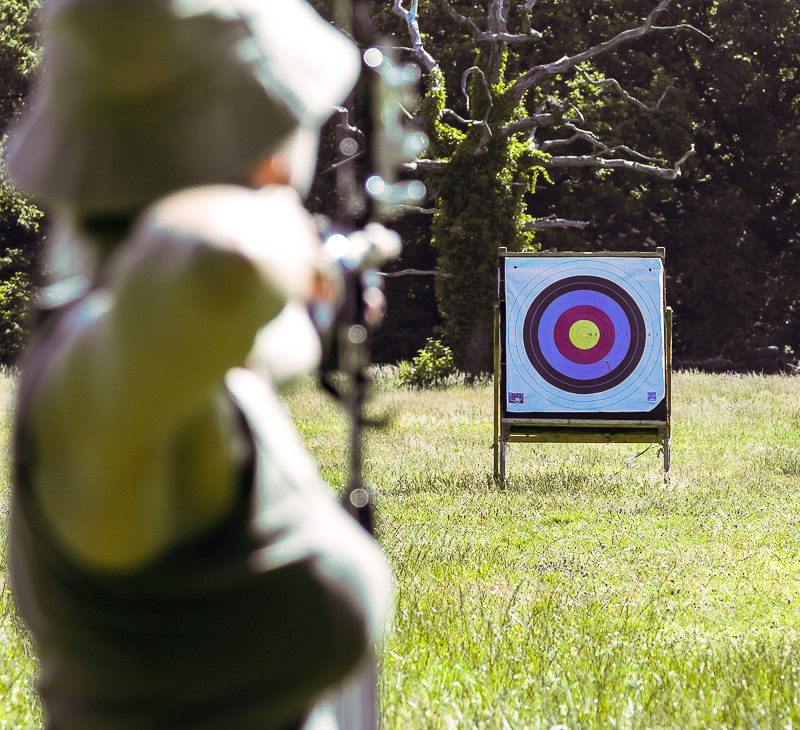
Here's an image I shot using 'Tungsten' white balance (Yes, I'm stupid). Luckily I shot it in raw, so just one click to set it to daylight got it right -

WAC-3.jpg


If I'd only had the jpeg to work with then I'd find it very difficult to get the grass green and the blue in the target correct by just changing the WB. Too much data has already been thrown away.

WAC-5.jpg
 
Status
Not open for further replies.
Back
Top