

JPEG - And Data Loss

Which image has been saved only once

  • Left Photo

    Votes: 14 20.0%
  • Right Photo

    Votes: 42 60.0%
  • Cannot Tell

    Votes: 14 20.0%

  • Total voters
    70
  • Poll closed .

MWHCVT

In Memoriam
Suspended / Banned
Messages
28,464
Name
Matthew
Edit My Images
Yes
We all should as photographers know that Data is lost each time that we open and save a jpeg file, what probably non of us have tested is just how much is lost and how this may affect the image we produce :thinking:

So with that in mind I present to you this:
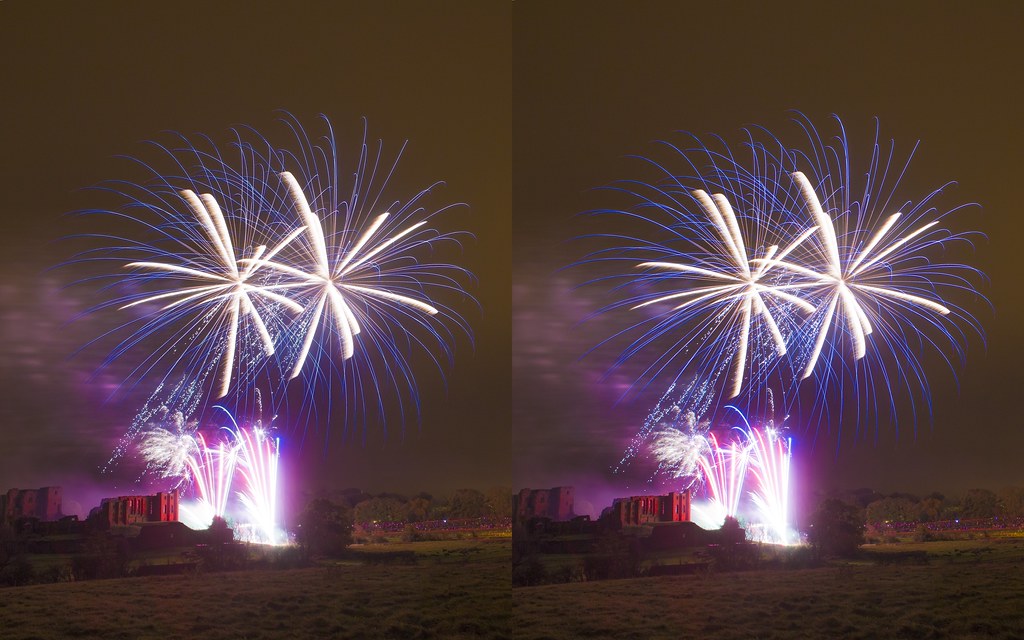

JPEG LOSS TEST by mwhcvt, on Flickr

One of these is the orginal JPEG from my RAW that has been opened and save a single time, the other is that same file after it has been opened and save all the the highest quality 50 times over :eek: can you tell which is which :D

And if you want to look closely then CLICK HERE to go the original full size file

So take you look and cast your vote :thumbs:

Matt
MWHCVT
 
Even after looking at both at 100%, I don't think you'd ever actually tell the difference between them.
 
Yup, I'm with James. Can't tell although as a guess I would say the right - gut instinct.
 
I always thought you had to open, EDIT and save a jpeg to lose quality?

So maybe that makes me not a photographer?
 
Last edited:
We all should as photographers know that Data is lost each time that we open and save a jpeg file, what probably non of us have tested is just how much is lost and how this may affect the image we produce :thinking:


One of these is the orginal JPEG from my RAW that has been opened and save a single time, the other is that same file after it has been opened and save all the the highest quality 50 times over :eek: can you tell which is which :D

And if you want to look closely then CLICK HERE to go the original full size file

So take you look and cast your vote :thumbs:

Matt
MWHCVT

I know that data is lost if you open, EDIT and save a jpeg. Just opening and then saving again gives you the result that you got.
Or try opening, then Save As a new file, re-open the new file and Save As another file , repeat that 50 times and see what you get :).
 
Very difficult to tell.

The difference I see is when looking closely at the gradients between colours.
 
It's performed better than I'd have expected for fifty re-saves but not well enough to not care about keeping originals.

I looked at the 1024px version and decided pretty quickly which I thought it was.
Looking at the 100% version it's absolutely clear which is which.

The single save image is the one on the right, the multi save image is the one on the left.
 
Last edited:
Even after looking at both at 100%, I don't think you'd ever actually tell the difference between them.

I can tell but then I know :D

Yup, I'm with James. Can't tell although as a guess I would say the right - gut instinct.

Well that's interesting that you've formed and decision :thumbs:

I always thought you had to open, EDIT and save a jpeg to lose quality?

So maybe that makes me not a photographer?

No even if you open then just save under a new file name, without doing any editing I've noticed a data loss on the file size ;) I wouldn't say it makes you not a photographer though and weather the different is decernable is sort of the object of the thread

I know that data is lost if you open, EDIT and save a jpeg. Just opening and then saving again gives you the result that you got.
Or try opening, then Save As a new file, re-open the new file and Save As another file , repeat that 50 times and see what you get :).

I can tell you from the exerience of just doing it that opening and saving as a new file does loose data

Original file: 8,028,160 bytes
50 Saves file: 7,249,920 bytes

So a total loss of 778,240 bytes over 50 saves with no editing what so ever ;)


Very difficult to tell.

The difference I see is when looking closely at the gradients between colours.

It's performed better than I'd have expected for fifty re-saves but not well enough to not care about keeping originals.

I looked at the 1024px version and decided pretty quickly which I thought it was.
Looking at the 100% version it's absolutely clear which is which.

The single save image is the one on the right, the multi save image is the one on the left.

I'm glad you've come to a conclusion and agree, you must keep the RAW's :thumbs: I'm not going to say if your right or not though ;)
 
It's performed better than I'd have expected for fifty re-saves but not well enough to not care about keeping originals.

I looked at the 1024px version and decided pretty quickly which I thought it was.
Looking at the 100% version it's absolutely clear which is which.


The single save image is the one on the right, the multi save image is the one on the left.

Can you explain why for those of us who are unsure ;)
 
How have you saved? If you open a JPEG and just keep saving it with the image still open in Photoshop, it doesn't actually degrade, as you're just constantly saving the file that's in RAM. You have to save as JPEG, close, re-open, save as JPEG, close etc.

I've just tested this with a JPEG converted from a TIFF. I've saved it once using quality 12, then opened it, renamed it, saved as JPEG12, closed it, opened it again, saved as JPEG12 etc... done that only 15 times and the results are below. I don't even need to ask you which you think is which.

{back in a min when I've uploaded}


http://i.imgur.com/Osij1.jpg

http://i.imgur.com/aEsTE.jpg
 
Last edited by a moderator:
But who or why would you need to re edit a file more than a couple of times? If the loss is apparent in a couple of edits/saves, then raw is the best way to go. But 6-7-8-9-10 edits and saves on an image...... really??
 
No... no one does... it's just to demonstrate that loss is taking place, so why bother with JPEG. Shoot RAW, edit in RAW, or TIFF if you're pixel editing, then archive as a TIFF. You want a JPEG.. then save a copy as a JPEG.. once.
 
I said Left

We shall see :D

How have you saved? If you open a JPEG and just keep saving it with the image still open in Photoshop, it doesn't actually degrade, as you're just constantly saving the file that's in RAM. You have to save as JPEG, close, re-open, save as JPEG, close etc.

I've just tested this with a JPEG converted from a TIFF. I've saved it once using quality 12, then opened it, renamed it, saved as JPEG12, closed it, opened it again, saved as JPEG12 etc... done that only 15 times and the results are below. I don't even need to ask you which you think is which.

{back in a min when I've uploaded}

http://i.imgur.com/Osij1.jpg
http://i.imgur.com/aEsTE.jpg

Not daft :lol: it was an open save, re open and save 50 times, yeah tonight's a quite night :rules:

But who or why would you need to re edit a file more than a couple of times? If the loss is apparent in a couple of edits/saves, then raw is the best way to go. But 6-7-8-9-10 edits and saves on an image...... really??

I'd worry if someone was but it proves a point, interesting or maybe not, by my findings from my not very scientific test seem to suggest, that the once you saved your JPEG from your RAW the next time that you open then save that file will be the time that the most data has been lost :thinking: and that after a certain point there is very little additional compression past about 15 saves
 
No... no one does... it's just to demonstrate that loss is taking place, so why bother with JPEG. Shoot RAW, edit in RAW, or TIFF if you're pixel editing, then archive as a TIFF. You want a JPEG.. then save a copy as a JPEG.. once.

Nope - still not convinced that raw is the way to go (unless it's a detailed edit for an important shot / job) I will guess the bottom image is the multi save one. The image is still usable, on screen and I guess on print too.

My (minor) gripe is the way some folks think that shooting jpegs only is going to send you down a slippery slope. I feel most end users, unless large commercial end users, would not notice or care about the slight loss in detail. It's pixel peeping for the sake of it and that has a place, sure. Just not one I visit often enough to take a season ticket for.

Phil.
 
How have you saved? If you open a JPEG and just keep saving it with the image still open in Photoshop, it doesn't actually degrade, as you're just constantly saving the file that's in RAM. You have to save as JPEG, close, re-open, save as JPEG, close etc.

I've just tested this with a JPEG converted from a TIFF. I've saved it once using quality 12, then opened it, renamed it, saved as JPEG12, closed it, opened it again, saved as JPEG12 etc... done that only 15 times and the results are below. I don't even need to ask you which you think is which.

{back in a min when I've uploaded}

Top one is the multi-save, you can easily see the macro blocking in the sky.
 
Nope - still not convinced that raw is the way to go (unless it's a detailed edit for an important shot / job) I will guess the bottom image is the multi save one. The image is still usable, on screen and I guess on print too.

My (minor) gripe is the way some folks think that shooting jpegs only is going to send you down a slippery slope. I feel most end users, unless large commercial end users, would not notice or care about the slight loss in detail. It's pixel peeping for the sake of it and that has a place, sure. Just not one I visit often enough to take a season ticket for.

Phil.

Please not this is not about should you shoot RAW or not...frankly that's down to the person holding the camera, I have my preference but that said while I will nearly always shoot RAW only I do occasionally shoot +Large JPEG as there are certain instances that unless for a special edit I've got no use for the RAW, but that instance is few and far between ;)
 
Top one is the multi-save, you can easily see the macro blocking in the sky.


Correct. Remember, with a very detailed pic, JPEG compression will be less. Try the same trick with a landscape with fine tonal gradation like the one I posted and you can clearly see what happens. The detail in the houses etc is nowhere near as degraded, but the water and clouds are a mess.
 
Please not this is not about should you shoot RAW or not...frankly that's down to the person holding the camera, I have my preference but that said while I will nearly always shoot RAW only I do occasionally shoot +Large JPEG as there are certain instances that unless for a special edit I've got no use for the RAW, but that instance is few and far between ;)

Surely it's all about whether you shoot raw or not. If you shoot raw, you have the option to do as much and as often as you like edits / saves :thinking:

If you shoot jpeg only, that is taken away from you.

If I'm wrong, then my brain has just turned to spaghetti ;)
 
phil8139 said:
Surely it's all about whether you shoot raw or not. If you shoot raw, you have the option to do as much and as often as you like edits / saves :thinking:

If you shoot jpeg only, that is taken away from you.

If I'm wrong, then my brain has just turned to spaghetti ;)

I mean this thread is not about trying to make people shoot RAW
 
Surely it's all about whether you shoot raw or not. If you shoot raw, you have the option to do as much and as often as you like edits / saves :thinking:

If you shoot jpeg only, that is taken away from you.

If I'm wrong, then my brain has just turned to spaghetti ;)


You're not wrong, no, but some people need to shoot JPEG because of the amount of images they produce, or they need to really quickly get teh image to a client. RAW is not for everyone. However, so long as you know it's crap... all is well. Just don't save, close, open and save more than once or twice, and keep the compression to a minimum.
 
David,

off topic, but where is that village? Looks so beautiful
 
I mean this thread is not about trying to make people shoot RAW
Sorry Matt, wasn't trying to derail it ;) but it's important to know if you are going to make an informed decision on your work flow :shrug:

You're not wrong, no, but some people need to shoot JPEG because of the amount of images they produce, or they need to really quickly get teh image to a client. RAW is not for everyone. However, so long as you know it's crap... all is well. Just don't save, close, open and save more than once or twice, and keep the compression to a minimum.

Not quite sure where that sits in your explanation :suspect:
 
Not quite sure where that sits in your explanation :suspect:

I mean.. if you're aware of the limitations in re-saving/quality loss with JPEG, you can still work quite effectively; If you are not, and are blissfully unaware of the problems, you can easily end up with an image like the one I posted above.
 
I'm glad you've come to a conclusion and agree, you must keep the RAW's :thumbs: I'm not going to say if your right or not though ;)
Just a copy of the JPEG with no editing would do if that's what you're shooting, just as long as you've got something to go back to.

Can you explain why for those of us who are unsure ;)

I originally did then edited it out so as not to influence other people's decision too much.
I basically looked for the sorts of areas that would be most affected by it. There are two where I think it's clear on the 1024px and then a third area which is largely masked by the resizing but is clear on the 100%.
 
Sorry Matt, wasn't trying to derail it ;) but it's important to know if you are going to make an informed decision on your work flow :shrug:


Not quite sure where that sits in your explanation :suspect:

No worries :thumbs:

Just a copy of the JPEG with no editing would do if that's what you're shooting, just as long as you've got something to go back to.


I originally did then edited it out so as not to influence other people's decision too much.
I basically looked for the sorts of areas that would be most affected by it. There are two where I think it's clear on the 1024px and then a third area which is largely masked by the resizing but is clear on the 100%.

Indeed it would :thumbs: One of the things for me the colours are a little more punchy in the original to my eyes :thumbs:
 
Ok, so the loss is there, some can see it some can't.

How would they stack up in print? Would it be like noise where it's lost (to a point) when printed?
 
Bu99ered if I can tell them apart, even at 100%! Probably even harder to spot anything once printed. Save/reopen cycles will eventually degrade a JPEG but as Matt's experiment shows, it takes a lot of 'em to do so. I've done similar experiments (but got bored after 10 or so cycles) and reached the same conclusion - JPEGs can be worked on several times without problems as long as the compression is kept to a minimum each time.

I make no secret of the fact that I hate doing PP and luckily, the files I get from the cameras I use simply don't need any (I shoot purely for myself 99.99% of the time) to give me great prints at A3+, printed straight from the cards. I can see there's a time and place for raw but not my time and not my place!

Shoot in whatever format you like and do whatever PP you like - I prefer photography to computer wizardry, YMMV.
 
I said left...but truthfully I can't tell.

Nice thread Matt - I've always thought jpeg compression was more theory than practical. Be interested to see some more examples...if anyone can be bothered to save 50 times lol.

Matt! I say Take David up on his theory - get a RAW landscape and do it again :)
 
Ok, so the loss is there, some can see it some can't.

How would they stack up in print? Would it be like noise where it's lost (to a point) when printed?

I honestly don't know :(

Bu99ered if I can tell them apart, even at 100%! Probably even harder to spot anything once printed. Save/reopen cycles will eventually degrade a JPEG but as Matt's experiment shows, it takes a lot of 'em to do so. I've done similar experiments (but got bored after 10 or so cycles) and reached the same conclusion - JPEGs can be worked on several times without problems as long as the compression is kept to a minimum each time.

I make no secret of the fact that I hate doing PP and luckily, the files I get from the cameras I use simply don't need any (I shoot purely for myself 99.99% of the time) to give me great prints at A3+, printed straight from the cards. I can see there's a time and place for raw but not my time and not my place!

Shoot in whatever format you like and do whatever PP you like - I prefer photography to computer wizardry, YMMV.

Fair enough :thumbs:

I said left...but truthfully I can't tell.

Nice thread Matt - I've always thought jpeg compression was more theory than practical. Be interested to see some more examples...if anyone can be bothered to save 50 times lol.

Matt! I say Take David up on his theory - get a RAW landscape and do it again :)

I have a lot of landscapes that I pull up so may do it later, as it is I'm hungry so I'm going to grab some dinner :lol:
 
I think the right hand pic looks like it has more detail in it? When do we get to find out ?
 
Matt! I say Take David up on his theory - get a RAW landscape and do it again :)

Agreed!
Preferably a light blue sky....
Smooth tones will always be a problem for re-saved JPEGs.

For a small number of edits I don't think the loss of quality is going to be significant, I've no issue with that.
Where JPEGs really don't work is highlight recovery. Burn in a bland bright sky to try and bring out some detail and the banding will be horrendous. This is because JPEGs are only 8 bit and increasing contrast in the sky shows those steps as obvious bands of colour.
Shadow recovery is OK as there is usually enough noise in the shadows to dither the tones and avoid obvious banding.

Matt - great thread, and I can't tell which is which.
David - cracking image :thumbs:
 
Matt! I say Take David up on his theory - get a RAW landscape and do it again :)


Theory? :) I did it... it's there for all to see :) Why would Matt have to do it? Fine gradients are the first casualty in JPEG compression.
 
Im new to photography and was always told to shoot raw because you can do so much more with the image with out loosing quality. I think Matts OP proves that isn't necessarily so.
To my untrained eye I would go with left but I cant tell the difference between the 2.

Nice thread Mathew :thumbs:

Mark
 
Nick_1981 said:
I think the right hand pic looks like it has more detail in it? When do we get to find out ?

Well I've put a 10 day poll up so I guess next weekend but if you want to know drop me a PM ;)

DuncanDisorderly said:
Agreed!
Preferably a light blue sky....
Smooth tones will always be a problem for re-saved JPEGs.

For a small number of edits I don't think the loss of quality is going to be significant, I've no issue with that.
Where JPEGs really don't work is highlight recovery. Burn in a bland bright sky to try and bring out some detail and the banding will be horrendous. This is because JPEGs are only 8 bit and increasing contrast in the sky shows those steps as obvious bands of colour.
Shadow recovery is OK as there is usually enough noise in the shadows to dither the tones and avoid obvious banding.

Matt - great thread, and I can't tell which is which.
David - cracking image :thumbs:

I think you've got it right :thumbs:

markyboy1 said:
Im new to photography and was always told to shoot raw because you can do so much more with the image with out loosing quality. I think Matts OP proves that isn't necessarily so.
To my untrained eye I would go with left but I cant tell the difference between the 2.

Nice thread Mathew :thumbs:

Mark

It should made clear this derives from a RAW I personally would still advocate shooting RAW in most situations :thumbs:
 
Not really a fair test though, JPG compression really loses detail when you alter something then resave as its got to work out and filter all over again. You wouldnt expect a lot just resaving time after time.

A better test would be open the files, do an adjustment like levels, resave, reopen then adjust say sharpening or NR or cloning. Then you'll see a far more pronounced difference
 
Last edited:
gnirtS said:
Not really a fair test though, JPG compression really loses detail when you alter something then resave as its got to work out and filter all over again. You wouldnt expect a lot just resaving time after time.

A better test would be open the files, do an adjustment like levels, resave, reopen then adjust say sharpening or NR or cloning. Then you'll see a far more pronounced difference

Yes but then you changing the image which invalidate the comparison :shake:
 
I've said can't tell, although I am looking at it having been on the pop all day! I will say however I can tell in my own files something that's been edited vs original with as little as 2 saves even at best possible quality. Hence if I suspect I need further editing I'll duplicate the original file into 2 layers and save as a PSP image to come back to later, or if it's a scanned negative keep the original as a 16bit Tiff, keeping Jpegs just for output files where possible.
 
Im new to photography and was always told to shoot raw because you can do so much more with the image with out loosing quality. I think Matts OP proves that isn't necessarily so.
To my untrained eye I would go with left but I cant tell the difference between the 2.

Nice thread Mathew :thumbs:

Mark

This exercise is about degree of degradation of jpeg images after successive saves and is nothing to do with the merits (or not) of shooting jpeg over raw. RAW files contain more information than jpegs and so give you more data to play with before saving as, for the sake of this argument, a 'first generation' jpeg - that extra information is 'discarded' by the camera when you shoot jpegs straight out of the camera. If you are happy with the jpegs sooc, then there is no point shooting raw. If you want to turn you hand at PP on the computer, then there are distinct advantages in working with the raw data to 'craft' your jpeg.
 
Back
Top