Isolette

Woodford

Suspended / Banned
Messages
165
Name
Lewis
Edit My Images
Yes
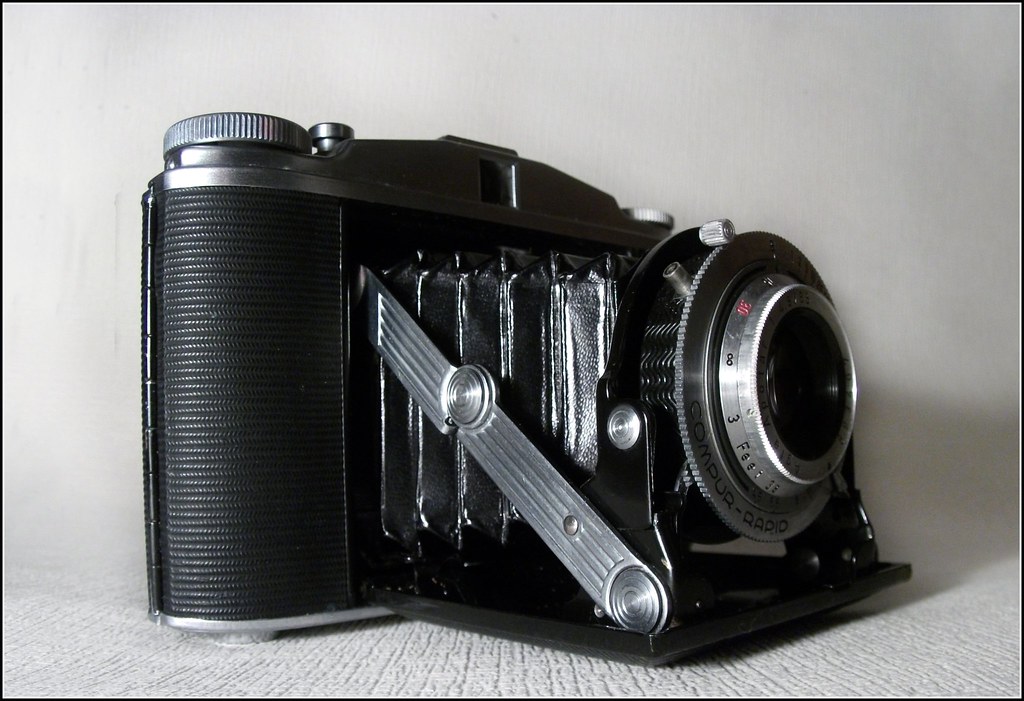
Hi guys I've been given this Agfa Isolette II, don't have a clue how to use it! I think its 50mm film? I've downloaded a manual and need to figure it out, I think it may be a beauty :)

Anyway, I put it on a white background and took a shot with just regular flash, never really done any of this photography before. Taken on a fuji s5800 bridge camera while my DSLR is 'off the road'


Agfa Isolette II by mjjlive, on Flickr

Cheers
 
It's a medium format folder - see here and here and the manual is available here.

It uses 120-format film which is readily available and can be developed on the High Street (negative/print film, Jessops and the like will even do a 1hr turnaround on develop only, printing is generally send-away unless you find a really good local shop that can also scan 120-format) or by mail order (negative/print or slide film). The image size will be 6x6cm (roughly).

There were a number of variations including shutter and lens. I can't see what lens you have on that one from that angle, but I can see it's a Compur-Rapid shutter.

It's definitely worth putting a roll of film through (I suggest Kodak Portra 400 or Fuji Pro400H). You're strictly flying manual with this one thought, no autopilot modes!
 
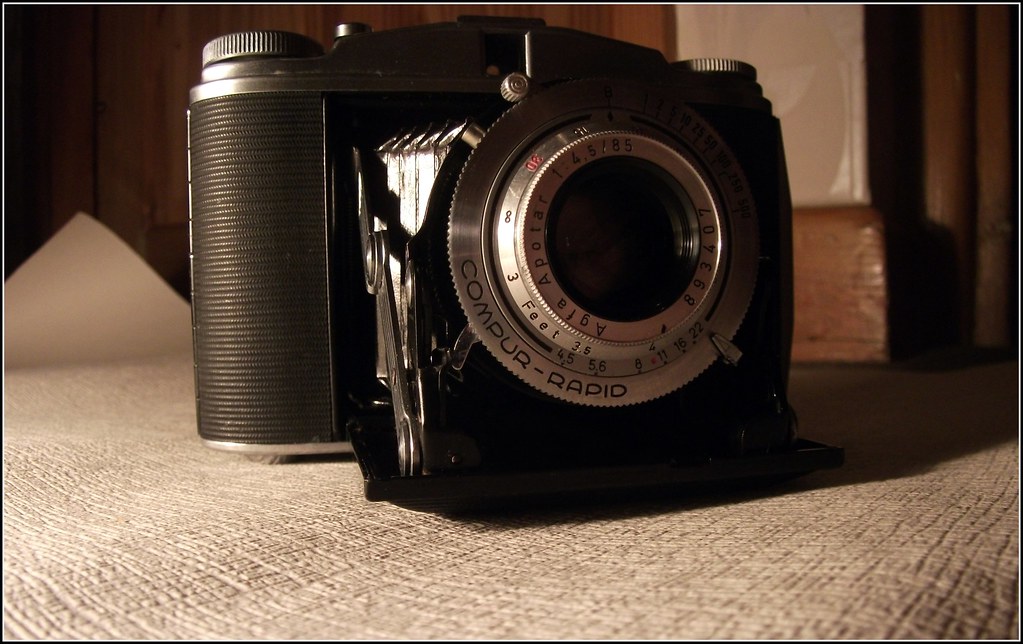
Ooh, I used to have one of these. The lens is likely an 85mm F4.5 and you focus by turning the front part of the lens, lining up the focus distance with the little diamond-shaped mark at 12 'o clock. Yes, you can't even see what you're focusing on, you just have to guess (or use a tape measure :)) There is a little tab for setting aperture and you have to cock the shutter between shots. Also, don't forget to wind the film on after each shot (you'd be surprised how easy it is to forget this) or you'll end up with multiple exposures per frame. Winding is again, all manual - there is a little red window on the back and you'll see frame numbers in it when you have a film loaded.
 
Guys thanks for the info! I'll deffo have to have a play with it! It does look complicated and I'm just learning. I've been taking photos for years but only just recently got a DSLR from a bridge camera which is when all the technical stuff comes in!

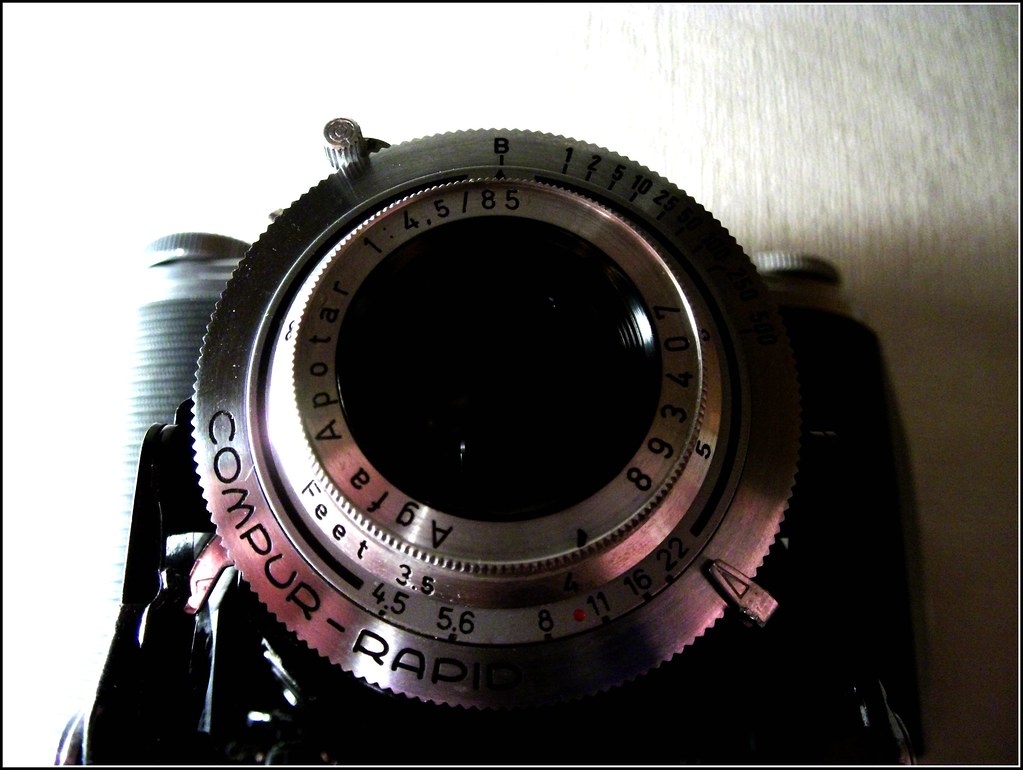
Heres a couple more pics:


Agfa Isolette II by mjjlive, on Flickr


Agfa Isolette II by mjjlive, on Flickr
 
It's not really that complex, though i guess it is if you've only ever used digital.

The ring with B, 1, 2, 5, 10, 25, 50, 100, 250, 500 are shutter speeds, B is bulb mode, 1 is 1 second the rest are fractions of a second i.e. 1/2, 1/5, 1/100 etc.

The lever below the lens will select the aperture, f/4.5 to f/22 in this case.

The lever with the small round knob on it above the lens just behind the shutter speed ring is there to cock the shutter. This concept is rather alien to most, but essentially the shutter won't fire until you cock it. Just push it into place and you'll see when the shutter fires it moves back to it's original position so you can cock it again. The shutter release is on the top of the camera with Isolette's, the other button on the top of the camera should be for opening the front with you fold the camera up.

The little brass socket next to cocking lever is called a PC sync socket and it's so you can use a flash with the camera, amazingly because this camera has a leaf shutter it can use flash at all speeds, even 1/500th, most DSLR's can't even do that.

Most people didn't guess the focus back in the day they bought an accessory rangefinder that went in the accessory shoe on the top of the camera so they could get the distance right, you can get a cheap Watameter finder for under 20 quid, i have 2 myself. Some more info on accessory rangefinder here Rangefinder (device)

Also the Camera-wiki.org page for the Isolette is much better than the old camerapedia one, http://camera-wiki.org/wiki/Isolette, all the main contributors for camerapedia switched to working on camera-wiki after camerapedia sold out to wikia. Also try looking at the Isolette group on flickr for a good idea of what the images taken with it look like.

 
This was the last shot I took with my Isolette II. I liked the challenge of shooting completely manual (my normal kit is a Canon 40D and GF1) but 120 film is an expensive way to shoot at around £5 per roll to buy and the cheapest dev/scan I found was around £11 for 12 frames at Moorfields Photographics in Liverpool.

http://www.flickr.com/photos/8476499@N02/6046827621

Cheers
Steve
 
There are much cheaper places than that for dev/scan, try Club 35 or The Darkroom, both are pro labs but offer really good prices and turn around times by mail order.

Mail order is pretty much the way to go these days regarding film as so many labs have shut or no longer do processing that its difficult to just drop it of.
 
It's not really that complex, though i guess it is if you've only ever used digital.

The ring with B, 1, 2, 5, 10, 25, 50, 100, 250, 500 are shutter speeds, B is bulb mode, 1 is 1 second the rest are fractions of a second i.e. 1/2, 1/5, 1/100 etc.

The lever below the lens will select the aperture, f/4.5 to f/22 in this case.

The lever with the small round knob on it above the lens just behind the shutter speed ring is there to cock the shutter. This concept is rather alien to most, but essentially the shutter won't fire until you cock it. Just push it into place and you'll see when the shutter fires it moves back to it's original position so you can cock it again. The shutter release is on the top of the camera with Isolette's, the other button on the top of the camera should be for opening the front with you fold the camera up.

The little brass socket next to cocking lever is called a PC sync socket and it's so you can use a flash with the camera, amazingly because this camera has a leaf shutter it can use flash at all speeds, even 1/500th, most DSLR's can't even do that.

Most people didn't guess the focus back in the day they bought an accessory rangefinder that went in the accessory shoe on the top of the camera so they could get the distance right, you can get a cheap Watameter finder for under 20 quid, i have 2 myself. Some more info on accessory rangefinder here Rangefinder (device)

Also the Camera-wiki.org page for the Isolette is much better than the old camerapedia one, http://camera-wiki.org/wiki/Isolette, all the main contributors for camerapedia switched to working on camera-wiki after camerapedia sold out to wikia. Also try looking at the Isolette group on flickr for a good idea of what the images taken with it look like.

Cheers mate thats cleared alot up for me! I definitely need to give this camera a try :)

This was the last shot I took with my Isolette II. I liked the challenge of shooting completely manual (my normal kit is a Canon 40D and GF1) but 120 film is an expensive way to shoot at around £5 per roll to buy and the cheapest dev/scan I found was around £11 for 12 frames at Moorfields Photographics in Liverpool.

http://www.flickr.com/photos/8476499@N02/6046827621

Cheers
Steve

Cheers steve, that picture is fantastic :)
 
Back
Top