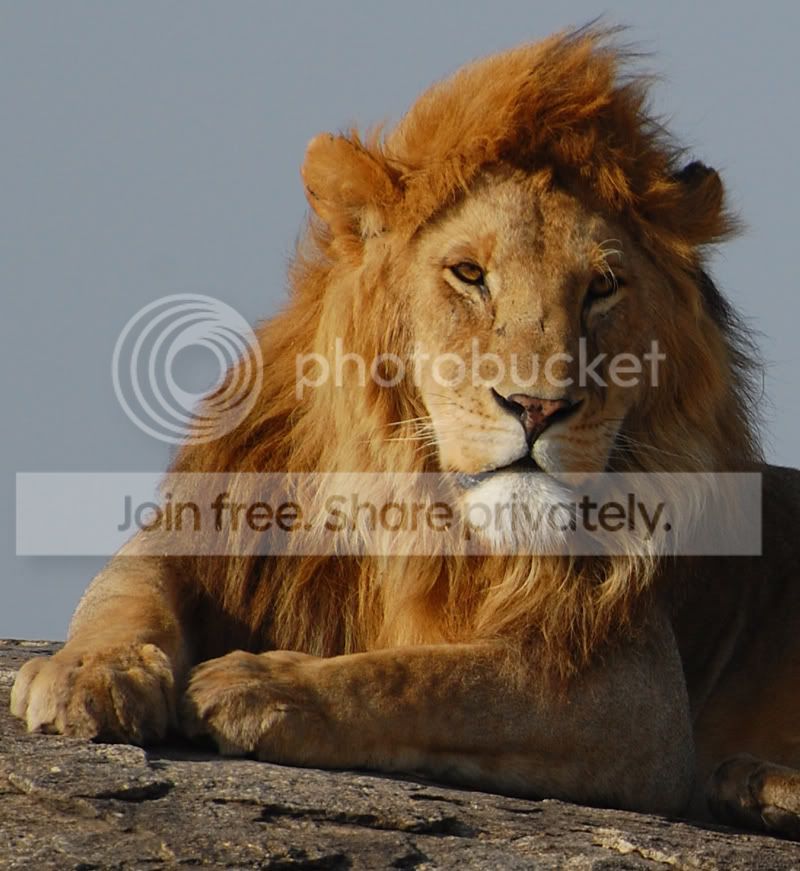
Is this sharp?

Xplosion

Suspended / Banned
Messages
276
Edit My Images
Yes
Hey, just looking for some advice, pretty new to SLR's so wanted to know if this image is considered sharp or not? I think its pretty good but wanted your profressional views :D

Its taken with a 70-300 Nikon VR and the exif data is

Camera: Nikon D40
Exposure: 0.002 sec (1/640)
Aperture: f/10
Focal Length: 300 mm

so the lenses is at full whack,

Full pic:
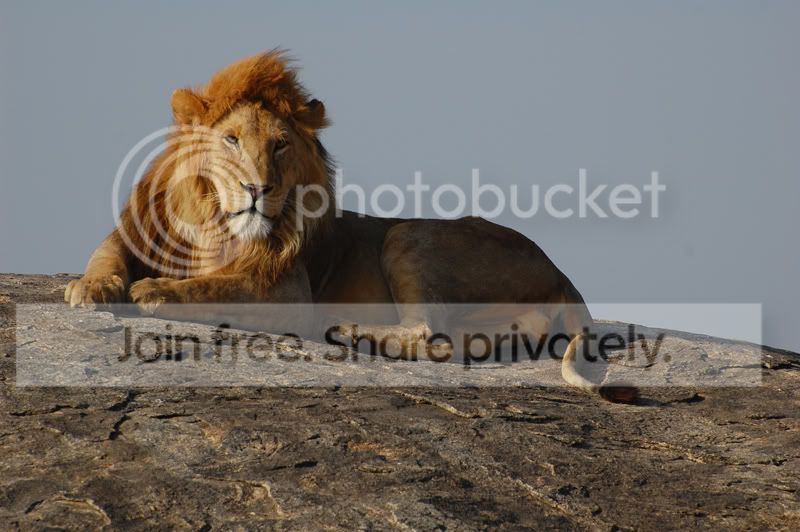
wholelion.jpg


Crop up:

closeuplion.jpg


Its straight out the camera,

Cheers
 
not easy to tell
as posting for the web always needs a bit of a sharpen anyway
 
I'd say that's sharp enough. I think the focus is more on the nose than the eyes, which is maybe why you may think there's an issue.
 
MobileVirgin, ahhhh...I was having so much trouble getting the focus right because the AF has a huge bracket and you can't really tell through the viewfinder how the focus is until you crop it on the pc...unless thiers any advice on it :)
 
Well ... I use the centre focus point only - turn off all of the others. Then focus on the eyes and re-compose the shot.

At least that's the theory. I usually forget to re-compose. Or, in so doing it throws the focus off altogether.

But I did find, pretty quickly, with wildlife that using the random focus points suggested by the camera meant that you ended up with the focus point being on some random bush or blade of grass that you didn't want to be in there.

So, take lots of pics and work on a percentage basis.
 
As mobilevirgin said, ...

or ....

you could practice manual focus to ensure that you get what you want! This may sound all too much to do, but once you start to practice this method you'll see how much "freedom" you'll get :shrug:.
 
As mobilevirgin said, ...

or ....

you could practice manual focus to ensure that you get what you want! This may sound all too much to do, but once you start to practice this method you'll see how much "freedom" you'll get :shrug:.

Hey,

Yup, I was trying what mobile virgin said and also ended up resorting to manual focus but couldn't for the life of me tell how good the focus is on the eyes through the viewfinder as I was at 300 mm, the only other way I can think is checking the LCD and zooming to check the focus but that takes way too much time for wildlife...any one got any suggestions? Thanks....
 
I've got a pic of another that looks exactly like scar...shall put it up sometime today.....
 
Its straight out the camera
Hmmm. You haven't said how much processing was done by the camera before the image came out of it. Images from DSLRs always need some sharpening - either in-camera or on your computer.

Here's a 2-minute workup to show what happens if you sharpen the image a bit. Your unsharpened version is on the left, my sharpened version is on the right. I could have sharpened it a bit more, probably, but I wanted to avoid over-cooking it.

Lion4.jpg


I think your version is a bit soft, but mine is decently sharp. (But the focus is still on the nose, not the eyes.)
 
Hmmm. You haven't said how much processing was done by the camera before the image came out of it. Images from DSLRs always need some sharpening - either in-camera or on your computer.

Here's a 2-minute workup to show what happens if you sharpen the image a bit. Your unsharpened version is on the left, my sharpened version is on the right. I could have sharpened it a bit more, probably, but I wanted to avoid over-cooking it.

Lion4.jpg


I think your version is a bit soft, but mine is decently sharp. (But the focus is still on the nose, not the eyes.)

Hey,

Thanks for that, I shot it in JPG so I presume the camera would have auto sharpened it to some point but computer sharpening seems to have a massive difference. still don't know how to control where the focus goes to as the AF bracket covers the whole face and the camera picks up the nearest object.
 
Hmmm. You haven't said how much processing was done by the camera before the image came out of it. Images from DSLRs always need some sharpening - either in-camera or on your computer.

Here's a 2-minute workup to show what happens if you sharpen the image a bit. Your unsharpened version is on the left, my sharpened version is on the right. I could have sharpened it a bit more, probably, but I wanted to avoid over-cooking it.

Lion4.jpg


I think your version is a bit soft, but mine is decently sharp. (But the focus is still on the nose, not the eyes.)

What method did you do use to sharpen it? Unsharp Mask?
 
What method did you do use to sharpen it? Unsharp Mask?
Yes. For sharpening (as opposed to local contrast enhancement, say) I usually have the Radius set to 0.3 and the Threshold to 0. Then I tweak the Amount up and down until it looks right. In this case I think it was 200, so the final setting in Photoshop-speak was USM(200,0.3,0).

But to be honest I find that Photoshop's quick "Auto Sharpen" often does a good job.
 
Quote: Thanks for that, I shot it in JPG so I presume the camera would have auto sharpened it to some point but computer sharpening seems to have a massive difference. still don't know how to control where the focus goes to as the AF bracket covers the whole face and the camera picks up the nearest object.[/

I have the Nikon D60 so I assume the menu settings are the same?
Go to menu, select the one that looks like a pencil then select 03 AF-area mode. Scroll right and select single point. This will now focus on the centre point thro the viewfinder instead of focusing on that blade of grass at the side, unless the grass is directly in front of your subject this may help. Other than that manual is the way as said above. Hope this helps. :|
 
Quote: Thanks for that, I shot it in JPG so I presume the camera would have auto sharpened it to some point but computer sharpening seems to have a massive difference. still don't know how to control where the focus goes to as the AF bracket covers the whole face and the camera picks up the nearest object.[/

I have the Nikon D60 so I assume the menu settings are the same?
Go to menu, select the one that looks like a pencil then select 03 AF-area mode. Scroll right and select single point. This will now focus on the centre point thro the viewfinder instead of focusing on that blade of grass at the side, unless the grass is directly in front of your subject this may help. Other than that manual is the way as said above. Hope this helps. :|

Cheers, will try this when I get a chance, so this would focus on the center of the bracket instead of the whole bracket?
 
Back
Top