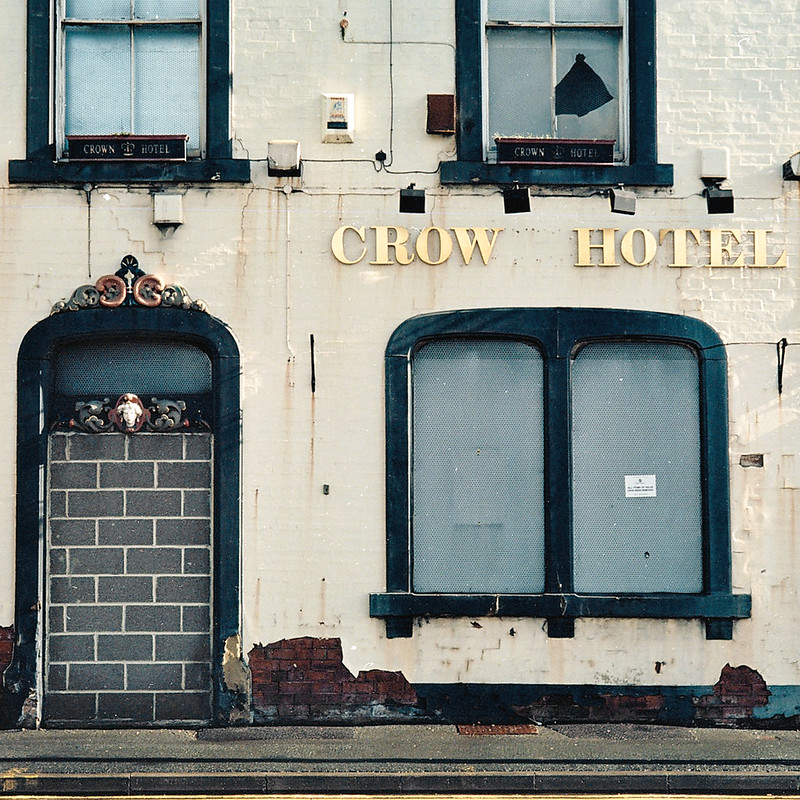
Is this poor scanning or something else?

thorton

Suspended / Banned
Messages
749
Name
Tom
Edit My Images
Yes
Shot a couple of rolls of colour recently across a Super Ikonta and an M2 & 5cm Summicron, and not too pleased with the results. They have a really poor look & feel to them which I can't really put into words, but looking at them you'll see what I mean.

The square one was shot on some out of date Portra 400NC on the Ikonta, and the other two on some new Ektar 100 on the M2. The Portra shot I just wrote off as the film, but the same quality has come out of the new Ektar which really surprised me in a bad way.

The 120 was developed at Dragon Photo in Leeds and the 35mm at Max Spielmann, so I'm thinking it's maybe the high street people just scanning them really poorly? Either that or I'm just being too harsh and they actually look ok? Just don't seem as good as I'd expect, comparing these to what you'd usually see coming out of Ektar/Portra something seems off!

My guess is the scanning has oversharpened them far too much?

They were all shot around f/8-11 and focused correctly.


Ektar & 5cm Summicron Test
by Tom Horton Photo, on Flickr
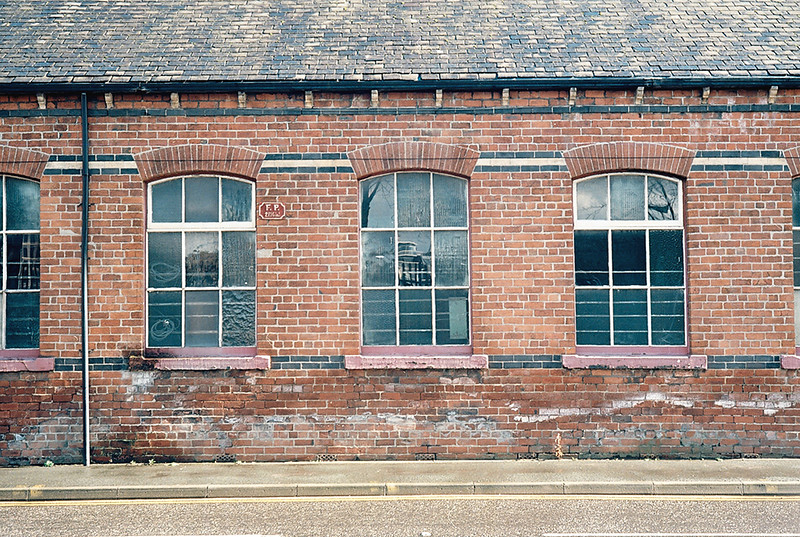

Ektar & 5cm Summicron Test
by Tom Horton Photo, on Flickr
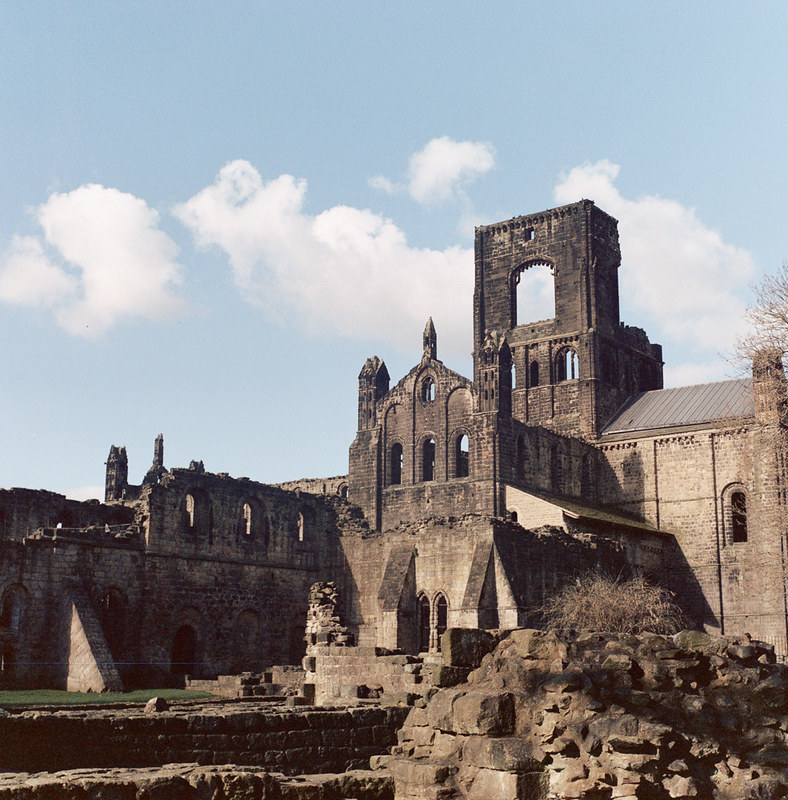

Kirstall Abbey
by Tom Horton Photo, on Flickr

Don't have a film scanner myself to rescan them on so would like some feedback as to what you guys think is causing the poor quality, whether it's the scanning, me, or whatever else.
 
Hi Tom,

It's definitely poor scanning! Looks like they've been fired through quickly with absolutely no consideration for the end image and it's something I often see often, it's the reason I avoid high street scans like the plague. I'm absolutely certain the results would be 1000 times better with more careful and considerate scanning.
 
Last edited:
last one looks like an under exposed neg, have you checked the negs?


*edit* just saw, it's out of date.
 
Last edited:
Hi Tom,

It's definitely poor scanning! Looks like they've been fired through quickly with absolutely no consideration for the end image and it's something I often see often, it's the reason I avoid high street scans like the plague. I'm absolutely certain the results would be 1000 times better with more careful and considerate scanning.

Cheers Paul, been tempted to invest in a good dedicated 35mm scanner as I shoot 90% 35mm and just get my 120 colour stuff (I don't really shoot B&W in 120) stuff done at CC Imaging where they would be scanned at a much higher quality, and this pretty much makes my mind up :)

Any recommendations on good but fairly low cost (£100 max maybe) dedicated 35mm scanners?

last one looks like an under exposed neg, have you checked the negs?


*edit* just saw, it's out of date.

Looked OK on the negs, although as you say it was rather out of date so that probably had something to do with that one, was just a bit curious with the same thing happening to new film.
 
Last edited:
You can't go wrong with the Epson V500 if you can get one at the right price! I'm not too well up on dedicated 35mm scanners so can't really comment, the V500 sure works well though. :)

Been on the hunt for a v500 for a few weeks now while deliberating what to get but the only things that are popping up are from America which are gonna cost me an arm & a leg on postage/import :( guess I'll just keep on looking and hope for something to crop up soon as I have a couple of rolls now that I want to rescan.
 
If you want a dedicated 35mm scanner then you've got only a tiny chance of being able to get anything with your budget. If thats all you have then I would just get a flatbed for now and get a dedicated one later when you have more funds available.

The above examples are classic examples of most high street developing and scanning sadly.
 
If you want a dedicated 35mm scanner then you've got only a tiny chance of being able to get anything with your budget. If thats all you have then I would just get a flatbed for now and get a dedicated one later when you have more funds available.

The above examples are classic examples of most high street developing and scanning sadly.

Wasn't sure what was out there in terms of dedicated scanners, if flatbeds are the best in my budget I'll go for a flatbed :) I do recall @retrogamer1990 saying he was thinking of selling his 9000f recently so will ask when he's back off hols.

Yeah it seems that way, I've never really had this much of a problem in the past though which is strange, either that or my standards have risen a lot since I last shot colour so I'm only just noticing it so much now.
 
I've never really had this much of a problem in the past though which is strange, either that or my standards have risen a lot since I last shot colour so I'm only just noticing it so much now.

I remember the one and only time I had high street scans done and it was when I first started getting into film maybe 7-8 years ago. The scans were horrible small things that just looked terrible, drastically oversharpened. I didn't have a film scanner back then so ended up scanning the prints on a conventional cheapy Canon flatbed which gave infinitely better results!
 
Well my 2p:-
pic #1 could be over sharpening or Ektar plus a summicron could give a very wiry sharp look to tree branches?
#2....... I prefer a bit more contrast, and if the road, pavement or roof stain is not suppose to have a biege colour? Well I couldn't remove it in Photoshop without ruining other colours.
#3 looks very nice but just needs a bit of sharpening.
 
I remember the one and only time I had high street scans done and it was when I first started getting into film maybe 7-8 years ago. The scans were horrible small things that just looked terrible, drastically oversharpened. I didn't have a film scanner back then so ended up scanning the prints on a conventional cheapy Canon flatbed which gave infinitely better results!

Maybe my standards have just risen since then haha, recently all I've been shooting is B&W and scanning on a dedicated Canon 35mm scanner we had in the shop but that sold recently so can't do that to these :( will hang fire on these until I rescan.

Well my 2p:-
pic #1 could be over sharpening or Ektar plus a summicron could give a very wiry sharp look to tree branches?
#2....... I prefer a bit more contrast, and if the road, pavement or roof stain is not suppose to have a biege colour? Well I couldn't remove it in Photoshop without ruining other colours.
#3 looks very nice but just needs a bit of sharpening.

Tempted to take the negs back to Max Spielmann on Monday and order them to rescan with no sharpening, any ideas whether they will or not? A lot have that horrid blue line across (see below) so the sharpening isn't the only thing wrong with most of the roll.

No idea on the beige colour haha, can't remember. I don't mind that though.


Crow Hotel Colour
by Tom Horton Photo, on Flickr
(blue line mainly visible on the left going through the box under the window)
 
If you have it with no sharpening then they'll probably look soft, film scans are like anything digital, they need some sharpening (think of how digital RAW files look, and then why do you the standard JPEG output has sharpening applied?).

The beige colour is probably because Ektar is a very saturated film, and it can easily make colours seem more prominent than they really are (its great for landscapes etc).
 
It's very definitely oversharpening, Brian. Absolutely 1000% without doubt.

It's annoying that no one has invented a program that can reduce the sharpening of a scan :(
 
***(blue line mainly visible on the left going through the box under the window)***

Could be a faint scratch on the neg?
 
Why would one be needed? The trick is to not oversharpen in the first place rather than 'fix' it afterwards!

cos I'm happy with the cheap prices at Asda, but I like sharp shots but even to me, some shots show the automatic machine sharpening too well and I try to reduce it......by reducing the contrast.
 
Last edited:
If you have it with no sharpening then they'll probably look soft, film scans are like anything digital, they need some sharpening (think of how digital RAW files look, and then why do you the standard JPEG output has sharpening applied?).

The beige colour is probably because Ektar is a very saturated film, and it can easily make colours seem more prominent than they really are (its great for landscapes etc).

Then I can sharpen them to my pleasure :)

***(blue line mainly visible on the left going through the box under the window)***

Could be a faint scratch on the neg?

Pretty sure it's the scanning, can't see anything on the negs and it goes across all the photos, some more visible than others :(
 
I'd rather have it right to start with than try fix flaws afterwards but that's just me, if it works for you then it works for you!

Well many subjects can accept a well sharpened shot e.g buildings, but for portraiture it could be a disaster e.g. my wife with curly hair as it looks like wire strands :eek:
 
Back
Top