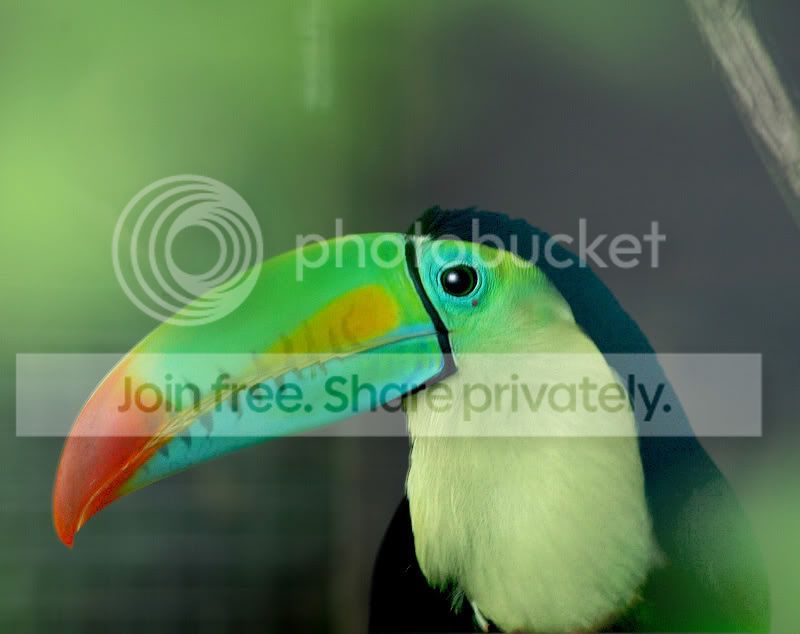
Is this knackered ?

Cobra

In Memoriam. TPer Emeritus
Admin
Messages
114,434
Name
The real Chris
Edit My Images
No
I have a few of these taken through wire fences in bright sunlight, its gone all hazy ( state the bleedin' obvious :D )
Its un touched apart from a resize
I have PSP XI and elements 5 to work with.
It would be a shame to bin them anyone any suggestions ?
Ta


IMG_3639.jpg
 
To be honest mate, I think it may well be :shake:
If I get a shot like this its instantly binned because of how difficult it is to save.
I have had a quick play to see if I could salvage any detail but I don't think id't be suitable for anything other than very small web viewing or use for some design element (eg: filter effects, etc) because the detail just isn't there (especially not in a web sized image - you'd probably have more success with the full sized version) :shrug:
I'd recommend levels adjustments, definately contrast increase to bring back some of the black detail & also increasing the levels of black in the image may help more. The cream/whites have had it I'm afraid, the detail is completely obscured by the white/green 'mist" so try to avoid these areas if you can.
I have attached my version, but as I said, it is very rough & ready (the back of the head looks dodgy & the whole image is waaay overdone & oversharpened to boot :bang:)

Cobras_toucan.jpg
 
i have to agree with mike, not much can be done with that, though you never know, someone might have something up there sleeve
 
Only thing i can think of is an extraction of the bird and clone some of the bottom green haze away. Put a new background in (neutral) to emphasise the detail........ Its a lot of work and I'm not sure the result would be worth the time. Sorry mate...
 
This is the best i can do at work cos the monitor here is crap, so this may look terrible on a proper screen you will have to tell me, i will have another go when i get home with a better screen if you want. Used a blue photo filter, levels, cloned and sharpen.

IMG_3639-2.jpg


Its a start anyway.

edit. looks like the right side may need more work in mine will have a play later. - have used replace colour to try and reduce haze
 
:agree:

ti's dooomed :(
 
Ok Guys thanks for the attempts anyway.
I have a couple that might pull, though I fear the majority are terminal........b****r...... they looked OK on preveiw
 
i just can't do it captain, i don't have the poweeerrrrr :)
 
Crop really tight on the beak/bill.......sharpen, saturate, levels etc, to boost the colours.......and use it for the OU "colours" posts. ;)

Oh Hell I haven't even got that far :D I guess its week 5's assignment?
 
It all depends on what level of processing you're happy with , the shot can still give a pleasing image (personal taste etc :))

toucan.jpg
 
It all depends on what level of processing you're happy with , the shot can still give a pleasing image (personal taste etc :))


Don't look too bad :thumbs:

I suppose something that colourful would stand quite a bit of "saturation" as it doesn't look real in the first place
 
Here's my attempt.
toucan.jpg


Dean:)
 
OK..it could be improved if done with a bit more care, but here's my version:

Bird.jpg
 
Back
Top