Is there anyway to cut out an image in Photoshop?

woof woof

I like a nice Chianti
Suspended / Banned
Messages
43,206
Name
Alan
Edit My Images
No
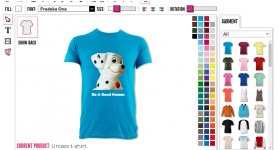
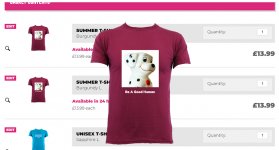
I wanted to put a picture on a T shirt... You just select the picture you want from your pc so I chose this dog but he appears in a white square as that's how the JPEG is.
Shirt.jpg

I thought it might be better if I cut the dog out instead of having him on a white background but I can't work out if this is possible as if I cut him out and paste him into a "new" image in PS I'm back to having the white background.

Is it possible to cut the dog out and have the picture without the square white background? I don't think it's possible but I thought I'd ask :D
 
Last edited:
Yes, or a TIFF with alpha. JPG doesn't have a transparency channel.

I do similar (didn't look at the video) all the time with JPEGS, just select the bit I want and copy and paste it onto whatever I want.
What internal process Affinity is using I don't know (or care)
Used to follow a similar procedure with GIMP and JPEGS

Not sure I understand why JPEGS would be a problem doing what the OP wanted?
 
I do similar (didn't look at the video) all the time with JPEGS, just select the bit I want and copy and paste it onto whatever I want.
What internal process Affinity is using I don't know (or care)
Used to follow a similar procedure with GIMP and JPEGS

Not sure I understand why JPEGS would be a problem doing what the OP wanted?
I don't know the technicalities of it, but JPEGs can't be transparent. Even if you have an image on a transparent background in PS, when you export it as a JPEG all the transparent bits will be white.
 
Done several and always had to use PNG to just get the design without the square background box. Using Photoshop you need to 'save as' to get the PNG option.
 
I don't know the technicalities of it, but JPEGs can't be transparent. Even if you have an image on a transparent background in PS, when you export it as a JPEG all the transparent bits will be white.


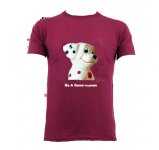
This took less than 2 minutes, hence the rough edgesShirtdog.jpg
 
I do similar (didn't look at the video) all the time with JPEGS, just select the bit I want and copy and paste it onto whatever I want.
What internal process Affinity is using I don't know (or care)
Used to follow a similar procedure with GIMP and JPEGS

Not sure I understand why JPEGS would be a problem doing what the OP wanted?

My problem was that once I'd either cut the dog out or the background I still ended up with a white square around the dog. Changing from JPEG to PNG worked 1st time. There may be a way of doing this with another file type but at the mo the PNG way is the only way I know.
 
This took less than 2 minutes, hence the rough edgesView attachment 435529
What file format is this? If JPEG how did you manage? Maybe by cutting and pasting the dog onto the shirt JPEG rather than importing the dog JPEG from your pc onto the shirt in the shops software?
 
Last edited:
I've done a couple of T shirts before but they were just ordinary whole pictures whereas yesterday I just thought it'd be an idea to just have the cut out dog as there was nothing else in the frame.
 
What file format is this? If JPEG how did you manage? Maybe by cutting and pasting the dog onto the shirt JPEG rather than importing the dog JPEG from your pc onto the shirt in the shops software?
I opened your JPEG in Affinity, selected the dog, copied that selection into a new layer, did the same with the T shirt then cloned the Tshirt over the dog, made those two layers visible with the dog layer in front, then exported it as a JPEG.

I didn't look at any other format apart from JPEG.

Roughly the same procedure in GIMP

I find it strange the PS can't do the same thing, thought it's probably about 10 years since I used PS, I will ask my daughter when she is around later.
 
I opened your JPEG in Affinity, selected the dog, copied that selection into a new layer, did the same with the T shirt then cloned the Tshirt over the dog, made those two layers visible with the dog layer in front, then exported it as a JPEG.

I didn't look at any other format apart from JPEG.

Roughly the same procedure in GIMP

I find it strange the PS can't do the same thing, thought it's probably about 10 years since I used PS, I will ask my daughter when she is around later.

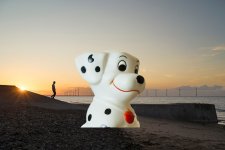
It's no problem cropping out the dog and putting it in another picture, it's a 30 second job...

1-DSC00305 copy.jpg

but would it work for something like this T shirt where you have to upload an image onto the suppliers website using their software? To do this I had to save the cropped dog as a file and of course saving it as a JPEG brought back the white surround square. It was only saving it as PNG that allowed me to save the cut out dog as a file which could then be imported by the shops software. What you then do is position the dog where you want it on the shirt and adjust the size.

My problem isn't cutting out the dog and placing it in another picture, the problem is getting the cut out dog onto the T shirt companies website.

Unless I'm missing something. He's the shop if you want to have a play.

 
Last edited:
It's no problems cropping out the dog and putting it in another picture, it's a 30 second job...

View attachment 435537

but would it work for something like this T shirt where you have to upload an image onto the suppliers website using their software? To do this I had to save the cropped dog as a file and of course saving it as a JPEG brought back the white surround square. It was only saving it as PNG that allowed me to save the cut out dog as a file which could then be imported by the shops software. What you then do is position the dog where you want it on the shirt and adjust the size.

My problem isn't cutting out the dog and placing it in another picture, the problem is getting the cut out dog onto the T shirt companies website.

Unless I'm missing something. He's the shop if you want to have a play.


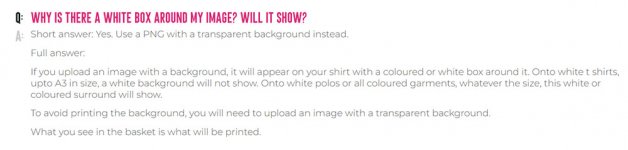
Their website says you have to use a PNG file to avoid a white background.
 
Hey guys. Not all png files are transparent. But a Gif file is transparent too. A gif file can contain only so much information. Png can contain a lot more information if saved right.

Photoshop ten years ago can easily separate the dog from the background. I started with Photoshop 7.0 and that program could do it no problem.
 
My problem isn't cutting out the dog and placing it in another picture, the problem is getting the cut out dog onto the T shirt companies website.

Sorry, I missed that in the original post, apologies :)
 
Their website says you have to use a PNG file to avoid a white background.

Does it? I missed that.

Just looking and they say they can remove the white background for you.

Ah. Questions and answers.

1-Shirt Talk.jpg

I'm glad I posted this question as I've learned something... If I want to do this again... Save as PNG :D
 
Last edited:
Sorry, I missed that in the original post, apologies :)

I used this company a while back. Mrs WW is a big dog lover and sadly her last dog died just a few months after she came to the UK. I ordered a shirt with a picture of her and her dog on it and it looks very nice. I'd kept the link and I thought I'd order a couple for myself. That's how I got here with this problem :D
 
Hey guys. Not all png files are transparent. But a Gif file is transparent too. A gif file can contain only so much information. Png can contain a lot more information if saved right.

Photoshop ten years ago can easily separate the dog from the background. I started with Photoshop 7.0 and that program could do it no problem.

Is there any advantage in using one file format which will do this over another?
 
Last edited:
Is there any advantage in using one file format which will do this over another?
It depends on what format the website which will print on the t shirt asks for. Not which format you think is best. Even if you sent them a transparent Gif they might just convert it to a transparent png. Like sending in 16 bit images and the printer converts the image into 8 bits before printing.

But if all you need is to remove the background I'm sure someone here would do that for you. I would. It would take me 5 seconds.
 
It depends on what format the website which will print on the t shirt asks for. Not which format you think is best. Even if you sent them a transparent Gif they might just convert it to a transparent png. Like sending in 16 bit images and the printer converts the image into 8 bits before printing.

But if all you need is to remove the background I'm sure someone here would do that for you. I would. It would take me 5 seconds.

Have you not read any of the previous posts in this thread?
 
Website conditions accepted... I just wondered if any particular file format has any advantage or disadvantage over another. If not I'll just remember to do this as a PNG if I need to do it again.

It may be that I never come across this issue again until I order something else on line... I've been taking pictures for over 50 years (Gosh I'm getting old :D) and have been taking digital pictures since about 200? and this is the first time I've needed to save and transfer a "cut out" section of a photograph as a file so it's not been something I've come across often :D
 
But if all you need is to remove the background I'm sure someone here would do that for you. I would. It would take me 5 seconds.

A generous offer, thank you.

My problem was just getting the cut out image onto the shirt on the companies website as I couldn't do it by saving the file as a JPEG. Once I'd watched that vid and saw that he saved the file as a PNG it was all... Simples :D Cutting out the dog took seconds, tidying the cut took minutes and importing the saved file onto the shirt was a doddle :D
 
A generous offer, thank you.

My problem was just getting the cut out image onto the shirt on the companies website as I couldn't do it by saving the file as a JPEG. Once I'd watched that vid and saw that he saved the file as a PNG it was all... Simples :D Cutting out the dog took seconds, tidying the cut took minutes and importing the saved file onto the shirt was a doddle :D
It sure is :D
 
Back
Top