Is there ANY merit to this?

Southdowns

Suspended / Banned
Messages
2,820
Name
Mark
Edit My Images
Yes
I've only been at this (i.e. using a DSLR and going for anything beyond snapshots), for three weeks, and although I'm getting some results I like, I don't really know whether I'm heading in the right direction or not!

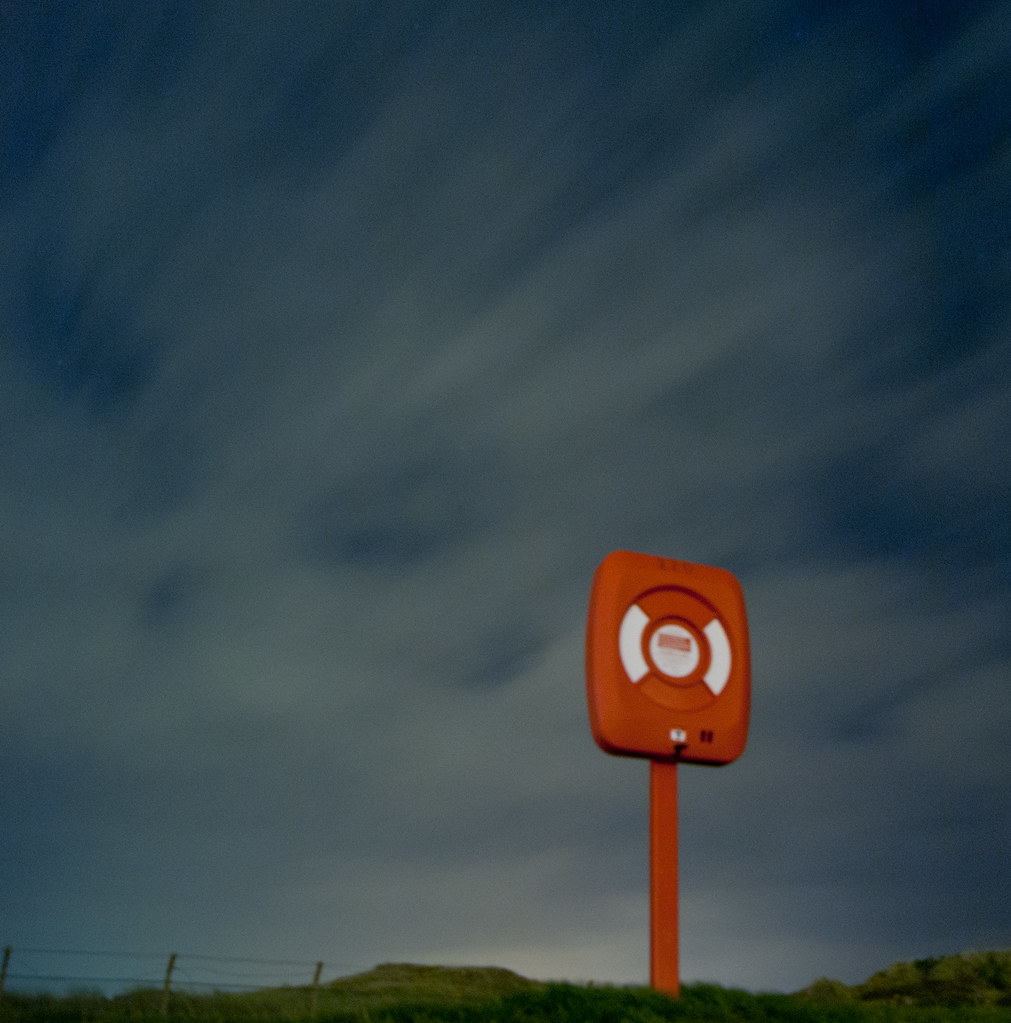
The picture below is the closest I've come to anything remotely arty, and I just wondered if it has any merit at all, or whether I'm kidding myself and only like it because it's novel and nothing like I'd have tried with my old point and shoot? I can see plenty wrong with it, but do have the feeling it's got something! If so, how could I have improved it (I'm thinking artistically more than technically, though the one may be limiting the other)? Does it only look any good to me because I was there and enjoyed taking the shot?

I don't want to end up the photographic equivalent of an X Factor auditionee who thinks he can sing when he plainly can't, so please be honest (taking only 3 weeks experience into account!).

DSC00796-2.jpg by MarkBerry1963, on Flickr
 
Last edited:
Not bad :thumbs:

You could probably improve it a lot by removing the orange cast, though it's too late to sharpen up the sign - you need a very solid tripod for long exposures like that. Is there anything more on the bottom? A bit more there would give some context and improve the composition.

How long was the exposure? The clouds are very blurred, maybe a bit shorter would make them more streaky.
 
Thanks!

The orange cast was something I struggled with. The whole shot was the same red to start with, and I wanted to separate the lifebelt from the sky, but don't yet understand the colour controls in Lightroom well enough to do it manually. In the end I went for the only preset that did it without changing the colour of the belt, which I wanted to keep.

There's not a lot more at the bottom, just a very small amount lost when I straightened it. I guess I'd need to think about where I shot from, to get more in without affecting the proportions of the belt?

The exposure was 20 seconds at f4, and at the time (from a test shot) I thought I'd under expose it any shorter, but I forgot the third part of the equation and left the ISO at 100. Doh!

The first thing I noticed when I looked at the shot on a decent sized screen was that the belt could have been a lot sharper. I wasn't sure if that was poor focussing in the dark (I ended up propping my phone on the belt housing and trying to focus on that!), or camera shake, but I guess it was shake. My tripod is pretty cheap and flimsy, it was on sand, and it was quite windy! I did use self timer for the shutter release though, so I tried!!!

So, a new tripod needs to go on the list too then; it's not cheap this photography lark is it?!

Mark
 
Nice photo, a better tripod would of made the foreground sharper. Have a look at my church photo in my sig, that was a 30 second exposure at ISO 100.

On some tripods you can hang your camera bag on it to aid stability which can help in windy situations.

I use a redsnapper 284, it won't break the bank but is performinc excellently :)
 
Well I really like it.
You say there is plenty wrong with it - why ?
It doesn't conform to 'the rules' but surely that is part of individuality and creativity.
Don't change anything - yes, the belt housing etc could be sharper, but would the picture be any better for that ?
Maybe you could re-edit it to change things slightly, but would they improve or just change it ?

There are not many photographs I would want on my wall bar my pictures but this is one I would happily have, so its a positive vote from me.
 
I've only been at this (i.e. using a DSLR and going for anything beyond snapshots), for three weeks, and although I'm getting some results I like, I don't really know whether I'm heading in the right direction or not!

Yes there is merit to it and yes it is worth persuing - the more you practice, the more confidence you gain, the better you become, you see what works and what doesn't, you also see what works for you ...

This game is very much a personal thing, what one person really likes, another may not...

I quite like your shot, for me, I feel it might have been better if the sign / lifebelt would have been sharp - BUT you may then loose the feel of the image you get from this one.

I don't want to end up the photographic equivalent of an X Factor auditionee who thinks he can sing when he plainly can't, so please be honest (taking only 3 weeks experience into account!).

I think I'd take a chance and put you through to the next round :lol::lol:
 
There is something about this that I really like, but can't quite put my finger on it!!

I've only recently started out myself. Thoroughly enjoying the learning process. Best thing that I was ever told was practice, practice practice.
 
I've only been at this (i.e. using a DSLR and going for anything beyond snapshots), for three weeks, and although I'm getting some results I like, I don't really know whether I'm heading in the right direction or not!

Art is subjective. Do you like it?

Or, more to the point, are you going to print it, frame it and hang it on the wall in your home?

If not, asking yourself why not will point you in the direction you want to go next.


I quite like your shot, it's dynamic, it has elements of abstraction, and even the orange tone has a slightly post-apocalyptic charm :)

I think I'd like to see a bit more of the silhouetted foreground at the bottom just to balance the image, but that's only a minor niggle and not a fault.


Lightroom tip.. if you did want to remove the orange cast pretty much completely, select the white balance tool and take a sample of one of the white patches on the lifebouy. Having a known white element in the image should make it easy to remove a colour cast.
 
Wow thanks everyone :)

Yes, I do like it, though possibly not enough to hang it on my wall (but certainly keep it in my "favourites" album). I'd like the post to be much sharper mainly, though the rest of the disappointment I felt when I first looked at it is from the unprocessed raw file; looking back at that now this is a massive improvement.

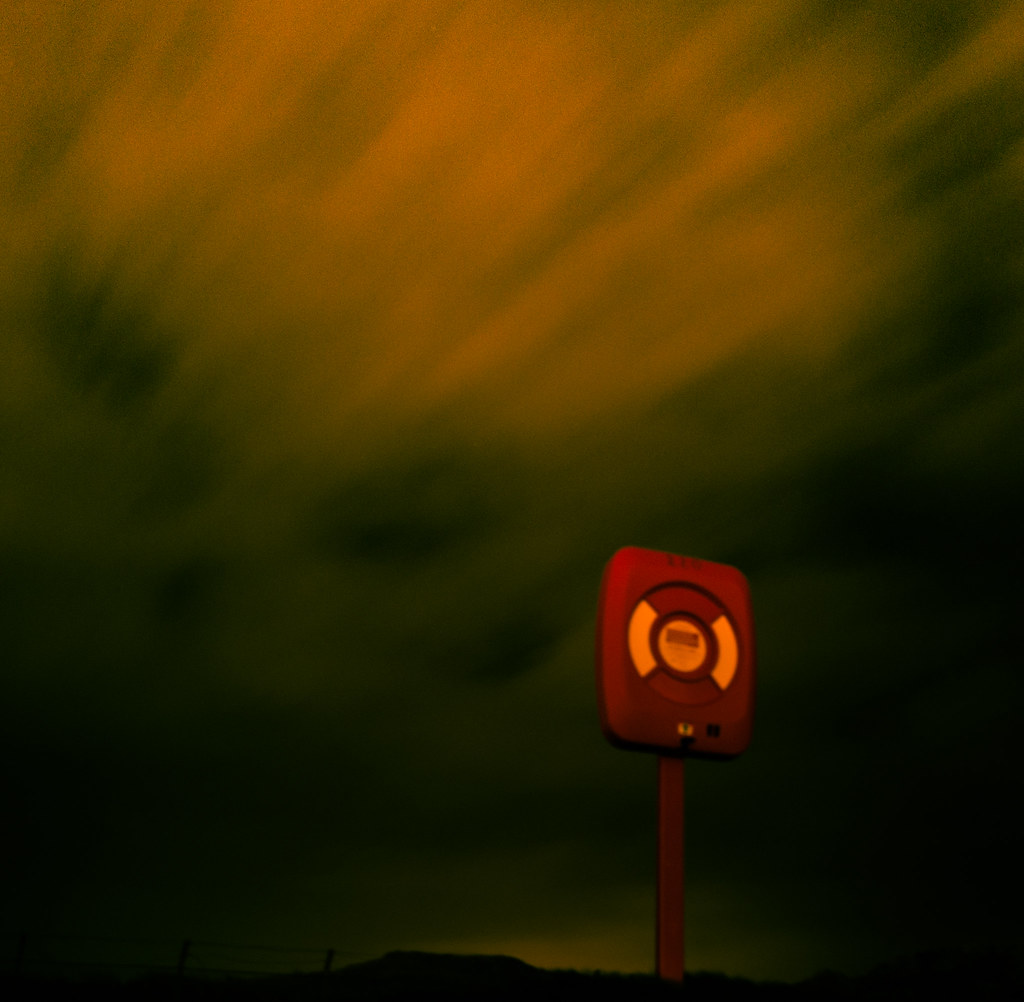
Alastair, I hadn't thought of correcting WB to the white on the lifebelt. I tried your tip, and learned that it matters when you do it; if I apply it to the processed image above, the sky goes green, while if I apply it to the original raw file, it works beautifully, and then just increasing the exposure almost turns it into a daytime shot! I don't know that it's "better" (I think I still prefer the one above), but it's a fascinating learning exercise!


DSC00796-2.jpg by MarkBerry1963, on Flickr
 
Last edited:
the first photo is much better and I'm starting to like the blur more and more.

The second photo looks like a blurred attempt at a photo, the first one is artistic
 
Cheers Dale, my thoughts exactly! Put another way, the art covers the lack of technical ability!!!!!
 
Mark, there's something about both versions (but moreso the first) that reminds me of some of the cross-processed photographs by Lomokev.

Anyway.. don't worry about technical ability.. sharpness is over-rated.. shoot the way you want, and if this sample is anything to go by then I like your style.
 
There is definetly merrit to it. Other than it being quite a pleasing image, you have gone and tried something different :)
I had a quick play in Lightroom.
White Balence eye dropper on the white bit.
This turned the sky green.
Under the [HSL/Colour/B&W] tab select HSL (hue, saturation and luminance) and I dragged the Hue of in the green aqua and blue sliders to the right to turn them more blue. This didn't get it as far as I'd have liked so [Split Toning] - Shadows set to Blue and upped the saturation.
Add in a little sharpening and noise reduction and thats all.
If you have the raw file you should get a better result, if this is what you were aiming for.
Hope you like it :)

6415638973_7a941d3dc6_b-3.jpg


Just to add, to help focus you can use a torch to light up the post while focussing, switch to manual focus, turn the torch off and take the shot.

[Edit]The second photo isn't showing up in the thread, I've now clicked the link and seen the w/b corrected raw. Oh well, this was how to fix the jpeg anyway :)
 
Last edited:
Thanks Andy! I dont know what happened to the second shot, but I've corrected it now so it shows up.

With just two dominant colours, both of which can be changed as you've demo'd even with just the jpeg to work on, I might just do a four panel "pop art" type thing and hang it on my wall! Once I've sold it for millions, I'll come back and buy everyone a pint. Maybe even a pint EACH if I'm in a really good mood!

Mark
 
Back
Top