Is LR really the best option? - Basic RAW processing software

Joe94

Suspended / Banned
Messages
574
Name
Joe
Edit My Images
Yes
Evening all, I'm just getting back into photography and am currently going through the rabbit hole of software research! So looking for some advice if that's okay.

I've been away from photography for over two years, where I previously used LL Classic to do my raw processing. I didn't and still won't do any editing or photo manipulation, I purely just used Lightroom to process the raw file into a JPEG I was happy with. This is what I would like to continue again now.

With this in mind, am I still better off signing up to a Lightroom subscription again (Classic or the new CC) or is there an alternative RAW processor I should consider for my use?

FYI I purely do photography as a weekend hobby, I'm no where near a professional :)

Thanks in advance. Joe.
 
There are many packages available. Darktable, Rawtherapee, DigiKam, are all free and all functional.

If you don't mind paying, On1 photoraw, DXO Photolab and Capture One all have good raw converters, and AFAIK all can be bought outright rather than needing a sub.

FWIW I still like & use Lightroom - preferred 6 to classic - as well as On1.
 
Last edited:
There are many packages available. Darktable, Rawtherapee, DigiKam, are all free and all functional.

If you don't mind paying, On1 photoraw, DXO Photolab and Capture One all have good raw converters, and AFAIK all can be bought outright rather than needing a sub.

FWIW I still like & use Lightroom - preferred 6 to classic - as well as On1.
Seems like I need to do some thinking ahah. Too many options
 
Does your camera manufacturer provide any suitable software eg Canon DPP?
Thanks a good point. I’ve just got a Nikon so I’m sure they do something. I’ll have to take a look :)
 
If you REALLY only want to make global adjustments to a NEF prior to conversion to a jpeg I suggest you try Nikon NX studio and Raw Therapee - both free.

If, after more experience, you want to do more, you need to look at ON1, LR Classic etc
 
I've been using Lightroom for quite a while (since LR4), and consider one of its main strengths to be the image keywording, tagging and cataloging capability. It works fine for image processing too of course, but for me it's the cataloging that really makes it.
 
Last edited:
I use Faststone image viewer for most of my needs. It has most of the image correcting apps that you need for most of you image editing.
Another vote for Faststone. Simple but quick and effective.
 
Loving LR desktop in combo with Apple Photos for cataloguing .
Love the more modern streamlined layout versus classic yet still have all the editing tools .
 
Loving LR desktop in combo with Apple Photos for cataloguing .
Love the more modern streamlined layout versus classic yet still have all the editing tools .
Sorry to sound silly, but is LR desktop the ‘’cloud version’’ Or Classic??

If it’s the newer ‘cloud’ version does it still have the Ai features like noise reduction?
 
Sorry to sound silly, but is LR desktop the ‘’cloud version’’ Or Classic??

If it’s the newer ‘cloud’ version does it still have the Ai features like noise reduction?
Lr is the cloud version (which I really don’t use).

LrC is the desktop version which is more familiar to me coming from Lr 5.7, though some prefer Lr 6 (I don’t know why).

Adobe Photography package has both Lr and LrC in addition to Photoshop. I don’t use their cloud services to store my images, so went for the 20 Gb version on my MacBook Air.
 
Sorry to sound silly, but is LR desktop the ‘’cloud version’’ Or Classic??

If it’s the newer ‘cloud’ version does it still have the Ai features like noise reduction?
Hi Joe yes it has all the editing features Inc Ai NR Enhance masks etcetc.i don’t use the cloud per se just edit then send Jpg to apple photos to catologue,I have classic included in my plan which I always used to use but I much prefer the newer LR layout.
Here’s a free course on it
View: https://www.youtube.com/watch?v=qlKR_cEIORY
 
Last edited:
LrC is the desktop version which is more familiar to me coming from Lr 5.7, though some prefer Lr 6 (I don’t know why).

Some features worked differently: clarity seems to produce a different effect in LrC, eraser tools were more effective, split toning was easier to use, pano stitch seemed to produce fewer artifacts.
 
Some features worked differently: clarity seems to produce a different effect in LrC, eraser tools were more effective, split toning was easier to use, pano stitch seemed to produce fewer artifacts.
Thanks.

I mildly regret not upgrading to Lr6 but can’t do it now. So have 5.7 on my old iMac 27 and LrC on my MacBook.
 
Hi Joe yes it has all the editing features Inc Ai NR Enhance masks etcetc.i don’t use the cloud per se just edit then send Jpg to apple photos to catologue,I have classic included in my plan which I always used to use but I much prefer the newer LR layout.
Here’s a free course on it
View: https://www.youtube.com/watch?v=qlKR_cEIORY
Thank you. I, take a look at the video and see which one I feel will suite best :)
 
If you do decide to go down the LR Classic subscription route, watch out for the Amazon 1 yr subscription bundles - normally £119, (same as 12 months of Adobe subscriptions), but they discount it 3-4 times per year - last Prime Day it was available for £71, for example.
Do take care to check you get the correct bundle if you do this - just to add to the confusion of the 3 different Photography plans (LR + 1Tb, LR Classic + 20Gb, LR Classic + 1 Tb) Amazon now also do the bundles as either 1 yr single payment (the option you want) or Recurring Subscription (you don't want this - it doesn't combine with an actual Adobe sub).
 
If all you want/need is a jpeg, why not set your camera to record jpegs? Or am I missing something?
Hello, whilst I ultimately like to export jpegs to upload online or share, I still appreciate processing a RAW file can produce a more defined image compared to in camera.

This being said, I don’t want to do any photo manipulation like removing things or sky swapping.

Mainly using the basic RAW processing slider tools & some noise reduction etc.. :)
 
Hello, whilst I ultimately like to export jpegs to upload online or share, I still appreciate processing a RAW file can produce a more defined image compared to in camera.

This being said, I don’t want to do any photo manipulation like removing things or sky swapping.

Mainly using the basic RAW processing slider tools & some noise reduction etc.. :)

A man after my own heart! Personally I don't believe you can better Lightroom Classic. As others have suggested you get the best deals around Amazon Prime day or Black Friday. Worth the wait maybe?
 
Hello, whilst I ultimately like to export jpegs to upload online or share, I still appreciate processing a RAW file can produce a more defined image compared to in camera.

This being said, I don’t want to do any photo manipulation like removing things or sky swapping.

Mainly using the basic RAW processing slider tools & some noise reduction etc.. :)
The AI noise reduction (for RAW files) feature in LrC is IMHO quite good.
 
A man after my own heart! Personally I don't believe you can better Lightroom Classic. As others have suggested you get the best deals around Amazon Prime day or Black Friday. Worth the wait maybe?
Ahah :)

I think after looking at lots of different options this week and considering lots of things I do come back to Lr Classic. I’m familiar and it’s just clean and can be as simple or as complex as you need.

Also as well as deals like you say I also personally don’t think £10 a month for what you get is bad. Actually works out cheaper than other perpetual licenses where you’d then have to buy again if you want the main yearly updates.

Thanks again for your help :)
 
The AI noise reduction (for RAW files) feature in LrC is IMHO quite good.
Yeah I’ve been reading quite a bit about LrC’s new AI features.

I particularly like the sound of the NR being in the same program.
 
Yeah I’ve been reading quite a bit about LrC’s new AI features.

I particularly like the sound of the NR being in the same program.


For me the AI NR is good but slow. Each image takes about 3 minutes, and IIRC it only works on RAW files. . Your PC may be quicker.

I also have Photolab with its AI NR but I couldn't get on with the software generally.

If I have already processed an image at some length in LR and then want to use AI NR, I put it through Topaz which is much quicker and you don't lose the edits you have already made.
 
Last edited:
I tried LR noise reduction but have suffered the infamous purple image issue. Had previously thought the drivers were up to date, but it seems they need updating again.
 
Everyone has different needs, and some will be content to edit each image individually, others may wish to bulk edit and tweak later.
Whilst there may be 'better' raw converters, Lightroom has the compromise of image cataloging and raw conversion in one package.
 
For me the AI NR is good but slow. Each image takes about 3 minutes, and IIRC it only works on RAW files. . Your PC may be quicker.

I also have Photolab with its AI NR but I couldn't get on with the software generally.

If I have already processed an image at some length in LR and then want to use AI NR, I put it through Topaz which is much quicker and you don't lose the edits you have already made.
Thank you for the heads up. Something to consider. But I’ll be honest for me speed isn’t a huge factor :)
 
Everyone has different needs, and some will be content to edit each image individually, others may wish to bulk edit and tweak later.
Whilst there may be 'better' raw converters, Lightroom has the compromise of image cataloging and raw conversion in one package.
LrC does seem to tick all boxes.
 
Hello, whilst I ultimately like to export jpegs to upload online or share, I still appreciate processing a RAW file can produce a more defined image compared to in camera.

This being said, I don’t want to do any photo manipulation like removing things or sky swapping.

Mainly using the basic RAW processing slider tools & some noise reduction etc.. :)
Get Nikon's NX studio... it is the best at generating jpegs from the raw files just like your camera would produce, and still allowing you to change things if you choose. You can always add a paid for program later if you decide.
 
Last edited:
Get Nikon's NX studio... it is the best at generating jpegs from the raw files just like your camera would produce, and still allowing you to change things if you choose. You can always add a paid for program later if you decide.
Yeah it is one I considered. Does it have any form of noise reduction software built in?
 
Yeah it is one I considered. Does it have any form of noise reduction software built in?
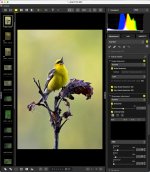
Absolutely, and it has some options for raw files not found in LR...
Just an example; I don't use NX studio often...


Untitled-1.jpg
 
Last edited:
I tried LR noise reduction but have suffered the infamous purple image issue. Had previously thought the drivers were up to date, but it seems they need updating again.

After a little research, downloaded and updated the graphics driver. Issues now resolved, plus LR has become much snappier (it was getting stupidly laggy, to the point I was wondering if I had a hardware problem).
 
It seems to me that processing apps become ever more capable, & in some ways ever more sensitive. :) / :(
 
Last edited:
To respond to the original query, Capture One is the sweetest RAW processor I've ever known. Colour rendition & highlight recovery are both excellent.

Highlight recovery would seem to be DxO Photolab's Achilles heel.

What suits each of us is personal. The flaw in the Adobe subscription model is that if you can't afford it any more, most of it stops working.

If you keep upgrading your cameras, you're going to need the equivalent upgrades of your RAW processing apps. Some of us are less relentless, and can take more of a back seat.

A current obsession seems to be with noise reduction. Not all of us need it. ;-)
 
Last edited:
Back
Top