Is anyone using Amazon Prime unlimited photo storage as backup?

SixToes

Suspended / Banned
Messages
824
Edit My Images
Yes
Amazon Prime members get free unlimited photo storage including raw files - see here. On paper it looks great but the Amazon upload tool seems so crude that it's almost unusable, especially for the first upload where you've got to send thousands of files. Is anyone here using it? If so how are you uploading into it?

The best way I can see so far is to buy this tool, does anyone have any experience of it?

Thanks for reading!
 
I use One drive & my WDCloud drive.
I tried prime over xmas but found it only good for free fast deliveries
 
I've not used the Lightroom plugin (don't use Lightroom :)) but have started to use the Amazon Prime storage.

All I do so far is use their upload tool to upload to one folder at a time, overnight usually as it takes a while and I don't want to hog the internet at home, I have quite fast broadband too.
At this rate I'll have everything backed up by the end of the year ;)
 
All I do so far is use their upload tool to upload to one folder at a time, overnight usually as it takes a while and I don't want to hog the internet at home, I have quite fast broadband too.
At this rate I'll have everything backed up by the end of the year ;)
:) Thanks for the feedback. Have you had problems with non-suported files eating up your free quota? I tried to backup all my files in one go but because of things like Windows cache files it used up my 5Gb non-image quota really quickly.

I'd also really like to find a way to monitor folders so that it automatically uploads new files in folders or changed files.

I need to upload something like 500Gb so I can't face doing it folder by folder! I may have to find another back up solution...
 
Only uploaded image files.
I have all my image files stored on a NAS (backed up to external drive) so just using the Amazon image storage as an archive backup really not as a current work backup if you know what I mean (having trouble typing today for some reason so may not be making clear sense :)).

My normal procedure for image storage/backup is:
1. Images transferred from card to laptop, do initial cull.
2. Images transferred from laptop to NAS.
3. Images transferred from NAS to editing PC for further cull and editing (only after this point will the card be formatted in camera).
4. Working Folder on PC synced with NAS.
5. NAS backed up nightly to external USB (done automatically).

The 'working' files on the editing PC are only removed once they have been backed up and uploaded to where ever they are to be displayed (Flickr, Scouts website, Facebook etc)

At any given time I will have at least 2 and mostly 3 copies of the original files and 3 copies of the edited files after the nightly backup.

I'm using the Amazon Image Storage as an extra belts and braces backup because it's there and free to use so not overly concerned about the length of time it will take to upload, most likely a very long time!
 
Thanks Paul,

What I do isn't a million miles from that:
  1. SD Card to PC, initial cull
  2. Backup PC to NAS using SyncToy
  3. Occasionally backup PC to offline USB3 drive using SyncToy, clear SD card following this
And I'm trying to add a fourth stage where I backup to the cloud.

But what your post has prompted me to think about is that the SyncToy backups don't take all filetypes, just the images and XMPs I want. So instead of from the working PC I should be able to backup from the NAS drive to Amazon without taking the files that eat up my free Amazon allowance. It might just work! :)

I still need to work out how to identify changed files in such a way that Amazon will update them though.
 
Amazon Prime members get free unlimited photo storage including raw files - see here. On paper it looks great but the Amazon upload tool seems so crude that it's almost unusable, especially for the first upload where you've got to send thousands of files. Is anyone here using it? If so how are you uploading into it?

The best way I can see so far is to buy this tool, does anyone have any experience of it?

Thanks for reading!

Thanks for posting that, I had no idea I got that included, even if it is rubbish :)
 
I've just got Prime. For the Films mostly. But I'd like to use it for off site jpeg backup. I've not found a way to do it yet. Apart from via my smartphone.
 
I've used it and have uploaded 188Gb of photos. Happy enough with the service so far.
 
I've used it and have uploaded 188Gb of photos. Happy enough with the service so far.
Thanks for your reply. Did you do it dropping folder after folder onto the upload tool or did you find a way to automate the process?

Also have you found a way to sync updated files into Amazon or do you not need to do that?

Finally are you just uploading JPEG, or are you putting other filetypes there too (Raw, XMP, etc.)?

Cheers! :)
 
Just did it folder by folder. Bit of a hassle, but only a one time issue (hopefully), so was prepared for that. Just manually update folders, i.e. no automation (which would be nice). Uploaded jpegs & raw (NEF).
 
I don't use the Amazon Cloud part of Prime, I've uploaded a bunch of pictures and didn't find any problems but the free space available on any of the on-line storage sites is never anywhere near enough for all the stuff I have to back up. I back up my 'media' folders to two separate portable hard drives using Microsoft's SyncToy (strange name but very effective software -- and free).

Best backup system I have is the one I used for my old B & W pictures, namely, negatives. Never have to keep up with the latest technology, there is little to no degradation when kept properly and can be examined off-line without a computer -- I wouldn't go back though, too smelly and hard work, all that cleaning afterward, ugh.
 
I don't use the Amazon Cloud part of Prime, I've uploaded a bunch of pictures and didn't find any problems but the free space available on any of the on-line storage sites is never anywhere near enough for all the stuff I have to back up. I back up my 'media' folders to two separate portable hard drives using Microsoft's SyncToy (strange name but very effective software -- and free).

Best backup system I have is the one I used for my old B & W pictures, namely, negatives. Never have to keep up with the latest technology, there is little to no degradation when kept properly and can be examined off-line without a computer -- I wouldn't go back though, too smelly and hard work, all that cleaning afterward, ugh.
You know there's a couple of glaring issues here?

If you'd read the opening post you'd know that the storage is unlimited, I'm slow but I can't see how that would be smaller than your external drive. What with 'unlimited' being... well unlimited.

And your negatives have no backup, unless you have a duplicate set in an alternative location. Whilst they might be tech friendly (for now) they're fairly susceptible to physical destruction.
 
The Amazon Prime site tells me I'm out of space for videos and folders although I can add more photos.

My negatives have no backup but then neither do I. Once I am gone only my negatives will survive -- perhaps for millenia in a degrading form. My digital images will survive as long as there is someone who cares who will move them to the next popular format. In either event all my images will probably outlive me and my backups are there only to serve me now and my surviving relatives for the future. Once they are gone, again, only the negatives may survive.

In fact this thread makes me think of putting them in a sealed box with dessicant and burying them somewhere, hey, you never know if some alien archaeologist in a thousand years time isn't going to find them. I'll always know where they are while I'm alive and I have the scanned negatives which I can see instead.
 
Amazon prime has unlimited storage for images only, jpeg/raw, there's a 5gb (I think) limit to all other types of files.
 
I bet it's not really unlimited. They are just hoping no one really tests the limits.

Now there's a challenge!
 
I suspect amazon's datafarms are adding disk capacity quicker than you'd be able to click the shutter even on the fastest motor drive mode especially if its just for jpgs.
 
If the 60k membership shooting 25 mb/s (5x 5mb files per second) we'd beat them. Each user would be generating ~90 gb/h an individual would fill a 3tb hard drive every 36 hours or so, they'd need to move their datafarm to the seagate hard drive facility to keep up with that!
 
If the 60k membership shooting 25 mb/s (5x 5mb files per second) we'd beat them. Each user would be generating ~90 gb/h an individual would fill a 3tb hard drive every 36 hours or so, they'd need to move their datafarm to the seagate hard drive facility to keep up with that!
You're forgetting the crap upload speeds most people have to live with.
I've got 50Mb down but only 3 up. So that's (being generous) 3Mbits ps which is less than 1MB ps.

Add in the reality of their inbound network speed (which will be capped) and I think they'd hardly notice us doing it.
 
You're forgetting the crap upload speeds most people have to live with.
I've got 50Mb down but only 3 up. So that's (being generous) 3Mbits ps which is less than 1MB ps.

Add in the reality of their inbound network speed (which will be capped) and I think they'd hardly notice us doing it.

Botnet? :)
 
I assume there are no Copyright issues uploading to Prime? Wouldn't want them to pull a facebook on me
 
Amazon Prime members get free unlimited photo storage including raw files

I always wonder if there's some hidden fair usage policy with deals like this. I wonder what they'd do if I dumped 15TB of images on there :)
 
I always wonder if there's some hidden fair usage policy with deals like this. I wonder what they'd do if I dumped 15TB of images on there :)

I think they've got that one covered - it would take forever to upload that. My experience is the same as PaulF (post #3).
 
I think they've got that one covered - it would take forever to upload that. My experience is the same as PaulF (post #3).


Oh they reckon so do they? he he... I could always upload from work

S9rQraG.png
 
Oh they reckon so do they? he he... I could always upload from work

S9rQraG.png

LOL Even so, you'd better get started soon. But seriously, you'd hope that Amazon had costed-in this possibility, just as they cost-in returned goods and other retailers factor pilferage etc. For every odd-ball :D with a lifetime's collection of Raws to upload, there will be thousands of others with only two gig of JPEGs.
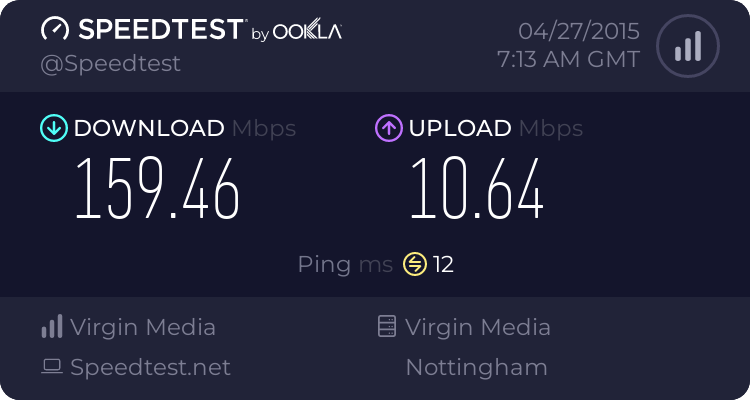
 
Well I've started by uploading Thursday's engagement shoot.
4319630486.png
 
Last edited:
Have any of you stopped to consider what will happen to your images if and when you die?

Will your next of kin know how to access them?

If not what will Amazon do with them?

I like modern technology, but I am always suspicious of large corporation’s long term ambitions when they are dealing with our images and data.
 
Have any of you stopped to consider what will happen to your images if and when you die?

Will your next of kin know how to access them?

If not what will Amazon do with them?

I like modern technology, but I am always suspicious of large corporation’s long term ambitions when they are dealing with our images and data.
It's a backup :thinking:
And as such it's copy no3 :)
And as long as my Mrs outlives me (likely as she's both female and younger) someone knows how to access my pictures.:D
 
It's a backup :thinking:
And as such it's copy no3 :)
And as long as my Mrs outlives me (likely as she's both female and younger) someone knows how to access my pictures.

I understand what you are saying phil, but many will just willy nilly backup not considering future implications.
 
I understand what you are saying phil, but many will just willy nilly backup not considering future implications.
I think that's true of all the storage media to be honest though, the only 100% safe 'heirloom' is the shoebox full of prints in the loft. And of course that's not really 'safe' in a business critical kind of way.
 
Back
Top