IR Photography

Gringo

Suspended / Banned
Messages
19
Name
Paul
Edit My Images
Yes
I've been playing with my EOS 30D trying to get some colour IR images using an R72 filter purchased from Flebay.

Whilst I can get some of the usual B + W images with the foliage white and frosty I can't get the bright blue sky colour IR look.

I've tried using a custom WB usng grass taken thru the R72 filter but image just comes out B + W. Have also used Auto WB and converted to remove red/pink colour cast in PS7, but again only converts to B+W even after swapping Bue and Red channels in mixer.

Anyone got any idea what I'm doing wrong or could it be my camera / filter?

Any help much appreciated.:(
 
Thanks for the link. I've tried all these aspects of tweaking in PS but still only end up with a B + W image.

Any other ideas anyone?
 
Thanks for the link. I've tried all these aspects of tweaking in PS but still only end up with a B + W image.

Any other ideas anyone?

Basically you're capturing a mono image i.e. just red and white. I think the kind of shots your after are really only achievable with a full spectrum camera! this means having the IR filter removed from the sensor and replacing with clear glass and some playing around in PS. :thinking:
 
Sorry, forgot to say :

you would also need to use the appropriate filters in front of the camera to get the look you was after HTH
 
Are you converting the image to B&W first? If so don't it will need to be RGB Colour.
 
Image is in RGB converted straigh from RAW to TIFF (and Jpeg) with no other fiddling in my RAW processing software.

What Splog says about it being essentially a B + W image makes sense but I've read threads from other users which seem to suggest they've taken the type of shot I'm after by using a non-converted DSLR simply by adding an IR filter in front of the lens.

Custom WB on camera set to the grass gave me a purely B + W image!? :bang:
 
Don't know if this helps but here goes:

You are trying to balance two filters. The IR at the front of the lens is only allowing IR to pass and then the light comes up against the second filter which is over the sensor and this filter is trying to block all the IR and only allow visible light to pass :thinking:
However no filter is perfect and therefore some visible light will get through the 1st filter entually :) therfore it is possible to get some colour into the IR shot but I guess its just a case of playing with exposure and making sure it's long enough to do the job :thumbs:

Steve
 
is there any chance of seeing an example of one of your shots?
I shot this on a 30D with a hoya R72:
2433950940_cba312fe89.jpg


EXIF

This picture was taken without setting a custom WB so after switching the channels I needed to desaturate the foliage because it was tinted slightly pink!

Anyway, you need to switch the channels, this is the first pic I took with my filter.
If you have photoshop, go to channels and select the red channel, set red to 0% and blue to 100%. then go to the blue channel, and set blue to 0% and red to 100%
After that it's just best to play about with curves to get the effect you're after.

It's probably best to use a jpeg, but if you didn't shoot in Jpeg, just make sure your RAW converter doesnt have any default settings, the only change you need to make to the image really is exposure if it's too dark..

Hope this helps a bit? Or if you don't get something, just let me know and I'll try and explain it a bit better :)

Lou
 
Wow Lou that's a fantastic pic. That is the exact effect I'm after.
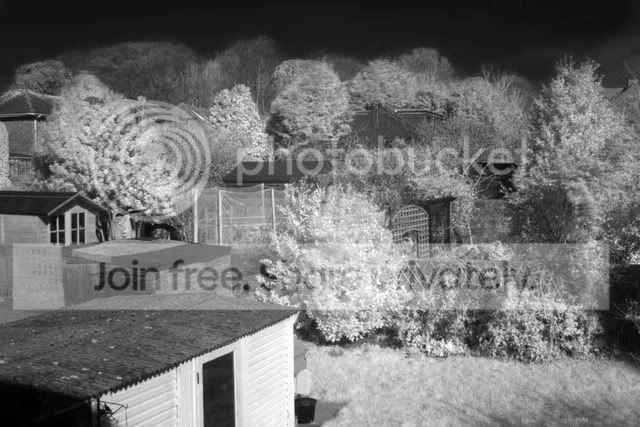
Here's my pic which is in its unfettled state simply converted to jpeg from CR2 RAW file using Canon's own software.
photo.php


I wonder if it might just be that I've not exposed for long enogh to capture sufficient light to register blues and greens and only IR. The shot is under exposed I know but it still had a 90sec shutter at f8.

Feel free to fiddle with my photo and see what you can do. I've swaped the channels on another version but that just ends up black and white.
 
1062.jpg


This is also an IR image. Taken on a converted Canon DSLR. I took a number of images and have them as a fine art collection.
 
Gringo, Great got that, this isn't the original image is it?
I see you mention you took the red/pink out of it?
 
Blimey, theres something not quite right here. I take it this is the one with custom WB? You need to start with the image you had the was red/pink.
What were you're settings/exp time?
 
??? the photo uploaded has a heavy megenta cast to it? how are you seeing.
Exp 90sec @ f8
 
Yes it has, was looking for a more red/pink... as you described earlier. The image I can see has retained very little detail in the cloud.
What time of day was it?
 
Have also used Auto WB and converted to remove red/pink colour cast in PS7, but again only converts to B+W even after swapping Bue and Red channels in mixer.
(


This was the original image I was hoping to see :)
 
it is very.. pink!! I'll have a mess with it and see what I can do, but something's not quite right for an original..
 
Ok.. the only decent thing I could do with it was convert it to B&W.. there's definately something odd going on here :lol: can we see your exif?
 
Yes, I think so too. Had a play with it but the original isn't what I'd expect .. almost like a night time IR:D
 
LOL I know . I wonder if its the filter. I'd appreciate any comments once you've had chance to fiddle with it.
 
which filter are you using, and is your camera set to a certain picture style like portrait, landscape.. whatever else they have preset in there??

I'll re-do it in black and white but it'll just be something you could easilly do yourself. I think the thing that's making it tricky is the lack of sky, as that's where the divide usually is between the rich blues and the white..
 
File Name IMG_0004.CR2
Camera Model Canon EOS 30D
Shooting Date/Time 08/03/2009 09:58:06
Shooting Mode Manual Exposure
Tv( Shutter Speed ) 90
Av( Aperture Value ) 8.0
Metering Mode Evaluative Metering
ISO Speed 160
Lens EF28-105mm f/3.5-4.5 USM
Focal Length 28.0 mm
Image Size 3504x2336
Image Quality RAW
Flash Off
White Balance Mode Auto
AF Mode One-Shot AF
Picture Style Standard
Sharpness 3
Contrast 1
Saturation 1
Color tone 0
Color Space sRGB
Noise Reduction Off
File Size 7219 KB
Custom Function C.Fn:01-0
C.Fn:02-0
C.Fn:03-0
C.Fn:04-0
C.Fn:05-0
C.Fn:06-0
C.Fn:07-0
C.Fn:08-0
C.Fn:09-0
C.Fn:10-0
C.Fn:11-0
C.Fn:12-0
C.Fn:13-0
C.Fn:14-0
C.Fn:15-0
C.Fn:16-0
C.Fn:17-0
C.Fn:18-0
C.Fn:19-0
Drive Mode Single-frame shooting
Owner's Name unknown
Camera Body No. 0930617756
 
I've converted to BW which is fine. i know the image is nothing special as it was only test shot but hoped it would work to some degree. I've fiddled and fettled the image in sooo many different ways but I can only get it to work as B+W. Am very very confused.
 
Do you have any other test shots perhaps with a bit more sky?? It'd make it a lot easier with the editing..
Maybe a longer exposure would help?
I can't see any problem with the exif.. I tried looking for the original of mine, but I've deleted it somewhere along the line.. meh!!

Hi Paul, nice to see you here!! I'll go reply to your email quick!
 
B & W is straight forward but its the colour you want. I'd try again, just a couple of little tweaks, change you colour space to
Adobe RGB (1998), turn sharpness, contrast & sat to 0. Take two shots, one with auto white balance and one with custom balance set to foilage again. make sure you fill the whole view with green. Will be interested to see the originals.

ps, just so we can see what the camera does, take another image with the camera set to auto.
 
Just found the exif on my image that I posted earlier in the thread, and it was shot in AdobeRGB, which is the only main difference I can see between your exif and mine..
 
looking at the link, it might actually be your filter.
Mine's a hoya R72 and I think it cost around £65 at the time I bought it..
Just a thought?
 
Back
Top