iPhone storage question

stevetiler

Suspended / Banned
Messages
1,475
Name
Steve
Edit My Images
Yes
Hi all ,
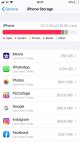
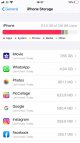
My wife’s iPhone 8 with 128 ha is saying it’s almost full yet when she looks at iPhone storage in settings it looks like it should be no more than about 20 gb full here is a screenshot
IMG_5773.JPG

Can’t get my head round it !
 

Attachments

  • IMG_5773.JPG
    IMG_5773.JPG
    57.6 KB · Views: 16
Well whatever the list shown, the scale at the top indicates a getting quite full with most space taken by Apps.

None too sure about iPhone but every once in a while I will uninstall any Apps I have not used for some while from my Android phone.

So are there memory hog Apps that came as default ones akin to bloatware on an iPhone that can be removed to gain back some space???
 
The numbers next to the apps are what that app has used for files and cache, not the apps themselves. As the bar is three quarters red, she must have a butt ton of apps installed.
 
No that’s what’s weird - she only has one page of apps
 
Must be a load of data associated with an app, maybe something with videos or large picture files? What other apps are on there? I've got about 100 apps on my iPhone, and it has 36.4 GB of 256 GB used.
 
Anything deleted that goes to Trash rather than getting deleted?
 
A common problem by all accounts. I have yet to see a solution on various websites. Perhaps try a reset and restore from backup.
 
She does lots of videos for online fitness classes, edits them in iMovie then sends them either to WhatsApp or the Zumba servers
These are soon deleted and we empty the recently deleted folder
I suspect this is the problem but not sure what to do about it
 
So yesterday my wife finally rang Apple - (they rang us back) talked her through some stuff and basically reset phone _ this process reduced her storage from 114gb to 17 gb with no loss of any data !! She asked him why this happened but he didn't have an answer
Thanks to all who replied
 
Yes it will be interesting to see if it happens again
 
Ooo er! an Apple conspiracy......are they using the millions of iPhones as as a distributed computer network, making use of all of that unused processor power & time??? Cue "Twilight Zone" music ;)
 
One likely explanation is one of the apps (or old deleted apps) was failing to clean up properly after itself, grabbing more storage each time and failing to release the old storage. If it's one of the current apps, the reset will reset it back to the storage the app currently knows about, but the same gradual growth will happen again over time. If it's one of the older, deleted ones, or the developer has fixed the issue, problem solved.
 
Back
Top