iphone 4 HDR

i5aces

Suspended / Banned
Messages
58
Name
steven
Edit My Images
Yes
not sure if this is the right place to post this
but i have just updated my iphone 4 and there is now an option to take HDR photos it saves both the normal and HDR version of the picture, not had chance to play with it yet but could be interesting.
 
4.0.2?

:-s

EDIT

OHHH downloading it now :-)
 
Last edited:
I got 4.1 yesterday but HDR is not supported on 3Gs :'(

I've got an app called HDR Pro which is quite fun and seems to give reasonable results.... bit of blurring at the border between the sky and the trees but not at all bad for a pound!

4975775933_ff82df84ca_z.jpg
[/url]
 
Will download 4.1 today, thanks for the heads up.
 
I had a quick play.

It's subtle, but I quite like that.

I'll post some examples in a minute
 
I had a quick play.

It's subtle, but I quite like that.

I'll post some examples in a minute
I like it too, give you an image that contains more detail in the light and dark extremes than it normally could. All whilst remaining photo realistic and not looking like a CGI mess, well done Apple :clap:
 
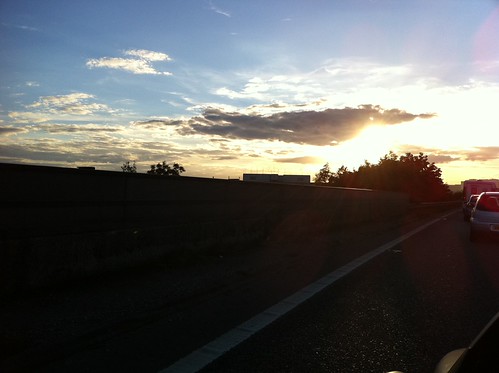
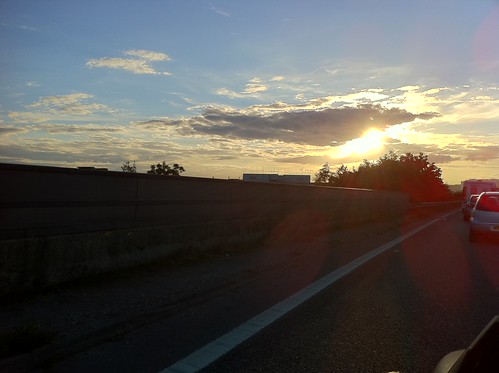
Some quick snaps straight out of the camera. HDR Off first, HDR On second.

By default, it saves both versions. There's no appreciable additional lag when taking an HDR.

edit: you can see them larger and with a couple of other examples here.

20100910_0009.jpg
20100910_0010.jpg


20100910_0013.jpg
20100910_0014.jpg
 
Last edited:
How long before this starts appearing in DSLRs?

Its already there on some.

The sony A500 already has it
The pentax K-X has it I think
and someone told me that some Olympus DSLRs have it.
 
looks more like an adjusted tone curve (images lack contrast and colour saturation)
 
looks more like an adjusted tone curve (images lack contrast and colour saturation)

It's definitely taking more than one exposure. If there's fast movement, it's visible in the HDR version (they obviously don't have a sophisticated ghost algorithm :))

Non HDR

20100910_0017.jpg


HDR

20100910_0018.jpg


100% crop of the figure on the left

20100910_0018-crop.jpg


The key thing is that all the information is there.

1-minute edit in Lightroom. The sky and the top of the Butlers Wharf building on the left was completely blown in the non-HDR version.

20100910_0014-edit.jpg
 
yeah its great, it does help when out in bright places, very good feature they add. save a few pics from being pants.
 
I also picked up the HDR Pro app, had mixed results with it, but it has a decent level of customisation. Have to admit I feel a bit silly now that a very usable HDR function has been built in, but hey, the price was right.

If I get some spare time, I'll do some comparison shots - Auto/Manual HDR on HDR Pro versus built-in HDR function. Might help anyone thinking about getting the app.
 
I had a spare moment...

Set up a very high contrast scene, black speakers indoors, bright sky outdoors.

Ordinary shot (iphone 4):

IMG_0828.jpg


Note the blown sky and little detail in the speakers.

Built-in HDR:

IMG_0829.jpg


Some sky recovered but still little detail in the speakers.

HDR Pro app adjusted for maximum dynamic range:

IMG_0832.jpg


Obvious signs of HDR use and lack of contrast (note some detail actually lost behind the speaker on the building opposite), but plenty of detail kept in the sky and the foreground. Should be noted that the app takes a fair while (maybe 20 seconds or so?) to analyse and then create the image.
 
Last edited:
Meh...

I'm a bit underwhelmed by it all.

I'd far more prefer if they concentrated on adding a hardware button and making it quicker to activate the cam and snap something, for me the whole routine is a bit laboursome.
 
Back
Top