iPad Pro, 13" Ultrabook or something else.

AndyWest

Suspended / Banned
Messages
8,400
Name
Andy
Edit My Images
No
Hi All

I have a Windows PC and also an iPad. I love them both but have been kinda feeling that the PC is big and bulky and want something sleeker and smaller. I have an idea to re-config the PC for gaming and replace the iPad with either an iPad Pro 12.9" or either a 13" Macbook Air [ M1 version ] or something like the XPS 13 which will be my main editing and 'do it all' PC. I do spend more time computing while sitting in front of the TV with the Mrs. I would absolutely love to live an iPad life but do find it a pain when dealing with importing/exporting files on and off the device. Also saving images at the size you want seems to be impossible plus again finding a program that can add a border to the outside of the image is impossible from what I researched a few years ago.

So all I use a pooter for is Photo editing and doing stuff in Chrome. I am also very keen on quiet pooters so it has to be either silent or have quiet fans.

So which would you choose? Any other suggestions welcome. Budget not an issue.

Thanks :)
 
Last edited:
For me, a 13" screen is too widdy for editing regardless of resolution. However if that's what you want (connected to a monitor for serious editing) then I'd look at an XPS13, Lenovo Legion or X1 carbon if lowest weight is essential. There's no reason you couldn't spec up a decent level in an M1 air, but my feeling is that it's just a little bit new still, and running un-ported software is a kludge, albeit effective one, right now, plus I have a feeling that in line with IOS, moving images around may become less easy as Mac OS continues getting developed.
 
For me, a 13" screen is too widdy for editing regardless of resolution. However if that's what you want (connected to a monitor for serious editing) then I'd look at an XPS13, Lenovo Legion or X1 carbon if lowest weight is essential. There's no reason you couldn't spec up a decent level in an M1 air, but my feeling is that it's just a little bit new still, and running un-ported software is a kludge, albeit effective one, right now, plus I have a feeling that in line with IOS, moving images around may become less easy as Mac OS continues getting developed.
I think you may be right. Plus I have heard of people having problems with the M1 chip for longevity. I'm now thinking maybe go for a top notch silent/quiet gaming machine [ Yes they do exist ] to replace my current PC then I'll have the ability to everything I want and have the iPad for mobile stuff.
 
I went from a desk top machine to a 13" MBP as used it as my only editing machine for 5 years. I also now have a highspec workstation with 27" 4k screens. I now use both machines and both are prefectly usable. I would have no worries about using a 13" machine as my only editing machine. I might be tempted to wait for later in the year, it is rumoured another higher spec 13" machine will be released that suports more memory and with more ports...
 
For me, a 13" screen is too widdy for editing regardless of resolution.

Double it and you are good to go for editing. Obviously it won't be a portable monitor by then.

I think you may be right. Plus I have heard of people having problems with the M1 chip for longevity. I'm now thinking maybe go for a top notch silent/quiet gaming machine [ Yes they do exist ] to replace my current PC then I'll have the ability to everything I want and have the iPad for mobile stuff.

I'd strongly recommend waiting for at least M2 macs if your intention is to go this route.
 
I have decided not to go down the Mac route and am leaning towards a Microsoft surface laptop as they are by far the most reliable laptops so I have read. They are updating them in March so will see what they have. :)
 
My Mrs has had a Surface for a few years now, lovely piece of kit, i dont think you'll regret it Andy.
 
I use an iPad Pro 11" as my main editing machine and it's great. I did a comparison between the iPad screen and my 14" laptop and the image is about the same size on each (within half an inch). If you go full screen for culling purposes on the iPad the image is actually bigger than on a 14" laptop due to the different screen aspect ratios.

Obviously make sure the editing apps you want to use are available on the platform and do what you need to do. I'm a Lightroom user and it works perfectly for me. Photoshop is now available on the iPad too but it is very cut down from the desktop version at the moment. Affinity is also available on the iPad and seems to be much fuller featured.

File management is much better now, iPads have full external drive support so moving images around and putting them on different drives is much easier than it used to be. From 2018 onwards the iPad Pros have a USB-C port, not Lightning so connecting peripherals is much easier. I have a USB-C hub for mine and can sit at my desk with it plugged in to an external hard drive, keyboard, mouse and monitor. It's not ideal as they still don't have proper external monitor support but that will hopefully come with iPadOS15. Not something I do very often but the option is there if I want to.

If you do go down the iPad route then budget for an Apple Pencil, it's a must for photo editing. iPads also have full mouse and trackpad support now so they can be used as a laptop if you want to go down that route.
 
Last edited:
I have just bought a Samsung tab S7+ 12.4 inch tablet. This is to replace my iPad Air which has been great but not good enough or quite big enough to run as a main editing machine. The tab 7+ has such a nice screen that it could possibly do as an editing computer. I have wanted to live a tablet life for years and I now may be able to do that. I love Snapseed and use it a lot. That and Lightroom may be all I need (y)
 
I use an iPad Pro 11" as my main editing machine and it's great. I did a comparison between the iPad screen and my 14" laptop and the image is about the same size on each (within half an inch). If you go full screen for culling purposes on the iPad the image is actually bigger than on a 14" laptop due to the different screen aspect ratios.

Obviously make sure the editing apps you want to use are available on the platform and do what you need to do. I'm a Lightroom user and it works perfectly for me. Photoshop is now available on the iPad too but it is very cut down from the desktop version at the moment. Affinity is also available on the iPad and seems to be much fuller featured.

File management is much better now, iPads have full external drive support so moving images around and putting them on different drives is much easier than it used to be. From 2018 onwards the iPad Pros have a USB-C port, not Lightning so connecting peripherals is much easier. I have a USB-C hub for mine and can sit at my desk with it plugged in to an external hard drive, keyboard, mouse and monitor. It's not ideal as they still don't have proper external monitor support but that will hopefully come with iPadOS15. Not something I do very often but the option is there if I want to.

If you do go down the iPad route then budget for an Apple Pencil, it's a must for photo editing. iPads also have full mouse and trackpad support now so they can be used as a laptop if you want to go down that route.
Really useful info. I’m currently thinking of getting an iPad Pro. Good to know that there’s a lot more connectivity than there previously was. I’m waiting to see if an updated iPad Pro comes out as there is talk one potentially being released in a few weeks. Would be great to edit without needing to go to the Mac.
 
Really useful info. I’m currently thinking of getting an iPad Pro. Good to know that there’s a lot more connectivity than there previously was. I’m waiting to see if an updated iPad Pro comes out as there is talk one potentially being released in a few weeks. Would be great to edit without needing to go to the Mac.

Yes they are due for a refresh in the next couple of weeks according to lots of rumours so I'd hold off for a bit if you're interested. I was torn between the 11" and 12.9" when I got mine and ended up going for the 11". I still don't know if that was the right decision, and whether I'd prefer the bigger screen size over the reduced portability. The 12.9" is absolutely massive though I can see how it would be a pain to carry around. The processor, RAM, screen effective resolution and performance are the same between the two models so the only difference is screen size.

You'll read loads of articles online about how hard it is to do "work" on an iPad etc, but most of the people writing them seem to pick one up, use it exactly like a PC or Mac and then get frustrated when things don't work the same way. There is a learning curve to using the software and in some ways it is very different, but I'm yet to run into a task I can't accomplish on my iPad.

Editing on it is amazing, it handles Raw files without breaking a sweat, absolutely flies through editing them. I've never once slowed it down or even felt it get warm under load when working in Lightroom. Just make sure you think about your workflow and make sure it will work for you before getting one.

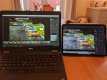
Here's a comparison of Lightroom showing the same image on a 14" laptop and 11" iPad. As you can see there's not actually that much difference in the image size.
IMG_20210303_085232.jpg
 
Last edited:
Yes they are due for a refresh in the next couple of weeks according to lots of rumours so I'd hold off for a bit if you're interested. I was torn between the 11" and 12.9" when I got mine and ended up going for the 11". I still don't know if that was the right decision, and whether I'd prefer the bigger screen size over the reduced portability. The 12.9" is absolutely massive though I can see how it would be a pain to carry around. The processor, RAM, screen effective resolution and performance are the same between the two models so the only difference is screen size.

You'll read loads of articles online about how hard it is to do "work" on an iPad etc, but most of the people writing them seem to pick one up, use it exactly like a PC or Mac and then get frustrated when things don't work the same way. There is a learning curve to using the software and in some ways it is very different, but I'm yet to run into a task I can't accomplish on my iPad.

Editing on it is amazing, it handles Raw files without breaking a sweat, absolutely flies through editing them. I've never once slowed it down or even felt it get warm under load when working in Lightroom. Just make sure you think about your workflow and make sure it will work for you before getting one.

Here's a comparison of Lightroom showing the same image on a 14" laptop and 11" iPad. As you can see there's not actually that much difference in the image size.
View attachment 310694

But with a little optimisation - autohide the taskbar, get rid of the filmstrip at the bottom in develop mode - the image could be a LOT bigger on the laptop.

I notice the screens are also at different colour temperatures - can you calibrate the iPad screen?
 
Yes they are due for a refresh in the next couple of weeks according to lots of rumours so I'd hold off for a bit if you're interested. I was torn between the 11" and 12.9" when I got mine and ended up going for the 11". I still don't know if that was the right decision, and whether I'd prefer the bigger screen size over the reduced portability. The 12.9" is absolutely massive though I can see how it would be a pain to carry around. The processor, RAM, screen effective resolution and performance are the same between the two models so the only difference is screen size.

You'll read loads of articles online about how hard it is to do "work" on an iPad etc, but most of the people writing them seem to pick one up, use it exactly like a PC or Mac and then get frustrated when things don't work the same way. There is a learning curve to using the software and in some ways it is very different, but I'm yet to run into a task I can't accomplish on my iPad.

Editing on it is amazing, it handles Raw files without breaking a sweat, absolutely flies through editing them. I've never once slowed it down or even felt it get warm under load when working in Lightroom. Just make sure you think about your workflow and make sure it will work for you before getting one.

Here's a comparison of Lightroom showing the same image on a 14" laptop and 11" iPad. As you can see there's not actually that much difference in the image size.
View attachment 310694
I’m going to wait and see what if anything turns up over the next few weeks. I’m not in a rush. The 11inch does seem to make more sense. I like the idea of the 12.9 inch but it’s probably not as practical as the 11 inch.
 
But with a little optimisation - autohide the taskbar, get rid of the filmstrip at the bottom in develop mode - the image could be a LOT bigger on the laptop.

I notice the screens are also at different colour temperatures - can you calibrate the iPad screen?

You can do all that on the iPad too, and the image is substantially bigger than on the laptop then. The 11" iPad Pro is almost a 3:2 aspect ratio (it's just slightly taller), so a 3:2 photo basically fills the entire screen. You can edit in Lightroom that way, the interface just slides over the top but then disappears when you're moving the sliders.

The iPad screens are basically perfect from the factory (see here: https://www.anandtech.com/show/13661/the-2018-apple-ipad-pro-11-inch-review/7), with 100% sRGB and DCI-P3 colour space coverage. As far as I'm aware you can't calibrate the display, but since I never print I don't really need to. In fact photos I think look great on the iPad screen can end up looking very off on my phone or my old desktop monitor, so having a perfect screen isn't the be all and end all. Most people don't view photos on perfectly calibrated, colour accurate screens.

The laptop is a 6 year old Dell supplied by my job so I don't expect any colour accuracy from it at all. That photo was taken on my phone under very warm lighting too so the WB will be way off. Images look much, much better on the iPad than on any other screen I own.
 
Last edited:
You can do all that on the iPad too, and the image is substantially bigger than on the laptop then. The 11" iPad Pro is almost a 3:2 aspect ratio (it's just slightly taller), so a 3:2 photo basically fills the entire screen. You can edit in Lightroom that way, the interface just slides over the top but then disappears when you're moving the sliders.

The iPad screens are basically perfect from the factory (see here: https://www.anandtech.com/show/13661/the-2018-apple-ipad-pro-11-inch-review/7), with 100% sRGB and DCI-P3 colour space coverage. As far as I'm aware you can't calibrate the display, but since I never print I don't really need to. In fact photos I think look great on the iPad screen can end up looking very off on my phone or my old desktop monitor, so having a perfect screen isn't the be all and end all. Most people don't view photos on perfectly calibrated, colour accurate screens.

The laptop is a 6 year old Dell supplied by my job so I don't expect any colour accuracy from it at all. That photo was taken on my phone under very warm lighting too so the WB will be way off. Images look much, much better on the iPad than on any other screen I own.

I couldn't agree with you more, I do a whole bunch of photo editing on my "iPad Pro 12.9" (2017 incarnation) and I'm currently sitting on the fence waiting for the anticipated release of the new one. With regards to screen calibration I did read something a time or two back that this can be done, but at the time of reading it went back to its factory settings of calibration if the iPad was switched off. I've never actually tried doing a calibration with mine as I've always been extremely happy with the colours that I get from it. In my opinion they are one hell of a good bit of kit and getting closer with every release to using a laptop, as an added point for photo editing I would strongly recommend using the Apple Pencil as it opens up a whole new world of accuracy.
 
Last edited:
Back
Top