Inpaint 4.7 - FREE

John Young

Suspended / Banned
Messages
4,330
Name
John
Edit My Images
Yes
I have tried this in the past and it works pretty good. Similar to the content aware fill in photoshop

FREE for a limited time HERE

Inpaint will magically remove elements from your photos!

Inpaint photo restoration software reconstructs the selected image area from the pixels near the area boundary. Remove undesirable objects from your images, such as logos, watermarks, power lines, people, text or any other undesired artefacts.

There’s no need to manually go through messing around with your old clone tool any more! Now you can use Inpaint to easily remove all those unexpected objects that end up spoiling an otherwise really great photograph.
 
just downloaded this.its such a simple tool to use.

thanks
 
I thought I'd give this a go and post some results

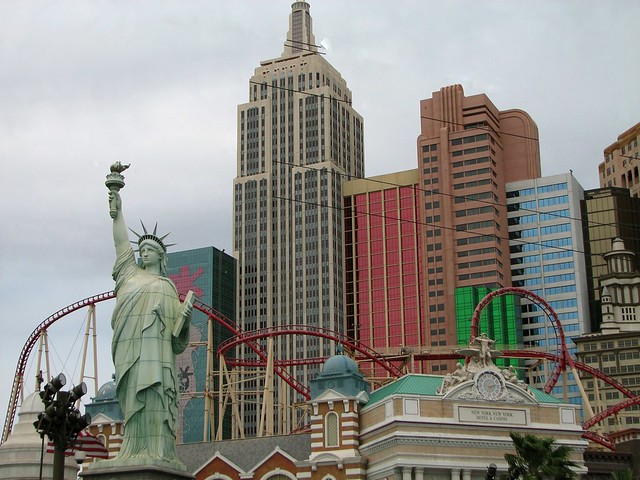
I had an admittedly not great photo that had a lot of cables across it and cloning out was tricky to say the least

Here is not the orginal image, but what I started with when I put it into the free version of InPaint. You can see the cables going across the buildings, but they have already been taken out of the sky which was relatively easy to do in my old version of photoshop elements...


Partial Edit - New York New York by Sibling Chris, on Flickr

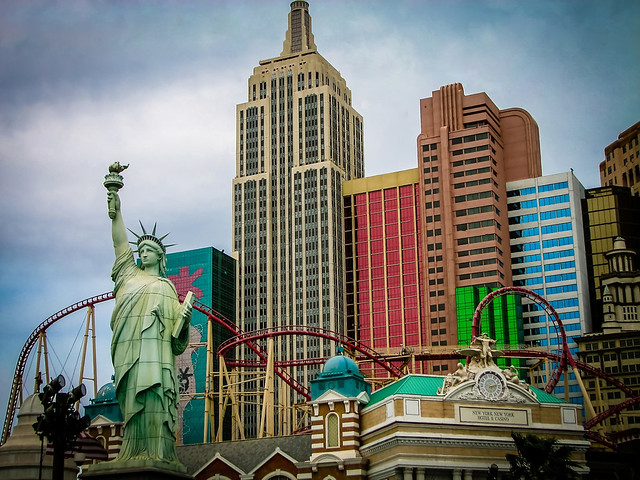
InPaint was relatively quick to finish this off and I was surprised at the results.
Not perfect, but acceptable. Narrowing down the area of selection when fixing seems to give more accurate results rather then letting it work across a larger area.

The image below is the InPaint result, but it has also had a bit of other processing to spruce the image up a bit...


New York New York, Las Vegas by Sibling Chris, on Flickr
 
Last edited:
Nice job there seemed to work well. I see Inpaint has been around for a while and everyone thinks photoshop are the only ones with this technology

Is see you have a D7000 - I am thinking of buying one, you like yours OK any problems with focusing in low light as I heard that mentioned as a problem somewhere
 
Stopped the free giveaway now.
 
TheCrewDesigns said:
Nice job there seemed to work well. I see Inpaint has been around for a while and everyone thinks photoshop are the only ones with this technology

Is see you have a D7000 - I am thinking of buying one, you like yours OK any problems with focusing in low light as I heard that mentioned as a problem somewhere

It's still early days for me with the D7000 only taken a couple of hundred shots in RAW and not had the time I would have liked to work through them yet. It doesn't strike me as having low light focus issues so far but I only have the kit lens and I think there are other lenses that will do a better job in such conditions

My Flickr is quite bare at the moment ;)
 
It's still early days for me with the D7000 only taken a couple of hundred shots in RAW and not had the time I would have liked to work through them yet. It doesn't strike me as having low light focus issues so far but I only have the kit lens and I think there are other lenses that will do a better job in such conditions

My Flickr is quite bare at the moment ;)

Well once I save up I will be getting a D7000 to compliment my D90

What's the noise like on the D7000 in low light, I hear its pretty good ?

It seems that every once in a while they do another...

Yeah the site has giveaways all the time and inpaint has been featured before on there
 
Back
Top