Infra Red filters?

355858

Suspended / Banned
Messages
679
Name
Ben
Edit My Images
Yes
hi guys,

hoping someon can help me out, am i right in thinking if i buy a hoya infra red 67mm filter i can shoot photos using infra red, getting some awesome effects, i check that my camera can pick up infra red by pointing a remote control at it and i can see the blinking purple light..

any help appreciated
 
Some cameras are more sensative than others and have infra-red filters inside them.. somewhere, I don't remember. Anyway, I have a hoya R72 and it works beautifully on my canon 30D and 450D.. I'm sure if you do a little research you can find out.. try googling 'camera manufacturer camera model hoya R72 and see what comes up :)
 
You can get the wee Fujis like yours converted quite cheaply to be fulltime infrared, I had an S5800 that was done and it was excellent
 
Anyway, I have a hoya R72 and it works beautifully on my canon 30D and 450D..


I tried one on my 400D, couldn't see a thing. I assumed that the canons had an IR filter over the sensor (actually, at the time, I googled it and saw several threads on how to remove it).
 
I tried one on my 400D, couldn't see a thing. I assumed that the canons had an IR filter over the sensor (actually, at the time, I googled it and saw several threads on how to remove it).

How long was your exposure? they usually have to be 30 seconds plus otherwise you won't see a thing.. even if the camera's sensativity is high, you should still have some sort of picture.. :S
 
The canon's, and in fact probably all cameras, have a filter fitted over the sensor that's pretty harsh blocking IR. That's why a lot of cameras for astronomical use get the filter replaced. It is possible to get IR captured with the filter in place, but as Louise said, you have to go for much longer exposures.
 
All digital camera sensors are sensitive to both infra-red & 'normal' visible light, so the camera makers install an infra-red cut filter in the light path, so the camera is now only sensitive 'normal' visible light.
The R72 filter works the other way and stops most of the visible light making it difficult to see an image though the viewfinder with the filter in place and requiring long exposures from unmodified cameras.
If you have a video camera try an R72 for ir video, sony used to be pretty good.
 
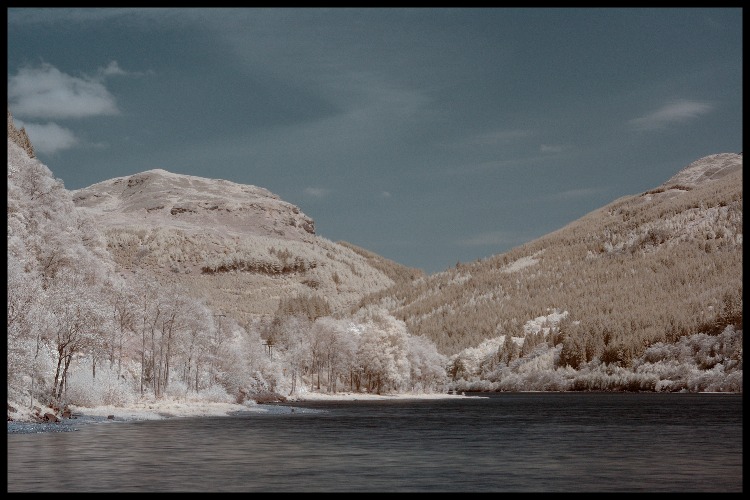
some examples and their EXIF
2607339940_c4b39d53fe.jpg

Camera: Canon EOS 30D
Exposure: 30 sec (30)
Aperture: f/11
Focal Length: 17 mm
ISO Speed: 320
Exposure Program: Manual

2792642199_c25e691096.jpg

Camera: Canon EOS 450D
Exposure: 30 sec (30)
Aperture: f/11
Focal Length: 17 mm
ISO Speed: 200
Exposure Program: Manual

2433950940_cba312fe89.jpg

Camera: Canon EOS 30D
Exposure: 30 sec (30)
Aperture: f/4
Focal Length: 17 mm
ISO Speed: 100
Exposure Mode: Manual

-Try keeping the aperture at 11 or 13, the last image there was at f/4 and it's not particularly useful for keeping things in focus..

it won't look like that straight out of the camera, if you want blue skies, you'll need to switch the red and blue channels, but generally, IR images will come out an orangey/red.. A good thing to do is set your camera up on a tripod, point it as some nice plush green grass with the filter on, take a 30second exposure and set that image as a custom white balance which will save a lot of time.
Make sure you set the focus before the filter goes on, and keep it set to manual focus otherwise it'll mess up once the filter goes back on..!!
:)
 
Tried again earlier, with a much longer exposure.
Kinda wish I hadn't now.
http://81.153.65.217/ir.jpg

Image has had tone curve assist applied, and brightness +2, contrast set to 4 in dpp.

Image on the left is a fit to view rotated -90 degrees. Image on right is at 100%, which I did to prove I wasn't imagining it.
Aperture F10, shutter speed 123 seconds. This was at 70mm, but I was hoping a chinook might fly past which was why the lens is not the best for this.
I am concerned now about the number of pixels which are incorrectly registering colours.

BTW. I found that with my lens, it is easier to focus, then set the lens to auto-focus whilst I screw the filter in, as it holds the focusing element of the lens better, then set back to manual before taking the photo.

I really like that lake photo you have.
 
a 2 minute exposure..? was there any sunlight on there? because that's what you need.. though I've never seen pixels like that on any of my images.. I know I get the ocasional dead pixel but only when I use the R72.. maybe the camera just has trouble registering the info or something..
There usually is a lot of detail lost in IR photos if your camera hasn't bee specifically converted.. if you're photographing grass/trees etc, with a long exposure there'll be no focus apart from things like tree trunks anyway, and the quality of my black and white IR above is pretty poor close up :( it looks good in print though fortunately :D heh!
 
IR photography with a non-converted camera is just a pain - after a while you get fed up having to lug a tripod around and do all that "focus and then add the filter" stuff.

I wonder how many people here have bought and R72 filter that now lies, unused, in their camera bag, because it's just too much hassle....
 
I wonder how many people here have bought and R72 filter that now lies, unused, in their camera bag, because it's just too much hassle....

My hand goes up!!

However, I didn't buy the thing with the intention of using it a lot, I'll take it out if I shoot landscapes, because I use a tripod for that anyway, so it's really not as much hassle as it sounds. :D
 
My Pentax K100D is quite sensitive to infrared, I tend to use a cheap and cheerfull Kood R72 IR filter:


3239845518_c7632d696c_o.jpg


Camera: Pentax K100D
Exposure: 1.3
Aperture: f/11.0
Focal Length: 55 mm
ISO Speed: 200

I generally find that I get good results between 1 and 3 seconds exposure!
 
Back
Top