Indoors With The 40D-Ugh

The strong orange cast is typical of shots under tungsten light with the wrong wb set. Our eyes see this orange cast but our brains ignore it, so we only see what we want to see. When it's presented to us in 2 dimensional form like this we see it and it looks completely wrong.

This is a quick edit just setting the wb balance to 6500 degs Kelvin, which is around sunlight colour temperature.

wb_edit.jpg
 
The strong orange cast is typical of shots under tungsten light with the wrong wb set. Our eyes see this orange cast but our brains ignore it, so we only see what we want to see. When it's presented to us in 2 dimensional form like this we see it and it looks completely wrong.

This is a quick edit just setting the wb balance to 6500 degs Kelvin, which is around sunlight colour temperature.

wb_edit.jpg

I assume this can be done in the canon digital photo professional or PS elements 6? Thanks...it looks so much better now.
 
graelwyn.jpg


nothing wrong other than a mild colour cast
reset white balance and put a curve on red, thats it

id be over the moon with them:thumbs: well caught


CT beat me to it
 
f/5.6 and 1/10 ;) I think a lower iso or a shorter exposure would have probably produced an image more to your liking.
 
I agree with the sentiments above, you are being very hard on yourself...stoppit this instance :nono::nono:
 
I assume this can be done in the canon digital photo professional or PS elements 6? Thanks...it looks so much better now.

I'm sure it can be done in both those packages, or any reasonable editing package in fact.
 
They're not 'warm', there's a bloody great orange cast on them which is typical of shooting under tungsten light with the wrong white balance!
 
just as a note, i have seen "proffesional"(someone who earns there living from photography, but i use the term loosely) that had far worse colour casts and looked 100 times worse than yours, and these were in the good photos section.

so now we know your camera works fine, that you can take a good shot, time to start building the confidence and just keep practising.
 
I am hoping that I might get some ideas by seeing what settings others are using on different shots in the photography magazines I buy in endless supply.
 
i recently downloaded http://www.opanda.com/en/iexif/

this allows you to view the exif data in an image on the web by right clicking then view exif/gps... towards the bottom of the list. in the exif it shows the f stop, flash if used, iso and shutter speed as well as a load of other things that i dont really look at.

the only problem is if they remove the data when they reduce the filesize for web
 
Grae i am new and having awful problems. And truly believe my pics are "crap"!! But i know that i need better glass and more undertanding of my camera. If i started taking pics of the quality that you have over the last couple of days i would be so happy.

I add one i took recently (one of my first ever shots) ok i know its not great but they were about 100 yards away with poop for glass...


f6.3
shutter 1/800
300m (35mm 450)
exposure -0.3
max aperture 5.3

And this is probably the pic ive taken :( (Justin Langer for Somerset V Kent by the way )
Its only a tamron 28-300 3.5-6.3 lens oh and it was hand shot . I havent got the camera out much since and am waiting till i get some better glass although i do have a sweet nikon VR lens with less range.

Grae you are getting there quicker than some of us.


and cropped

 
i nearly got the ball too (its a fraction above the stumps and white :) just a bit out of focus. So the ISO should have been less to freeze the ball. But i still have to learn how to get more DOF etc etc.

I know i can get good shots but have to be patient. And i know if i hd better glass and used a tripod then the image would be better, but my knowledge has to improve too. And it seems like you have way more knowledge than me (and take far better shots).

There will always be someone far worse than you Grae :(
 
Have a read of this Graelwyn which should help somewhat. CLICKY

Over the next couple of days I'll try to write a couple of ''How To's' on setting wb in degs Kelvin and taking and using a Custom White Balance shot.
 
your shot looks ok to me dogfan, :thumbs:
 
Have a read of this Graelwyn which should help somewhat. CLICKY

Over the next couple of days I'll try to write a couple of ''How To's' on setting wb in degs Kelvin and taking and using a Custom White Balance shot.

Thanks CT, shall get onto reading that and trying to get some basic ideas on what I need to be doing for what lighting situation. :)
 
Those shots looked good to me, dogfan... I think we tend to always see our own work in a different way to how others see it.
 
the manuals are mainly crap aren't they?
I always think that the manuals are great after you understand what they are trying to explain.
I find that when you finally do understand a subject, usually via a fellow tog, book or web tutorial, when you go back to the manual it's "oh, I see what they mean now" !

I'm not sure the reason for this, maybe the authors are too familiar with the cameras functions and can't understand anyone having a problem or they want to leave room for the book publishers !
 
Dogfan, personally I would have cropped the image to just take out the spectator in the white shirt as he is a bit distracting, but you need to allow a little space for the batsman to move into so I think your crop is a little more extreme than you need. On the other hand, if the spectator on the far right had been wearing a darker coloured shirt (and was therefore less distracting) I would probably not have cropped the image at all. Good shot though, and practise will make perfect.

Graelwyn, you just need to play around with the camera to get the correct settings, easy to say I know, but if someone wants to really learn to be a good photographer, they have to learn how to override or compensate for Auto settings. This is not to say Auto is bad, you just have to learn how and more importantly, when, to override them to get the results you desire.

As photographers, with modern technology we now have cameras with more advanced features and settings available than our predecessors, yet the photographs that many of us aspire to take were taken on equipment with limited facilities and it was their knowledge of the subject and media (film, chemicals, paper etc) that allowed them to get good results. if you point a modern camera at a white wall regardless of what metering you use (spot, matrix or centre weighted) it will come out grey similarly if you aim at a black wall the result will be the same, we know this and we make allowances for it, it should be the same with every part of the image capturing process, and practise makes perfect (okay maybe not perfect, but a whole lot better).

So, how do you improve? Well digital helps massively here as you can take hundreds of shots and after perusal, just delete the ones you don't require, I don't mean when you are on an assignment I mean just to practise! In the past really learning photography was an expensive business as you had too buy the film and get it processed before being able to see the results, and then do the same again each time you wanted to try out a new technique, the expense of this and the time delays were not condusive to quick learning. Use your camera, every free minute take photos of things around the house, use different settings and techniques, take the camera out with you for a walk when you have some free time, but most important of all, record details of every shot and all your settings for each one, then on your return, stick them into the computer and armed with your notebook of exposure information see what worked for you, take note of the settings of the ones you are happy with.. Take the camera out of some of it's auto modes, and set the controls yourself, experiment, use the wrong settings to see what will happen (use tungsten and fluorescent settings in daylight etc) deliberately underexpose and overexpose to see what the results will be like and if and how you can correct them, use JPGs rather than RAW to start, to take another variable out of the equation.

Remember too, that digital has a range of exposure of about 5 stops from black to white, this is a similar range to that of Transparency Film and must be remembered when shooting for optimum exposure. Try to visualise how you want the end image to look and remember to meter from a 'known tone' and then adjust the exposure to suit i.e white wall, add two stops, light grey or coloured subject (yellow, beige) add one stop, mid range subject (grass, blue sky, light tarmac) as is, darker subject reduce one stop, black subject reduce two stops.

As I said before, practise will not necessarily give you perfect images, but it will enable you to get perfect control over your cameras functions (and foibles) and the confidence to know that you are fully conversant with it and how it performs under different circumstances, therefore then allowing you to then concentrate on the subject matter.

 
Thanks for the advice, Edbray and for taking the time. I shall re-read it later.
Great shots, combat, gives me hope... I mean, I love the camera in the sense of it feels just right to grip and I love taking it out... just disappointed that it is such a steep learning curve and that I cannot capture what I see the way I see it yet.
 
Is custom wb difficult on the canon? On the olympus I just hold down a button and take a pic of something white. WB job done. I'd assumed it would be as easy if not more so on the canon and nikon (given how many reviews slated the olympus user interface)
 
You set the white balance to CUSTOM... take a pic of a white sheet of paper for instance in the same light you will be using for your pic... then scroll thru and use that pic as your white balance setting. DONE
 
Thanks for the advice, Edbray and for taking the time. I shall re-read it later.
Great shots, combat, gives me hope... I mean, I love the camera in the sense of it feels just right to grip and I love taking it out... just disappointed that it is such a steep learning curve and that I cannot capture what I see the way I see it yet.


Patience is a virtue

is an apt saying in your case:)

Give it some time and give yourself a bit more credit.
As has been said in your other threads try to have a PMA when you pick up the camera or leave it behind.

It is an art and on bad days artists do not perform well.

You just don't have an understudy to take over.
 
You set the white balance to CUSTOM... take a pic of a white sheet of paper for instance in the same light you will be using for your pic... then scroll thru and use that pic as your white balance setting. DONE

Strange as it may seem you shouldn't use a white item to set your white balance, but rather one that is 18% gray to give a neutral reference point
 
The 100mm f2.8 macro is a cracking lens!

Might have a little bash at low light with that on my 5D, can always compare then.
 
The 40D takes great indoor shots

It does. There is only one thing to say after reading all your comments, Graelwyn....... you have to learn how to use your camera before you will get the best from it.

And that is the bottom line.
 
Another handy way to get Canon's DPP softwar to deal with white balance is to use 'click white balance' on the RAW editing tool. With this you click on something that you know is white, e.g a background wall and the software will then make the necessary adjustment. Obviously it's only useful when there is a white object in the image.

I think its worth noting that the Canon manual is somewhat over packed with information on stuff like picture styles, white balance - customizing it or bracketing it etc.

I shoot in raw because you can forget this stuff and use the DPP software to deal with it later.

Graelwyn you are being very hard on yourself. You're actually trying to shoot in some of the worst conditions you could i.e a dull orange light.
 
Just as a quick test I tried the 5D with the 100mm f2.8 macro and then tried the same shots with the 24-105mm f4. This was at about 8.30 tonight and the light in our front room was not fantastic and the dogs were moving. The 100mm I tried at ISO 100 to ISO 1600 and at f2.8 I was able to get shutter speeds adequate to take pics of the dogs. In the region of 1/30 through to 1/125 depending on the light and ISO.

As a comparison I tried the 24-105mm at it's widest f4 and got an exposure of 3 sec at ISO 100! that was one blurred whippet!

So no real reason why you should not be able to take acceptable pics in less than bright conditions with the 100mm.
 
It does. There is only one thing to say after reading all your comments, Graelwyn....... you have to learn how to use your camera before you will get the best from it.

And that is the bottom line.


Absolutely :thumbs: It'll take months and months, forming a relationship with the camera to get anywhere near a full understanding on how you can both get the best.

Have you considered taking shots on the RAW setting? This way, you can adjust the white balance till your hearts content. You can access the RAW setting through the menus (refer to instruction manual for the exact route) and stop panicking! Everything will fall into place probably when you least expect it, ok? :)

We're all still learning and the best you can do is to continue asking questions on here, after all there's loads of really good advice about, getting out with your camera and being patient, as hard as it is.

Hope this helps in some way, Mark
 
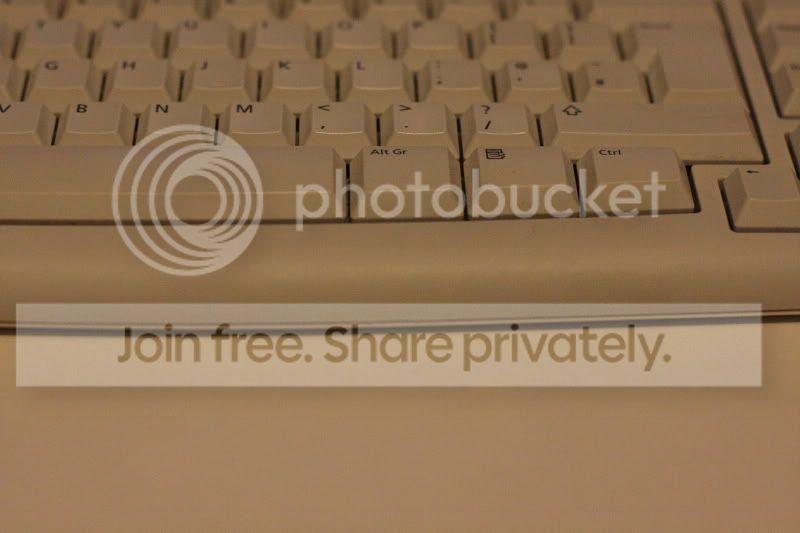
I thought I'd grab my 40D and have a quick white balance adjustment demonstration for you. This was shot with my 50mm at f/2.8 at a noisy ISO 3200. Naturally I couldn't be bothered to get off my backside so took a simple shot of my keyboard. I suggest you do the same and preferably take a picture of something white. An open text book would be ideal.

Anyhow:

Make sure your camera is set to 'RAW' and there are no WB adjustments and WB is set to Auto.

Take the image and open Digital Photo Professional and find the .CR2 file.

Export it straight to JPG > File, Convert and Save (for future comparison). Here's what mine looked like:

IMG_0227a.jpg


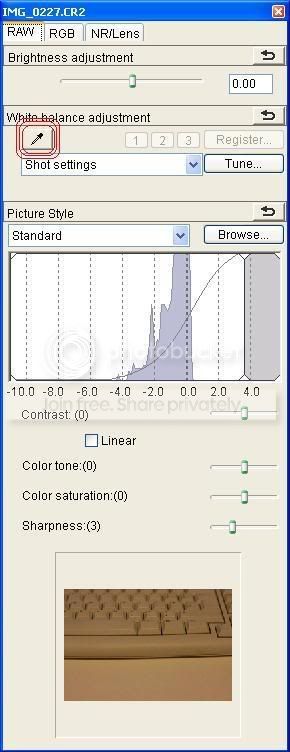
Next go to View, Tool Palette. The RAW tab will be selected for you and will look like this:

DPP1.jpg


I have circled the 'click white balance' function as it was applicable here with my white table. I selected this button and then clicked on the image itself (just in front of the keyboard) and then the software knew what was white and worked out the required adjustment. So the changed image is like this:

IMG_0227b.jpg


I would only suggest using the click white balanace when there is something white in the image. Or alternatively in the same conditions quickly shoot a piece of paper to achieve the same purpose. You can then apply the adjustment to other images.

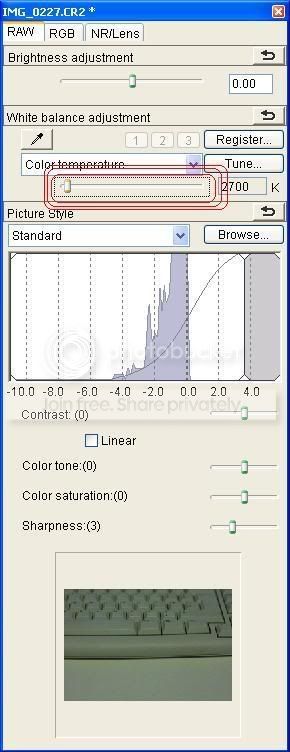
Here's what the WB slider looks like. Play with it to go from deep orange to a blue tinge:

DPP2.jpg


I hope the above makes sense. I could have adjusted the WB better for the keyboard but I wasn't concerned at all with the quality, I just wanted to show the principal.

Have a play :)
 
Back
Top