Imagines Soft/Grainy on D7100

jemstar555

Suspended / Banned
Messages
37
Name
Steven Heidstrom
Edit My Images
Yes
I just can’t seem to get sharp photos with my D7100.

I’ve tried 4 lenses and tried the same lenses on a friend’s D7500. We used the same settings and his images were crystal and mine were soft and grainy.

Any suggestions?
 
I just can’t seem to get sharp photos with my D7100.

I’ve tried 4 lenses and tried the same lenses on a friend’s D7500. We used the same settings and his images were crystal and mine were soft and grainy.

Any suggestions?
Yes it sounds like your lenses need to be micro adjusted on your camera .. another possibility is a very dirty sensor . But I would go for it needing MA
 
I just can’t seem to get sharp photos with my D7100.

I’ve tried 4 lenses and tried the same lenses on a friend’s D7500. We used the same settings and his images were crystal and mine were soft and grainy.

Any suggestions?
Can you post examples so that we might be able to identify the issue better? Jeff might be right regarding the micro adjusting but I'd be surprised being as you've tried 4 lenses, it would be strange that 4 lenses are out on yours and fine on your friends. Unless of course you or someone else has previously messed with the MA adjustment previously. Another reason that it would be odd that it was MA is that you're saying they're grainy as well as soft, I wouldn't expect shots to be grainy just because they're slightly out of focus.

Have you checked your EXIF to make sure the camera's not being shooting at high ISO or something?
 
Thing is, the sensor will be the cause of grain/digital noise not the lens. Are you sure the settings ie ISO are the same.
Beat me to it Trev ;)
 
I've asked my friend to send me the photos he took on his camera with my lens to show you the difference between the two. Same lens, same settings but different cameras.

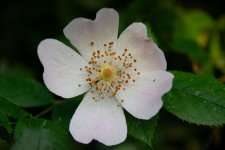
In the meantime, here's an image of a flower I took over the weekend to try to give you an idea of what I mean.

Here's the original image, sorry its a touch dark


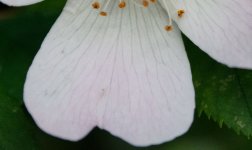
And this one is cropped right into one of the petals


Attachments

  • photo3.jpg
    photo3.jpg
    80.6 KB · Views: 31
  • photo4.jpg
    photo4.jpg
    78.1 KB · Views: 30
The other important question to ask is there a possibility your shooting .JPG and your friend shooting RAW ?
 
The histogram shows underexposure though not by much that cannot be recovered from a raw file.

However, as the EXIF Has been stripped I cannot guess the ISO but there is obvious noise in all areas including the shadows......so can you please either avoid stripping the EXIF in your workfkow or make sure to include the ISO, Shutter speed & Aperture in your posts.

As mentioned by @trevorbray please can you confirm the exact three settings were used by both you and your friend plus whether in his post processing he used the same workflow :thinking: this on the surmise that you are comparing his processed image to your processed image....or did he process yours too?
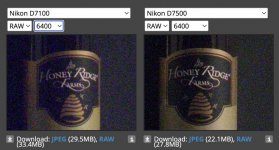
PS I am not a Nikonite so the question arises, is the D7100 using a noisier sensor than the newer D7500 :thinking:
Edit ~ a quick Google with its AI summary says that the lower pixel count of the D7500 has improved low light sensitivity compared to the D7100 which can show noise at as low as ISO 1000. Therein lies a possible contributor to what you are experiencing.
 
Last edited:
I have shot a lot in the past with a D7100 and no issues regarding either noise or sharpness - sure, not as noise free as a more modern camera, but still pretty impressive and if shooting e.g. outside then there should be no issue... My first thought was shooting in jpg and one camera having different jpg processing settings, but if you are both shooting in RAW that won't be relevant. It might be worth giving the D7100 a factory reset in case there is a weird setting doing something - otherwise I would be considering whether it needs repair...
 
The D7100 should be pretty good at low ISO, I've got a 7200 which is a tiny bit better than that and a 7500 in the low ISO range and there is no problem.

Could be all sorts of things such as auto ISO with a high minimum shutter speed or default ISO set too high.

Stick it in aperture priority, f/5.6, ISO 100, +/- set to 0EV. Set auto-ISO as on with minimum shutter 1/125, maximum ISO as 6400. Take some pictures in decent light.

Also stick it in landscape picture control. If it is in neutral or flat the contrast and sharpening will be dialled down.
 
Last edited:
I've asked my friend to send me the photos he took on his camera with my lens to show you the difference between the two. Same lens, same settings but different cameras.

In the meantime, here's an image of a flower I took over the weekend to try to give you an idea of what I mean.

Here's the original image, sorry its a touch dark


And this one is cropped right into one of the petals

Without knowing the EXIF it's hard to say whether this is an acceptable level of noise or not, and of course EXIF doesn't tell us the whole story as we don't know the quality of light when you shot these. I must admit, just looking on here there's nothing that screams too much is wrong as the light quality doesn't look the best, is it possible to provide a link to the original raw file to download and look at properly?

Also, the D7500 handles low light/high iso better as you can see here.

Screenshot 2025-06-03 at 13.27.31.jpg
 
I think you need to give us a bit more info I had a d7000 some years ago which was very good , then upgraded to the 7100 which broke after 3000 or so shots replaced by LCE and the replacement did the same … and it wasn’t till the 7200 came out that I got a good working model .. ..
But I digress which lenses are you using , and as you can tell from the variety of answers everyone will have their own theory .. if it was mine I would do a full factory reset . Just in case of a previous owner error … then test just one lens at a time .. if the results are still poor the look into a MA,on that lens . If that cures it there’s your answer if not then there’s possibly something wrong in camera ,remembering these are a fairly old camera now that’s been superseded by quiet a few models
 
Thanks for you’re replies everybody.

I’ll work through them and let you know how it goes.
 
I've asked my friend to send me the photos he took on his camera with my lens to show you the difference between the two. Same lens, same settings but different cameras.

In the meantime, here's an image of a flower I took over the weekend to try to give you an idea of what I mean.

Here's the original image, sorry its a touch dark


And this one is cropped right into one of the petals

It looks slightly mis-focussed to me. The green leaves to the lower light look sharper than the flower. It's very easy to end up missing focus with close ups, and it would be useful to have some examples where there is less chance of getting the subject slightly mis-focussed.

I confess to producing my fair share of flower pictures that look "exactly" like this, when I've been too lazy to set up a tripod and critically focus on the part of the flower I want sharp, and even then, the least bit of wind can move the flower out of focus and switch it to the foreground or background leaves/flowers.

The other issue, which often occurs in this type of photograph is over relying on AF to focus. Without taking full control on what the AF is doing, or switching to manual focus, the AF can often end up focussing in the wrong place

As others have mentioned, knowing what lenses you are using, and the exif would be useful.

And as I suggested, a slightly. wider shot where the exact focussing point is less critical would be useful. I personally would also look at several other examples and see if there is a pattern of mis-focussing (rather than it just being 'soft). This can be tricky at high iso and in circumstances where you may have a little bit of camera shake, knocking the edge of the sharpness.

The sensor in the D7500 is certainly slightly better than the D7100, but nothing that a bit of sharpening can't fix. And from that single picture it's difficult to judge whether you have a problem or not.
 
Back
Top