

Images blurred at 1:1 Zoom

Dracven

Suspended / Banned
Messages
47
Name
Thomas
Edit My Images
Yes
Hi guys, can someone please tell me why my photos look in focus at screen size and printed out on A4 but become blurred at 1:1 zoom? This is one I took yesterday at a racing day my Father in law attended. I just can't understand why they're all so soft at full size.

Thanks for any advice/information in advance guys n gals.

Thom
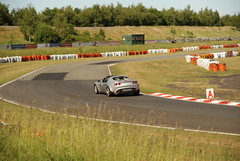
 
Hi there, it's a Sony A200 with a Sigma 17-70mm F2.8 lens at 1/4000. There should be a picture now, I had to figure out how to attach it.
 
Could you enable view all sizes? difficult to see at the standard Flickr size
 
Hi there apologies, how do I enable all size viewing? I've gone to flickr and can view it from small to original so I thought it was already done.

Thanks
 
All photos tend to look soft at full size in my experience. If they look fine printed, what's the problem?
 
Might have something to do with the Size settings on your camera? are you using small to try and cram as much as possible onto the the memory card??
 
I always shoot RAW and at full size. I was thinking it was a fault of my equipment or a limitation which is fine but if I want a reasonable sized canvas print of a picture I assume it'll look soft or blurred.
 
I always shoot RAW and at full size. I was thinking it was a fault of my equipment or a limitation which is fine but if I want a reasonable sized canvas print of a picture I assume it'll look soft or blurred.

Are you sharpening the RAW image? A RAW image will always need some sharpening. :thumbs:
 
I don't know how much sharpening you'd applied to the image or exactly where your focus point is but with a small amount of sharpening in photoshop, LOTUS on the back of the car looks sharp to me so I can't see a problem with this image.
In my opinion pixel peeping at 100% isn't good for the health!
 
Paul - thanks for that, at least some of it is clear. I was always told that in Photoshop the best way to edit is in 1:1 as you see it as it would be at it's largest size. I'm sure I've seen other peoples stuff incredibly clear at 1:1, mayhaps it's a quality of gear thing?
 
The EXIF data shows that you were shooting at F4.5 & 70mm. Lenses tend to be a bit softer at their extremes with many of them having a "sweet spot"

Try doing some test shots at different apertures & see how the sharpness changes at 100%
 
Thomas, you have loads of shutter speed in that pic, 1/4000 you said, stopping the lens down to F8 or 9 would have been a better option in this case.
 
Cheers Fracster, I did shoot some at F11 later on which look pretty much the same at 1:1 zoom that's part of what's confused me so much.
 
If they look ok at 50%, they will print out fine usually...........:thumbs:
 
Cheers Petersmart, perhaps I'm just overdoing the zoom in lightroom. I'll give it a little sharpening tonight.
 
Nothing wrong with that image, given the shooting distance. Nothing ever looks great at 100%, and it's a pretty unrealistic expectation TBH.

Tweaking the sharpness in post processing will help a bit, but the fundamental problem is that the car is too small in the frame. If that was shot with a 300mm lens, or perhaps even longer, I don't think you would be disappointed at all. It's not a lens 'sweet spot' problem, any big enlargement stretches image quality to the max so you must ensure that every square mm of imaging data and sensor area is used.
 
Back
Top