
image sharpening

Huss

Suspended / Banned
Messages
241
Name
Huss
Edit My Images
No
Hi all,
I am hoping someone will be kind enough to help please. I finally take a shot which I consider to be ok with one exception, the camper van in the shot is quite blurred. So I am hoping some of the experts on the site might be able to help please? Can anyone advise of the best settings to use in CS4 to remedy this issue please. I have posted a small version of the image beloew.
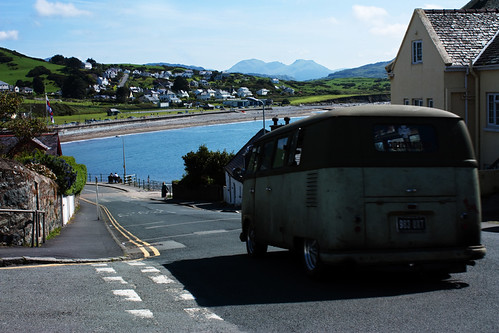
3564690382_a695484ffb.jpg


thanks for looking and any help anyone can offer
 
For sharpening specific areas of the image i would have thought selective sharpening via a layer mask .

Although viewing on my PC i'd be more concerned about the van being in so much shadow....as whats the point of being sharp when you cant make out the detail?
 
thanks for the prompt response dcash, I must apologise for the quality of the image I have not really played with level etc yet so might be a little dark on some screens. trust me though on the raw file the van detail is very evident. I appreciate the feedback
 
It's difficult to tell how bad the blur is on this photo. However, sharpening is not the solution. It doesn't correct what you would call blur. The usual result from trying to sharpen a blurred picture or object is usually, well.......crap.

You could try Smart Sharpen set to lens blur, with something like 200% radius 20, and apply to the van only as it will mess up the rest totally. Play with the figures a bit, but these are probably the max you could go to. As for the degree of shadow, I'll leave that to you.
 
Hi,

I am a great supporter of the simple shadows/highlights. Couple of minutes. I used the following:
shadows 60, 15, 7
highlights 85, 25, 70
color 0
contrast -25

camperVan1.jpg


If you want to sharpen, then the filter>sharpen>unsharp mask is the easiest. I didn't apply any sharpening.

John
 
It doesn't look that unsharp on the pic here, although it's a little small to see any detail, it'd guess it would sharpen ok, make a duplicate layer, sharpen that just for the van, and use a layer mask to hide the extra sharpening from the rest of the pic. Wayne
 
Hi,

I am a great supporter of the simple shadows/highlights. Couple of minutes. I used the following:
shadows 60, 15, 7
highlights 85, 25, 70
color 0
contrast -25

camperVan1.jpg


If you want to sharpen, then the filter>sharpen>unsharp mask is the easiest. I didn't apply any sharpening.

John

And this is done in CS4?
 
Thanks alot for all the advice, I will go away and see what I can do with the original image now.
 
No, just PS CS.

Image>adjustments>shadows/highlights.

Its easy to adjust the sliders.

John
 
Back
Top