
Image resizing

Scots_quine

In memoriam
Suspended / Banned
Messages
1,753
Name
Joan
Edit My Images
Yes
I have a conundrum that I cannot figure out and hoping you can help.
I use FastStone to batch resize images that I have taken at the whippet racing. For some reason which I cannot figure out, the file sizes of the images from Fastone are a lot smaller than if I had resized them in Photoshop (Elements). For example:

Original image: 1500x1500 pixels 1.16mb

Resize in Photoshop: 238kb
Resize in FastStone: 97.9kb

Both images still keep resolution of 300dpi, resized to 600x600.

Can anyone throw some light on this? or suggest another free batch resizing program.
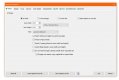
 
This is the resizing screen from FastStone.
Untitled-1.jpg
 
Somewhere in the options will be a setting for JPeg quality, which related to the degree of compression used.
Your Photoshop Jpegs are less compressed than your FastStone ones, IE they are using a higher quality setting.
 
JPEG quality is set at 100 which is the highest it will go. Original jpg is saved at Maximum, large file.
This is driving me nuts!
 
Somewhere in the options will be a setting for JPeg quality, which related to the degree of compression used.
Your Photoshop Jpegs are less compressed than your FastStone ones, IE they are using a higher quality setting.
When saving as in Faststone there's a little options tab at the lower right of the filename window, this allows you to adjust JPEG quality, I usually leave mine at 94% unless reducing a file for forums when I sometime go down to 74%. IIRC there's also a tick bow to make the value selected your default. The quality setting might be different in batch processing, but I wouldn't be surprised if it doesn't just use the default from here unless told otherwise.
 
It's the resampling filter being used. Lanczos3 does a lot of averaging of color/luminance data resulting in smaller file sizes. IDT Adobe products support Lanczos resampling algorithms; using versions Bicubic or Nearest instead.
Lanczos3 is very likely not the best choice either... but it might be the best option as implemented in FastStone (about a decade ago Lanczos was one of the best options available).
 
Last edited:
I have tried changing the filter to 'none' and it only pushes size up to 103kb! Lanczos3 is the filter used when I did a single resize.
There is obviously a compression effect in the batch resize which is not visible!
 
I just prepared a jpg image at 1500 x 1500 (ppi is immaterial) and it was 1.15Mb on file (6.44Mb opened in Photoshop). After batch resizing to 600 x 600 in Faststone according with the above, it was 395Kb on file.

I dunno about Elements but in full PS you can set up an action to resize, and run it on a batch, having chosen the parameters.
 
Last edited:
Thank you so much @droj . I changed Batch convert/rename output settings on the jpg output to 'disable colour subsampling' and set the filter on the resize options to 'none' and now have reached the giddy heights of 242kb (from a measly 97kb). that is a bit of an improvement! Still not quite at the 351kb from the single resize option but much better.
This forum is a font of knowledge! Thank you so much.
 
Back
Top