Image help

JD007F

Suspended / Banned
Messages
215
Name
James Franklin
Edit My Images
Yes
Evening guys,

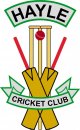
I’ve got a website which I’ve currently made for our cricket club as our old one was out of date and useless but it’s been a while and I have an image which’s the club logo and on the old site the same file would just use the logo but on this website it’s giving it a white background which looks awful can anyone help or explain how to get rid of it [emoji85]
IMG_9663.JPG

Many thanks
 
Change the background color of the logo in Photoshop?

Does it normally have a white background when you view it in isolation?

Or does it have a clear background?
 
In your editing software delete the white background, then save the image as a transparent .png format.

Personally I would recreate the logo from scratch to remove the glaring error which makes the logo look very odd. At the bottom of the image the stumps are in front of the bats and towards the top of the image the stumps are behind the bat
 
Last edited:
Okey dokey guys, I don’t currently have photoshop since being on Mac is there any editing tools I can get for Mac that are relatively easy to use as it’s been quit a few years since using photoshop etc.

Either that or I can send the logo to someone if they don’t mind helping me out?

The logo I’ve got is in a pdf and a jpeg format but the jpeg has a white background and the pdf has a clear background but can’t load the pdf to the website.

Let me know your thoughts and hank you for the quick replies [emoji1360]
 
on Mac is there any editing tools I can get for Mac that are relatively easy to use as it’s been quit a few years since using photoshop


I use and recommend British made "Affinity Photo"
for my pixel editing work!
 
Found it.
Will this do?
19140-1506936036-ced09f56465a2d6bc28a0041f45b3c98.png
 
Evening guys,

I’ve manage to work out and get rid of the stumps at the bottom but I can’t work out how to get the background to go[emoji85]see what you think.
Hayle CC.jpg
 
Still got Moebius/Escherish bats. (Right hand side of the V needs erasing.)
 
Rubbish [emoji85]forgot about that I’ll do that then pop it back up for another check sorry guys appreciate all the help [emoji1360]
 
Sorry, James!

I had to redo some prints I had done for Mrs Nod for a very similar oversight. Half a dozen A3+ logos which I had messed up. :( Could have been worse - at least I spotted the cook-up and redid the prints before they went on display!
 
One thing...
Is the anomalous logo also on things like hats/cricket whites/clubhouse/official stationery?
Did the club intend it to be a "Wait a minute...?" o_O thing?
 
Back
Top