iMac Problems....

EdinburghGary

Reply not Report
Suspended / Banned
Messages
19,271
Name
Gary
Edit My Images
Yes
Guys, any help appreciated :) I will keep it simple.


  • BT Business Broadband
  • Homeplug Switches from Netgear (lan over mains)
  • One laptop is wireless (Windows 7)
  • PC has it's own homeplug (Windows 7)
  • iMac has it's own homeplug (Most up to date Mac OS)
  • Lexmark laserjet and HP pro printer share their own homeplug
  • The final homeplug is at the router and dishes out the Internet to the others

Quite simply, the iMac is appalling online. Youtube & spotify can't stream, web pages literally take a minute to respond to a click at times (not the browser hanging, just the actual speed of the Internet it would appear). It feels like mega packet loss, poor ping times etc .

Both the laptop and PC fly online, the iMac is going to get a punch square in the balls.

Oh - little snitch is installed, same situation whether it's turned on or off though...

Planning a backup and factory restore after the shop closes today, unless one of you bright sparks can get it sorted :)

G.
 
Gary, do you have the default Mac firewall turned on as well as little snitch ? How does the iMac perform on wireless ? I'm running the latest release of snow leopard and not having any issues with wireless. I've not tried using homeplug... but what have you got the homeplug connected into ? And does the connection go through the circuit breakers or are they on the same ring main ?
 
Have you tried swapping the homeplugs over so that the iMac uses one of the "known good" ones? If it's still rubbish, you've ruled the homeplug out and need to move the iMac to one of the other homeplugs in a different power socket. How is it then? There may be some interference in the power spur the iMac is plugged into which is causing the slowness.
 
Is the iMac as slow if you switchover to using its wireless? Thinking maybe something could be interferring with your Homeplug network... Possible it wouldnt affect the PC if on different loop...
 
OK guys,

Homeplug taken out of the equation, wireless now active. Even worse, TP homepage took over a minute to start loading, Sky News 5 minutes or so and still not fully loaded....

I have been getting lots of ACCEPT OR DENY requests via the firewall recently, I blocked them all - maybe 5 or 6 a day. Something to do with RMDSAC or something....
G.
 
using pc on a home plug in same room as Gary
 
screenshot20100415at114.png


^^^^ all the time.
 
How are you having two printers 'share' single homeplug?

Lots of homeplugs used here and no issues at all. Time to take everything back to basics I think. Disconnect everything from your local network except the problem machine. Let's rule out other devices as being the cause of the problem.
 
How are you having two printers 'share' single homeplug?

Lots of homeplugs used here and no issues at all. Time to take everything back to basics I think. Disconnect everything from your local network except the problem machine. Let's rule out other devices as being the cause of the problem.

The home plugs I use are four port....
 
OK an update.....

I installed Adblock Plus for Firewfox, and subscribed to ALL the adblock lists. It would appear to have completely solved the problem, I have no idea why or how though.....it may just be a temp relief? Coincidental timing maybe...

G.
 
Stop adding complications. Start unplugging devices.
 
Cau you plug just the iMac into the router, nothing else? It will basically isolate the problem further.
 
I blame the Volacanic ash myself. Everyone trawling net seeing when their flights back on :)
 
You're blocking an akamia streaming service and associated process.

Lot's of software vendors (Adobe, Apple etc) use this to offload and accelerate app downloads.

Lot's of online media streaming services like iTunes, YouTube etc do the same. BBC and SkyNews website uses it too, but iPlayer uses Level 3.

I'd turn off Little Snitch temporarily, and see if that makes a difference.
 
Sorry, misread, It blocks both incoming AND outgoing connections.

I will isolate the iMac after the shop closes, on the router, and report back...

Cheers all :)

G.

Hi Gary

I'd be very wary of running anything like that on my Mac.

One sure-fire way to cause havoc on a Mac is to put antivirus software on it. (I know Little Snitch isn't AV software as such but it works in a similar way)
 
Has the Mac worked ok before on that router / connection ? I had a similar problem with a mac book where i had to reduce the 'MTU' size to match what was configured on the router (or set by the ISP). Symptoms were very similar to what you describe !
 
Gary, did you ever get to the bottom of this?
The same thing started happening on my Macbook, surfing the net is sooooo slow.
 
Have you tried a different browser. I have Chrome as a back up to Safari. Check processing running with activity monitor.
 
Have you tried a different browser. I have Chrome as a back up to Safari. Check processing running with activity monitor.

Tried that, Chrome's just as bad.
Oddly, despite the iTunes store homepage taking an age to load, music downloads appear to be about the same speed as they used to be.

It's getting really, really irritating.

My iPhone and my wifes windows laptop are all unaffected though, so it's definitly something OSX related and not the connection or router.
 
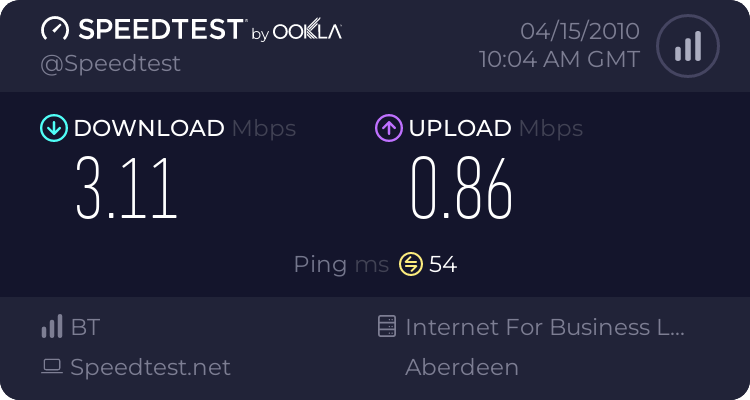
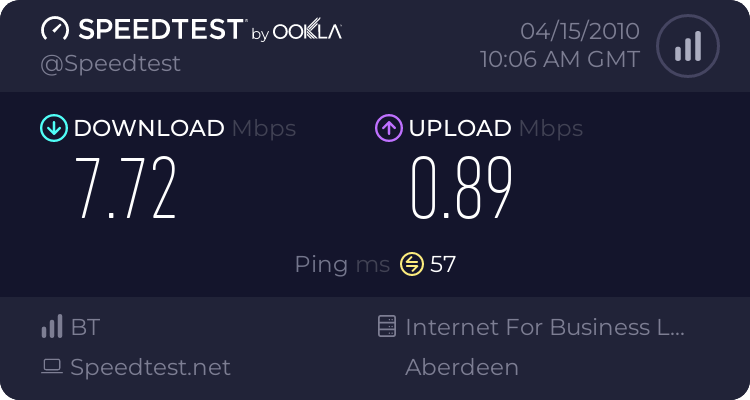
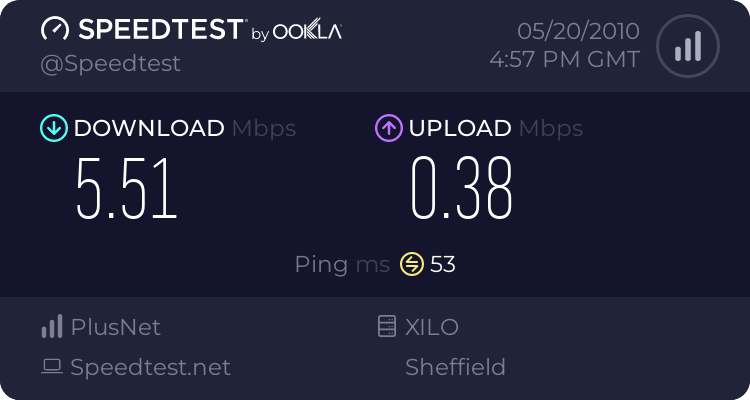
Just done the same speed test on my imac over wireless and got this result:


No pages take all that long to load which would indicate that its maybe not a direct speed related problem but something software based.

Other than that I can't be much help!

Do you have any software that is scanning web pages or such likes? I had a really bad speed drop when I installed AVG on my PC.
 
Tried that, Chrome's just as bad.
Oddly, despite the iTunes store homepage taking an age to load, music downloads appear to be about the same speed as they used to be.

It's getting really, really irritating.

My iPhone and my wifes windows laptop are all unaffected though, so it's definitly something OSX related and not the connection or router.

Ditto - my downloads are blazing, but general browsing is the dogs.

Do me a favour, try loading www.sky.com/news and tell me how long it takes to fully load...

G.
 
Right, after an evenings Google-ing, I spotted this on one of Apple's discussion boards:

I have been having the same slow connection issue in snow leopard. I finally did the following:

0. Close all apps using an internet connection
1. open system preferences
2. click on security
3. click on firewall tab
4. you may have to click on lock at bottom left of window to unlock preferences
5. click advanced
6. Uncheck "automatically allow signed software to receive incoming connections"
7. In large white box COULD be several program permissions
8. select each one and press the "-" icon under the box to remove ALL of them
9. After ALL are removed, OK out of the preferences
10. Relaunch safari. Your connection speed should be back to normal now

Let me know if this works for you. It so far has for me. (fingers crossed)

So off I went to do as suggested and discovered that my firewall wasn't even switched on. So I enabled it and tried accessing the net using Safari and it's like someones hit the turbo button, MUCH faster than it was. I'm not convinced it's back to full speed, but it's a dramatic improvement!

So, WTF is all that about?

Gary - Try turning Little Snitch off and the OSX firewall on and see how you get on, I'd be interested to see if it works for you as well.

Oh, and the Sky news website is awful, took forever to load on both machines I tried it on!!!
 
sky news on my imac - counted to 4 to totally load

stew
 
sky news on my imac - all loaded within approx. 6 secs speed as before roughly
 
Back
Top