Imac models for editing / business

gpc1

Suspended / Banned
Messages
2,289
Name
Greg
Edit My Images
No
I’m in the market for a new dedicated editing machine. I’m a mac convert I’m afraid. I have a mid 2009 Mac Book Pro and a Dell monitor which, up until now has been fine for editing weddings, bit sluggish when running CS6 and light room at the same time, but for various reasons I need to get a dedicated ‘business’ machine. The MBP may well still be used for the odd time I shoot tethered, but other than that it will be relegated to the ‘family’ machine for family stuff / house documents, family photos and holiday vids etc
  • I use LR (latest Version)
  • I use CS6 (not Creative cloud)
  • I use various CS6 / LR plug ins
  • I batch edit where possible
  • I rarely burn DVDs as I supply images on USB
  • I back up to an external HDD which is then kept offsite, but would be interested in backing up to a cloud service
  • I’m looking for editing speed and storage for images (5D 2 / 5D 3 Raw files)
  • I don’t edit videos (only Imovie for holidays / family stuff)
  • My work station isn’t very deep, so a 27inch monitor may be overkill. I already have a Dell monitor too.
  • I don’t tend to edit on the move.
  • I was thinking of having everything on the machine (all files, catalogues, apps / software etc) so there were no slowdowns with data transfers between drives etc.
Budget – I would like to keep budget as low as poss, but recognise that certain upgrades now may be beneficial.
So all in all I was looking at the 2 21inch IMac models.
If anyone has any experience of the basic Imac with similar usage to the above I would be interested to hear the pros and cons.
Many Thanks
 
I have a pimped out 27" iMac, but I'm sure the 21inch is fine. Just be sure to add as many upgrades as you can afford as it can't really be done afterwards.

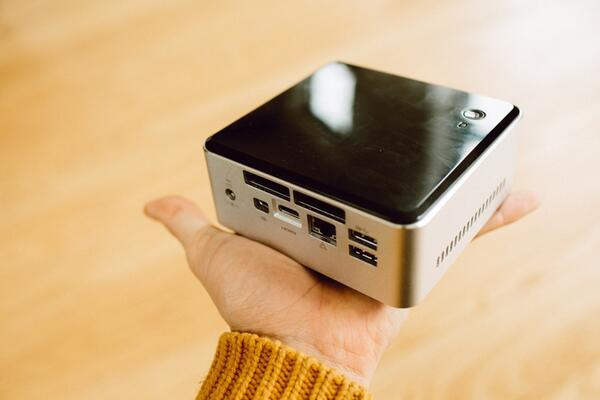
Alternatively, have you considered a MacMini to pair with your current Dell Monitor? They are good little machines and specced out would be more than capable of doing what you need. Just a thought!
 
Best move I did was to my imac. I was in the same boat and was really pushing my budget going for the 21 but managed to get a very good deal on the last of the old type 27's with built in cd drive. Apart from work stuff I use it for editing 18mp raw files and gopro footage and its fine, for example to apply one of the more complex filters in PS CS6 takes about 2 seconds.

Consider though that with my older model you can upgrade the ram which I did, whereas on the new ones you can't so to try and futureproof spec it up as high as you can. Solid state drives should help as generally its the read speed rather then the processing speed which slows things down. Also consider what plugins you are using as not all of them are available for mac, and if you plan to use things like an external card reader try and get a thunderbolt or USB3 one, else importing images can take a while.
 
I have an iMac 21.5", the only upgrade I did with apple was the processor got the i3 3.2GHz intel processor. Did the Memory upgrade myself upped it to 12GB DDR3 1333MHz. Bought this machine brand new few years back, it runs mavericks, cs6 and LR fine. and a Spyder 4 pro to calibrate the screen.
 
Alternatively, have you considered a MacMini to pair with your current Dell Monitor? They are good little machines and specced out would be more than capable of doing what you need. Just a thought!
id agree with this. if apples thunderbolt displays are anything to go by i have no confidence in any of their displays. dell displays > apple displays in my opinion.
 
The Mac mini is a good option, especially if you already have a good monitor. I think they are all i7 processors now but check.The i7 is much faster than the i5. You might want to add an Apple keyboard. An extra £40. I've had an iMac now for over 4 years and had no problems with it at all. The display is fine and calibrates perfectly.


Remember if you go for the 21.5" iMac NOTHING is upgradable on the latest model. Not even the memory. So you have to decide at the time of ordering how much you need.

A quick config on the Apple web site gives a 2.6GHz iMac 8Gb Ram an 1 Tb hard drive =£1149
A Mac mini to similar spec= £879 a saving of £270.
 
many thanks
2.6GHz iMac 8Gb Ram an 1 Tb hard drive =£1149
Would this spec be capable for my needs do you think?

I like those mac minis, but i have to say im a sucker for the Imac....plus i do find dual screens useful. Email / web open on one whilst editing on the other.
 
Don't forget to have a look in the Apple refurb store. All the products come with the same 12 month warranty as a brand new one (which the refurbs effectively are) but you can get a decent percentage off.

If you want to extend the warranty using apple care you can do that just fine as well. I did it with my iMac from the refurb store when I got it and its still going strong now.
 
Don't forget to have a look in the Apple refurb store. All the products come with the same 12 month warranty as a brand new one (which the refurbs effectively are) but you can get a decent percentage off.

If you want to extend the warranty using apple care you can do that just fine as well. I did it with my iMac from the refurb store when I got it and its still going strong now.
good point... cheers...will take a look
 
seems like a decent spec and saving £200
Processor
  • 2.9GHz quad-core Intel Core i5 processor (Turbo Boost up to 3.6GHz) with 6MB shared L3 cache
Memory
  • 8GB (two 4GB) of 1600 MHz DDR3 SDRAM
Storage
  • 1TB1 (5400-rpm) hard drive
Graphics
  • NVIDIA GeForce GT 750M graphics processor with 1GB of GDDR5 memory
Ports
  • Four USB 3 ports
  • 10/100/1000BASE-T Gigabit Ethernet (RJ-45 connector)
  • Kensington lock slot
  • Mini DisplayPort output with support for DVI, VGA, and dual-link DVI (adapters sold separately)
  • SDXC card slot
  • Two Thunderbolt ports (up to 10 Gbps)
 
really?

8gb ram not juicy enough

ahh, ok, so im better off getting a non refurbed and adding in some ram 16gb?
 
Last edited:
I am pretty sure you can upgrade the ram just fine, there is a small cover that comes off on the back just behind where the stand joins the screen on the very latest versions of the macs (super thin screen version) and you definately can upgrade ram on the version before the super thin screen version as I have one and have upgraded the ram myself.

Little tip, get the iMac with the least ram you can from Apple, then go to crucial and get more (apple ram is very expensive)
 
You won't need anything too powerful at all. I do very similar things to what you expect from your machine and I use this with an SSD and 16gb RAM; runs like a dream.

BkSvsHMCIAAXVIQ.jpg
 
You won't need anything too powerful at all. I do very similar things to what you expect from your machine and I use this with an SSD and 16gb RAM; runs like a dream.

BkSvsHMCIAAXVIQ.jpg


thats cool! I may spec out a mac mini then......its such a shame you cant upgrade the ram post purchase on an imac...
 
jeez!

just speced a mac mini and thats coming in at just under £1100.
  • 2.3GHz Quad-Core Intel Core i7
  • 16GB 1600MHz DDR3 SDRAM - 2x8GB
  • 1TB Serial ATA Drive @ 5400 rpm
  • Apple Wireless Keyboard - British
  • Apple Magic Mouse
 
Unless Apple make another abrupt policy change, my next Mac is likely to be a mini. Very underrated machine. In fact get one of these, gaffer tape a pimped out mini to the top, add a couple of lights and some hubs and you pretty much have MacPro. Plus 5 grand in your pocket.

I do pretty much everything on your list (except I do a little video and tend to chuck a lot of D800 files around), like Al I have a heavily specced 27" iMac. It's probably the nicest computer I've ever had.
 
thanks all

Useful stuff.

Im close to making a purchase. Off to john lewis at the weekend to have a look. (2year warranty with JL) Then decide what model to go for. I need dual screens really, so the mac mini, although great, doesnt have one.

The refurb spec above for the 21inch would be ideal if the RAM was 16gb.

Thanks all
 
I have a pimped out 27" iMac, but I'm sure the 21inch is fine. Just be sure to add as many upgrades as you can afford as it can't really be done afterwards.

Alternatively, have you considered a MacMini to pair with your current Dell Monitor? They are good little machines and specced out would be more than capable of doing what you need. Just a thought!
how do you find the screen for editing? Did you try the 21 vs th 27.

My editing desk is quite shallow so a 27inch would be too big / close i think
 
Because its a sharp display, you can look at it very closely without the normal pixelation problems you get when looking at a screen close up - although it probably doesn't do your eyes much good. I reckon I sit about 600mm away from mine and unless I lean back I don't see the edges - the bigger screen is great once you get use to it as you can populate it with lots of stuff, either look at a whole image and edit overall rather then bit by bit, or have images open side by side for comparison still at an editable size.

Just because the screen is big, doesn't mean you need to see it all in one go!
 
I
Because its a sharp display, you can look at it very closely without the normal pixelation problems you get when looking at a screen close up - although it probably doesn't do your eyes much good. I reckon I sit about 600mm away from mine and unless I lean back I don't see the edges - the bigger screen is great once you get use to it as you can populate it with lots of stuff, either look at a whole image and edit overall rather then bit by bit, or have images open side by side for comparison still at an editable size.

Just because the screen is big, doesn't mean you need to see it all in one go!
like it!

Costco seem to have a good deal on 27 inch. Cheaper than the apple store including 12 g of ram as standard.

The only thing is it's the basic drive ( not fusion).

Still, need to go and have a look. I think I need to up my budget.

Cheers all
 
If you can afford the 27" then go for that over the 21.5"

I bought my 27" with the 3TB fusion and just 8GB of RAM knowing that I can upgrade ithe RAM myself. I spec'd the best I could afford/justify including the better graphics card with a view that this will extend its life with me for much longer.

I calibrate the screen monthly and it is staying 99% true and can't complain at the quality/processing capability etc and the desk is much tidier without the 17" MBP on the desk! :)

I also have the 3 year warranty - essential on a machine that has near zero user upgrade/repair.
 
The only thing is it's the basic drive ( not fusion).

Still, need to go and have a look. I think I need to up my budget.

Cheers all
I wouldn't go for a "normal" hard drive unless you have absolutely no other option. You will regret it.
 
I wouldn't go for a "normal" hard drive unless you have absolutely no other option. You will regret it.
whys that?

is there such a difference btween that and a fusion for my uses?
 
whys that?

is there such a difference btween that and a fusion for my uses?
di
Why will he regret the 'normal' drive?

Sorry, I should have clarified. The speed differential is noticeable and significant. Having tried a standard HDD set up and an SSD based one, the SSD was so much more 'usable' but to spec this on the iMac is prohibitive. Fusion is a good compromise.

All IMO of course.
 
Fusion drive is surprisingly fast. Now that SSDs are pretty much standard in PCs I bet the normal drive will feel slow in a Mac.

But the SSDs are crazy money.
 
Back
Top