You are using an out of date browser. It may not display this or other websites correctly.
You should upgrade or use an alternative browser.
You should upgrade or use an alternative browser.
iMac M1 - How do I?
- Thread starter gramps
- Start date

OP

gramps
Suspended / Banned
- Messages
- 44,805
- Name
- 'Gramps'
- Edit My Images
- No
Yes it's almost always Mail - seems little point in having an option to 'Sleep' if using it doesn't make it sleep!There’s probably an app or setting keeping it awake.


- Messages
- 7,468
- Name
- Stephen
- Edit My Images
- No
If you're using anti-virus it may be actively scanning, or do so at regular intervals through the night. On my iMac I can force it to sleep by pressing the back power button for 1 second - no more and no less.

Yukyum
Suspended / Banned
- Messages
- 45
- Edit My Images
- No
I added a link to an Apple support page but it didn’t make it through moderation.Yes it's almost always Mail - seems little point in having an option to 'Sleep' if using it doesn't make it sleep!

Musicman
Suspended / Banned
- Messages
- 9,866
- Name
- Rob Telford
- Edit My Images
- No
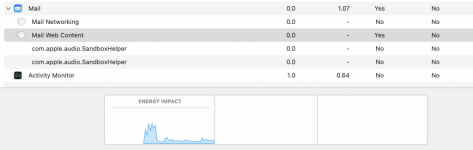
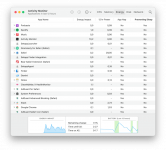
Have you checked the Energy tab in Activity Monitor? There should be a column there for Preventing Sleep; if not make sure it is ticked in View > Columns in the menus for Activity Monitor.
Anything that says 'Yes', is going to be a problem and you should be starting with quitting those apps/processes.
That said, you should not be needing regularly to Force Quit applications, especially something like Mail.
An ordinary Quit (from the application menu or Command-Q) should suffice to close down apps properly. If not, and you are having to force quit apps, then you may have some other problems that need addressing.
Anything that says 'Yes', is going to be a problem and you should be starting with quitting those apps/processes.
That said, you should not be needing regularly to Force Quit applications, especially something like Mail.
An ordinary Quit (from the application menu or Command-Q) should suffice to close down apps properly. If not, and you are having to force quit apps, then you may have some other problems that need addressing.
Attachments
OP
gramps
Suspended / Banned
- Messages
- 44,805
- Name
- 'Gramps'
- Edit My Images
- No
Thanks, I'll keep an eye on thatHave you checked the Energy tab in Activity Monitor? There should be a column there for Preventing Sleep; if not make sure it is ticked in View > Columns in the menus for Activity Monitor.
Anything that says 'Yes', is going to be a problem and you should be starting with quitting those apps/processes.
That said, you should not be needing regularly to Force Quit applications, especially something like Mail.
An ordinary Quit (from the application menu or Command-Q) should suffice to close down apps properly. If not, and you are having to force quit apps, then you may have some other problems that need addressing.