I need help :)

Chr1stof

Suspended / Banned
Messages
1,171
Name
Chris
Edit My Images
Yes
Hope Im posting this in the right place, if not please forgive me and maybe a mod will move this thread.

I bought a Canon 550d a couple of months ago and to be honest, Im really struggling to produce anything that looks much better than I could have done on my compact. Ive been reading my manual, played with DOF, composure, picture styles, spent ages on here reading tips and so on. Im 99.9% sure its all down to me but I have a nagging doubt about the camera. The reason is that I look at reviews of the camera, flickr and various forums with people posting images "straight from the camera" and they mostly seem to have a certain quality about them that I cant quite put my finger on to describe. They seem so much sharper, vivid and more detailed. My pics just seem to have something missing quality wise. The focus looks soft and the pictures often have a certain blandness that doesnt just look like an incorrect exposure.
I appreciate that Im just starting off and as I learn more and improve my technique things will improve, and I know I have a massive hill of knowledge to climb but I would like to put my mind at rest and check Im starting on soild ground and not a crumbling rock :)
My thought was to get another camera side by side with mine and take some control shots to test a few things out to confirm that I am indeed a numpty (most likely) or If my cam isnt quite right.
I know its a big ask but I was wondering if there was anyone with a 550d in the North Wales/Merseyside area who would spare me an hour to test things out?
I wanted to try my local club but I work every week on their meeting night.
The camera represents a big purchase for me and I would feel a whole lot better if I could confirm its 100% ok and the issue is just down to me!
 
Two questions Chris, What lens are you using? And could you post a picture on here straight from the camera?
 
Firstly don't panic!

A huge number of people new to DSLRs (usually having had a compact) go through exactly what you are thinking at the moment.

Firstly the whole 'straight from camera' stuff is usually nonsense; and even if it's not they almost certainly couldn't claim 'straight from the camera, as it came from the dealer, without any adjustments'.

Secondly, I'm willing to bet that a fair few of the images that you are looking at come from Nikons (NO THIS IS NOT A DIG!!). Nikon and Canon take a different approach to their Jpeg conversion, and a similar image taken with a Canon will need more work in PP to achieve the same saturation and sharpness as that which you would see from a Nikon.

You need to learn a few things:

How exactly picture styles work on your camera, and what your preferred settings are, as these control how the 550D treats or develops the Jpeg.
How to achieve the best results by using the appropriate AF point and method, and also the best exposure.
How best to Post Process your images using the relevant software.

As you've already said, it's going to take time, patience and it's a very steep learning curve, but it really is worth the blood sweat and tears; and you'll know that as soon as you capture your first image exactly as you envisaged it and go WOW!

If it's any help, I found the Blue Crane tutorial DVDs very useful and at around £20 they're fairly good value.

I hope that you find someone to reassure you, but even if you don't stick with it; you'll soon get there! :D
 
its a matter of practice, put it in manual and shoot, everytime you **** up try to work out why, everything you dont understand go find it out

the more you shoot the faster you learn
 
Thanks for the replies, I was expectecing to get blasted lol

I was looking at a Guys pics on Flickr, he had just bought it and was using the kit lens on standard settings on AE and they just had that certain pezaz.
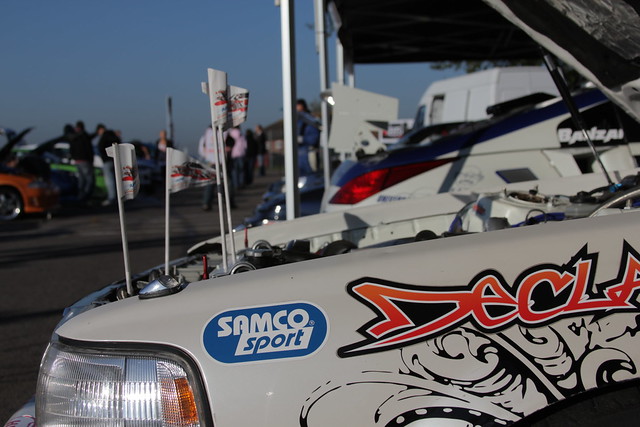
Anyway, as requested here is a pic (one of my better ones lol) using my EF 28-135mm f/3.5-5.6 IS.

5112403913_13c2ba8155_z.jpg
 
Last edited:
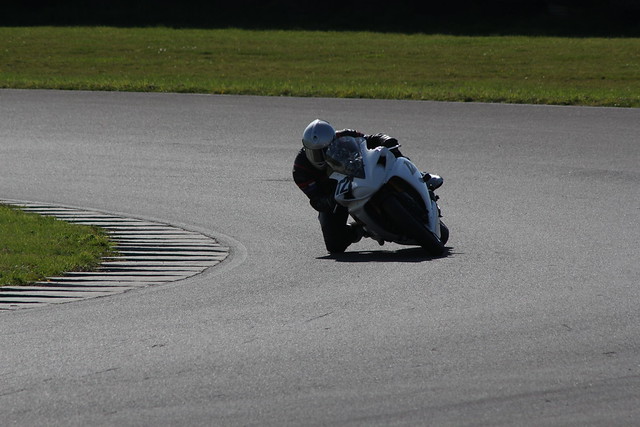
canon 75-300is,1/400,f10
shutter priority
5113054800_925b0e3229_z.jpg
 
Last edited:
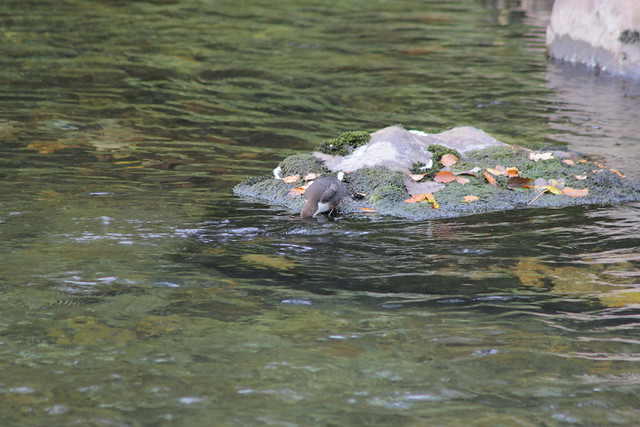
75-300,f6.3,1/80
Ap priority

5113131450_4d06d4d301_z.jpg
 
Last edited:
right, think about the reasoning behind the shots

why did you shoot the bike at 1/400 not 1/100 or 1/1000

why did you shoot the duck at f6.3 as you chose those settings......
 
Nothing wrong with the camera or lens. The first shot looks like it was taken late afternoon when the sun was low in the sky, secondly the composition is lacking, in terms of a focal point. What were you trying to capture exactly? The car is in focus, but you can only see bits and pieces? On the second shot you were shooting towards the sun, the camera metered for a correct exposure of the grass/track, which meant the bike/rider were under-exposed. The #3 shot again is down to composition, the dipper needed to be larger in the frame (if that was the subject) also a circular polarizer would cut down on some of the reflections in the water. As David said, its a matter of going out and seeing what works and what doesn't and as Mark said, play around with software to get the best out of your images. Rob
 
Last edited:
Pedant mode on.....the "duck" is a dipper.........pedant mode off......:thumbs:
 
Pedant mode on.....the "duck" is a dipper.........pedant mode off......:thumbs:

Still looks sharper than one of yours :D Taking the P..s mode off! ;)
 
Both of you first two shots the camera's metering has been fooled by the conditions. In the first there is a predominance of white. The camera assumes that everything is 18% grey, hence you picture is underexposed. Very quick to make some sort of recovery in post-processing. Here is a very very quick play in photoshop. Still needs a bit more as on here the whites are still a little grey.


The second picture looks like you were shooting into a low sun. As the rider is in shadow and so small in the frame he remains underexposed.
 
My input as a noob.
The biggest change Ive noticed in my pics lately has been after I purchased Elements. I always shoot RAW and post processing is where you can make the pics 'zing'.
You need some shots with potential to start with obviously.
Your white balance on the cars for exampe, if you shot in raw, can be corrected in canons DPP software(or Elements) using the eye dropper tool to select the white paintwork. A bit of saturation boost perhaps and some sharpening. You might be surprised.
 
I'd agree with most of what's been said on here I think, I used to shoot Canon and the picture styles were really very good once you got used to them and what they did but it's a combination of things in these pictures, partly picture styles/processing (as that's what picture styles are really) and partly composistion and understanding how your camera meters a scene, maybe try using spot metering and keeping your subject central till you learn how the average metering will work?
 
thanks for all the replies so far. I apreciate that my composition is quite poor on these and so on but I was struggling to find a photo that I hadnt tinkered with or deliberatly set something too high or low as a test. I will take some better "plain" shots later on and post them up.My main worry was that the pics are poor and Im having to shop them. They always seem to be under/over exposed and/or soft when using shutter and aperture priority.
To answer a few questions-
David 1701- With regards to shutter speed, I was trying to go as fast as I could with the shutter to keep the following bike sharp without freezing everything as I was panning the first bike.
I shot the bird if you pardon the pun at 6.3 as with anything less nothing looked in focus.

Feek- car shot was 9.15am :) I was trying to focus on the flags (fail) with a shallow DOF. My fault but I posted that pic to show the poor whites and general wishy-washiness.
Seagullsteve- thanks, interesting
Micloi- thanks. I under exposed it a bit to catch the colours, raising it in PP really seems to wash out the grass which is what I did in other shots.Maybe raisng saturation in styles is the answer to that? Sun was at about 2oclock to me which didnt help though.

Heres the flicr link if you want to see the exif-

http://www.flickr.com/photos/55047965@N03/
 
Last edited:
Couple of questions on the duck EXIF..... contrast -4 and 1/80th @ 300mm are two that jump out at me straight away.
You're using a user defined picture style there too, maybe try using one of the Canon defined ones?
 
Basically what everyone else has said, and playing around with the picture styles in camera should give you some of the 'pop' you're looking for in your jpegs. If you're using RAW then they will be flat until you've done some pp. As almost everyone who as moved from a compact to a DSLR will agree, there is a huge learning curve and pictures are usually pants for a while....practice, practice, etc.
 
Duck! :)

Chris, don't get too down, all that need to happen is you need to learn how your camera sees things. It's a steep learning curve coming from compacts which artificially bost colours and contrast to make your pics look better out of camera.

A dslr does none of that but asks you to be the "brains" of the outfit. It is basically a box with a hole in it and understanding how all the systems come together takes time. Which AF mode? Which shooting mode? Which metering mode?

The basis of your problem appears to be exposure. My advice would be to read up on exposure and then the different metering modes and how they work. Once you know how they work you start to learn which conditions will fool them........

It's not a quick fix such as "buy xxx for pp" but it will stand you in much better stead to understand how your kit works.
 
Basically what everyone else has said, and playing around with the picture styles in camera should give you some of the 'pop' you're looking for in your jpegs. If you're using RAW then they will be flat until you've done some pp. As almost everyone who as moved from a compact to a DSLR will agree, there is a huge learning curve and pictures are usually pants for a while....practice, practice, etc.

I remember I went through this, 'why cant I get any zing!' from my D80? Then I bumped into this:

http://www.pcpro.co.uk/blogs/2009/0...ital-photos-with-the-levels-and-curves-tools/

It gave me the ability to put some life into my JPG pictures, which made me happy, which gave me enthusiasm to investigate further. I now had a template to work from, adjusting the in camera colour menus. That led to RAW, which is a more refined version of PP-JPG pictures.

Its not the whole story, enthusiasm became confidence, I now shoot RAW/JPG, adjusting the camera on board processing colour menu to 'my liking' (now I know what that is). I usually view on computer screen in JPG, choose the ones I like and then simple PP as a RAW file, note, unprocessed RAW pictures can look very flat, but you know where you are going from the JPG.

Why not just use the JPG? . . . any additional PP'ing, and there will be some, does not have the finess of what can be done in RAW.

I'm still at a low level of competence, but off the first rung of the ladder . . . I like to think:lol:

As for camera shooting settings, personally, I use center weighted metering, it rarely lets me down, usually requiring; -0.3 or -0.7 compensation for normal shots . . . into sun or a white subject might require; +0.3, +0.7 or +1. Trial and error . . . thats the beauty of digital;)

Just my two penneth, its my way. I understand it may not be the proper way, but I have spent my whole life adjusting and adapting as I have a problem with dyslexia. Its great coming from a different angle to a final result . . . however sometimes one ends up with egg on the face . . . step back, regroup, make a few adjustments, get in and have another go!!!! :thumbs:

CJS
 
Last edited:
its a matter of practice, put it in manual and shoot, everytime you **** up try to work out why, everything you dont understand go find it out

the more you shoot the faster you learn

Excellent advice. That's how I learnt.:)
 
Ive taken some pics on the way home tonight. Mostly Ive taken the shot once with the "standard" style an once with a custom upping the saturation a bit along with the contrast and sharpness. Ive just had a quick look and Ive noticed even on the pics with a smallish aperture (around f11) and despite picking specific focal point, there seems to be a certain softness even around the area I focused on. If i run it through DPP and slide the sharpness control right up it seems to really inprove the picture but surely I shouldnt have to run every image through this. Will post them in a minute.
 
So this is a duck too? :D
images


Maybe...... :lol:

Chris, you might want to try shooting on a tripod or really watching your shutter speeds in A mode, on the picture of the 'duck' your shutter speed was 1/80th at 300mm..... a lot of people can't handhold that reliably.
 
Point taken on the shutter speed.

Right heres a couple from this afternoon.
All on evalutave metering

Taken in "standard" 1/80th, f5.6, Aperture pri

5115219684_bf16498de0_z.jpg


Same pic with a custom setting-

5114610853_006a339929_z.jpg


pics are all here if you want to see the larger size
http://www.flickr.com/photos/55047965@N03/
 
Last edited:
Excellent advice. That's how I learnt.:)

Manual . . . ? O'boy . . . Why??? its purgatory, most of the time . . . hair shirt and photographic self fladulation???

After I had got 'pictures' presenting the way I wanted, I did the 'manual bit', basic stuff, pre choose ISO and aperture, then spin the thumb wheel to bring the view finder bars into '0' line or + - 0.3 etc., click, perfect picture every time:thumbs: Thats OK all the time nothing was moving or there was time to faff about like that. If the subject was on the move or it was there and then 'gon'!!! :thinking:

I soon worked out that ISO was a fairly constant setting over a long enough period, and that if I used 'aperture priority', the camera could do all the thumb wheel twiddling a lot faster than me . . . ! And the same applied if things were moving fast and I needed to guarantee a quick shutter speed, over to 'shutter priority'.

I can see the need for manual, but I rarely use it these days, the easy option is the 'priority' semi manual/auto settings. As I say, its good to know 'how' and 'why', but why make life difficult?

I also recon a top end camera body is better at manual, compared with bodies the further towards entry level you go. A top 'Pro' must be like a pianist, playing the buttons like piano keys with a deft touch. What chance have we amateurs got to achieve that sort of dexterity? . . . or do they??? may be they use the priority settings as well, its the easy life :naughty:

Only my way; 'approach from a different angle'.

CJS
 
One more example for now, I sense y'all getting bored :)

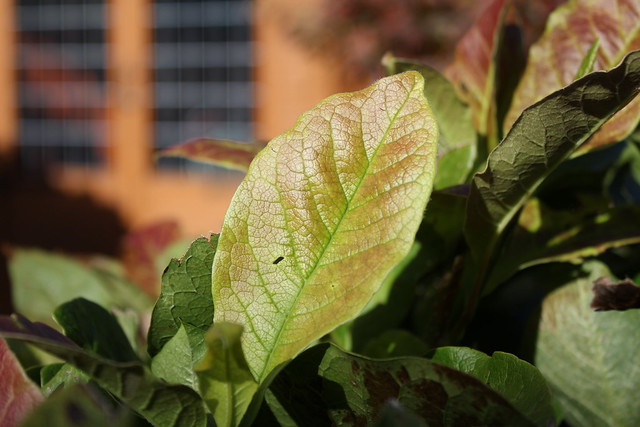
As the images I got today were in slightly fading light and shutter speeds came down, I thought I would post one I took a day or two ago. Again, kit lens, standard style. I thought the exposure was fairly good in aperture priority, but the reason I post this one is that I noticed when I looked a bit closer at the veins (or whatever they are called) in the leaf the image looked a litle soft again.
This surprised me as I used centre spot AF, so I loaded it up in DPP and again it looked a lot better when I upped the sharpness slider. Am I asking too much or is summat amiss here?
Thanks again for all your input everyone, I really do appreciate your wisdom :)
here you go-

Kit lens, 1/640, f5, evalutive metering, spot AF
http://www.flickr.com/photos/55047965@N03/
5115183125_ea7b452794_z.jpg
 
Last edited:
The birdie is a white throated dipper by the way :)
 
The birdie is a white throated dipper by the way :)

:thumbs:......Somebody more pedantic than *insert forum pedants name here* or just Flashy or Hoppy.....:naughty:
 
(Cinclus cinclus) :) Thank god for Wiki..

Right, enough of this, has anyone downloaded the original full size image of the leaf yet to have a play on the sharpness slider? Im in suspense here to see if its just me being paranoid :cuckoo:
 
OK, I have looked at it. Why did you take this test shot,why that aperture and shutter speed?

Bear with me and give me an answer......:thumbs:

And stop stripping the exif from the photos...........:bat:.....;)
 
I think the thing making that look soft is the DOF or lack of it, if I was to guess you were about 18" from your leaf then that will give you about an inch depth of acceptable focus. See basically, the closer you get to the subject the higher an F number you need to get more of the scene in focus. (if that makes sense) The bit of the leaf that is in focus looks pretty sharp but it's hard to tell without a full sized image.
 
Oh and if that is a kit lens then it's pretty much wide open.... .not usually the best way to use one of those.

Edit to add** It is a kit lens.... closer to F8 would be a nicer/sharper way to shoot this lens.
 
Last edited:
Hmm, I thought on Flickr there was an option to download the origginal, seems to be missing for some reason
 
Back
Top