
and the site receives a small commission
You are using an out of date browser. It may not display this or other websites correctly.
You should upgrade or use an alternative browser.
You should upgrade or use an alternative browser.
How would you restore this photo
- Thread starter erding
- Start date


- Messages
- 26,617
- Edit My Images
- Yes
That looks a pretty easy restore Tom - just light marks which are easily fixed. It's just a question of putting some contrast back into those faded areas in the corners, which again shouldn't be difficult. The problem is that involves a lot of hands on retouching to do a proper job - there aren't any magic buttons or filters which will do it. I'll be quite happy to sort it out for you if prefer.
Great old photo!
It looks good enough to scan and be printable quite a lot larger than you've shown it here. To work on it - the larger the scan the better.
Great old photo!
It looks good enough to scan and be printable quite a lot larger than you've shown it here. To work on it - the larger the scan the better.
Last edited:


Mr G
Suspended / Banned
- Messages
- 2,392
- Name
- James
- Edit My Images
- Yes
as everyone says the more time you spend clearing up the spots the cleaner the pic..I have done a bit but not nearly enough time spent on it.. but it will give you an idea of what can be done...spot healing and contrast and brightness and a little bit of sharpening 

Last edited:
- Messages
- 26,617
- Edit My Images
- Yes
Tom's actually done a pretty good job on his own (he sent me his edited version so far)
It does raise an interesting question though about how much you should do to these old photos. I've been doing this work since the first home computers and the first photo editing software, and attitudes (including mine) have changed a lot in that time.
If you're going to do it it - the key thing to remember is you're trying to restore it to as near original as you can get it, and depending on the amount of damage, that's often nigh on impossible without the work you've done (a) showing and (b) having an obvious effect on the validity of the original image.
Interestingly, a lot of the valuable old historic photos which are shown on TV programmes are shown warts and all - the shots will have been scanned for preservation purposes, but they don't do restoration on them - even the ones requiring quite simple editing. The truth of it is that no matter how well the restoration is done, it will never have the credibility of that original old print which you can actually hold in your hand and marvel at the history it represents with all it's faults.
The problem is if you undertake this kind of work people will bring you old photos near to disintegration which are truthfully well past any meaningful repair and you should advise them accordingly. Often though it's a cherished photo of some loved one and they'll implore you to do your best - which of course you will, but never lose sight of the fact that your retouching work is judged from these results and the state of the original photo won't come into the equation.
The moral is store these old photos properly in the first instance - they're pretty well priceless.
It does raise an interesting question though about how much you should do to these old photos. I've been doing this work since the first home computers and the first photo editing software, and attitudes (including mine) have changed a lot in that time.
If you're going to do it it - the key thing to remember is you're trying to restore it to as near original as you can get it, and depending on the amount of damage, that's often nigh on impossible without the work you've done (a) showing and (b) having an obvious effect on the validity of the original image.
Interestingly, a lot of the valuable old historic photos which are shown on TV programmes are shown warts and all - the shots will have been scanned for preservation purposes, but they don't do restoration on them - even the ones requiring quite simple editing. The truth of it is that no matter how well the restoration is done, it will never have the credibility of that original old print which you can actually hold in your hand and marvel at the history it represents with all it's faults.
The problem is if you undertake this kind of work people will bring you old photos near to disintegration which are truthfully well past any meaningful repair and you should advise them accordingly. Often though it's a cherished photo of some loved one and they'll implore you to do your best - which of course you will, but never lose sight of the fact that your retouching work is judged from these results and the state of the original photo won't come into the equation.
The moral is store these old photos properly in the first instance - they're pretty well priceless.
Last edited:
OP

erding
Suspended / Banned
- Messages
- 11,424
- Name
- Tom
- Edit My Images
- Yes
Thanks for all your advice and suggestions. For reference the edit I sent over to CT last night was:

Please feel free to have a go if you can improve it, just please post it back in this thread with exactly what you did.
Tom
Please feel free to have a go if you can improve it, just please post it back in this thread with exactly what you did.
Tom

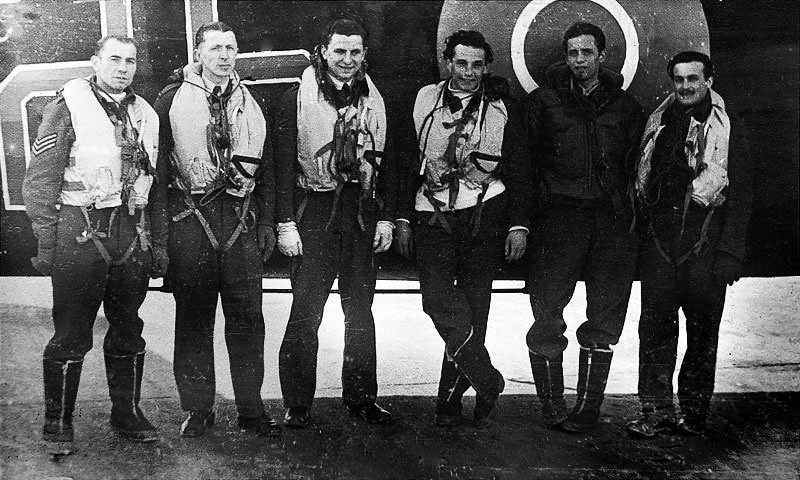

swanseamale47
Suspended / Banned
- Messages
- 10,876
- Name
- wayne clarke
- Edit My Images
- Yes
Had a very quick go as I'm stupidly busy, but tried to even ir out a bit.


- Messages
- 4,134
- Name
- Carol
- Edit My Images
- Yes
Tom's actually done a pretty good job on his own (he sent me his edited version so far)
It does raise an interesting question though about how much you should do to these old photos. I've been doing this work since the first home computers and the first photo editing software, and attitudes (including mine) have changed a lot in that time.
If you're going to do it it - the key thing to remember is you're trying to restore it to as near original as you can get it, and depending on the amount of damage, that's often nigh on impossible without the work you've done (a) showing and (b) having an obvious effect on the validity of the original image.
Interestingly, a lot of the valuable old historic photos which are shown on TV programmes are shown warts and all - the shots will have been scanned for preservation purposes, but they don't do restoration on them - even the ones requiring quite simple editing. The truth of it is that no matter how well the restoration is done, it will never have the credibility of that original old print which you can actually hold in your hand and marvel at the history it represents with all it's faults.
The problem is if you undertake this kind of work people will bring you old photos near to disintegration which are truthfully well past any meaningful repair and you should advise them accordingly. Often though it's a cherished photo of some loved one and they'll implore you to do your best - which of course you will, but never lose sight of the fact that your retouching work is judged from these results and the state of the original photo won't come into the equation.
The moral is store these old photos properly in the first instance - they're pretty well priceless.
I think it depends on what you're trying to achieve. Merely to archive it digitally, you wouldn't do anything other than a high res scan. But to give it to someone as a memento, its better to 'clean it up', but not try to make it look as if it were taken yesterday. I've done a lot of this sort of thing for my Dad from his WWII days. I've also done some 'retouching' for people who bring a frankly hopeless image. It then almost becomes a work of fiction, trying to replace the irreplaceable. But if they are happy ...
Last edited:
swanseamale47
Suspended / Banned
- Messages
- 10,876
- Name
- wayne clarke
- Edit My Images
- Yes
Nice one Wayne. Can I ask you exactly what you did to achieve this please?
Tom
I duplicated the layer, set it to multiply, then used a gradient on the layer mask to apply it to the bottom half (to darken it) then a fair bit of burning dodging to lighten/darken various bits, added a bit of contrast (not much) just to lift it.