
How would you post-process this

mattjg01

Suspended / Banned
Messages
60
Edit My Images
No
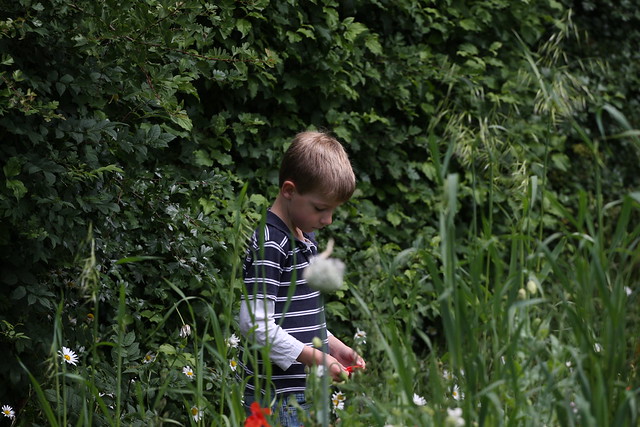
I am still very much my camera and post-processing using Canon's Digital Photo Professional mostly. I took this picture last month and have just got round to looking at it. Currently it is an untouched jpeg straight from the camera and I'd welcome suggestions for how to improve it in post-processing. I do have the RAW file as well so can work from that.
5955446974_1b2e2e7495_z.jpg


Many thanks
Matt
 
To be honest I would bin that unles you have a specific reason for keeping it.

Big part of the learning process is knowing what to keep and what to bin.
 
No particular reason to keep it, just interested to hear ideas of what people might do to it in PP.
 
If the grass in the foreground wasn't there and there was some eye contact then it would be a different image.

The grass can be removed, not easily, but there would still be no eye contact.

The colours etc are fine.
 
i've cropped it to bring the boy closer to the viewer and then added quite a heavy vignette again to focus on the subject. i sharpened it up but it looks like it's really buggered it up somehow with jpeg compression etc. but you get the jist.

all personal preferences but just an option for you.


matt by leftcurl, on Flickr

don't worry.. it's on my flickr but private so no-one else can see it :thumbs:
 
Add an action or 2 from the MCP collection to leftcurl's good choice of crop and you are on your way to a keepable image...........
 
Guys, many thanks for those suggestions it makes a huge difference to the image :thumbs:
 
5955446974_1b2e2e7495_z-Edit-2.jpg

I've taken a different crop to bring him forward and give him space to walk into.
Cloned out the big white flower and the red one by his leg. But left the bit in his hand as it gives him something to look at (explains no eye contact.)
Boosted contrast,
Added graduated filter towards bottom right to darken and a slight vignette.
 
Last edited:
Back
Top