How to upload photos

  • Thread starter Thread starter Mayer71
  • Start date Start date
M

Mayer71

Guest
Can any one tell me how to upload some photos for examples in a tread. Please help me cause in abit stupid here :bang:
 
Just asked the same thing, photomad is going to post the answer in my thread. So keep looking at mine.
 
Can any one tell me how to upload some photos for examples in a tread. Please help me cause in a bit stupid here :bang:

if you upload them in your gallery and then use the button with a mountain on it where you can add the link - to get the link click on the pic in ur gallery and copy and paste from address bar. voila
 
go to photomad s posts and look at the one that is titled photomad by photomad

it is next to the thread that says 'my thread has moved'

hope you find

i dont know how to link you to it
 
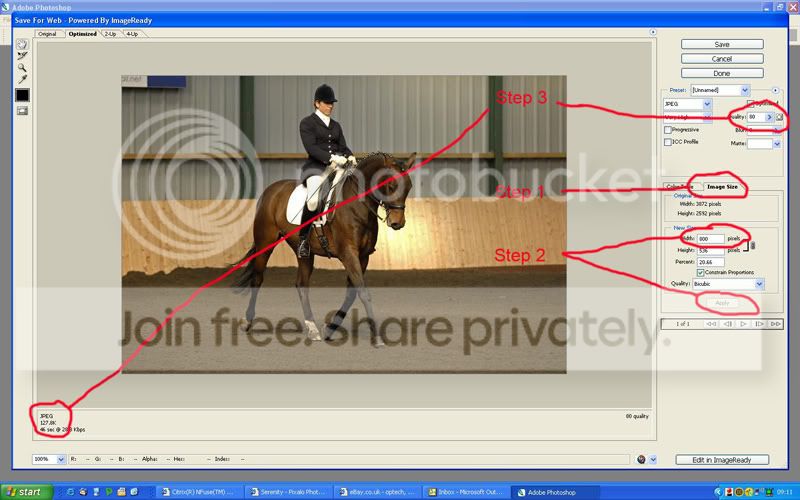
The first thing you need to do is resize so open up Photoshop (the example I'm using here) and go to File > Save for web. You will get a page very similar to below.

Step 1 below: Go to image size and
Step 2: Put in 800 on your longest side and click Apply
Step 3: Move the 'Quality' slider until 160kb shows in the bottom left hand corner.

Save and close.

Save-for-web.jpg


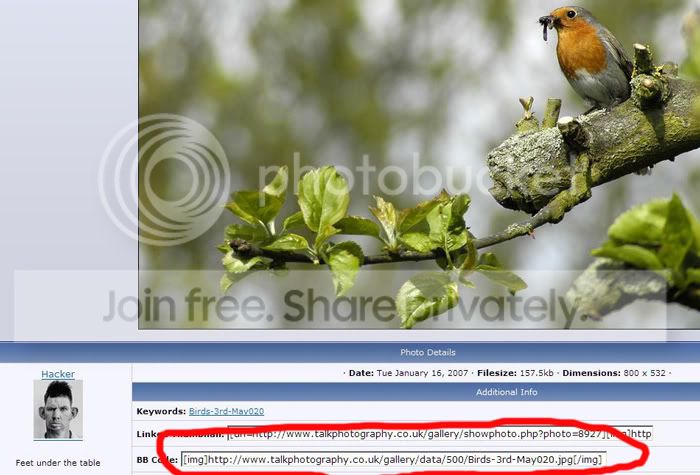
As other have said you then need to upload to your TPF gallery, once that is done click on the image and you will see the bar at the bottom with the IMG tags around it, copy and paste this into your thread, job done.

Tut1-1.jpg


Alternatively you can upload the images to somewhere like Photobucket and copy and paste the the IMG code as shown below.

Tut2-1.jpg


Hope this helps.
 
Back
Top