How to stretch an image in photoshop.So frustrated with this

peter fran

Suspended / Banned
Messages
64
Name
Peter Francis
Edit My Images
Yes
Took several images and overlapped them by about 50% and stitched them in lightroom to create a panorama.Thing is the image is a little squashed and distorted for some reason so I'm wanting to stretch it out a little.I found a way of changing the "pixel aspect ratio" under "view" but when I save the image it doesn't save the new aspect ratio.Please help.
Thanks
 
If you have photoshop you can use edit-Transform-distort. then stretch it to your hearts content.
 
Took several images and overlapped them by about 50% and stitched them in lightroom to create a panorama.Thing is the image is a little squashed and distorted for some reason so I'm wanting to stretch it out a little.I found a way of changing the "pixel aspect ratio" under "view" but when I save the image it doesn't save the new aspect ratio.Please help.
Thanks
I’d start again, you really shouldn’t have squished it to start with. It’ll be easier and better to stitch it properly.
 
I’d start again, you really shouldn’t have squished it to start with. It’ll be easier and better to stitch it properly.

Some stitching programs like Adobe give you no choice in the matter, as there have no used controls. but are very simple to use.
Stitchers like PTGui and PTAssembler let you adjust Just about anything, but are much more complex to use.
if a stitch goes wrong in an Auto program you are stuck.
If you know what you are doing, a PT stitcher gives you the tools to sort it out, and restitch. but this is usually beyond beginners, with out help.
Distortions like he mentions are usually because the wrong angle of view or focal length has been set by the program. both of which would normally be obtained and calculated from the EXif data. But if for some reason or another, such as when a non communicating lens is used. then that information is unavailable to the stitcher. Both the TP programs I mentioned can make a good attempt to calculate these things for them selves. but on occasion you have to enter them manually.
 
Last edited:
Hugin is another good stitcher, and there are guides online for it.
 
Hugin is another good stitcher, and there are guides online for it.
Hugin is also based on PT (Pano Tools) developed by Helmut Dersh a German Professor of mathematics.
I have never used Hugin, and I do not know if it has been developed as far as PTGui or PTassembler.
 
Hugin is also based on PT (Pano Tools) developed by Helmut Dersh a German Professor of mathematics.
I have never used Hugin, and I do not know if it has been developed as far as PTGui or PTassembler.

I use it mainly as a 'defisher' but it's a great pano stitcher too.
Might be a bit daunting for some though.
 
When I open the image in photoshop "transform" under "edit" is greyed out and not available
Have you selected the whole image first? Transform works on a selection.

But you’re still going to be guessing that it looks ‘right’ whereas, just doing it right in the first place will get you perfect.
 
Could be wrong here, but open the image in PS and press crop tool, tick content aware at the top and just pull the left and right edges to stretch it. The opposite of cropping?

I’m not 100% sure what you are trying to stretch. Having reread the post it sounds like you are trying to change the whole picture and my solution is just for extending the sides.
 
Last edited:
If you do not want to combine all the layers. Make a duplicate of the image and combine the layers in that, then you will be able to transform it.
 
Stitch the panorama in Photoshop, it is pretty good at that.
 
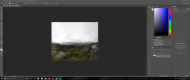
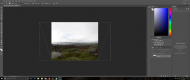
I have finally got the "transform" option available.Problem is when I drag the image it doesn't stretch the image at all.In face I lose MORE of it.Hope the attached screenshots show this.What am I doing wrong?
By the way this was taken by my 12 year old daughter and she's quite proud of the photo although I'll have to edit the camera bag etc out of the photo.

Screenshot (14).png Screenshot (14).png Screenshot (15).png
 
That doesnt look like a panorama or any panorama I’ve ever seem come out of Lightroom.

Are you sure stitchedthe images correctly?
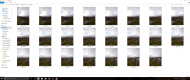
As far as I know..yes.22 photos with a 10-20mm lens with the camera flipped vertical with a good overlap.Imported them to lightroom and created this "panorama".I've done panoramas with the exact same setup before but never had the image so compressed like this.
 
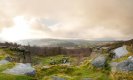
Sorted it.Stitched the photos in photoshop insteaUntitled_Panorama1.final - Copy..jpg d and have got a better result.Thanks for the input everyone
 
Sorted it.Stitched the photos in photoshop insteaView attachment 115284 d and have got a better result.Thanks for the input everyone

I am somewhat surprised that you did a mosaic with a wide angle lens using 22 shots. I would expect to use less than that with a standard lens. Photoshop does not always work too well if the overlap much exceeds 50%. though "PT" programs don't care one way or the other. They even cope perfectly well is you use a mix of portrait and landscape images. or use a different focal length for parts of the image, as this can work very well using a wide angle for sky areas, that have little detail, and a longer focal length for the main land area.
 
Thanks for all the advice.Like I said this was the one my daughter took but I never knew she had the wide angle lens on until she handed it back to me but as soon as these were taken it started snowing there in Derbyshire so we didn’t have time to take any more.Nearly an hours drive for literally 5 mins of photography.Must point out she took the pics without a tripod
 
Thanks for all the advice.Like I said this was the one my daughter took but I never knew she had the wide angle lens on until she handed it back to me but as soon as these were taken it started snowing there in Derbyshire so we didn’t have time to take any more.Nearly an hours drive for literally 5 mins of photography.Must point out she took the pics without a tripod

Lets face it, this is a great attempt by a Dad to create an image from his daughters attempts at photography, encouraging her. So now she's got the bug, you can progress her skills :D
 
This is what I did a month or so ago with my 55mm lens I believe.Only 6 stitched
DSC_0547-Pano..jpg
 
Back
Top