How to post photos from flickr?

IanC

Suspended / Banned
Messages
1,318
Name
Ian
Edit My Images
Yes
Im trying to create a new thread to show my latest photos on flickr but the link doesnt seem to be working. I click on the link to "share this" then "grab the link" but when I try to use the code generator on here to convert the link into a viewable pic it doesnt work properly.

I never had this problem with the previous version of flickr, and I saw a thread on here the other day which said how to fix it but I cant seem to find it :lol:

Eg below

4784755246
 
If you click on share this, then there is a little link in there somewhere which is the one to plug into the picture share tab.

I'm struggling to explain, but have a look at someone elses post from flickr, see the link then find it in the 'share this' bit.

Hope this kind of helps! :)
 
Hi Ian

Actions/View All Size choose the size you want once opened right click View Image (or open in new tab) then the image url is in the Address bar, copy paste it into your post using the img tags as you usually would HTH

Dave
 
Hi Ian

Actions/View All Size choose the size you want once opened right click View Image (or open in new tab) then the image url is in the Address bar, copy paste it into your post using the img tags as you usually would HTH

Dave

Hi Dave, I dont appear to have the option to view image when I right click. The open in new tab is greyed out also?
 
If there is the option to copy image location then use that and it should have copied the URL to your clipboard and you can past it in to the image thing in the message.
 
should have mentioned that this is once you've went to view all sizes and selected the size you want :)
 
If there is the option to copy image location then use that and it should have copied the URL to your clipboard and you can past it in to the image thing in the message.

I cant see an option to copy image location?

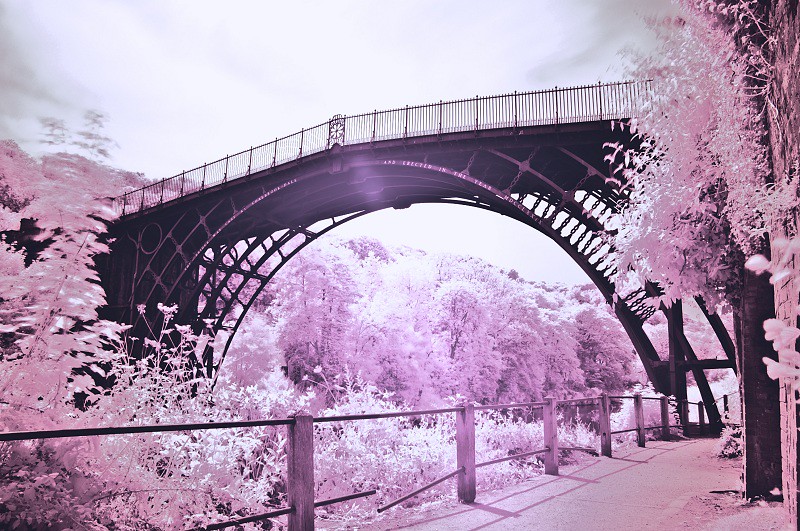
Edit: This is the url from the pic I want to post - <a href="http://www.flickr.com/photos/ianc85/4784755246/" title="Ironbridge Infrared by I Carvell, on Flickr"><img src="http://farm5.static.flickr.com/4136/4784755246_6bd7d0b13c_b.jpg" width="800" height="531" alt="Ironbridge Infrared"></a>

Does anyone know which part of that code I need to wrap the image tags around?
 
Hi Ian

use the bit in red

This is the url from the pic I want to post - <a href="http://www.flickr.com/photos/ianc85/4784755246/" title="Ironbridge Infrared by I Carvell, on Flickr"><img src="http://farm5.static.flickr.com/4136/4784755246_6bd7d0b13c_b.jpg" width="800" height="531" alt="Ironbridge Infrared"></a>

4784755246_6bd7d0b13c_b.jpg
 
A handy site is http://quickrpickr.com/. Enter your user name, check the image, generate the html. This provides a BBCode version on the right.

Or, download flickr relinker from here. Paste in the html and convert it to BBCode using that app.

Hope this helps!
 
4784755246_6bd7d0b13c_b.jpg


Thats got it, thanks Dave and thanks to everyone elses help :)
 
Your welcome pleased you got it sorted now, like the shot, did you take it with an infrared camera, or is it pping, nice tones though :thumbs:

Oh yes what browser you using Firefox is very good
 
Your welcome pleased you got it sorted now, like the shot, did you take it with an infrared camera, or is it pping, nice tones though :thumbs:

Oh yes what browser you using Firefox is very good

Thanks! I used a Hoya R72 with a bit of false colour added in elements 7.0

Im using the latest version of internet explorer :thumbs:
 
Flikr just keep meddling.
 
If you are using Windows, then the quickest way to get the static url (without using another website) is to get the picture size you want on screen, right click on it and then click properties, copy the url from the popup.

I know that this breaks the Flickr terms of use as there is no link back, (what ever that is) so if anyone knows how to do it the "legal way" and still show the photo directly in post, then I for one would love to know how you do it.

Tara
 
Found a way thanks use quickr pickr.
 
I know that this breaks the Flickr terms of use as there is no link back, (what ever that is) so if anyone knows how to do it the "legal way" and still show the photo directly in post, then I for one would love to know how you do it.

Tara

Open the pic in Flickr>Share This>Grab The HTML>Copy the HTML>Use drop down menu to select size>Go to this website and paste>Click submit>Copy and just paste into your post.

Sounds complicated in writing but only takes a few seconds.

Paul
 
@ Redpaul, yes, I know about that way, but it is a pain in the bum to keep flicking back and forth between websites, If flickr won't offer me a one shot option, then I'll carry on the way I am, and if they complain I'll go back to photobucket. After all, I pays my money to who ever makes it simple for me !!! :shrug:

Thanks anyway :thumbs:
 
Back
Top