Barryboy
Suspended / Banned
- Messages
- 274
- Name
- Rob
- Edit My Images
- Yes
Hi...
Not sure if this is the right place to raise this.... Feel free to move it if necessary....
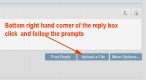
I'd like to post a picture or two to various forums on the site but not sure how to go about it. The pics are stored on my HD as JPEGs.
Grateful for some advice.
Regards
Rob
Not sure if this is the right place to raise this.... Feel free to move it if necessary....
I'd like to post a picture or two to various forums on the site but not sure how to go about it. The pics are stored on my HD as JPEGs.
Grateful for some advice.
Regards
Rob