How to Do Panoramic Photography

Julian Elliott

Suspended / Banned
Messages
493
Name
Julian Elliott
Edit My Images
No
Panoramic photography opens up a whole other world if you take the time to see the scene in front of you a lot wider. This doesn’t mean using wide angle lenses but actually panning your camera to capture a bigger ratio of image rather than 3x2 or 4x3.

For over 10 years I have routinely captured panoramas of both landscapes and cityscapes. These panoramas enable the viewer, in some cases, to have a far better understanding of a particular scene.

So in this tutorial I explain some of my methodology to creating the imagery as well as some things you shouldn’t be doing.
 
For those who want a simpler alternative: many compact cameras have a built in panorama mode. Simply switch on the mode and follow the instructions displayed on the LCD.

The results won't be as good as a full frame camera with a panoramic mount on a tripod but they will be cheaper and a lot easier.

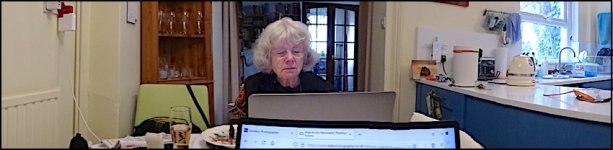
Here's one I did a few minutes ago on a Sony HX90...

Kitchen panorama HX90 DSC00111.JPG
 
Last edited:
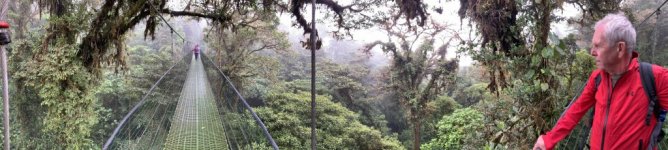
This is one I did with my iPhone whilst in the cloud forest in Costa Rica
AB5999F0-9693-417D-A8EA-D1B27E05E89C.jpeg
 
I've only recently started doing panos, as frankly my old Mac couldn't cope with stitching the large raw files from my Sony so never bothered until I got a new Mac....but one I have done is probably one of my favourite images I've ever taken...this was a 5 portrait shot hand held pano with an 85mm prime...the "same" shot, or rather scene taken with my 20mm prime and cropped just doesn't come close...this is now a huge image for print with magnificent fine detail when viewed large...

Loch Druim Suardalain by Martin Steele, on Flickr
 
Last edited:
I didn't watch sorry. I started to then realised it was about 45 minutes.

Panos are good to master though. I very often shoot panorama images instead of wides especially in woodland scenes.
 
Pan shots are always an alternative. And any lens can be used.
From a set viewpoint any framing is possible.
They can be used to get more in a shot. Or greater detail than is possible on a single sensor at one time.

There is a mass of kit that you can buy, or make your self. And I have all that is needed to do anything from 360x180 VR, to
normal single and multi row pans. However most of my pans have been done hand held.

For most people the basic lightroom or Photoshop stitching program will be their first choice. But it is extremely limited in terms of projections, and dealing with stitching errors.
The best software with every conceivable process included is PTGUI,, but it is very expensive, and perhaps not for the occasional user.
But is aimed more at the professional.
 
For those who want a simpler alternative: many compact cameras have a built in panorama mode. Simply switch on the mode and follow the instructions displayed on the LCD.

The results won't be as good as a full frame camera with a panoramic mount on a tripod but they will be cheaper and a lot easier.

Here's one I did a few minutes ago on a Sony HX90...

View attachment 342383

For many people sweep pans are an excellent way to increase the range of their happy snaps. Ike most phone snaps. They will never be perfect, but they do the job for social media.
Almost all sweep shots end up with distortions, strange and inconsistent verticals, and any number of wavy content but they can be fun. Many cameras output them at remarkably low resolutions.
 
I've only recently started doing panos, as frankly my old Mac couldn't cope with stitching the large raw files from my Sony so never bothered until I got a new Mac....but one I have done is probably one of my favourite images I've ever taken...this was a 5 portrait shot hand held pano with an 85mm prime...the "same" shot, or rather scene taken with my 20mm prime and cropped just doesn't come close...this is now a huge image for print with magnificent fine detail when viewed large...

I'm using CS5 on a lap top. I convert to JPEG and reduce the file sizes before stitching as I don't need a file that print to massive dimensions.
 
My most successful ones.

This was a 10 picture stitch taken with a 35mm.

6VizdTa.jpg


I think this was taken with a Takumar 50mm f1.4. I wish I'd included more sky.

5SJkxFy.jpg
 
I'm using CS5 on a lap top. I convert to JPEG and reduce the file sizes before stitching as I don't need a file that print to massive dimensions.

I've a roughly 8400 x 5600 image I was working on yesterday.

4 image mosaic I guess rather than straight panorama - each image is a 4 image stack for noise reduction (it's a night sky landscape image) - and the resulting tiff is 639mb, the jPeg version same dimensions is 11.5mb
 
I suppose it depends what you want. If you want a massive print and to be able to look at it closely and see wonderful detail, that's one thing. These days I print very little and frame and mount almost never so ending up with something like that seaside picture which is only 6000 x 3000 and 13mb isn't a disaster considering that I have A3's framed from my early Canon 6 or 8mb DSLR's. That Saltburn picture is 11974 x 3053 and 25.5mb.
 
I suppose it depends what you want. If you want a massive print and to be able to look at it closely and see wonderful detail, that's one thing. These days I print very little and frame and mount almost never so ending up with something like that seaside picture which is only 6000 x 3000 and 13mb isn't a disaster considering that I have A3's framed from my early Canon 6 or 8mb DSLR's. That Saltburn picture is 11974 x 3053 and 25.5mb.

Yeah, I don't usually go for tiffs but that's what the stacking program gives me so.... I'll work on that & then save as a jPeg normally, then copy & resize a version for web.

I was just posting for comparison :)
 
I'm using CS5 on a lap top. I convert to JPEG and reduce the file sizes before stitching as I don't need a file that print to massive dimensions.

Interestingly, PTGui, and PTAssembler convert your files to small JPEGs to do the stitching and find the seam lines. And only use the full files to do the blending and final outputs. At that stage you can use whatever output pixel dimensions that you want.

You can save the PTGUI file with the original original individual files and output any size you like in the future. Without going through the entire process again. This takes very little time at all, as it uses your GPU to do the heavy lifting.
 
Interestingly, PTGui, and PTAssembler convert your files to small JPEGs to do the stitching and find the seam lines. And only use the full files to do the blending and final outputs. At that stage you can use whatever output pixel dimensions that you want.

You can save the PTGUI file with the original original individual files and output any size you like in the future. Without going through the entire process again. This takes very little time at all, as it uses your GPU to do the heavy lifting.

Are those free packages Terry?
 
Are those free packages Terry?
Unfortunately not Ptgui is very expensive at over £250 . PTAssembler is much more reasonable but does cover 360x 180 vr.
But is the one that I use.

Pretty much all professional panographers use PTGUI it is so much more comprehensive than all the other programs. And. It makes the difficult easy. If I want to use PTGUI I have to get my son to output the files for me as he has the latest full version.
It also uses zero overlap seams so the join areas never look less sharp or detailed through blending. Photoshop also uses a form of zero over lap, but it is take it or leave it, and you can not adjust the seams nor anything else.
 
Unfortunately not Ptgui is very expensive at over £250 . PTAssembler is much more reasonable but does cover 360x 180 vr.
But is the one that I use.

Pretty much all professional panographers use PTGUI it is so much more comprehensive than all the other programs. And. It makes the difficult easy. If I want to use PTGUI I have to get my son to output the files for me as he has the latest full version.
It also uses zero overlap seams so the join areas never look less sharp or detailed through blending. Photoshop also uses a form of zero over lap, but it is take it or leave it, and you can not adjust the seams nor anything else.

Thanks.

I've only done a few panos so I'm not going to spend that much on software. So far CS5 has worked pretty well with joins and cracks only showing a couple of times when posting the picture on line. I'm not sure what causes this as I'd have thought that reducing the size and quality for web posting would be more likely to mask any joins but it seems it can do the opposite and make them obvious.

As a mostly standard prime user panos could be a way of getting a different picture for me so I may try to do more.
 
Thanks.

I've only done a few panos so I'm not going to spend that much on software. So far CS5 has worked pretty well with joins and cracks only showing a couple of times when posting the picture on line. I'm not sure what causes this as I'd have thought that reducing the size and quality for web posting would be more likely to mask any joins but it seems it can do the opposite and make them obvious.

As a mostly standard prime user panos could be a way of getting a different picture for me so I may try to do more.
PTAssembler is £37.85 and is very capable and has a reasonably steep learning curve.
Hugin is almost as capable and is freeware. but has a steeper learning curve

Neither has had any real development since 2017 but are mature programs. They are both better than the pano program in photoshop.

I mostly use my 18-55 at 18mm for pans. I never have problems that PTAssembler can not sort out. I uses PTAssembler's own stitcher, and Smart blend blender. (you have a choice of helper programs)

Panorama programs are easier to learn with someone to set you on the right track. as they introduce you to concepts that you do not usually meet in other branches of Photography. Which is perhaps why so many photographers never more than dip a toe into them. which is why Photoshop only lets you select the files and press go. it either works or it does not.
 
  • Like
Reactions: Nod
Panorama programs are easier to learn with someone to set you on the right track. as they introduce you to concepts that you do not usually meet in other branches of Photography. Which is perhaps why so many photographers never more than dip a toe into them. which is why Photoshop only lets you select the files and press go. it either works or it does not.

I may be missing something but I've found the concept and execution both when taking the pictures and doing the pano on the pc very easy with the select and go system in CS5.

It's not something I'll ever do a lot of, I'll just do one now and again when faced with a suitable scene. For example when stood at the bottom of this with a 35mm lens a pano was really the only option.

xDqRhZU.jpg
 
I may be missing something but I've found the concept and execution both when taking the pictures and doing the pano on the pc very easy with the select and go system in CS5.

It's not something I'll ever do a lot of, I'll just do one now and again when faced with a suitable scene. For example when stood at the bottom of this with a 35mm lens a pano was really the only option.

xDqRhZU.jpg

Absolutely, Photoshop and the like have simplified the user experience to make it automatic.
However if your meet problems they do not give you the tools to do anything about it.

Distortions, stitching errors, converging verticals, duplicated people and objects and parallax and uneven horizons are easily corrected in the specialist programs. A majority of people just bin such shots. When more often than not. They can be corrected.
Moreover a majority of these problems can be mitigated during the shooting, with a better understanding of the whole process
 
Last edited:
I've used Hugin to put together a 30+ shot horizontal pan of a glacier in Iceland. Plan is (or was, at least!) to get it printed at 300 DPI but we don't have a piece of wall long enough to accommodate it so that plan is on hold for the time being. Not least because the mate who had a large format printer no longer has it. It was shot with a 50mm on a D750, handheld but with careful attention paid to the horizon and with at least a 50% overlap on every shot.

For pan snaps, I use the in camera options and try to avoid anything too close because their parallax capabilities aren't that good!
 
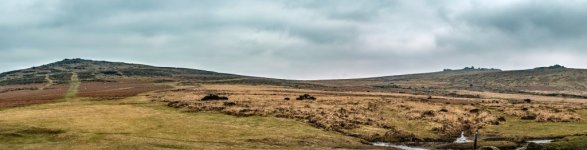
This is probably the most extreme pano I’ve done - original image is 21,000x3480 - Great Orme, Llandudno and Deganwy - all the places I lived in my youth.
F6C3D3F9-A875-4521-BAC7-9654897DCD3A.jpeg

These days most of my panos are 3 shot affairs using the shift function of my Tilt-Shift lens - Photoshop seems to handle those quite nicely - well not had a problem yet!!
 
I've used Hugin to put together a 30+ shot horizontal pan of a glacier in Iceland. Plan is (or was, at least!) to get it printed at 300 DPI but we don't have a piece of wall long enough to accommodate it so that plan is on hold for the time being. Not least because the mate who had a large format printer no longer has it. It was shot with a 50mm on a D750, handheld but with careful attention paid to the horizon and with at least a 50% overlap on every shot.

For pan snaps, I use the in camera options and try to avoid anything too 0close because their parallax capabilities aren't that good!

Just like normal stitched pans, the sweep pans suffer from parallax for the same reason. That is, that you are not rotating around the no parallax point of the lens(nodal point). when doing sweep pans we tend to swing around from the hips which moves the lens in an arc well away from that point. It is better, but more difficult to try to revolve the camera on the spot as tight as you can.

However sweep pans take far more images, and only use a slit like portion in the centre of each to join up.

They are fun and quick, but they can never match the quality of a stitched pan.
 
Last edited:
This is probably the most extreme pano I’ve done - original image is 21,000x3480 - Great Orme, Llandudno and Deganwy - all the places I lived in my youth.
View attachment 342754

These days most of my panos are 3 shot affairs using the shift function of my Tilt-Shift lens - Photoshop seems to handle those quite nicely - well not had a problem yet!!

One would think that using a tilt shift pans would be ideal, however this is not the case.
If you could fix the lens and shift the back (sensor) then this would indeed be a good option, as you would not be shifting the Entry pupil (nodal point) which is what happens with a Shift lens. This of course introduces parallax problems with close objects.

However for landscape type shots at a distance. Parallax is not usually a problem. A fact taken advantage of with hand held pans.


When setting up a Pano bracket it is better to be as accurate as possible, and it is easy to set the NP to within a fraction of a mm. This ensure virtually no Parallax on interior shots.

Though when doing 360-180 shots with a fisheye, there is inevitably going to be slight inaccuracies at the nadir and zenith, how ever the NP is set up. Such lenses do not have a single NP as it moves with the angle from the centre. However separate Nadir and Zenith shots helps.
 
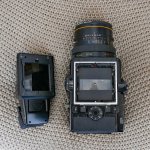
I've tried 2 variations of Pano with my Bronica SQ system, one is to mask the viewfinder to get a 3x1 crop which I later use from a scan.

Broni Pano.jpg

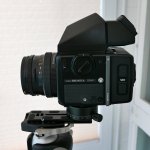
The other is to set up on a tripod and take 4 shots to later stitch, I did the parallax test and marked the rail.

L1010111.jpg

I agree though with landscapes the distance to subject rarely needs the exactness of the nodal rail.
 
Last edited:
I've only ever used LightRoom to do my stitches and it's semi-successful I'd say.

Doesn't always get the tones correct for smooth skies, but produces results interesting enough for me. not printed anything yet mind.

(I need to go back in to this one to remove all the sensor dust). From memory this was about 8-9 shots.

View from Aslundur Lakefront Villa by Kell Lunam-Cowan, on Flickr

I also quite liked this one to create a fisheye effect on a normal lens. This was about 20+ shots.

IMG_4622-Pano-2 by Kell Lunam-Cowan, on Flickr

I had to do a pano here, as I on;u had a 50mm lens

IMG_9679-Pano-2 by Kell Lunam-Cowan, on Flickr

This is the one where I feel like you can see some of the joins.

TP52 - WK31: Static 01 by Kell Lunam-Cowan, on Flickr
 
Last edited:
I've tried 2 variations of Pano with my Bronica SQ system, one is to mask the viewfinder to get a 3x1 crop which I later use from a scan.

View attachment 342898

The other is to set up on a tripod and take 4 shots to later stitch, I did the parallax test and marked the rail.

View attachment 342899

I afree though with landscapes the distance to subject rarely needs the exactness of the nodal rail.


Nice little Nodal set up though the rotator should be centered under the NP. (eg ball head, rotator, extension arm, (another clamp) camera.)

What is the make of that low profile ball head and clamp? I like balls that clamp around the periphery like that. They are usually smoother and much better locking. I also like lever arm QR clamps for speed.


I've only ever used LightRoom to do my stitches and it's semi-successful I'd say.

Doesn't always get the tones correct for smooth skies, but produces results interesting enough for me. not printed anything yet mind.

(I need to go back in to this one to remove all the sensor dust). From memory this was about 8-9 shots.

View from Aslundur Lakefront Villa by Kell Lunam-Cowan, on Flickr

I also quite liked this one to create a fisheye effect on a normal lens. This was about 20+ shots.

IMG_4622-Pano-2 by Kell Lunam-Cowan, on Flickr

IMG_9679-Pano-2 by Kell Lunam-Cowan, on Flickr

This is the one where I feel like you can see some of the joins.

TP52 - WK31: Static 01 by Kell Lunam-Cowan, on Flickr


Vertical banding in the sky ( like your last shot) can be caused by the program using a poor blender, unfortunately some are much better at giving a smooth blend than others. ( the algorithms, to deal with this, in Smatblend and the new blender in PTGui are especially good.) PTGui uses a zero overlap seam and somehow has developed a blender that is pretty much faultless at blending even very different exposures invisibly. Though a majority of blenders do a very good job of matching either sides of a seam.

The other problems that cause this are variations in exposures (you need to lock exposure and colour balance for all shots). or in deed vignetting, caused by the lens. The better programs correct for vignetting automatically.

Vertical banding is horrendously difficult to deal with later, in PP.
 
Nice little Nodal set up though the rotator should be centered under the NP. (eg ball head, rotator, extension arm, (another clamp) camera.)

What is the make of that low profile ball head and clamp? I like balls that clamp around the periphery like that. They are usually smoother and much better locking. I also like lever arm QR clamps for speed.
Hi Terry, I don't use the rotating clamp to rotate it's just a convenient way to hold the camera, I rotate using the ball head rotation. It's a RRS BH-55 Head with QR Clamp B2-LLP-11.

L1010308.JPG
 
Hi Terry, I don't use the rotating clamp to rotate it's just a convenient way to hold the camera, I rotate using the ball head rotation. It's a RRS BH-55 Head with QR Clamp B2-LLP-11.

View attachment 342903


As I said great bit of kit.

However It is far better to have a second rotator above the ball head. As it will rotate straight and level after levelling the head. My head has a rotator top and bottom just for that purpose.
You could place your second rotator on top of your head and use another simple clamp under your camera. this would make the rotation far more level and accurate.

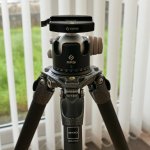
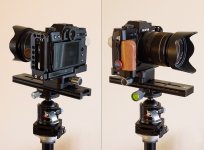
This is my inexpensive version of your set up. bought with a top and bottom head rotator.
The top rotator lets you swing the camera straight and level for accurate composing after leveling the head, much like a gimbal. ( I have just ordered a second rotator clamp, to use on a horizontal rail when doing close ups.)
As you can see I have a double sided clamp under the camera this can be split and repositioned at 90 degrees.
camera-slide-web.jpg
 
As I said great bit of kit.

However It is far better to have a second rotator above the ball head. As it will rotate straight and level after levelling the head. My head has a rotator top and bottom just for that purpose.
You could place your second rotator on top of your head and use another simple clamp under your camera. this would make the rotation far more level and accurate.

This is my inexpensive version of your set up. bought with a top and bottom head rotator.
The top rotator lets you swing the camera straight and level for accurate composing after leveling the head, much like a gimbal. ( I have just ordered a second rotator clamp, to use on a horizontal rail when doing close ups.)
As you can see I have a double sided clamp under the camera this can be split and repositioned at 90 degrees.
View attachment 342904
You could place your second rotator on top of your head and use another simple clamp under your camera. this would make the rotation far more level and accurate.

Agreed.

BTW, how do you resolve the nodal points for the different FLs in the zoom lens?
 
One would think that using a tilt shift pans would be ideal, however this is not the case.
If you could fix the lens and shift the back (sensor) then this would indeed be a good option, as you would not be shifting the Entry pupil (nodal point) which is what happens with a Shift lens. This of course introduces parallax problems with close objects.

However for landscape type shots at a distance. Parallax is not usually a problem. A fact taken advantage of with hand held pans.


When setting up a Pano bracket it is better to be as accurate as possible, and it is easy to set the NP to within a fraction of a mm. This ensure virtually no Parallax on interior shots.

Though when doing 360-180 shots with a fisheye, there is inevitably going to be slight inaccuracies at the nadir and zenith, how ever the NP is set up. Such lenses do not have a single NP as it moves with the angle from the centre. However separate Nadir and Zenith shots helps.
Yup - it's still possible to suffer from parallax issues when the camera is fixed and the lens is shifted so totally agree that on it's own a T/S isn't a parallax eliminator. One of the reasons for getting the T/S lens was for doing panos and looked at brackets that attached to the lens and allowed it to be mounted to the tripod as opposed to fixing via the camera body. That way the image stays the same but the camera moves across the fixed image when you operate the lens controls - parallax problem fixed!! The big problem was, at the time, the only such bracket available was around £400 - so decided to postpone the purchase until I actually found out whether or not parallax would be a problem for me given the type of pictures I was taking (know it always exists due to the laws of physics and optics - just wasn't sure if it would impact in my particular situations)
I have to say that, to date, I never found parallax to be a problem for me - so even though the brackets for fixing the lens directly to a tripod are now available are considerably cheaper (£60-£70) I'm still not seeing the need to use one. Obviously if the panos I want to take change and parallax does become a problem for me then this may change - but for now I'm sticking to spending the cash on beer :D
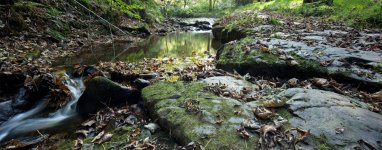
Out of interest the following image was taken when I was learning to use the T/S lens as part of the learning curve - so not supposed to be particularly interesting from a subject/composition point of view - but it's a 3 shot pano with tilt functions also used - the closest leaves and twigs on the foreground stones were about 6" away from the front of the lens - no signs of parallax problems here......
Roddlesworth T&S Pano.jpg
 
You could place your second rotator on top of your head and use another simple clamp under your camera. this would make the rotation far more level and accurate.

Agreed.

BTW, how do you resolve the nodal points for the different FLs in the zoom lens?

Easy,. You have to find them for each focal length you are likely to use.
However in practice you are likely only to use the widest focal length indoors, where the NP is most critical.

For out doors it is less critical. And you will most likely find a choice of three settings is more than close enough. It is only parallax problems you need worry about and the greater the distance the less the problem. The software is able to take care of the stitching even if the NP is some way out.
If you have a close feature in the pan, it is good practice to take an extra shot that includes all of it. This avoids having a join running through it and some parallax issues.

I always swing though the pan to see where the shots will overlap, and adjust the shots to avoid seams on critical areas.
 
Yup - it's still possible to suffer from parallax issues when the camera is fixed and the lens is shifted so totally agree that on it's own a T/S isn't a parallax eliminator. One of the reasons for getting the T/S lens was for doing panos and looked at brackets that attached to the lens and allowed it to be mounted to the tripod as opposed to fixing via the camera body. That way the image stays the same but the camera moves across the fixed image when you operate the lens controls - parallax problem fixed!! The big problem was, at the time, the only such bracket available was around £400 - so decided to postpone the purchase until I actually found out whether or not parallax would be a problem for me given the type of pictures I was taking (know it always exists due to the laws of physics and optics - just wasn't sure if it would impact in my particular situations)
I have to say that, to date, I never found parallax to be a problem for me - so even though the brackets for fixing the lens directly to a tripod are now available are considerably cheaper (£60-£70) I'm still not seeing the need to use one. Obviously if the panos I want to take change and parallax does become a problem for me then this may change - but for now I'm sticking to spending the cash on beer :D
Out of interest the following image was taken when I was learning to use the T/S lens as part of the learning curve - so not supposed to be particularly interesting from a subject/composition point of view - but it's a 3 shot pano with tilt functions also used - the closest leaves and twigs on the foreground stones were about 6" away from the front of the lens - no signs of parallax problems here......
View attachment 342908
That shot worked very well.
Now that focus bracketing is built in to so many digital cameras. It is not difficult to do in combination with taking pans. Some of the programs can do focus blending and exposure fusion whilst doing the stitch.

There is no advantage in using a TS lens whilst doing pans, as it actually makes the stitching more difficult than swinging the camera. The program plots the images onto the surface of a sphere relative to the focal length of a lens and slides them into position to make the stitch. It then re plots the combined spherical image sections on to a flat plane for output. It can only do this accurately for one viewpoint. So moving the lens is counter productive.
PTGui and PTAssembler have a feature called view point correction. Which can correct in a single plane, which is useful when adding a nadir to remove the tripod, with an offset shot of the ground. Or when shooting large flat objects like maps, but it can not handle depths like found in a normal shot.
 
That shot worked very well.
Now that focus bracketing is built in to so many digital cameras. It is not difficult to do in combination with taking pans. Some of the programs can do focus blending and exposure fusion whilst doing the stitch.

There is no advantage in using a TS lens whilst doing pans, as it actually makes the stitching more difficult than swinging the camera. The program plots the images onto the surface of a sphere relative to the focal length of a lens and slides them into position to make the stitch. It then re plots the combined spherical image sections on to a flat plane for output. It can only do this accurately for one viewpoint. So moving the lens is counter productive.
PTGui and PTAssembler have a feature called view point correction. Which can correct in a single plane, which is useful when adding a nadir to remove the tripod, with an offset shot of the ground. Or when shooting large flat objects like maps, but it can not handle depths like found in a normal shot.
Must admit that this has got me thinking far more than is good for me or even appropriate given my “just for me” approach to photography :D
Having said that I can see a bit of a play with different approaches at the weekend (weather permitting) - interesting to see what the “in theory” and “in practice” differences are when it comes to my sort of thing……. Even so I’m not sure I’ll be rushing out to buy either a nice new camera with focus stacking built in or even a pano rig for rotating around the nodal point just yet ;)
 
Back
Top