

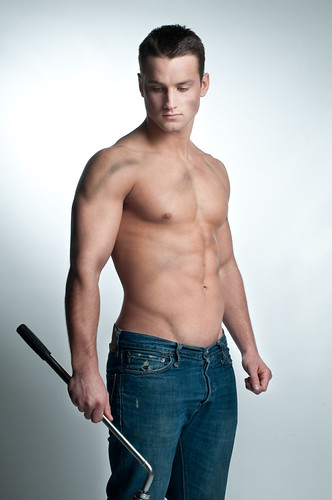
How to achieve lighting like this? update 2 after getting 2 off camera studio lights.

russdaz

Suspended / Banned
Messages
1,930
Edit My Images
Yes
lighting is pretty simple but alot of the "shadows" and muscle shape is done in photoshop
 
Really, like how not to up on that type of photo, only really ever done motorsport. Be interested in learning a thing about doing portrait shots, and how to make the most of lighting.
 
probably strip lights left and right and just behind to create the rim lighting
then beauty dish over head to provide the main fill light.

then a whole load of photoshop work
 
probably strip lights left and right and just behind to create the rim lighting
then beauty dish over head to provide the main fill light.

then a whole load of photoshop work

I agree about the lighting, not sure about the photoshop work.
Maybe the orginal photo looks better...
 
probably strip lights left and right and just behind to create the rim lighting
then beauty dish over head to provide the main fill light.

then a whole load of photoshop work

Thanks, i am hoping not so much of the PS would be needed.

Jason Cole from the N&G section posted this. Its been helping me when I'm photographing bodybuilders.

http://www.talkphotography.co.uk/forums/showthread.php?t=141118

Cool thanks for that, properly abit outta reach then.

May have to try finding a way to light from the side cheaply. But i suppose PS on this would be another subject.
 
I agree about the lighting, not sure about the photoshop work.
Maybe the orginal photo looks better...

Wouldnt know on the orginal photo bit, never saw orginal photo, nor mag print.
 
I agree about the lighting, not sure about the photoshop work.
Maybe the orginal photo looks better...


photoshop is fairly obvious shading work in the serratus anterior and External abdominal obliques really gives it away.

There was a news item awhile ago where one of the cover models was complaining about howhe had been over photoshopped but can I find it :bang:
 
photoshop is fairly obvious shading work in the serratus anterior and External abdominal obliques really gives it away.

There was a news item awhile ago where one of the cover models was complaining about howhe had been over photoshopped but can I find it :bang:

Wouldnt suprise me tbh, not wanting to sound big headed but i have more dif then that guy. Just i have no idea how to show case it fully, too light ruins it, but too dark isnt right. Cant make my mind weather to post an example or not, or more to the point where to post.

But thanks for the info so far!
 
your gunna struggle to do it with one flash light as you can't key and fill with a single light source
 
Yeah i thought as much, but after reading this thread, got me thinking a tad. I have got a couple of very powerfully lights on the van used on building sites. Would they be any good, or does the extra lighting have to flash?

Sorry if that sounds like a silly question, really have not a clue on this aspect of photography.
 
probably strip lights left and right and just behind to create the rim lighting
then beauty dish over head to provide the main fill light.

then a whole load of photoshop work


Not a whole lot, but some exagerated shading going on.

It's pretty easy to do, as long as you've got a good photo beforehand. As has been said above, there's at least 3 lights involved there.
 
I think its classic athletic shot...
two gridded lights pointing back towards the camera about ten feet @ 45 degrees behind the model. The front fill is done with a softboxt from high on the left of the model left and above. ( Check the nose and chin shadow.) check how Joe Mcnally does it.... with the addition of blue gels
http://www.joemcnally.com/blog/2009/08/page/2/
 
Thanks all. Well i have had a play with some lighting i had around, not perfect but much better, well put it this it will do, if i can get the focus right lol will need a vextra pair of hands for that one.

Any-one care to point us to some where about what type of PS i may need to perform, although i wouldnt want to do much if any-thing would kinda defeat the object at this point, but would be nice to know what the pro's do.
 
FWIW I thought the above shot was a little overdone in the skin smoothing dept...I'd suggest a duplicate layer with a mask to blur the skin tones slightly and above all keep the eyes and hair sharp. Any oil on the skin will rflect as if its wet ( Might even want to spray some on your model to add a bit of sweaty "shine" you dont want to lose that.
 
FWIW I thought the above shot was a little overdone in the skin smoothing dept...I'd suggest a duplicate layer with a mask to blur the skin tones slightly and above all keep the eyes and hair sharp. Any oil on the skin will rflect as if its wet ( Might even want to spray some on your model to add a bit of sweaty "shine" you dont want to lose that.


cool thanks shall have a google of that later.

RUSSDAZ, You will have to post some of your results!

Well i have something that will fit what i was after properly not upto TP standards though but good enough to settle a bet lol.

Will have another play at some point though.
 
Well just thought i'd just update this with the best i personally could do on my own. Seen a few things for sale by FITP that i am considering would be nice to learn a bit more about lighting, just weather i'd get much use from it all.

19575_360015803832_772813832_4726415_1748707_n.jpg


19575_359333783832_772813832_4723609_8001755_n.jpg


Like i say not the best photo ever, but will do for initial purpose. Thanks to all those that have helpped.

Oh for the record PP was white balance, cropped, resized, levels, and minor curves adjustment, and about it. Any other surgestions, tips advise, or offers to actually take a proper shot would be much welcome.:thumbs:
 
that's good, but those are pretty underexposed. Bump the flash power up a bit, or decrease the aperture value, etcetc..

Here's a similar shot to what you're after...this shot was very simply lit (pose, prop etc's a bit lame, better one is still in pp ;) ), there was just one big umbrella (I think, anyway...) to the camera's right giving a nice soft light. Another light gave the 'spot' on the background but wasn't really essential. A bit of definition added in the shop, just very very slightly increase / decreasing exposure on certain features. No huge banks of lights or beauty dishes etc.
You would be well off getting an umbrella of some sort + umbrella adapter for your flash, gives you a nice soft light that you can then work with. Flash in the pan can sort you out with light stand, umbrella and adapter for about £30 all in iirc. Really good start to get to grips with off camera lighting.

 
Oh cool, yeah i shall have to look into that, and also a proper tripod to my other one isnt really strong enough for the 1d, at £30 cant really go to wrong.:thumbs: . Pain in the arse trying to photos of yourself, and i actually hate having my photo taking which dosnt help much lol
 
If you look around on flickr, then the guy that does these shoots is on there

from memory I think his username is something like photosmudger

I'll have a look and see if I can find it
 
i really recomend the calumet really little lightstands, when I get some time I'll do a review of them ;)
 
glad I could be of help
good luck with your images and dont forget to let us know how you get on
 
i really recomend the calumet really little lightstands, when I get some time I'll do a review of them ;)

Shall be on the look out with interest.

glad I could be of help
good luck with your images and dont forget to let us know how you get on

Yeah shall do, but reading that guys stuff, i know have some questions lol.

Think his lighting rig is way out of my budget, what is the difference between a soft box, and large umbrella, to which i have seen there available in different colours. I think the softbox is more then is personally want to go but if i went umbrella which colour should i plumb for? Seen a kit that has 2 kinds in it i was considering. What else though would i need to make them work, on the Canon 1dmk2n and Sigma flash, and if i did consider going the twin route would the YongNuo Flashguns YN-460-II offered on here FITP be good enough.

Cheapness is of the issue, as i very much doubt id have much use for gear although i have a few other thoughts for useage later in the year so dont mind spending a little.
 
Just an update to those interested. Well received a nice little bonus from work, so decided to splash some out on some lighting that i am hoping to use later for a project. Started with 2 lights, 1 umbrella, and a softbox. Had a quick play and what a difference they make, was thinking of getting a beauty dish but thought it may have running before walking thing, but did a order a 3rd light that i havent yet got.

Think i could get quite into this side of photography, although i'd need to find some better models then me! lol Latest version, poor background yes need something better, and need to think how stop the rear shadow? (could get a flourescent light fitting for peanuts to lay on floor any good?) and soft yes focus is out a tad, and naff pose etc but hows the lighting? This was a white umbrella reflected, and silver lined softbox (have got white inners too) is white or silver better for that kinda shot?

RD9K0591copy-vi.jpg


Oh PP was just slight noise reduction, minor lift on exposure, then cropped slightly be resized, but PP is the next major learning step for me and another subject matter.
 
I'd suggest stepping away from the background, by lighting yourself closely you can make the background fall off to black that way.

I'd try light in brolly on camera right, reflector on camera left to pick up spill and direct it back at you and have the softbox above and slightly in front of the head so that the shadows aren't quite so long down the chest and should add some brightness to the front. Your current image seems underexposed a fair bit to me.
 
What lights did you get? Something like this you shouldn't really need to remove noise and adjust exposure afterwards. You should be able to shoot around 100-200 ISO which shouldn't give you any noise and if it's under exposing turn the lights up or open the aperture up.
 
I'd suggest stepping away from the background, by lighting yourself closely you can make the background fall off to black that way.

I'd try light in brolly on camera right, reflector on camera left to pick up spill and direct it back at you and have the softbox above and slightly in front of the head so that the shadows aren't quite so long down the chest and should add some brightness to the front. Your current image seems underexposed a fair bit to me.

Thanks alot for the time with, not got a reflector yet just waiting for them to get one so i can pick it up but will give that go. Yeah is under exposed, spent ages wondering why, then it clicked earlier today, reason below lol

What lights did you get? Something like this you shouldn't really need to remove noise and adjust exposure afterwards. You should be able to shoot around 100-200 ISO which shouldn't give you any noise and if it's under exposing turn the lights up or open the aperture up.

There a Proline kit.

Yeah thats what i thought at the time, wasnt until today i relised why i couldnt get them exposing correctly, the lights being triggered by an onboard flash that was erm i forgot to set to manual rather then ettl. :bonk:

Also managed to get something better for a back drop that isnt almost the same colour as me lol.

Thanks guys been a major help :thumbs:
 
Back
Top