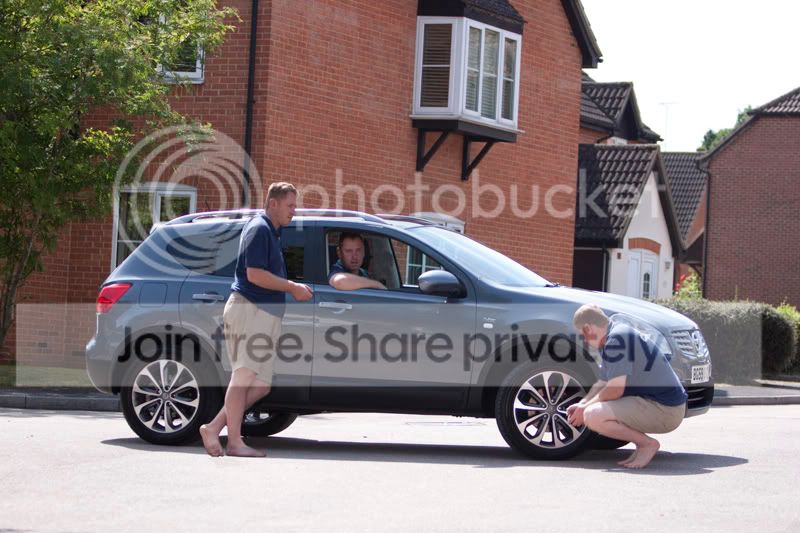
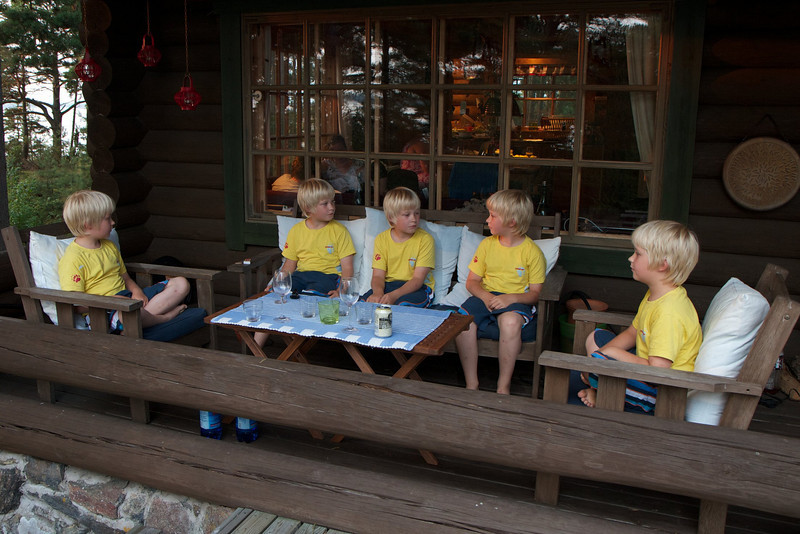
How is this type of image acheived?

Blaque

Suspended / Banned
Messages
51
Edit My Images
No
I remember that on an old 35m pentax camera, this idea was to use the same exposure twice. That is, taking two shots with the same part of the film. How do you do this on a dslr? Or will one have to achieve it with post processing these days?


Uploaded with ImageShack.us
 
Last edited:
Easiest way is with a tripod, remote shutter and a tad of post processing with multiple layers.

Edited, I knew I had a play after this possped up in another thread...

carplay.jpg
 
Last edited:
Some cameras offer multiple exposure, both D3 & D2X do, not sure about the others, but not something I have ever used.
 
My first test, tripod+ multiple exposures -> GIMP, layers, erase parts of top images to make bottom ones visible.

And yes, I know I screwed up one erase, have to do this again and have the originals :)

961588509_mQscj-L.jpg
 
Thank you guys. I have Pentax Kx but no remote control, (can always use the timer.) I will have to wait till when I buy PSE before I can do anything.

Please keep them coming. :)
 
Nice shots Ryan and Jukka :).
I remember seeing one such image that focusing was done on the man in the image in different positions. Obviously it was tightly framed so the person who stood in different spots the camera had to be refocused on him. It really had a huge impact. I think it was a landscape image where there were several shots of the person in different locations. Looked pretty impressive.
So I am assuming refocusing had to be done but very carefully so that the position of the camera wasn't moved at all from its original one.

Something to try, looks very interesting
 
the first image i believe is done with a flash and long exposure.
i THINK he has moved to one position, used a flash, moved to another, used a flash, gone to the one were he sitting down and stayed there probbly also using a flash multiple times :)
 
the first image i believe is done with a flash and long exposure.
i THINK he has moved to one position, used a flash, moved to another, used a flash, gone to the one were he sitting down and stayed there probbly also using a flash multiple times :)

Yup, I agree, that first one was achieved with long exposure with flash. I remember playing with wine glasses and flash and achieving similar results.
But in my view the one with great impact is if its done with multiple exposures, then you don't get those other parts of the image superimposed and looking ghost like.

Quite keen on playing up with these type of multiple exposures :) Will go and see if the kids are into some modelling mood ;)
 
the first image i believe is done with a flash and long exposure.
i THINK he has moved to one position, used a flash, moved to another, used a flash, gone to the one were he sitting down and stayed there probbly also using a flash multiple times :)


Pardon me if I sound naive. I am a newbie lol. By using long exposure, you mean leaving the shutter for longer period right? Surely, wont that leave trails behind when he moves position?

As per using flash multiple times, do you mind explaining a bit more please (I am really interested in pulling off something like that and every little helps. . . ;) )
 
Thank you guys. I have Pentax Kx but no remote control, (can always use the timer.) I will have to wait till when I buy PSE before I can do anything.

Please keep them coming. :)

There are some free software packages that will let you use layers and achieve this, as well as lots of other editing tools.

GIMP is one, a bit complicated but quite popular so lots of examples on the internet.
Paint.net is another, a bit easier to use IMO, a good user group with plug ins but not quite so popular as GIMP.
 
Thank you guys. I have Pentax Kx but no remote control, (can always use the timer.) I will have to wait till when I buy PSE before I can do anything.

Please keep them coming. :)

Only problem with using the timer is you have totouch the camera which could move it unless on a verys turdy tripod.

Cheap remotes are easily available for most dslrs now :thumbs:
 
Some cameras offer multiple exposure, both D3 & D2X do, not sure about the others, but not something I have ever used.

D300s does too, not sure if the D200 does, I'm inclined to say it might ;)
 
Pardon me if I sound naive. I am a newbie lol. By using long exposure, you mean leaving the shutter for longer period right? Surely, wont that leave trails behind when he moves position?

As per using flash multiple times, do you mind explaining a bit more please (I am really interested in pulling off something like that and every little helps. . . ;) )

To do this with flash, you would set a small aperture, like f/22 to get a long exposure time of say 30 seconds. Next you go to the first position, start the exposure and an assistant fires a flash manually. Then move to the next position, flash again, etc until you're done (before the exposure is done).

Of course the background gets more exposed for every flash, so it's a bit tricky. And you will look like ghosts because you are in a certain position for only one of the flashes. So for 3 positions, each "you" would be 1/3 there and 2/3 background.. well it's more complicated than that really but the that's the basic idea.

FAR easier to take 3 normal exposures with a timer or remote release and then blend them as layers in GIMP or PS.
 
Last edited:
Thanks guys for your tips. :D Will give it a try soon.
 
It should be easy with post processing. Take 3 shots and combine them as you would with multiplicity photos and turn down the opacity so you can see through the person as in the photo...
 
You can do this just as Jukka says, but on your own by using the strobe setting on some flash guns.

Easier doing multi shots and combining them in software but a nice challenge to do it all in camera .

Copyrighted_Image_Reuse_Prohibited_874495.jpg
 
Last edited by a moderator:
Back
Top