

You are using an out of date browser. It may not display this or other websites correctly.
You should upgrade or use an alternative browser.
You should upgrade or use an alternative browser.
How is it done?
- Thread starter BIGEYE
- Start date


There are a few ways but heres one. (I use photoshop CS2 so bear with me if your software is defferent)
- Open picture in photoshop
- Add a layer for `Hue / Saturation` then reduce the saturation as far as it will go to the left (so the image goes b&w)
- Now click ok
- Make sure the new layer (for hue / saturation is selected) and select the brush tool
- Now basically use the brush tool to `paint` the bits you want in color, and they will appear in color.
If you make a mistake you can use the eraser to erase them back into B&W.
Also if you hold ALT + Click on the white frame within the layer window it will make it easier to tell if you have all of the bits you need.
I hope this helps, im new here myself but this is the first thing I learned and IMO still well worth it.
You can play around and try different methods too, for example try selecting areas of the image with the lasoo tool and see what happens when you do it this way.
- Open picture in photoshop
- Add a layer for `Hue / Saturation` then reduce the saturation as far as it will go to the left (so the image goes b&w)
- Now click ok
- Make sure the new layer (for hue / saturation is selected) and select the brush tool
- Now basically use the brush tool to `paint` the bits you want in color, and they will appear in color.
If you make a mistake you can use the eraser to erase them back into B&W.
Also if you hold ALT + Click on the white frame within the layer window it will make it easier to tell if you have all of the bits you need.
I hope this helps, im new here myself but this is the first thing I learned and IMO still well worth it.
You can play around and try different methods too, for example try selecting areas of the image with the lasoo tool and see what happens when you do it this way.

inaneredstripe
Suspended / Banned
- Messages
- 6,457
- Name
- mark
- Edit My Images
- Yes
easy to do, and looks amazing.

jinja chin
Suspended / Banned
- Messages
- 122
- Name
- mark
- Edit My Images
- Yes
why is it that selective colouring and hdr seem to be taboo with more experienced togs i dont understande whats wrong with it if you like. you like it.not looking for a argument i just wondered . sorry for hijacking the thread

Jayst84
Suspended / Banned
- Messages
- 5,092
- Name
- James
- Edit My Images
- No
why is it that selective colouring and hdr seem to be taboo with more experienced togs i dont understande whats wrong with it if you like. you like it.not looking for a argument i just wondered . sorry for hijacking the thread
Because everyone's done it at some point, the internet is over-saturated with selectively saturated images, and it looks shocking.
 Also a lot of bad photographers use it to try to jazz up their photos in lieu of any genuine talent.
If you like it, nobody's stopping you though. Just don't expect to be hailed as a creative visionary.

jinja chin
Suspended / Banned
- Messages
- 122
- Name
- mark
- Edit My Images
- Yes
does that mean your HAILED AS A CREATIVE VISIOARY because you dont use or like it
Jayst84
Suspended / Banned
- Messages
- 5,092
- Name
- James
- Edit My Images
- No
does that mean your HAILED AS A CREATIVE VISIOARY because you dont use or like it
From time to time.

PerfectSpeed
Suspended / Banned
- Messages
- 2,173
- Name
- Steve
- Edit My Images
- Yes
SC depends on the subject, great for some wedding shot, I like to use it in my urban trash shots.

TheBigYin
Moderator
- Messages
- 16,982
- Name
- Mark
- Edit My Images
- No
I think a big part of the issue some people have with selective colouring is that it gets used in cliche'd situations... The Red Postbox - The Bride's Bouquet - Red lips on a B&W portrait, that kind of thing.
I'm even guilty of doing it myself occasionally, though at least it wasn't quite as predictable as the above examples.
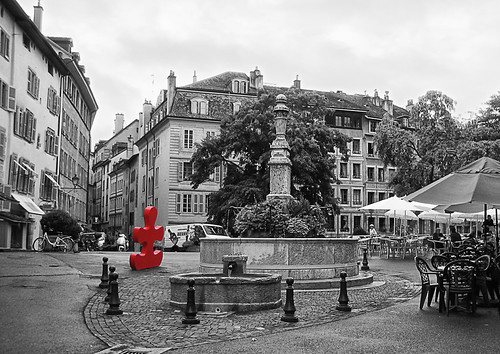
In this case, the original shot was taken on a flat horrible drizzly day, all the street furniture was clashing colours, and it just didn't work. So - I did a B&W conversion on it, and it wasn't too bad. But it needed something - I realised that the Jigsaw piece just fell away into the background tarmac in B&W, leaving a hole in the composition. So I climbed off my high horse, and had a mess around with selective colour on the jigsaw section. Personally, I think it works, precisely because it looks like the Jigsaw bit just landed from outer space... And, as I sold a large framed art print of it, frankly, I don't really care
I'm even guilty of doing it myself occasionally, though at least it wasn't quite as predictable as the above examples.
In this case, the original shot was taken on a flat horrible drizzly day, all the street furniture was clashing colours, and it just didn't work. So - I did a B&W conversion on it, and it wasn't too bad. But it needed something - I realised that the Jigsaw piece just fell away into the background tarmac in B&W, leaving a hole in the composition. So I climbed off my high horse, and had a mess around with selective colour on the jigsaw section. Personally, I think it works, precisely because it looks like the Jigsaw bit just landed from outer space... And, as I sold a large framed art print of it, frankly, I don't really care
trencheel303
Suspended / Banned
- Messages
- 4,888
- Edit My Images
- No
why is it that selective colouring and hdr seem to be taboo with more experienced togs i dont understande whats wrong with it if you like. you like it.not looking for a argument i just wondered . sorry for hijacking the thread
Probably because they can't understand why others like it and so have to rubbish it to make themselves feel better.
Much like *cough* certain owners of 1D series cameras have to make up every reason under the sun as to why xxD or xxxD series cameras are apparently crap, and that to take any decent photo you need to use a 1D and an L lens.

trencheel303
Suspended / Banned
- Messages
- 4,888
- Edit My Images
- No
I like it and use it, as for saying it's already been done well so have half the photo's we take but we still take them!!!!
Exactly, so many 'Pros' (on here and everywhere) talk about how overdone things like selective colouring are, but then everything else 'normal' is also so overdone! :razz: I personally think a bit of creativity goes a long way over your bog standard 'technically correct' shot that so many 'pros' p*ss themselves over!
I mean is there any square foot of the earth we haven't actually photographed yet????:bang:
jinja chin
Suspended / Banned
- Messages
- 122
- Name
- mark
- Edit My Images
- Yes
I like it and use it, as for saying it's already been done well so have half the photo's we take but we still take them!!!!
well said sunsets are one but there still nice. alot of the time people put hdr up on the forum and they apologize for doing so when they have put time and effort in to it only for some one to come on and say only people who use hdr are cr@p at photography .people like me who have alot to learn look up to people with a lot of posts and when they say that they willnot try what they would have probly like to have ago at. it also puts some off commenting in case they look stupid
 its coments like this that put people off Because everyone's done it at some point, the internet is over-saturated with selectively saturated images, and it looks shocking. Also a lot of bad photographers use it to try to jazz up their photos in lieu of any genuine talent.
trencheel303
Suspended / Banned
- Messages
- 4,888
- Edit My Images
- No
well said sunsets are one but there still nice. alot of the time people put hdr up on the forum and they apologize for doing so when they have put time and effort in to it only for some one to come on and say only people who use hdr are cr@p at photography .people like me who have alot to learn look up to people with a lot of posts and when they say that they willnot try what they would have probly like to have ago at. it also puts some off commenting in case they look stupid


- Messages
- 19,271
- Name
- Gary
- Edit My Images
- Yes
I was at a Private Scanning service recently (pregnancy scanning), we were checking on our baby girls progress! Anyhoo, the owner had a MASSIVE framed pregnancy portrait courtesy of Venture. He told me it cost about £1,400. It was Black and White, except for a big purple flower stuck to mum's belly....
I'm not dissing it, and I'm not a fan as such either. If you like it, you like it - if you don't, get over it
Gary.
I'm not dissing it, and I'm not a fan as such either. If you like it, you like it - if you don't, get over it
Gary.
Jayst84
Suspended / Banned
- Messages
- 5,092
- Name
- James
- Edit My Images
- No
well said sunsets are one but there still nice. alot of the time people put hdr up on the forum and they apologize for doing so when they have put time and effort in to it only for some one to come on and say only people who use hdr are cr@p at photography .people like me who have alot to learn look up to people with a lot of posts and when they say that they willnot try what they would have probly like to have ago at. it also puts some off commenting in case they look stupid
Number of posts is no indication of experience nor photographic talent. Merely how much time someone has to spend making those posts.
Regarding my comment;
"Because everyone's done it at some point, the internet is over-saturated with selectively saturated images, and it looks shocking. Also a lot of bad photographers use it to try to jazz up their photos in lieu of any genuine talent."
Obviously the fact that it looks bad is in my opinion (I'm not one of those who'll put IMO after everything I type incase I offend someone). And the second part that a lot of photographers use it to jazz up rubbish, is very true heaps of people use it to draw attention to something that could've been done with far more class if they understood how to use light or decent composition skills.
You asked a question which I answered, albeit slightly tongue in cheek, you don't need to be that defensive. I'm certainly not going to stop anyone using the technique if they want to, I'd just suggest that they look at other possibilities which may improve their photography.

rellik666
Suspended / Banned
- Messages
- 599
- Name
- Roo
- Edit My Images
- Yes
Well I like certain Selective colouring, like I like certain HDR and I like certain landscapes, even though generally they do nothing for me....it is horses for courses and sometimes I feel there is a lot of negativity on this site....The question was how do I have a go, not what does everyone think of this.....
If you feel that there may be a better way to do something why not help the OP rather than putting down their idea.
If you feel that there may be a better way to do something why not help the OP rather than putting down their idea.

Strangways
Suspended / Banned
- Messages
- 1,195
- Name
- Gordon
- Edit My Images
- Yes
Back to Jim's original question!
I just open a second layer and turn it black and white, then use the eraser tool to rub out the bits i want in colour. I find this the easiest and quickest way to do it.
I just open a second layer and turn it black and white, then use the eraser tool to rub out the bits i want in colour. I find this the easiest and quickest way to do it.
Jayst84
Suspended / Banned
- Messages
- 5,092
- Name
- James
- Edit My Images
- No
Don't use the eraser. You can't go back without potentially losing a lot of work. And you can't alter your edits.
In PS: Open image > Black & White adjustment layer > then on the layer mask paint black over where you want the colour to show back through. Done, negligible extra file size as opposed to duplicating the layer, and infinitely adjustable.
In PS: Open image > Black & White adjustment layer > then on the layer mask paint black over where you want the colour to show back through. Done, negligible extra file size as opposed to duplicating the layer, and infinitely adjustable.
Strangways
Suspended / Banned
- Messages
- 1,195
- Name
- Gordon
- Edit My Images
- Yes
Don't use the eraser. You can't go back without potentially losing a lot of work. And you can't alter your edits.QUOTE]
I don't understand what you are saying here James. I always keep the original file and because selective colouring is generally only a very small part of the picture it probably takes no more than a couple of minutes to do. It's easy enough to take a step while your editing.
Jayst84
Suspended / Banned
- Messages
- 5,092
- Name
- James
- Edit My Images
- No
Don't use the eraser. You can't go back without potentially losing a lot of work. And you can't alter your edits.QUOTE]
I don't understand what you are saying here James. I always keep the original file and because selective colouring is generally only a very small part of the picture it probably takes no more than a couple of minutes to do. It's easy enough to take a step while your editing.
Say you go 'outside the lines' a tiny bit whilst erasing, ie you reveal colour in an area next to what you want. You have to undo it. Which, if you've been doing a particularly long brush stroke could mean having to redo quite a bit. If you were using a layer mask, you could switch to white (or black depending what you're doing) and just touch up the edge.
You also have the options of all the greys inbetween black and white for feathering much more accurately than using opacity on an eraser.
Now, say you saved the PSD file, then later on you want to alter what's in colour. You can't you have to start again. Had you done it with a layer mask, you could add and remove the colour at will. This becomes even more of an issue if you have more and more layers of different edits involved in the image.
Layer masks also offer you a myriad of different options for edge refinement, doing levels adjustments, etc on the mask to control down to the last pixel what is and isn't affected.
scaramanga69
Suspended / Banned
- Messages
- 103
- Edit My Images
- No
Ive done it using the lasso tool , but can't remember exactly what I did was just messing about and experimenting.

the ghost
Suspended / Banned
- Messages
- 1,912
- Name
- paul rogers
- Edit My Images
- Yes
back on track this is what i Do
Popping Colour
Make a copy of the background layer.
We now want to convert the image to black and white using an adjustment layer.
Click on the adjustment layer icon at the bottom of the layers palette and select Channel mix.
Tick the monochrome box and move the sliders to get the desired effect.
TIP: a good starting point is 60 red, 30 green, 10 blue as this gives an effect similar to some photographic films. The sliders should add up to approximately 100%.
Click okay.
Now on the channel mix layer there is a blank white box – this is a layer mask, a handy little way of reducing or even taking away some of the effect of the adjustment layer. Click on this box to make it active.
Zoom in on the area you want to colour, select the paintbrush with black as your foreground colour.
You can reduce the opacity too if you wish.
Select the brush size you want [square bracket keys] and paint carefully over the area. Some of the colour should start to appear.
If you make a mistake, change the brush to white and paint to correct.
Popping Colour
Make a copy of the background layer.
We now want to convert the image to black and white using an adjustment layer.
Click on the adjustment layer icon at the bottom of the layers palette and select Channel mix.
Tick the monochrome box and move the sliders to get the desired effect.
TIP: a good starting point is 60 red, 30 green, 10 blue as this gives an effect similar to some photographic films. The sliders should add up to approximately 100%.
Click okay.
Now on the channel mix layer there is a blank white box – this is a layer mask, a handy little way of reducing or even taking away some of the effect of the adjustment layer. Click on this box to make it active.
Zoom in on the area you want to colour, select the paintbrush with black as your foreground colour.
You can reduce the opacity too if you wish.
Select the brush size you want [square bracket keys] and paint carefully over the area. Some of the colour should start to appear.
If you make a mistake, change the brush to white and paint to correct.

- Messages
- 25,725
- Name
- Yvonne, pronounced Eve...
- Edit My Images
- Yes
There is actually a tutorial here on the forum which colin wrote, using colour popping to explain how to use layer masks, might be worth having a read.
http://www.talkphotography.co.uk/forums/showthread.php?t=37165
http://www.talkphotography.co.uk/forums/showthread.php?t=37165
D
Deleted member 27472
Guest
There is also an iphone app to do such a thing

Freester
Suspended / Banned
- Messages
- 1,602
- Name
- Mark
- Edit My Images
- Yes
There is actually a tutorial here on the forum which colin wrote, using colour popping to explain how to use layer masks, might be worth having a read.
http://www.talkphotography.co.uk/forums/showthread.php?t=37165
Good point and the techniques used are good for love it or loath it selective colour as well as a lot of other situations like selective sharpening, popping the subject etc etc

Redpaul
Suspended / Banned
- Messages
- 623
- Name
- Paul
- Edit My Images
- Yes
There is also an iphone app to do such a thing
Color Splash
It's an American app, not a typo by me
Paul
D
Deleted member 27472
Guest
That's the one.
Not that accurate but does the job if you put the time in.
Not that accurate but does the job if you put the time in.