How do...

Or you can disign "something" on a "blank canvas "and save it as a "brush" and just stamp it on as and when ( well you can in CS3 and I guess they are basically the same)
 
in CS3 anyway

untitled.jpg
 
Matt, I don't do it very often, but when I do I use a brush as well.
I set it up using this guide. I did it in CS1, but guess it should be the same in CS2.
 
Go to Image... Canvas Size.. make sure u tick RELATIVE... choose the size of border (say 1cm).. choose colour (say white).... click OK

You can then repeat this with a black border so u get a small white one then a small black one..

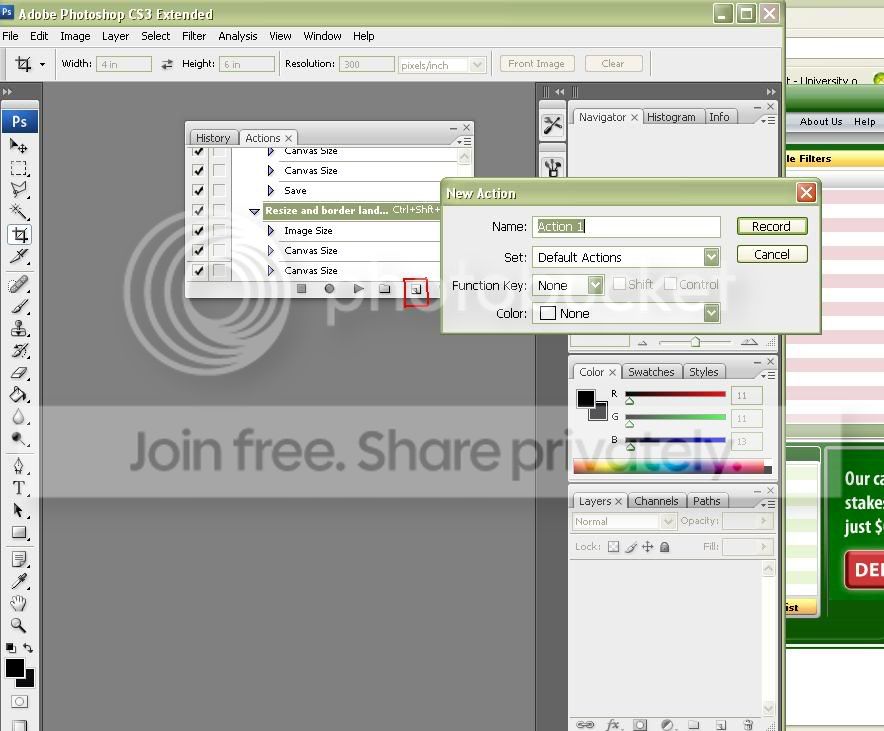
If u go to actions and record this process, it will do it automatically for u with one click
 
Go to Image... Canvas Size.. make sure u tick RELATIVE... choose the size of border (say 1cm).. choose colour (say white).... click OK

You can then repeat this with a black border so u get a small white one then a small black one..

If u go to actions and record this process, it will do it automatically for u with one click


:thinking: THis doesnt work. It is huge!!!
 
I use CS3 and it works OK... what is huge?? The border? if so reduce the size of border.. make sure its set to cm
 
iremember that if you do all of these while recording a macro you can then just click one button and the image is bordered for you


i extended this so the macro-
added a border
put a watermark onto the border of the image
resized the image for the internet!
 
i love pics wit h borders... much better

lovely capture & great car... one day hey??
 
personally i dont like the way the border isnt consistent all the way round the image, its also a bit thin to add impact to the image IMHO.
Also the watermark text isnt equidistant from the bottom or the righthand edge of the image.
 
I like it too.. (what font is that)

If u like something dont change your mind if others dont like it...

Its what you feel comfortable with..

Good luck with your new processing options

Vinny
 
I like it too.. (what font is that)

If u like something dont change your mind if others dont like it...

Its what you feel comfortable with..

Good luck with your new processing options

Vinny

Yeah, my mum said its to big but i like it like that.
 
press alt + f9 then click the new tab

then record :)

Shown below, you click the bit i've highlighted in the red box, then click ok on the pop up box. it then starts recording. Once you've recorded it, click the stop buttin, the little black square.

lovelystuffz.jpg
 
Back
Top