How do you get this colour effect?

SandyMcClure

Suspended / Banned
Messages
232
Name
Sandy
Edit My Images
No
I really like the colour correction in these images and have tried to get something similar but don't seem to quite get there. I have looked at the histograms for several different shots that have this style and I can see there are peaks at the highs and lows with a trough around the mids. The deep shadows and top highlights have also been killed to flat colour in places but then pulled back to dark or very light grey which implies they have dragged in the tone curve at both ends.

I also really like the colour intensity and quality, I know much of this will come from good kit but I can't quite get these colours even when I'm shooting with my 70-200 L Mk II. I'm thinking maybe the blacks have been dropped to add contrast and depth? Again, when I do this it comes out a bit too contrasty so I think I'm missing something. Any ideas?

Here are a few samples from people I admire (credited and linked from their websites, if these are your photos and you don't want me to link them here please let me know and I will take them down immediately, I really like your work and I'm just trying to learn to make my own work better)

Martins Skikulis,

sion-park-wedding-photography-038.jpg


Albert Palmer

wpid18400-babington-house-wedding-photographer-187.jpg
 
Probably using canned presets for lightroom. You can create your own by raising the end point on the bottom of the curve on blue channel, and increasing the top end of red and yellow.

Some weird choice of settings on that last shot... 1/8000th at ISO6400? WTF?


I've just quickly put one together for you here....

https://dl.dropboxusercontent.com/u/23953768/Cool-warm split.lrtemplate

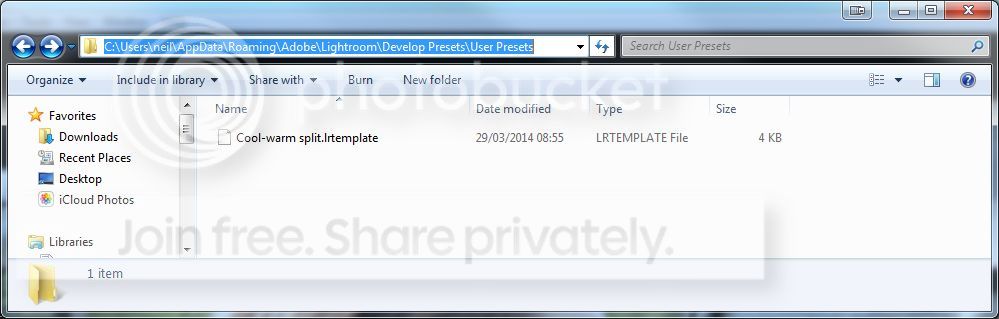
Drop that file in c:\\Windows\Lightroom\lightroom settings\develop presets\users\ ...and it should appear in your presets palette in the develop module.

You can then apply it to an image and see what#'s been done. From there, you can adjust it to create your own to suit your own tastes. That's all I do... in fact, I'm not even sure where this preset started from... I adjust and re-save so many times, I've got hundreds of these things... and I never seem to use any of them.. LOL

Anyhow... the one above was used on this image...

Omi1KwW.jpg


This has more green in the low end than the example you linked to, which has more blue/magenta in the shadows, but the principle is the same... just make some adjustments to the green curve.
 
Last edited:
Pookeyhead:
Useful description, thanks. I will play around a bit too.
I might try the preset too as have been trying to get a similar look for some of my photos.
It's a typical 'film' look really isn't it? Just spent ages scanning some old negs and starting to realize the subtle differences.

By the way nice car - RS4?
 
Pookeyhead, I tried your preset but it sent the colours waaaay off into the yellows, I compensated but it wasn't quite what I was after. Thanks for telling me about individual channel adjustments though, that has helped loads, I think I have got much closer than I had before. It still feels a bit to contrasty to me though but it is definitely an improvement. What do you think? I have included the settings in the image so you can see a bunch of what I have done. Wouldn't normally have the blacks and whites at such extremes but I needed them to compensate for the RGB curve adjustment.
View attachment 8480
 
Thanks, that's really helpful. Can you tell me where you got that information from? By just looking or did you drop it into lr and read off from somewhere?

Not sure I understand... I didn't get the information from anywhere... I just made the preset based on what I wanted... I usually then adjust my own presets, and resave them when needed. That's how I've built up my collection.


Pookeyhead, I tried your preset but it sent the colours waaaay off into the yellows, I compensated but it wasn't quite what I was after. Thanks for telling me about individual channel adjustments though, that has helped loads, I think I have got much closer than I had before. It still feels a bit to contrasty to me though but it is definitely an improvement. What do you think? I have included the settings in the image so you can see a bunch of what I have done. Wouldn't normally have the blacks and whites at such extremes but I needed them to compensate for the RGB curve adjustment.
View attachment 8480


Yeah... it may well do depending on what tones, and levels are in your shot compared to mine. But the idea was to see what my preset was doing so you can then make further adjustments and create your own. That's why you should build up your own collection that do exactly what you want. Your image has a great deal of yellow in it, and my preset is adding yellow/green to the low end, so that's why. However... when you see what the preset is actually doing by looking at your settings in the develop module, you can adjust it to give a colour grading that suits that image... then just save it out again as a different preset.


As I said though... look at other presets... see what they are doing... learn what needs to be done, then create your own exactly as you want them. It's more fun, it's yours.. and you'll learn more about post processing as a result.
 
Last edited:
In the first picture, the treatment applied at the outside is probably different to the centre of the picture. Different treatment (contrast, saturation, exposure) to different layers to get the best of both worlds.
 
Last edited:
Just had a quick look at the first pic, for my guess I'll go with...

looks as tho the shadows have been lifted and he's put some cyan in there, they also look to have de-yellowed (hue/sat?) her dress and the groom. This looks as tho was done locally check the very end of her dress by the sofa leg where her dress looks more yellow.

Great pics and well lit tho,

Edit just had a look at the second similar but more extreme added blue to shadows and yellow taken out, unhighlights blue taken out and a little yellow added (not as extreme as shadows) poss a preset?
 
Last edited:
Getting to know how colour correction and balance work, generally as well as specifically, would help you a lot here. Presets are great but you don't learn much by using them and as you've seen already, the result you get can be quite shot specific. Better to just noodle around with some sliders, work out what they do and to examine the shot you like, try and figure out what's going on.

There's only really a small handful of things that affect how an image looks; colour balance - which can vary across the brightness range - colour saturation, brightness and contrast. Looking at the second of your example images you have blue shadows and warmer highlights - varying colour balance across the brightness range, which we used to call crossed curves but somehow these days has become the less correct 'cross-process'. In Lightroom you can get this with the Split Toning sliders. Set the Highlights warm, the shadows cool and adjust the saturations and balance until you get something you like. (Tip, push sliders to extremes, just to see what happens, it'll teach you a lot). Alternatively can use RGB tone curves further up the panel for a bit more control. You can also use the colour balance tool in Photoshop. Even more control.

The rest is just basic exposure & contrast which is just part of the best practice post processing workflow. Make sure you get your shadows and highlights right then adjust contrast to suit. The clarity slider - mid range contrast - is a handy thing to have too.

Don't forget, it's not just post processing that makes a shot, lighting is also a big part of that deal.
 
Sandy

I think the first pic has had the darks reduced in Lightroom. this rather than the shadows gives a more "solid" look. Apply a vignette with a strong feather to highlight the couple, , plus a wink of fill in flash from the left ( look at the shadows on the chair). I also think there is one to the right. Plus a quick run round with the local adjustment brush to adjust the colour temperature on the couple , ensuring the dress is white. I also think he is a damned good wedding photographer who knows how to handle light.

The second shot I would suggest has had a similar treatment, but with a single flash to the right of the Bride
 
In the first picture, the treatment applied at the outside is probably different to the centre of the picture.

I genuinely don't think it is. It's colour grading using curves most likely. The base of the curve has been lifted in blue and magenta I'd say. I'm sure there's other stuff done to the image we'll only ever guess at, but the colour treatment is global, but split across the histogram with curves.
 
There's nobody better to ask than the photographers themselves. Why don't you do that instead? Because you assume they wouldn't be happy to share this info in full? Fair assumption.

My advice would be to not try and copy other wedding photographers who operate in the same area as you! Just concentrate on developing your own style, rather than trying to mirror somebody else's then undercutting them and I'm sure your business will head in the direction you want it to. It's a bit of a low blow asking this - especially considering one of them is a member on here (@bertpalmer)

The two examples are both very different styles anyway.
 
Last edited:
Drop that file in c:\\Windows\Lightroom\lightroom settings\develop presets\users\ ...and it should appear in your presets palette in the develop module.

"Presets and templates
C:\Users\[user name]\AppData\Roaming\Adobe\Lightroom\[preset or template folder]\[preset or template filename.lrtemplate]"

(appdata is a hidden folder, you may need to manually type it into the address bar)

http://helpx.adobe.com/lightroom/kb/preference-file-locations-lightroom-41.html
(assuming LR5)

:)
 
Not on mine it's not

3nZgtf4.jpg
 
I have a folder in LR5 that I call 'Presets to Try' - I right click - choose import - find it in explorer & that's it :)
 
Mine was just a default install.. no custom path changes.

The folder you want... either way... is "user presets" inside the folder "Develop Presets"... you'll know you have the right folder if it already contains .lrtemplate files.
 
Thanks everyone for your help, I have picked up a couple of very helpful bits of advice here.

There's nobody better to ask than the photographers themselves. Why don't you do that instead? Because you assume they wouldn't be happy to share this info in full? Fair assumption.

My advice would be to not try and copy other wedding photographers who operate in the same area as you! Just concentrate on developing your own style, rather than trying to mirror somebody else's then undercutting them and I'm sure your business will head in the direction you want it to. It's a bit of a low blow asking this - especially considering one of them is a member on here (@bertpalmer)

The two examples are both very different styles anyway.

Ben, I object to the assumption I am trying to base my business on others styles. I am trying to work out how they did this correction as there are elements that I couldn't see what had been done. I like the work and would like to understand it better so I can improve my own work. I follow lots of photographers who I respect and take some influence from each of them, it doesn't mean I am copying their style. I also like your work, would you be willing to talk over it? We are local to each other after all, I'd buy you a pint.

You have clearly had a look around my website (as I have yours now), you must see that I have a different style already? I would love to ask them directly how they achieved that look but you are correct, I doubt they would tell me as I am competition. To me, this is a huge shame with the industry, we will all be in competition regardless of how we interact, wouldn't it be better to work together? And as it happens I knew that @bertpalmer was a user here, I kinda hoped he might chime in and prove me wrong in my assumptions. I have heard though a mutual friend that he is a lovely chap.

Currently yes, I am undercutting them (and you), I think this is fair based on experience. I have been shooting weddings professionally for almost 2 years now, I strongly suspect that Albert Palmer and Martins Skikulis have been doing so for significantly longer than I have and have a more established business than I. As it happens I plan on raising my prices very soon, I set a number of weddings I wanted booked for this year and decided to raise my prices once I had reached that number, I only need 1 more.

I'm serious about that pint if you're up for it.
 
Not sure I understand... I didn't get the information from anywhere... I just made the preset based on what I wanted... I usually then adjust my own presets, and resave them when needed. That's how I've built up my collection.

I meant where did you get the shutter speed and ISO from but I assume it was the EXIF data?
Sandy

I think the first pic has had the darks reduced in Lightroom. this rather than the shadows gives a more "solid" look. Apply a vignette with a strong feather to highlight the couple, , plus a wink of fill in flash from the left ( look at the shadows on the chair). I also think there is one to the right. Plus a quick run round with the local adjustment brush to adjust the colour temperature on the couple , ensuring the dress is white. I also think he is a damned good wedding photographer who knows how to handle light.

The second shot I would suggest has had a similar treatment, but with a single flash to the right of the Bride

I think you are right, looking at those chairs the shadows are quite hard but quickly soften so I assume it is the classic 2 flashes at 45 degrees with perhaps a snap on diffuser, I think the shadows are too hard to be an umberella or softbox. Although the reflections on the pictures in the background hint at a larger light source so I'm not sure.

I'm happy to keep deconstructing these images but I think you lot have answered my question, it looks like it's bluer darks and yellower highlights but done thorough curves rather than split tone. The funny thing is that that is something I used to do all the time to my images (using split tone) but stopped as I thought it looked too retro. I think I was just over egging it, I like the individual channel control and it has actually been useful for stuff other than getting this effect. Thanks guys :)
 
I did what you suggested in another thread.

"Even if you don't understand it all to start with you can get some pretty good results out of it just by playing around with the sliders (which I strongly encourage you to do, that's how you learn!). If you want to feel good about yourself quickly you can cheat and download some presets - just google free presets - and play with those. Now go look at what they did and play some more."

I just had a play and made some presets based on what
Ben, I object to the assumption I am trying to base my business on others styles. I am trying to work out how they did this correction as there are elements that I couldn't see what had been done. I like the work and would like to understand it better so I can improve my own work. I follow lots of photographers who I respect and take some influence from each of them, it doesn't mean I am copying their style. I also like your work, would you be willing to talk over it? We are local to each other after all, I'd buy you a pint.

You have clearly had a look around my website (as I have yours now), you must see that I have a different style already? I would love to ask them directly how they achieved that look but you are correct, I doubt they would tell me as I am competition. To me, this is a huge shame with the industry, we will all be in competition regardless of how we interact, wouldn't it be better to work together? And as it happens I knew that @bertpalmer was a user here, I kinda hoped he might chime in and prove me wrong in my assumptions. I have heard though a mutual friend that he is a lovely chap.

Currently yes, I am undercutting them (and you), I think this is fair based on experience. I have been shooting weddings professionally for almost 2 years now, I strongly suspect that Albert Palmer and Martins Skikulis have been doing so for significantly longer than I have and have a more established business than I. As it happens I plan on raising my prices very soon, I set a number of weddings I wanted booked for this year and decided to raise my prices once I had reached that number, I only need 1 more.

I'm serious about that pint if you're up for it.
 
I did what you suggested in another thread.

"Even if you don't understand it all to start with you can get some pretty good results out of it just by playing around with the sliders (which I strongly encourage you to do, that's how you learn!). If you want to feel good about yourself quickly you can cheat and download some presets - just google free presets - and play with those. Now go look at what they did and play some more."

Take your own advice. I just had a play and made some presets based on what I liked the look of, then made more for various lighting situations etc I've then tweaked them over the years - these things take time, which is why somebody is unlikely to share their techniques when they've worked so hard to achieve them. If the photographer who's style you are trying to emulate wouldn't be willing be to tell you what they do then chances are they wouldn't appreciate it if you were trying to find out via other methods.

Most wedding photographers do interact, work together and are happy to recommend each other to couples when they're already booked etc

You do have a different style indeed, which is a good thing. Make people buy into what you're doing already as it is obviously working if you are one off of your target for the year. I'm not concerned about the undercutting of prices (my first year doing weddings) as people don't book me, or Bert or most other Bristol wedding photographers on price - it's about the style. And they're all very different.

Be happy to meet for a pint one day to have a chat.


Ben, I object to the assumption I am trying to base my business on others styles. I am trying to work out how they did this correction as there are elements that I couldn't see what had been done. I like the work and would like to understand it better so I can improve my own work. I follow lots of photographers who I respect and take some influence from each of them, it doesn't mean I am copying their style. I also like your work, would you be willing to talk over it? We are local to each other after all, I'd buy you a pint.

You have clearly had a look around my website (as I have yours now), you must see that I have a different style already? I would love to ask them directly how they achieved that look but you are correct, I doubt they would tell me as I am competition. To me, this is a huge shame with the industry, we will all be in competition regardless of how we interact, wouldn't it be better to work together? And as it happens I knew that @bertpalmer was a user here, I kinda hoped he might chime in and prove me wrong in my assumptions. I have heard though a mutual friend that he is a lovely chap.

Currently yes, I am undercutting them (and you), I think this is fair based on experience. I have been shooting weddings professionally for almost 2 years now, I strongly suspect that Albert Palmer and Martins Skikulis have been doing so for significantly longer than I have and have a more established business than I. As it happens I plan on raising my prices very soon, I set a number of weddings I wanted booked for this year and decided to raise my prices once I had reached that number, I only need 1 more.

I'm serious about that pint if you're up for it.
 
Back
Top