How do you fill in a colour CS5?

D-pearce92

Suspended / Banned
Messages
2,115
Name
Dex
Edit My Images
Yes
Hi can you help me please, am trying to fill a whole page 1 colour and do not have a cliue how to do it? I know its basic but ive googled and i simply cant find what im after.
 
Do you mean that you have a new canvas opened and that you want to fill it with a colour?
 
So.... If you are using Photoshop, go to Edit - Fill and in the box that pops up click on the downward triangle that is at the right hand side of the" USE" box and choose colour, this should then show you your colour picker box, clickety click on the colour that takes your fancy, click ok, then ok again. Hope this helps - if not I can pop up some screen grabs
 
Thanks a lot, have nearly gone bald sitting here trying to work out how to do it.
 
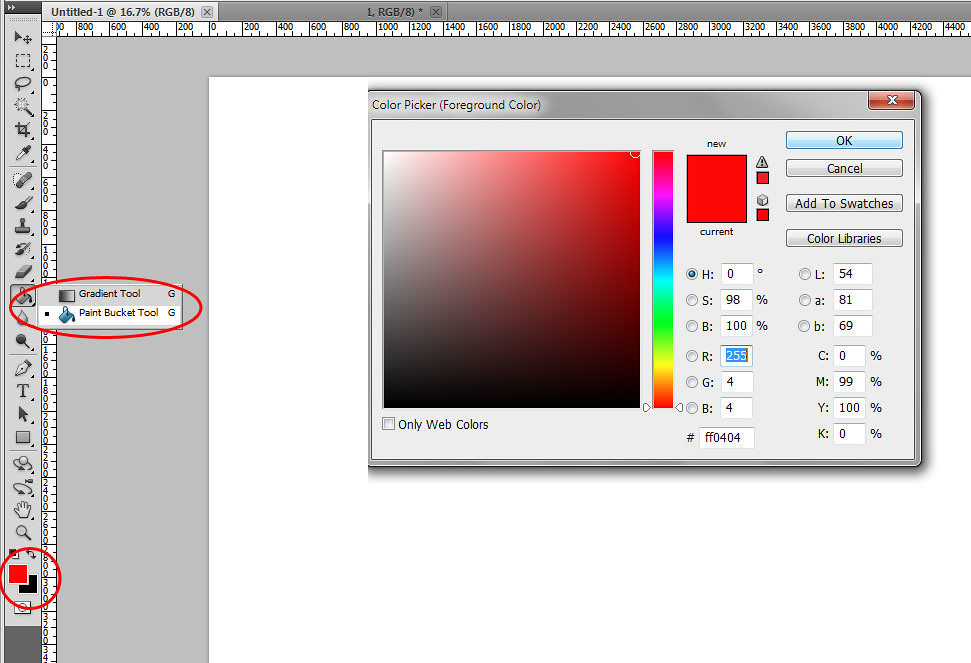
Click on the bucket tool choose your colour and click anywhere on the canvas job done

6483440161_36114cd329_b.jpg
 
Cheers, you'll notice that in that dialogue box that you can also fill with foreground/background colour, black, 50% grey, white, patterns etc. and also change the blend mode and opacity too.
 
Back
Top