

You are using an out of date browser. It may not display this or other websites correctly.
You should upgrade or use an alternative browser.
You should upgrade or use an alternative browser.
How do you do that
- Thread starter Dave P
- Start date

 :embarrassed:
Janice
Suspended / Banned
- Messages
- 11,626
- Name
- Janice
- Edit My Images
- Yes
There is a runthrough somewhere, but until someone directs you to it.
you upload your image in your gallery on this site...Quick Links (above).
Once its there you will see the code for it below the photo.
copy the code and in your post you wrap these tags:
 round the code.
have a try!!!
you upload your image in your gallery on this site...Quick Links (above).
Once its there you will see the code for it below the photo.
copy the code and in your post you wrap these tags:
have a try!!!

- Messages
- 11,048
- Name
- Adam
- Edit My Images
- Yes
There's several ways Dave, I don't know them all…and I may not be that accurate.
One, you can download an image to the free gallery here at TP...Go to your gallery and download from your home PC. ...then you'll have somewhere to host your images you'll be able to show to us in a post/thread. (More instructions available on how to link in the information in threads found at the top of most main forums.)
Second way is to host somewhere else and link from their, many people have galleries on line already.
Linking code goes something like this, (It’s also automated to a certain extent with the 'insert picture' tool found at the top of an editing/post page)...
IMG[]http://file location/folder/image.jpg[/IMG]...that will show your image where placed, as long as you have the address right. (correct the first img tag same as last one, img inside tags)
So its host somewhere first.
(Most people have 50+meg free with BBand packages btw, you’ll need an ftp transfer software for that though…often found free)
Then place a link to those stored images…with a similar link to above.. In a post so we can see.
Hope that’s about right.
One, you can download an image to the free gallery here at TP...Go to your gallery and download from your home PC. ...then you'll have somewhere to host your images you'll be able to show to us in a post/thread. (More instructions available on how to link in the information in threads found at the top of most main forums.)
Second way is to host somewhere else and link from their, many people have galleries on line already.
Linking code goes something like this, (It’s also automated to a certain extent with the 'insert picture' tool found at the top of an editing/post page)...
IMG[]http://file location/folder/image.jpg[/IMG]...that will show your image where placed, as long as you have the address right. (correct the first img tag same as last one, img inside tags)
So its host somewhere first.
(Most people have 50+meg free with BBand packages btw, you’ll need an ftp transfer software for that though…often found free)
Then place a link to those stored images…with a similar link to above.. In a post so we can see.
Hope that’s about right.


- Messages
- 7,625
- Name
- Colin
- Edit My Images
- Yes
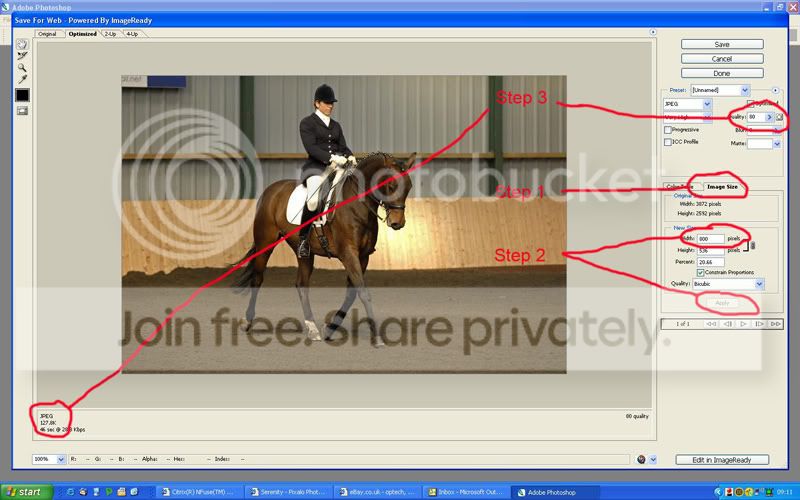
The first thing you need to do is resize so open up Photoshop (the example I'm using here) and go to File > Save for web. You will get a page very similar to below.
Step 1 below: Go to image size and
Step 2: Put in 800 on your longest side and click Apply
Step 3: Move the 'Quality' slider until 160kb shows in the bottom left hand corner.
Save and close.
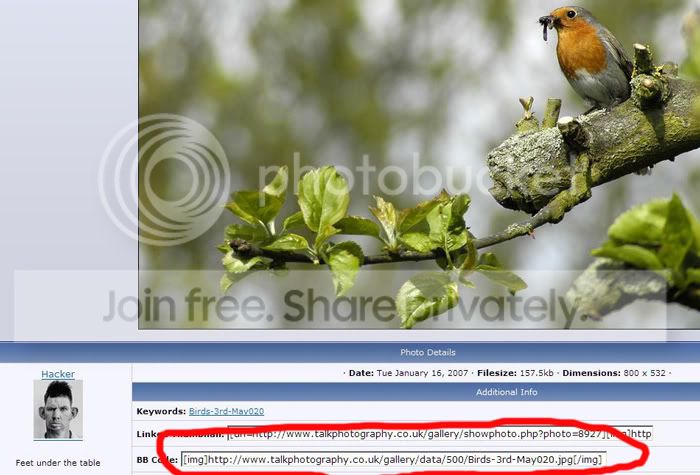
As other have said you then need to upload to your TPF gallery, once that is done click on the image and you will see the bar at the bottom with the IMG tags around it, copy and paste this into your thread, job done.
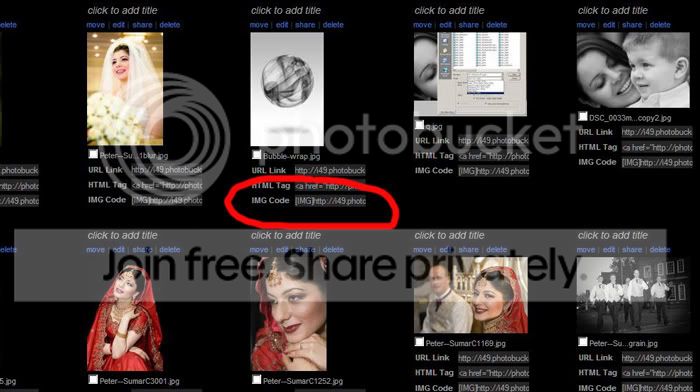
Alternatively you can upload the images to somewhere like Photobucket and copy and paste the the IMG code as shown below.
Hope this helps.
Step 1 below: Go to image size and
Step 2: Put in 800 on your longest side and click Apply
Step 3: Move the 'Quality' slider until 160kb shows in the bottom left hand corner.
Save and close.
As other have said you then need to upload to your TPF gallery, once that is done click on the image and you will see the bar at the bottom with the IMG tags around it, copy and paste this into your thread, job done.
Alternatively you can upload the images to somewhere like Photobucket and copy and paste the the IMG code as shown below.
Hope this helps.
