

You are using an out of date browser. It may not display this or other websites correctly.
You should upgrade or use an alternative browser.
You should upgrade or use an alternative browser.
How do I photograph the moon?
- Thread starter Choc Fan
- Start date

Sky
Suspended / Banned
- Messages
- 4,244
- Name
- Trevor
- Edit My Images
- No
It depends on a few things. Have a read of this: https://helpdeskgeek.com/how-to/6-best-camera-settings-for-moon-photos/
Last edited:

tijuana taxi
Suspended / Banned
- Messages
- 15,748
- Name
- Rich
- Edit My Images
- Yes
Also spot meter off the moon

ShropshireLad
Suspended / Banned
- Messages
- 476
- Name
- Lew
- Edit My Images
- Yes
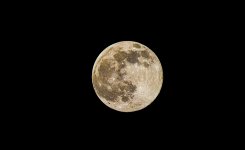
This was taken by me 2 nights ago ... 1/500th sec at f6.5 iso 200 Canon SX50 raw image processed in photoshop.
.
.

- Messages
- 43,206
- Name
- Alan
- Edit My Images
- No
f16 seems a little much to me.
I'd start with spot metering and that may give something like ISO 100 or ISO 200 or maybe more and you may want to alter that if you want to keep the shutter speed up, I'd use f5.6 because that's what my lens is wide open at its longest zoom and it's sharp enough at f5.6 and that equates to something around 1/250 or so but I'd see settings as guides as it all depends, really, on atmospherics and wot not and for example if the lens is a bit soft at f5.6 you might want to stop down to f8 and if you have IS or a tripod and how good you are at handholding etc.
So I think for me, it all depends
I think I'd start and usually do start with spot metering the moon though and go from there.
I'd start with spot metering and that may give something like ISO 100 or ISO 200 or maybe more and you may want to alter that if you want to keep the shutter speed up, I'd use f5.6 because that's what my lens is wide open at its longest zoom and it's sharp enough at f5.6 and that equates to something around 1/250 or so but I'd see settings as guides as it all depends, really, on atmospherics and wot not and for example if the lens is a bit soft at f5.6 you might want to stop down to f8 and if you have IS or a tripod and how good you are at handholding etc.
So I think for me, it all depends
I think I'd start and usually do start with spot metering the moon though and go from there.
Last edited:

- Messages
- 49,339
- Name
- Nod (UK)
- Edit My Images
- Yes
I generally start around 160th/sec f/11 iso 200 ( or auto depending)
or 200th/sec f/16 iso 200 if its bright.
Or indeed any combination of the above.
These settings are as good a point to start at as any. Take a shot or 2 using them and adjust as necessary. You might need a faster shutter speed (depending on your handholding abilities and the efficiency of the lens's image stabilisation).

andrewc
Suspended / Banned
- Messages
- 10,024
- Name
- Andrew
- Edit My Images
- Yes
The moon moves faster than you think, so a faster shutter speed is needed than you may imagine.
The rest is balancing f/stop and ISO, and that depends partly on the sharpness of your lens at a given f/stop and the noise handling ability of your camera.
The rest is balancing f/stop and ISO, and that depends partly on the sharpness of your lens at a given f/stop and the noise handling ability of your camera.

- Messages
- 8,852
- Name
- Tom
- Edit My Images
- Yes
Having done extensive testing, on my equipment. F/16-f20 fives far more detailed and sharper results that anything below. I always used to pretty much ignore the aperture as the moon is so far away, it can't possibly make a difference.
I was wrong. It does. Obviously Every camera and lens will be different but for me f/16 is the sweet spot.
I was wrong. It does. Obviously Every camera and lens will be different but for me f/16 is the sweet spot.
- Messages
- 43,206
- Name
- Alan
- Edit My Images
- No
Having done extensive testing, on my equipment. F/16-f20 fives far more detailed and sharper results that anything below. I always used to pretty much ignore the aperture as the moon is so far away, it can't possibly make a difference.
I was wrong. It does. Obviously Every camera and lens will be different but for me f/16 is the sweet spot.
I'm amazed by that as you're heading into diffraction. I suppose all tastes and kit can vary but I'd have thought much kit hits its sweet spot well below double digit aperture settings.
- Messages
- 8,852
- Name
- Tom
- Edit My Images
- Yes
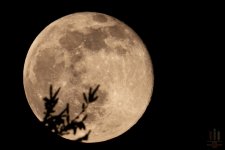
Taken last night at f/20.I'm amazed by that as you're heading into diffraction. I suppose all tastes and kit can vary but I'd have thought much kit hits its sweet spot well below double digit aperture settings.
The forum kills it, but each crater is defined and as sharp as its possible to get imo. Even my watermark looks like arse on here, but believe me, its sharp!
- Messages
- 43,206
- Name
- Alan
- Edit My Images
- No
I know the effect that posting can have so I'll always take the word of the poster and if you say it's sharp that's good enough for me.
Myself, I have nothing at the moment that's at its best at double figure apertures but who knows what the future may bring.
Myself, I have nothing at the moment that's at its best at double figure apertures but who knows what the future may bring.
- Messages
- 8,852
- Name
- Tom
- Edit My Images
- Yes
Like I said, up until last year, I always used a max of f/8 for moon shots. My wife got into photography and she used my old fuji xt3 and 100-400 and started taking shots of the moon. Not knowing any better, she used f/16 and the shot was the sharpest Id seen from that camera of all the shots I'd taken.
I then experimented with my a9 and 200-600 and found f/16 gave far better results than f/8.
I then experimented with my a9 and 200-600 and found f/16 gave far better results than f/8.

LeeRatters
Suspended / Banned
- Messages
- 7,354
- Name
- Lee
- Edit My Images
- Yes
Last night I saw a nice colourful full size moon and thought that would make a great photo.
Can someone please give me what settings I need to use to get a photo, thank you.
Camera: 5d Mark IV
Lens: Canon EF 70-300mm F/4-5.6 IS USM
Did you not try to get some photos yourself?

Topsy
Suspended / Banned
- Messages
- 4,025
- Name
- Paul
- Edit My Images
- No
The best advice I can give is to try it yourself then work out why it didn't work then adjust and try again. Digital is free to experiment apart from your time and the best way to learn is to experiment. Even if you use any of the settings advised by the contributers here you will not know how to do it you'll just have a lucky shot. Sorry to seem harsh but the road to good photography is not asking for solutions it's experimenting. If you try some shots then post them back here for comment you'll probably learn a lot more. Go try it show us what you get good or bad and advice will be forthcoming no doubt.

4wd
Suspended / Banned
- Messages
- 3,224
- Name
- North York Moors
- Edit My Images
- Yes
The moon itself is brightly reflecting sunlight, so even if your lenses can't get it all that large in frame to see any detail on the surface you want close to daylight settings as suggested above.
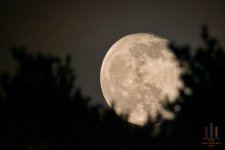
I always think photos of it full are less interesting than crescents where you can often see sun catching the edge of features at the edge of bright area.
Also composition-wise taking the shot when it's low enough to include some ground features is usually a good thing
I always think photos of it full are less interesting than crescents where you can often see sun catching the edge of features at the edge of bright area.
Also composition-wise taking the shot when it's low enough to include some ground features is usually a good thing
- Messages
- 49,339
- Name
- Nod (UK)
- Edit My Images
- Yes
Also composition-wise taking the shot when it's low enough to include some ground features is usually a good thing
While this is true, shooting as close to straight overhead is best for capturing as much detail as possible on the Moon itself - you're looking through much less atmosphere than you are at a lower angle.

checkmate91
Suspended / Banned
- Messages
- 83
- Name
- Andy
- Edit My Images
- Yes
A couple from this evening, too much haze and distortion here in Essex on the evening of the Wolf Moon:
View: https://flic.kr/p/2mYar8Y
View: https://flic.kr/p/2mY1QyR
Had a bit of a play with aperture etc and white balance, first one is AWB, second is daylight 5200. Lens is a Sigma 150-600mm Contemporary which I'm pretty sure is not one of their finest examples but there's some acceptable detail in these images. As has been said, full(ish) moons aren't the most interesting of subjects.
View: https://flic.kr/p/2mYar8Y
View: https://flic.kr/p/2mY1QyR
Had a bit of a play with aperture etc and white balance, first one is AWB, second is daylight 5200. Lens is a Sigma 150-600mm Contemporary which I'm pretty sure is not one of their finest examples but there's some acceptable detail in these images. As has been said, full(ish) moons aren't the most interesting of subjects.

- Messages
- 114,434
- Name
- The real Chris
- Edit My Images
- No
f16 seems a little much to me.
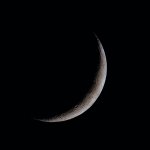
Well it works for me taken a few nights ago at those very settingsI'm struggling to understand why f11/f16.
As @4wd said, the moon is a lot brighter than some people imagine, and you have to stop down a bit to save blowing the highlights.
tijuana taxi
Suspended / Banned
- Messages
- 15,748
- Name
- Rich
- Edit My Images
- Yes

OP

Choc Fan
Suspended / Banned
- Messages
- 16
- Edit My Images
- Yes
No as I was going out in the car!Did you not try to get some photos yourself?

MrRichAllen1976
Suspended / Banned
- Messages
- 657
- Name
- Richard Allen
- Edit My Images
- No
Wow! It's a bit good that, you can see the Craters and everything!