How do I make a stamp??

Matt Sayle

2017MSA Young Photographer of the Year(Motorsport)
Suspended / Banned
Messages
18,976
Name
Matt Sayle
Edit My Images
Yes
Out of this:

logo.jpg


in photoshop ???

I am thinking it is time for em to put a dirty big watermark across my shots that is obvious but doesnt wreck them (I.E need to get rid of the white )

Thanks
Matt
 
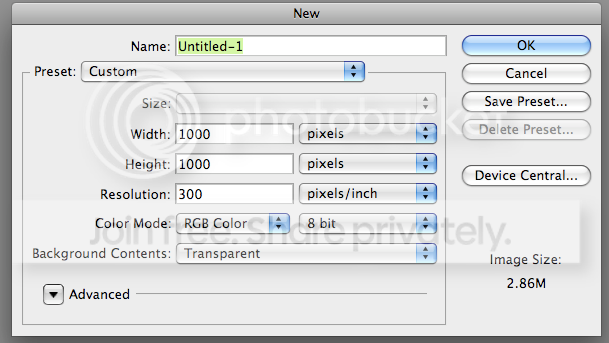
Open a new document on photoshop, on the dimensions input window select the size that you wish the document to be and set the background to be transparent.

Picture1-8.png


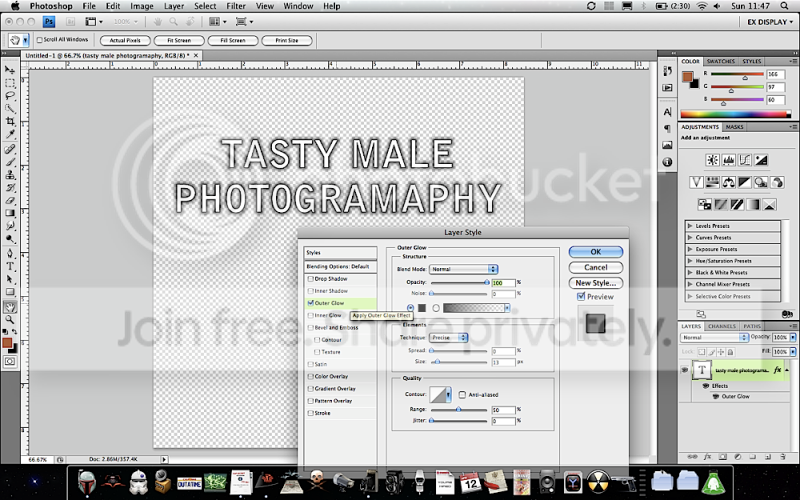
Add your text and stroke, or outer glow, whichever gives you the desired outline: (The bar you have separating the two words may have to dealt with as a shape maybe).

Picture2-2.png


....and then save as a PNG. This will retain the transparency.

You can then set up an action and a droplet to apply the watermark to your images, or if you use lightroom I can recommend the mogrify plug in.

Hope this helps buddy :thumbs:
 
nice tutorial, that just what i was after also..
 
nice tutorial, that just what i was after also..

If I missed anything just let me know, I do have a habit of excluding vital pieces of info here and there. It's all in my head just sometimes doesn't all come out proper :bonk:

**bows down**

That is awesome, thank you very much!!

Where can I get this plug in??

Ney bother.

http://www.timothyarmes.com/lrmogrify.php

it does have a catch, unless your willing to donate a few pence then the limit of each export will be ten images.

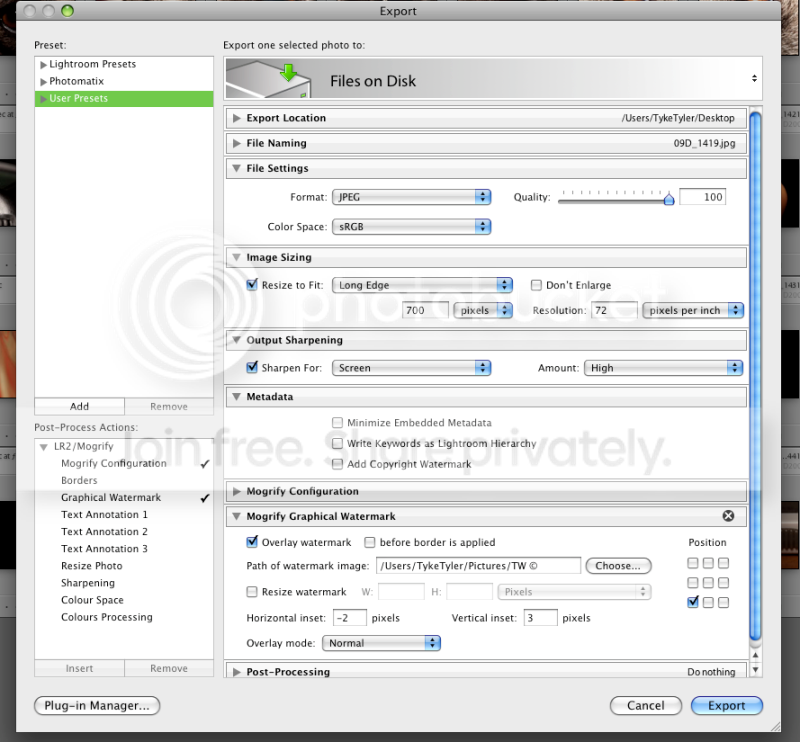
AFter installing mogrify, your export menu options will have a few new tabs, my watermark (TW ©) has also been created in exactly the same way as I mention above, a transparent PSD saved as a PNG:

Picture2-1.png
 
To, how do I save it as brush?? You can make it so that you click the paint brush and put it on??

Haven't a clue mate to be fair, using a copyright brush is still too fiddly and time consuming , especially when batch processing IMO.

My watermark is saved as a PNG at around 135 pixels wide by 60 pixels high, it's then applied during export in Lightroom via the mogrify plug in.

I'm completely in love with the output sharpen in LR's export so my workflow involves LR as a main brain, even with photoshop edits, I right click the RAW in LR and select edit in photoshop, do my edit and when I save the PSD it automatically appears in my LR catalogue allowing me to edit further if I wish and also export via mogrify. It's top banana!
 
Brilliant info thanks - the exact reason I came onto the forum today! Thanks! Now off for an Easter Egg Hunt!!!
 
Back
Top