
and please use their services
You are using an out of date browser. It may not display this or other websites correctly.
You should upgrade or use an alternative browser.
You should upgrade or use an alternative browser.
how do i do this?
- Thread starter Mojo Jojo
- Start date


MasterChief
Suspended / Banned
- Messages
- 139
- Name
- Mike Edwards
- Edit My Images
- Yes
Not 100% but try and the image adjustment shadow & Highlight, play with the adjustments and you might be able to get it to where you want.
Hope this helps.
Hope this helps.


- Messages
- 26,617
- Edit My Images
- Yes
Quick job.

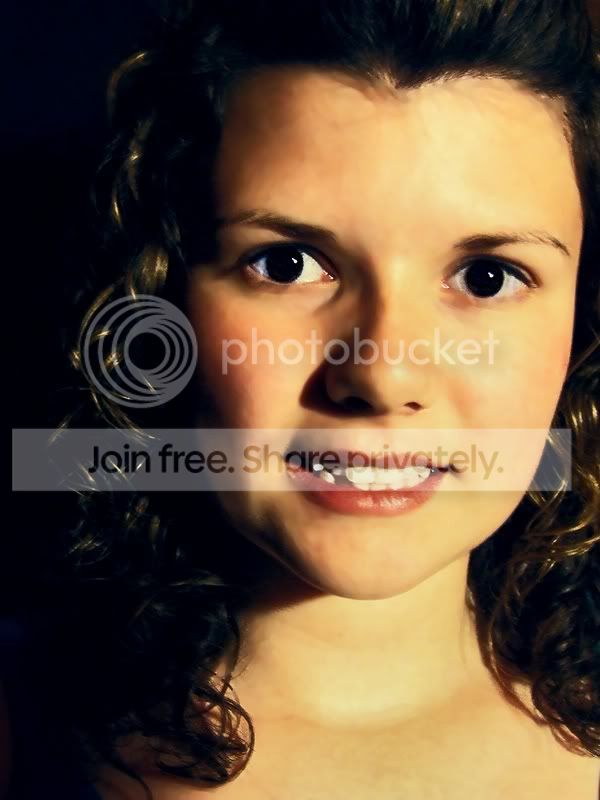
Draw a fairly tight mask around the hard shadow area and feather it by a few pixels. Now clone a suitable flesh colour into the shadow area from outside the mask (from elsewhere on the face). When the shadow has gone, remove the mask. You'll need to selectively lighten the shadow side of the nose as it will now look too dark in relation to the now lighter cheek.
You need to do a bit of pixel pushing with some sort of blend tool to get it all looking as natural as possible with no obvious processing joins. Not the easiest of jobs tbh without a fair amount of practice.
As has been said - it's a lot easier to look for that nose shadow before you press the shutter.
Draw a fairly tight mask around the hard shadow area and feather it by a few pixels. Now clone a suitable flesh colour into the shadow area from outside the mask (from elsewhere on the face). When the shadow has gone, remove the mask. You'll need to selectively lighten the shadow side of the nose as it will now look too dark in relation to the now lighter cheek.
You need to do a bit of pixel pushing with some sort of blend tool to get it all looking as natural as possible with no obvious processing joins. Not the easiest of jobs tbh without a fair amount of practice.
As has been said - it's a lot easier to look for that nose shadow before you press the shutter.


- Messages
- 21,370
- Name
- KIPAX Lancashire UK
- Edit My Images
- No
Damn you CT, proving me wrong
and me.... I wouldnt hang it on my wall like that.. but deffo impressed

- Messages
- 26,617
- Edit My Images
- Yes
Can you not mask the area and increase the exposure then heal blend?
Or duplicate layers and image then mask and dodge area of shadow?
All roads lead to Rome - it's a question of which you prefer. there's always a gazillion different ways to tackle these jobs.
- Messages
- 26,617
- Edit My Images
- Yes
Damn you CT, proving me wrong
Well you weren't really wrong - it should be taken again. The whole of that side of the face still has some dark shadows that are now at odds with the rest of the shot really, and need sorting out.
Don't feel too bad - this comes from years and years of sorting out old damaged, cracked pics for people.

Jo
Suspended / Banned
- Messages
- 3,667
- Name
- Jo Fisher
- Edit My Images
- Yes
I had a play too, I hope you don't mind
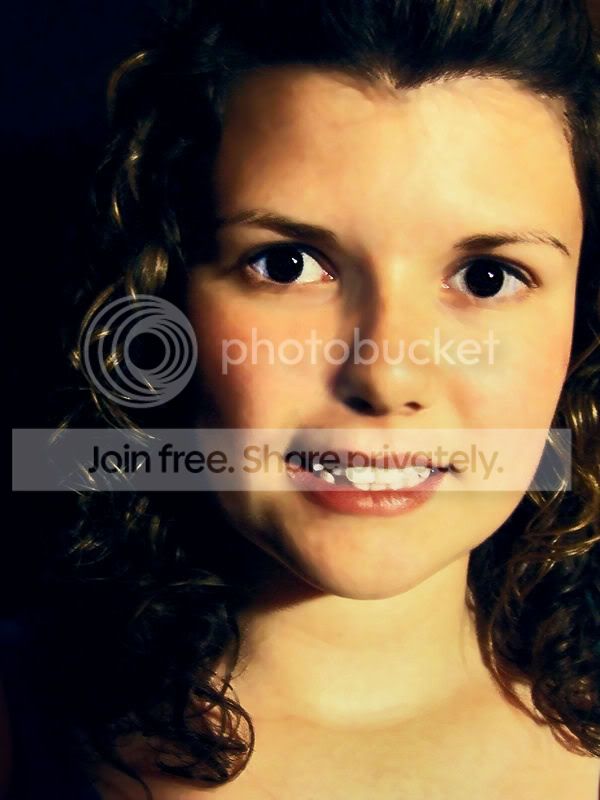
I did so much to it I couldn't possibly tell you exactly how. There was a lot of cloning, smudging and softening done though, as well as two different layers made and merged with different brightness settings. When I had done I tried to reverse it all, then I was going to record the actions and try being clever and making a short movie type clip But alas it didn't work.
I did so much to it I couldn't possibly tell you exactly how. There was a lot of cloning, smudging and softening done though, as well as two different layers made and merged with different brightness settings. When I had done I tried to reverse it all, then I was going to record the actions and try being clever and making a short movie type clip
But alas it didn't work.