How do I do it?

Spavo

Suspended / Banned
Messages
52
Name
Phil
Edit My Images
No
I'm not sure the best place to post this?

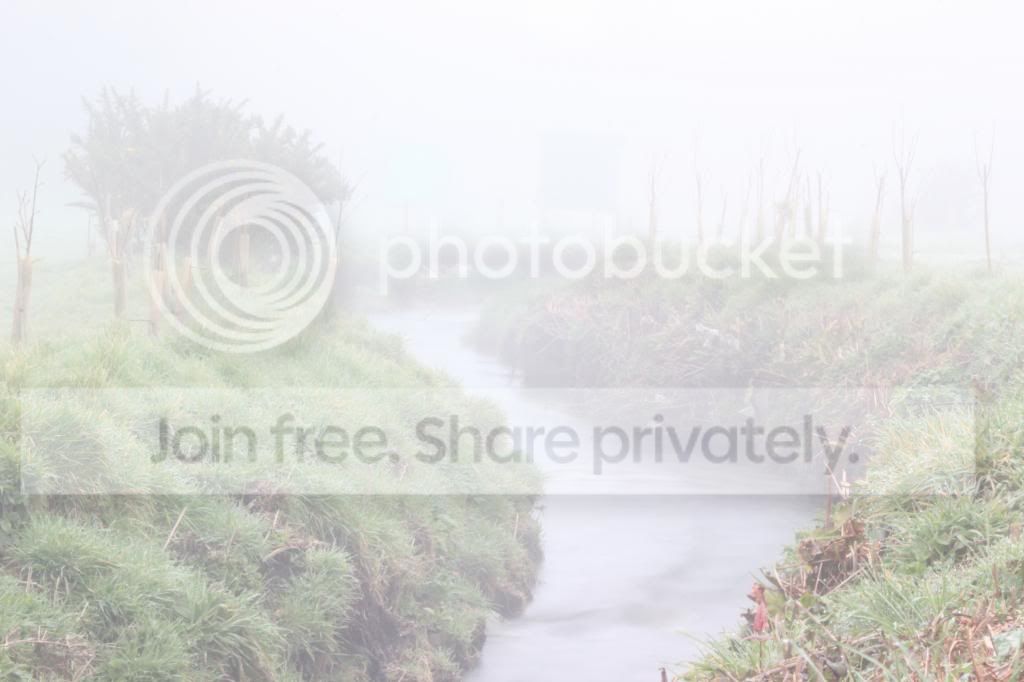
Really after some advice I've tried and failed to take photo's of a river this morning in fog, I wanted to try and get the misty effect in the running water and the fog in the back ground against some archery targets. I Took lots of pictures and nothing came out well.

I tied shooting around 1sec to 4sec with a ND4 filter on, using a Canon 550 with a standard lens 75mm - 300mm lens shot on a tripod. I think I got the ISO wrong as most were between 100 - 400

Really disapointed with the outcome, what sort of settings would I need to use?
 
Post a couple of the pictures and people will be able to give you advice on them.

Keeping the ISO between 100-400 is ok, you would only go higher when you want to get a higher shutter speed.
For misty water you want a longer shutter speed, 20-30 secs for example.
Until you say what you felt was wrong with the photos nobody can advise you.
 
Last edited:
Normally, just adding one stop of exposure compensation to whatever your meter suggests will get the exposure right. Not sure what else you need without seeing what you already have.


Steve.
 
None of the seem sharp, I used a trip pod and could get the targets in the background, below are a selection of photo's not very good.

River0002.jpg


River0001.jpg.html
 
Last edited:
They are overexposed.
Were these taken in (more or less) daylight? An ND4 filter isn't enough for exposures this long in daylight.
You probably want them slightly overexposed to capture the "fogginess" but these are a little too far gone.
 
Last edited:
Firstly they're overexposed, but they're what you saw, not what you thought you were seeing. Fog doesn't go in the background. It exists between you and the riverbank too.

My guess is you were shooting into the light, the fog would be less if you shot with the light behind you.
 
What focal length were you using?...to much zoom will mean you're just zooming into the fog/mist and there will be no areas that are clear, as in a few dozen or so yards in front of you.
 
Normally, just adding one stop of exposure compensation to whatever your meter suggests will get the exposure right. Not sure what else you need without seeing what you already have.


Steve.

I've never used the meter not sure on how to read.
 
sg2uc1.jpg


Is this anything what is was like ?
 
Last edited:
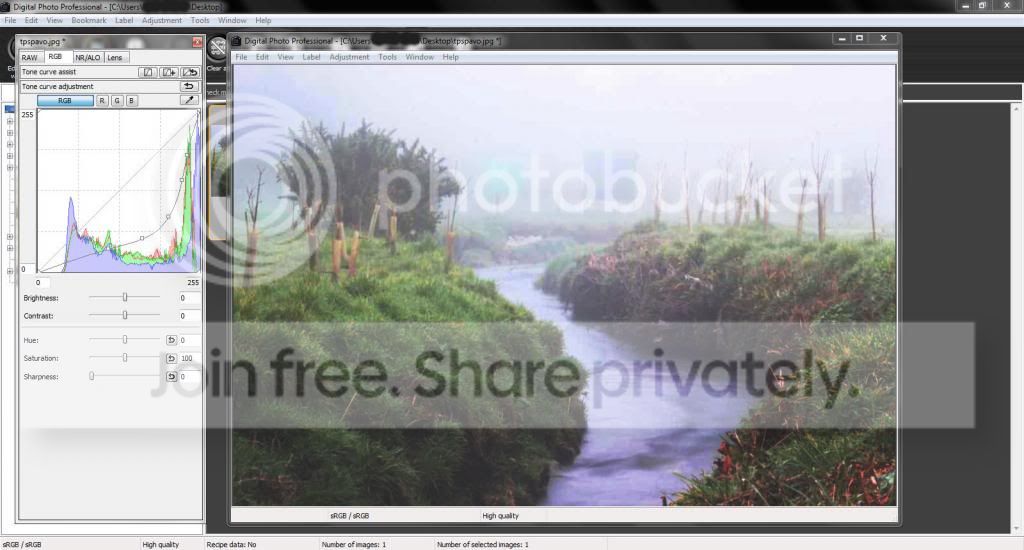
I just did something similar to Barso. All I did was use DPP which comes with your Canon. Shows 5 points on the RGB tone Curve Adjusment graph. Have a play with it to familiarise yourself with it.

tpspavoedit_zps3f88c6ec.jpg


If I had the raw file I would also reduce the highlight and shadow. DPP is a brilliant tool.
 
Last edited:
At ghoti, took them about 11.00 today very foggy I've got ND 8 filter so should have gone for that?

Barso & Archy a lot more like it I really need to use the computer a lot more.
 
I've never used the meter not sure on how to read.

If you are using an automatic setting (aperture or shutter priority) just add +1 stop of exposure compensation.

Barso & Archy a lot more like it I really need to use the computer a lot more.

Much better to get it right in camera than to rely on post processing,


Steve,
 
Last edited:
I've never used the meter not sure on how to read.
What I don't understand is how the camera will have over-exposed the scene so much if you were relying on it rather than setting the exposure yourself. There doesn't seem to be any EXIF data in those photos, so I think it would help if you could explain what camera settings you were using.
 
For landscape photography like this a good base to start would be:
Have your ISO set between 100-400 (the higher you go than ISO 400 the more the image quality suffers).
Set the camera on Aperture Priority (Av on canon cameras).
Set the aperture to around F11 to give a reasonable Depth of Field (how much of the picture will be in focus).
Let the camera sort out the shutter speed, but be aware of it because if the camera sets a shutter speed longer than 1/60th of a second (ie 1/60, 1/50, 1/40, 1/30, 1/25, 1/20, 1/15, 1/10, 1/8, 1/6, 1/5, 1/4, 0"3, 0"4, 0"5,0"6,0"8,1"0, and any whole second number, also BULB) then you'll have to use a tripod or the pictures will be very blurred.

You said you were using filters, I assume to try and blur the water, in which case keep the settings as I said above, and with the ND filter on the camera will pick a longer shutter speed. You'll maybe need to set the camera onto self timer (or use a remote shutter trigger) to stop you moving the camera when you physically press the shutter button, and it would also be an idea to use mirror lock up.

To get the water blurred you need to get your camera to select a shutter speed of around 20-30 seconds, use 100 ISO, that will give you a little longer, and maybe a 10 stop filter. With a fast flowing waterfall you should get a nice blur, with a slower running stream like in your pictures it will give a more silky effect.

Remember the above is a guide to get you going, but there is no substitute for learning and understanding how the exposure works, and the relationship between ISO, Aperture and shutter speed, and don't forget to change your settings after or that next picture of your dog on the beach will be all blurred!

Good luck and let us know how you get on.
 
I tied shooting around 1sec to 4sec with a ND4 filter on, using a Canon 550 with a standard lens 75mm - 300mm lens shot on a tripod. I think I got the ISO wrong as most were between 100 - 400
What mode, "M"?
What aperture?
ISO is fine, or leave it at 100.
The example is way overexposed ... this suggests you were overriding the camera's automatic behaviour, you could let it "Auto" and then compare with your own settings and see which are better.
 
Let the camera sort out the shutter speed, but be aware of it because if the camera sets a shutter speed longer than 1/60th of a second then you'll have to use a tripod or the pictures will be very blurred.
Depends entirely on whether the lens is stabilised or not.

To get the water blurred you need to get your camera to select a shutter speed of around 20-30 seconds, use 100 ISO, that will give you a little longer, and maybe a 10 stop filter. With a fast flowing waterfall you should get a nice blur, with a slower running stream like in your pictures it will give a more silky effect.
Off by a factor of 10. 2-3 seconds is enough to smooth water out. 10 seconds is really pushing the boat out.

Phil: I think that before trying long exposures and using 10-stop filters, it's best to get the basics right. Go out on a nice sunny day and take a good, sharp, well-exposed picture of anything at all, and when you can do that with ease, then you can start coping with difficult lighting conditions (and mist can be very tricksy, my preciousssss) and taking on more involved techniques.
 
If you are using an automatic setting (aperture or shutter priority) just add +1 stop of exposure compensation.


Much better to get it right in camera than to rely on post processing,


Steve,


Yes correct. Whilst DPP and your PS like programs are useful for getting the most out of an image and/or arty'fying it as well as rescuing an image, the skill of the photographer is where it is at and this is another lesson you have learned to improve camera skills.
 
If the images are over exposed why would you add 1 stop of plus ec? Am I being dumb? (This is entirely possible ;) )
No you're not being dumb. You're perfectly correct.
 
I didn't mean +1 stop above what you already have, I meant +1 stop over what your meter suggests.

When photographing scenes with a lot of mist, the meter is usually fooled into under exposing and it needs to be compensated for to make the mist closer to white than to grey. Much like you do with snow but to a lesser extent.


Steve.
 
Last edited:
Depends entirely on whether the lens is stabilised or not.


Off by a factor of 10. 2-3 seconds is enough to smooth water out. 10 seconds is really pushing the boat out.

Phil: I think that before trying long exposures and using 10-stop filters, it's best to get the basics right. Go out on a nice sunny day and take a good, sharp, well-exposed picture of anything at all, and when you can do that with ease, then you can start coping with difficult lighting conditions (and mist can be very tricksy, my preciousssss) and taking on more involved techniques.
I offered up a basic guide to start from, which is what he asked for, not the be-all-and-end-all.
Instead of picking holes why not offer up your own guide so he can try them both and see how he gets on?
 
Back
Top