How did you all start out with PP?

gaz_jameison

Suspended / Banned
Messages
282
Name
Gary
Edit My Images
Yes
Hi all.

All of my photos are 'straight from the camera' and whilst I do quite like some of them, they do still look a bit amateurish or 'snapshot-ish.'

For some reason I always thought PP was cheating but the more I get into this game the more I can appreciate its merits.

The problem is I haven't a clue where to start, I've never owned any PP software before, and I hear a lot of experienced people talk about how complicated a lot of the applications like Photoshop can be. To be honest I find the whole thing very intimidating at the minute.

Has anyone any advice that could help me break into this area?

Thanks!
 
It depends what you want to do to the photo. I use lightroom and it does all I want it to do. You could download a trial version of lightroom and see if it is any good for you.
 
Is it free? Is it complicated? Any idea where I could download it from?

Sorry for being a mong...
 
i was into editing before photography and as a result, I think my togging suffers as I like doing PP stuff ... although, saying that, since joining this site, I realise how rubbish I am at editing too :D

google GIMP, which is a free editing package, or go to the Adobe website for Photoshop and Lightroom trials
 
Another vote for Photoscape.

It is very easy to use. It does not have as many features as some photo editors but I often find it does all I need. If I need something more I use GIMP.

Dave
 
You could get Photoshop Elements 6 for around £15 on Amazon, and Scott Kelby's excellent book on how you use it for under a tenner. That is likely to give you everything you need. And check out your local colleges for beginners courses.
 
Download a trial of lightroom from adobes website. Its very easy to use and you just have a play about with it. Plenty video instructions on YouTube or the likes.
 
Lightroom isn't really an editor, it does have some very good editing features but it's not meant to be an editor.

Lightroom is a fantastic program but it's main function however is to catalogue your collection, it is also really good for batch processing however as a main editor I would look at either Elements or photoshop depending on budget. Photoshop also comes with Bridge which does a similar job to Lightroom.

Elements is a fantastic way into Photoshop. It's reasonably cheap and has most of the function of full blown Photoshop. All the camera magazines usually have tutorials on how to use it too.

I have Both Lightroom and Photoshop and love them both. Having said that I have spent years trying to learn them both and still haven't found everything!


Having said that you will need to spend time with it learning how to use it and understanding layers will be your biggest challenge!! However anything worthwhile takes effort and you will learn to enjoy the process.
 
With any software theres going to be a learning curve, we all start pretty much knowing nothing, the best way is watch a few video tutorials on youtube (or wherever) then play play play!, the more you use a program the more you'll get comfortable with it.
Both photoshop and it's free rival Gimp need a bit of learning, but I've had total beginners using the program with just a bit of basic learning and a play.
 
What sort of editing do you want to do? General improving of the image, lightening/darkens a whole image etc, or do you want to get fully involved replacing skies/merging images etc.
 
What sort of editing do you want to do? General improving of the image, lightening/darkens a whole image etc, or do you want to get fully involved replacing skies/merging images etc.

I actually dont really know. Probably just improving the shots that come straight off my camera. In general I'm happy enougfh with them, but theres still something very amateurish about them that a lot of people on here seem to be able to get around with PP
 
I use the free Canon software Digital Photo professional, it only has the basics but its good enough for me and i'd recommend it as a good starting point!
 
gaz_jameison said:
I actually dont really know. Probably just improving the shots that come straight off my camera. In general I'm happy enougfh with them, but theres still something very amateurish about them that a lot of people on here seem to be able to get around with PP

In that case my first port of call would be the software that came with your camera, or Photoshop Elements.
 
i was into editing before photography and as a result, I think my togging suffers as I like doing PP stuff ... although, saying that, since joining this site, I realise how rubbish I am at editing too :D
..

Me and you are separated at birth :lol:

I started out on something like Photoshop 3 when the clone tool was the new thing to us graphic designers. Working on Quadras and Powermac 8500/9500s with less ram than most modern mobile phones :LOL:

When I turned to photography, actual digital capture was still a very new and expensive thing, especially in any high resolution form, so scanning negs and trannies was necessary (albeit very slow) and to be fair, most of us at my college preferred the darkroom as a result.

It was probably about 2002 when I finally got into digital processing proper, when we got some D60s to replace our EOS 50s. Then it was a case of getting back up to speed with the existing tools (and the new ones). Once the 'CS' series came out and then LR, it was great because there was a real sense of photographer-centric thinking from Adobe for me.

These days I do feel that there are sometimes too many temptations, what with so many plug-ins and separate 'effects' programmes available that can lead you away from delving deeper into the software you currently own.

I don't edit that crazily these days in reality. I still love doing exposure blending but I generally just do very subtle adjustments that I can apply to batches of images that are then sent out to the magazine editors. Personal work probably gets a bit more personal attention but as with darkroom processing, I'm pretty straightforward.
 
I started using PSE10 last year and then got LR4 recently and prefer it unless it's layering, 99% of my shots don't need layers because I get it right in the camera, if it's not right in camera then it gets deleted as I take them
 
Last edited:
It really depends how deeply into post-processing you want to delve, I'd say. At one end of the scale, there's simpler software like iPhoto, which offers a good selection of tools for whole image adjustment, through to the rather more comprehensive set offered by the likes of Aperture and Lightroom, to the full-blown alteration/recomposition possibilities of Photoshop and its ilk, not to mention the wealth of plugins for Aperture, Lightroom, and Photoshop.

As for the opening question: iPhoto, in my case, which I used happily while enjoying my Panasonic Lumix TZ-5, and for the first year of owning my D90, until the Mac App Store brought about a sharp drop in Aperture's price. I'll likely pick up CS6 this year, courtesy of Adobe's highly generous academic discounts, primarily to begin exploring the possibilities, rather than for immediate applicability to my photography - but first, a TC17E-II teleconverter. (Why couldn't my wildlife passions be large, like on safari, rather than the small mammals, rabbits especially..)
 
Last edited:
If your new to PP one thing i would say to start with, is saves as copies or with a new file name so you always got your original to fall back on if you want to start again from the start. Dont overwrite your original file, you never know when you might want it
 
I started out using photoshop elements 2 which came free with my first DSLR - since then i've upgraded to Elements 5 but havent gone any further as it does whats needed so if it isnt broke why fix it.

Ive also got LR3 which i use principally as a raw converter - I don't use the organiser on either program because i have my own file structure on the external hard drive for catalouging and don't need or want a program to do it for me.
 
If you shoot RAW Elements can process those files although I use Capture NX2. I have Elements 10 but I only use it occasionally when I want to try out some editing skills (layers and stuff). Before you buy editing software I would try GIMP and try out some of the free trials. If you try before you buy, you will have a much better idea of what you want to do and which software is best for you.
 
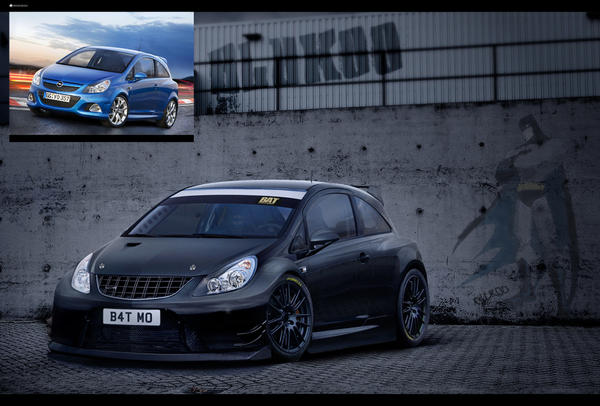
I started off in Photoshop by virtually modifying cars when I was 15.

Stuff like this:
Corsa_VXR_BAT_by_BluKoo.jpg

Rust_In_Pieces_by_BluKoo.jpg

Jaguar_E_Type_by_BluKoo.jpg


I found it a great way to break into a pp game. Trial & error is a great way of learning.

10 years on and i'm still learning though haha.
 
Thanks for all the replies. I downloaded GIMP yesterday and watched a few youtube tutorials, so I'd say trying to get my head around that will keep me occupied for the rest of my life lol! :P

Actually I just remembered a friend of mine has a degree in graphic design so I'll have her tortured for the next while explaining layers and channels and the like haha!
 
I think its underselling Lightroom to say its not an editing tool. Its absolutely fantastic by itself at processing photos in many disciplines. To say its mainly for cataloging is underselling it. I know of many well respected pros that do all their processing in LR and i personally do 90% of my processing in it despite 10 years of photoshop experience.

Definitely at least download the trial!
 
I think its underselling Lightroom to say its not an editing tool. Its absolutely fantastic by itself at processing photos in many disciplines. To say its mainly for cataloging is underselling it. I know of many well respected pros that do all their processing in LR and i personally do 90% of my processing in it despite 10 years of photoshop experience.

Definitely at least download the trial!

:agree:

95% of my stuff never sees photoshop.

The only things that do are anything that needs liquify, or layer masks or anything used for advertising that may require the addition of logo's and other stuff
 
I sharpen in photoshop or do any remedial work if necessary. I think its a bad habit to get into where you think 'i can photoshop that later' while on a shoot. My workflow is this:

Photomechanic (cull, label, rate and rename RAW)
Lightroom (Batch Process using my own presets for large shoots, fine tune images one by one or process individually for small shoots)
*Export images as JPG or TIF if required*
Photoshop (Sharpen images, perform any necessary fixes)
Photomechanic (final cull if necessary and rename accordingly)
 
A friend who was a design student bought himself a newer version of photoshop (education version as he was a student) so gave me his full version of PS7, showed me how to use layers and then left me to play with it.

I'm no expert but I can do enough to process my own images and did like most get stuck in the whole "photoshop it to hell and back" routine for a while many years ago.
Now I just do whats needed and stopped doing manipulation requests from vikki's friends and others.
 
gaz_jameison said:
The problem is I haven't a clue where to start, I've never owned any PP software before, and I hear a lot of experienced people talk about how complicated a lot of the applications like Photoshop can be. To be honest I find the whole thing very intimidating at the minute.
 
I've downloaded the photoshop trial and have started messing around with it.

There are more options than i know what to do with! :lol:

started watching a few tutorials and will just take it from there.
 
What happens to your catalogued & organised photos if say for example, you un-installed LR ?
 
They stay where they are.
 
Lol right, I was going for LR but thought, what happens to the pics if you took LR off your PC. :bonk:
 
Back
Top